
If you run an accounting or tax firm, you have probably seen managed IT proposals that look similar on paper yet land miles apart on price.
One provider quotes what feels like a modest monthly fee, another comes back with a number that is several times higher, and both insist they are covering “everything you need”. Sorting out whether you are overpaying or underprotecting the firm quickly turns into guesswork.
The problem is not just the jargon.
Managed IT pricing for CPA firms bundles together several different things under one label: day-to-day support, monitoring, security tools, backup and recovery, cloud or server management, and often some level of compliance help tied to IRS and FTC rules.
Two quotes might both say “managed services”, but one is really a light monitoring package while the other is closer to a complete security and compliance stack.
For small and mid-sized practices with 1 to 50 staff, that ambiguity is more than an annoyance. A quote that looks attractive on cost can leave you exposed on issues like WISP documentation, FTC Safeguards Rule expectations, or cyber insurance requirements.
On the other hand, it is easy to feel like you are being oversold when a provider proposes a higher figure without explaining in plain language what that extra spend actually buys you in reduced risk and fewer outages during tax season.
This article is intended to strip the topic down to what matters for accounting firms. Instead of generic “IT for small business” numbers, you will see real-world pricing benchmarks by firm size, framed around the way providers actually charge: per device and per user.
We will unpack what is typically included at each spend level, where cheaper quotes usually cut corners, and how to sanity check any proposal against what firms like yours are paying in 2026.
The goal is for the reader to be able to look at a managed IT quote for your firm and say, with confidence, whether the pricing is in the right ballpark for your size and risk profile, and what you are getting in return for each dollar you spend.
The Short Answer:
For accounting firms with 1 to 50 staff in 2026, fully managed IT with security and compliance support typically costs between $100 and $200 per device per month.
That translates to roughly $500 to $2,000/month for firms under 10 staff, $1,500 to $6,000/month for 11 to 30 staff, and $4,000 to $10,000/month for 31–50 staff.
Packages priced below $80 per device almost always cut back on security tooling, backups, or compliance support to hit that number.
Table of Contents Show
Key Takeaways
- Most 1 to 50-person accounting firms that buy full, security-focused managed IT end up in roughly the 100 to 200 dollar per device per month band, not counting one-off projects.
- That usually translates to about 500 to 2,000 dollars per month for very small firms, 1,500 to 6,000 dollars per month for mid-sized firms, and 4,000 to 10,000 dollars per month for larger small firms, assuming they expect strong security and compliance help.
- Quotes that sit well below 80 dollars per device per month yet claim to be “all inclusive” often do it by cutting back on security tooling, backup scope, WISP support, or tax season responsiveness, which pushes risk back onto the firm.
- For many 5 to 30-person CPA firms, a mid-band plan around 149 dollars per device is the recommended default, because it lines up with market benchmarks while including modern endpoint protection, email security, backups, WISP templates, and IRS/FTC-aware support.
- As firms grow and lean more on remote work and hosted applications, a per user bundle that combines hosting, managed IT, and security, such as VeritComplete at 129, 199, and 249 dollars per user tiers, usually becomes the most predictable option for both cost and uptime.
- The fastest way to sanity check any MSP quote is to convert it to a per device and per user number, compare it to these ranges by firm size, and verify that it explicitly covers endpoint security, email protection, backups, WISP guidance, and tax season SLAs.
- If your goal is predictable tax seasons rather than the lowest possible monthly fee, it is almost always better to sit in the middle or upper part of the benchmark band with a CPA-focused provider that owns security and compliance outcomes end-to-end.
How Managed IT Pricing Works for CPA Firms
Before you compare numbers, it helps to decode what you are actually buying when you pay for managed IT services.
Most accounting firms see three broad models in the market:
1. Break-fix IT Support
You pay hourly when something breaks. There is little or no proactive monitoring, security tooling, or compliance support baked in. On paper it can look cheap, but it is unpredictable and rarely satisfies IRS or FTC expectations.
2. Managed IT Services (MSP Model)
You pay a recurring fee in exchange for a defined set of services: monitoring, help desk, maintenance, security stack, backups, and often some level of compliance help. This is what most providers mean when they talk about managed IT for CPA firms and what this article focuses on.
3. Internal IT with External Projects
Larger firms sometimes keep an in-house IT person and buy security, cloud, or compliance projects from third-parties. This can work if you are big enough to justify full-time headcount, but for 1 to 50-person firms, it is usually more expensive and still leaves gaps that an accounting-focused MSP can cover more efficiently.
Common Pricing Models You Will See
Most managed service providers selling into accounting firms use a mix of these pricing models:
1. Per Device Pricing
You are billed a flat fee for each managed device: desktops, laptops, servers, and sometimes thin clients. This is the most common model for small and mid-sized CPA firms because it maps cleanly to how many people actually need managed workstations.
2. Per User Pricing
You are billed per staff member, sometimes with a minimum headcount. This model can make sense if each user has multiple devices, or if the MSP bundles a lot of user-centric services like identity management, MFA, and security awareness into the fee.
3. Hybrid or Tiered Bundles
Many providers offer tiered packages that combine per device pricing with feature bundles. For example, a base tier might include monitoring and patching, while higher tiers add endpoint detection and response, phishing protection, 24/7 support, and WISP assistance for compliance.
For an accounting firm, the label matters less than what is actually covered. Two providers could both quote 150 dollars per device per month, but one includes a full security stack and WISP support while the other quietly excludes backups, security awareness training, and incident response.
Do you have to sign a multi-year contract for managed IT?
No. Month-to-month and annual agreements both exist in this market, and a confident provider like Verito doesn’t need a three-year lock to keep you. Watch for auto-renewal clauses, early-exit penalties, and data-return terms before signing. The contract length question reveals more about a vendor than the price quote does.
Contract length is a confidence signal. A provider that needs three years of lock-in is pricing in the customers who would otherwise leave; one that earns its renewal monthly or annually is betting on its own service. Verito, for the record, runs month-to-month on every plan.
Three clauses do the damage in this market. Auto-renewal that rolls a 12-month deal into another 12 unless you object inside a narrow window. Early-exit penalties that price leaving like staying. And data-return terms that go vague on format, timeline, or cost, which becomes the provider’s bargaining chip when you try to leave. Read those three before you read the price page.
What Really Drives Your Managed IT Cost as a CPA Firm
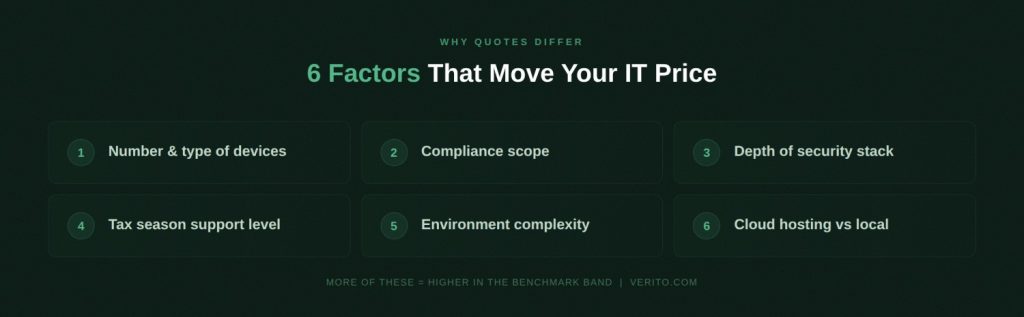
Beyond simple headcount, there are specific cost drivers that push managed IT pricing up or down for accounting and tax firms:
1. Number and type of devices
How many desktops, laptops, and servers need full management. A partner who only checks email on a tablet may not be billed the same as a full-time staff member with a power workstation and multiple monitors.
2. Compliance scope
If you expect your provider to help you align with IRS Publication 4557, the FTC Safeguards Rule, and state privacy rules, you are asking for more than basic IT support. That means more security tooling, more documentation, and more effort during exams or cyber insurance renewals.
3. Depth of security stack
There is a real price difference between:
- basic antivirus and ad-hoc patching,
- and a stack that includes next-gen endpoint detection and response, managed threat monitoring, email security, MFA enforcement, encrypted backups, and phishing simulations.
4. Support expectations and tax season coverage
A provider that answers quickly during tax season nights and weekends, tracks your critical tax applications, and understands filing deadlines will price differently from a generic small business MSP that treats March like any other month.
5. Environment complexity
Firms with local servers, multiple offices, hosted tax software, remote staff, and third-party apps will need more engineering time than a single office firm running everything in one hosted environment.
6. Cloud hosting vs local infrastructure
If your applications and data are hosted in a dedicated accounting cloud (for example, Verito’s environment) and your devices are thin clients into that platform, the shape of your managed IT needs changes. In many cases, combining hosting and managed IT into one platform is what makes your per user cost predictable instead of spiky.
Managed IT vs “Cheap IT Support” for Accountants
From a pricing perspective, one of the biggest mistakes firms make is treating any IT quote as interchangeable as long as the monthly number looks reasonable. For CPA firms, that is risky.
Typically:
- Lower priced quotes tend to:
- focus on reactive support and basic monitoring.
- exclude advanced security tools and backups.
- avoid explicit responsibility for WISP documentation or regulatory alignment.
- Well scoped managed IT agreements for accountants tend to:
- spell out security tooling and backup expectations in writing.
- include WISP and policy support, at least at a template and advisory level.
- define response times during tax season and after hours.
- include regular reviews of cyber insurance and compliance requirements.
This is why two proposals can differ by 30 to 50 percent and still be considered “market rate”. One is closer to a help desk subscription, the other behaves more like a full outsourced IT and security function.
Managed IT Pricing Benchmarks by Firm Size (1 to 50 Staff)
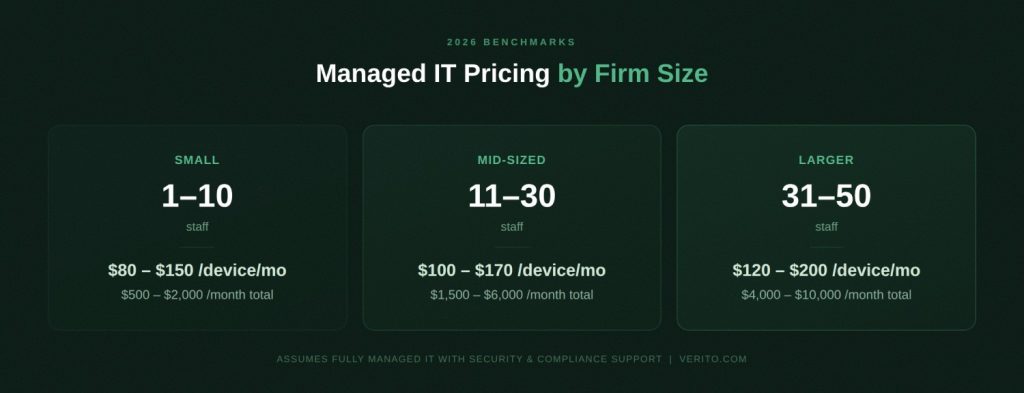
Once you know your headcount and rough device count, you can get surprisingly close to what a fair managed IT price should be. The ranges below assume fully managed, security focused services for CPA firms, not light monitoring or break fix support.
Benchmarks by Firm Size
| Firm size segment | Headcount range | Typical managed devices | Typical per device price* (USD / month) | Typical total monthly spend (USD) | What this usually includes for CPA firms |
|---|---|---|---|---|---|
| Small firm | 1 to 10 staff | 5 to 12 devices | 80 to 140 | 500 to 2,000 | Remote help desk, monitoring and patching, basic to mid-tier security stack, managed backups for core systems, support for tax and accounting apps, limited compliance guidance |
| Mid-sized firm | 11 to 30 staff | 15 to 35 devices | 100 to 170 | 1,500 to 6,000 | Full managed IT, stronger security stack with EDR and email security, MFA enforcement, documented backup and recovery, support for remote work, WISP templates and guidance, basic FTC and IRS Publication 4557 alignment |
| Larger small firm | 31 to 50 staff | 35 to 60 devices | 120 to 200 | 4,000 to 10,000 | Complete outsourced IT function, advanced security monitoring and SOC integration, regular security awareness training, detailed WISP support, cyber insurance and audit assistance, stricter tax season SLAs |
*These bands reflect managed IT services pricing for CPA firms that expect security and compliance support, not just ticket handling. Your exact quote will vary based on environment complexity and add-ons.*
If you want to gut check a proposal without turning into an MSP pricing expert, stack it against Verito’s managed IT pricing for tax and accounting firms and see where it lands in these bands. It is often the fastest way to spot whether a “too good to be true” quote is quietly cutting back on security or backup coverage.
1. Small Accounting Firms: 1 to 10 Staff
For solo CPAs and firms up to 10 people, managed IT often covers:
- 5 to 12 desktops or laptops.
- A mix of tax and write-up software plus QuickBooks Desktop or similar.
- One or two partners who live inside email and tax software during the season.
At this size, many firms are tempted to chase the lowest possible managed IT cost per device. That is understandable, but it is worth remembering that small businesses are not invisible targets. ConnectWise’s research shows that 94 percent of small and medium-sized businesses experienced at least one cyberattack in 2024, and 78 percent worry a major incident could put them out of business.
According to IBM’s 2024 Cost of a Data Breach Report, the average cost of a data breach for small businesses reached $4.88 million globally, but for professional services firms handling financial data, the reputational fallout from even a minor incident often outweighs the direct recovery cost.
That is why a bare bones 40 or 50 dollars per device “managed services” quote is a red flag. At the small firm level, a realistic pricing that actually includes security tools, patching, and backups usually starts around the lower-end of the 80 to 140 dollars band and climbs if you expect help with WISP documentation and compliance.
If your goal is simply to keep the doors open in tax season and avoid obvious security gaps, a plan in the lower half of this range is usually best for solo and three-person practices that do not have complex server setups. Just make sure backups, MFA, and basic endpoint protection are explicitly included in writing.
Is managed IT worth the monthly cost for a small firm?
For most firms, yes, once you count what it replaces. A flat monthly fee folds in support, security, backups, and updates that otherwise arrive as hourly invoices, a hardware refresh every four years, and lost billable hours during downtime. The predictable number is usually lower than the unpredictable one it retires.
The honest comparison is not the monthly fee against zero. It is the fee against what you spend now in pieces: hourly tickets, the server you replace every few years, the backup licenses, and the hours lost when something breaks in April.
Those costs are real but unpredictable. A flat fee turns them into one number you can plan around, usually a lower one.
2. Mid-sized CPA Firms: 11 to 30 Staff
Once you move into the 11 to 30 staff bracket, pricing begins to reflect:
- Multiple offices or a heavy remote workforce.
- More complex software stacks.
- Higher expectations from regulators, clients, and cyber insurers.
In this segment, most firms that want reliable support and compliance help will land in the 100 to 170 dollars per device band, which translates to roughly 1,500 to 6,000 dollars per month in total spend.
This is where a mid-tier plan like Verito’s managed IT services plan at 149 dollars per device per month usually lines up with real-world needs. It is built to include stronger security controls, managed backups, WISP templates, and support that understands IRS Publication 4557, the FTC Safeguards Rule, and state privacy requirements out of the gate.
For most firms between 12 and 25 staff, this tier of plan lines up with practical compliance needs without pushing into enterprise tooling territory.. You are paying to reduce the chance that a tax season outage or security incident wipes out far more in lost billable hours than the monthly fee.
3. Larger small firms: 31 to 50 staff
By the time a firm reaches 30 to 50 people, decision makers are usually done gambling on cheap IT. At this size, expectations include:
- Near zero tolerance for downtime in tax season.
- Regular audits from clients or regulators.
- Cyber insurance scrutiny of controls and documentation.
That reality is reflected in the 120 to 200 dollars per device benchmark band and the 4,000 to 10,000 dollars per month total spend range. Providers serving this slice of the market tend to include:
- Advanced endpoint protection and 24/7 monitoring.
- Structured security awareness training.
- Formal WISP development and maintenance.
- Help preparing for cyber insurance questionnaires and IT sections of peer reviews.
For firms at this level, a higher tier VeritGuard service (Verito’s Managed IT plan) in the upper part of the band is often the most predictable option for uptime and audit readiness.
You are effectively buying an outsourced IT and security department that already understands tax workflows, not just a help desk.
What You Actually Get at each Spend Band
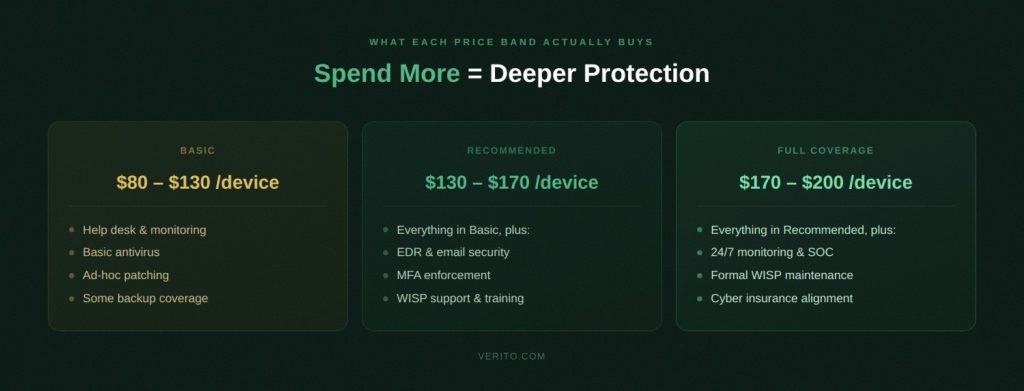
The firm size benchmarks answer the question “are we roughly in the right ballpark”. The next question is what that spend actually buys you in practice.
If you found yourself eyeballing the table and thinking “our quote sits between these rows, but I still have no idea if we are overbuying or underprotected”, this section is for you.
And if you want to compare your proposal with a real, published price list that fits the same bands, like Verito’s pricing, so that you don’t get caught negotiating in the dark.
1. Per Device Spend Bands vs. Inclusions
Here is how typical managed IT services pricing maps out by per device spend band. This assumes you are talking about full managed IT, not occasional break-fix support:
| Per device spend band (USD per month) | What is usually included | Likely gaps for CPA firms | Risk notes for accounting firms |
|---|---|---|---|
| Under 80 | Basic remote support, ticketing, simple monitoring, occasional patching. Often aimed at generic small business environments with light security needs. | Little or no advanced security tooling, limited backup coverage, no structured WISP support, no help with IRS or FTC rules, weak tax season coverage. | Pricing far below about 80 dollars per device for so called “full” managed IT almost always means corners are being cut. For a CPA firm that handles taxpayer data, this level is usually high risk. |
| 80 to 130 | Core managed IT: monitoring and patching, antivirus or basic EDR, remote help desk, managed backups for key systems, support for your accounting and tax applications. | Limited security awareness training, basic email security, light or template only WISP support, little involvement in cyber insurance or audit prep. | Often fine for small firms if you know exactly what is included. For a 5 to 10-person firm, this band is usually the minimum for credible outsourced IT support cost. |
| 130 to 170 | Full-stack managed IT for accountants: modern EDR, email security and spam filtering, MFA enforcement, encrypted backups with retention, regular maintenance, vendor coordination, WISP templates, and advisory support for IRS Publication 4557 and FTC Safeguards. | Deep custom security engineering, heavy compliance consulting, and dedicated fractional CISO time may still sit outside the base fee. | For many 10 to 30-person CPA firms, this is the “sweet spot” where managed IT cost per device lines up with real security and compliance support, not just ticket handling. |
| 170 to 200 plus | Comprehensive outsourced IT and security function: everything above plus 24/7 monitoring, security operations center (SOC) involvement, phishing simulations, detailed WISP development, regular security reviews, and help with cyber insurance questionnaires and client security audits. | Only the most specialized needs, like highly customized workflows or regulated multi-entity setups, typically require more. | Best for firms that have zero tolerance for downtime in tax season and face regular audits from banks, larger clients, or regulators. Here you are buying predictability and documentation, not just higher speed support. |
This is why two quotes that both look like “managed IT cost for an accounting firm” can differ by 40 to 50 percent. One sits in the 80 to 130 band and quietly excludes higher-end security, the other is priced in the 130 to 170 or 170-plus band and behaves more like a complete IT and security department for your CPA firm.
How VeritComplete Changes the Numbers
So far we have been talking about “per-device vs. per-user managed IT pricing” where you buy support for on-premise or existing devices. The math shifts when you move to a combined platform that includes hosting plus IT.
Verito’s VeritComplete bundle (managed IT + cloud hosting + security) is designed for firms that want one predictable per-user fee for hosting, managed IT, and compliance-grade security:
- VeritComplete Basic at 129 dollars per user per month for solo practitioners and very small firms that want secure hosting with foundational IT management and compliance coverage.
- VeritComplete Standard at 199 dollars per user per month for growing firms that need stronger performance allocations and expanded managed IT services.
- VeritComplete Pro at 249 dollars per user per month for firms that want full service hosting, managed IT, and compliance infrastructure tailored to peak season demands.
Instead of paying a separate MSP and then a separate cloud hosting bill, you end up with one per-user line item that:
- Covers your primary tax and accounting applications in a SOC 2 Type II certified data center
- Includes managed IT and security controls tuned to IRS Publication 4557, WISP requirements, and the FTC Safeguards Rule.
- Scales up or down as headcount changes, without you trying to reconcile multiple contracts.
If your goal is a single, predictable IT bill that already bakes in hosting, backups, and security, VeritComplete is often best for firms that want one contract instead of juggling three vendors.
Real-world Pricing Scenarios for CPA Firms
Numbers make more sense when you put them in a real firm.
Below are two simple scenarios that show how managed IT pricing plays out in practice and what happens when you go with a cheaper package that trims security or support.
Scenario 1: 8-person Tax Firm Choosing Between “Basic IT” and “Full-stack” Support
Profile
- 2 partners, 6 staff
- 10 managed devices
- Mix of tax software, QuickBooks, and Microsoft 365
- No internal IT person
You receive two realistic quotes:
- Provider A: “Basic managed IT” at 95 dollars per device per month
- Total monthly fee: 950 dollars
- Includes: remote help desk, monitoring, basic antivirus, ad-hoc patching. No explicit WISP support, no security awareness training, limited backup detail in the contract.
- VeritGuard Pro-style package: 149 dollars per device per month
- Total monthly fee: 1,490 dollars
- Includes: modern endpoint detection and response, email security, MFA enforcement help, managed backups, WISP documentation, security training, and 24/7 support built for CPA firms.
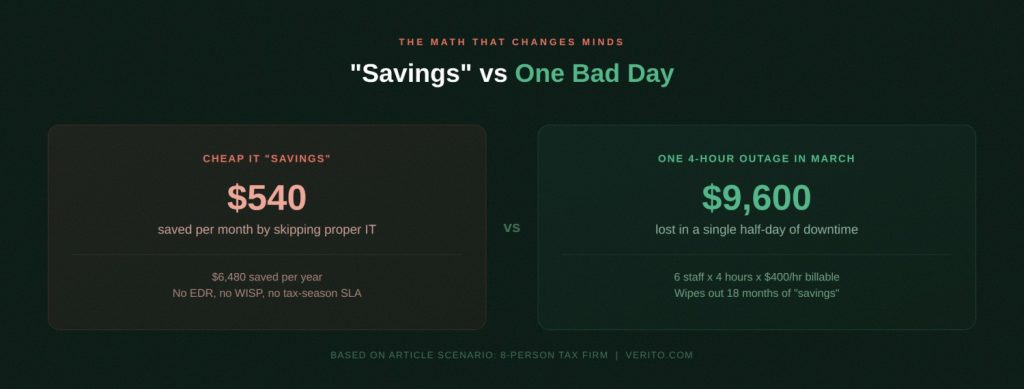
On paper, Provider A is about 540 dollars cheaper per month. The catch is what happens when something breaks at the worst possible time.
Assume a bad but realistic scenario during March:
- Your main tax application is unusable for half a day while your IT provider and software vendor debate where the issue is.
- 6 chargeable staff lose roughly 4 billable hours each.
- If you assume an effective billable rate in the 200 to 400 dollars per hour range, which recent CPA pricing analyses put as typical for small-firm tax work, that is 4,800 to 9,600 dollars of lost billable time in one afternoon.
In that context:
- Saving 540 dollars per month by skipping advanced security, better monitoring, and a CPA-focused support team stops looking like a win.
- A single outage can wipe out several years of “savings” from the lower-end plan.
For firms like this with no in-house IT, a mid-band plan around 149 dollars per device is usually best for firms that want one number they can budget and support that does not fold under tax season pressure.
If your goal is to avoid losing an entire day of billable work over preventable IT issues, choose the package that includes modern security, proper backups, and written WISP support, even if it is not the lowest line item.
Scenario 2: 25-person Multi-office Firm Deciding How Far Up the Stack to Go
Profile
- 3 partners, 22 staff
- 2 offices plus several remote preparers.
- 35 managed devices
- Mix of hosted tax, document management, and practice management tools.
- Cyber insurance policy already in place
You are comparing two quotes that both call themselves “complete IT”:
- Quote 1: 120 dollars per device per month
- Total monthly fee: 4,200 dollars
- Includes: help desk, monitoring and patching, basic antivirus, some backup coverage, generic security policies. No SOC integration, no formal security training program, minimal help with cyber insurance questionnaires
- VeritGuard Elite-style package: 199 dollars per device per month
- Total monthly fee: 6,965 dollars
- Includes: 24/7 SOC monitoring, advanced EDR, dark web monitoring, SaaS backup, WISP documentation, anti-phishing training, and explicit positioning as “cyber insurance ready” for established firms
On the surface, Quote 1 saves roughly 2,765 dollars per month.
Now put that against the potential cost of serious downtime or a security incident:
- Downtime during tax season hits harder than the lost hours on the clock. For a firm billing $200 to $400 per hour, even a half-day disruption across 15 chargeable staff can erase $9,000 to $18,000 in productive capacity, before you factor in rework, client friction, or filing extensions. Reputational damage from a preventable outage is harder to quantify but just as real.
For firms in this bracket:
- Cheaper, mid-tier quotes in the 120 dollars per device range often drop critical pieces like managed phishing training, dark web monitoring, or documented incident response that your cyber insurer is expecting.
- Higher-end, 170 to 200 plus dollars per device plans are usually the most predictable option for firms that cannot afford a public incident, a failed exam, or a strained relationship with their cyber insurer.
If your goal is to make IT a fixed, boring cost instead of a latent business risk, it is usually more rational to sit at the upper-end of the benchmark band and treat security coverage as part of your firm’s insurance strategy.
When to Move from Managed IT Only to a Full Platform
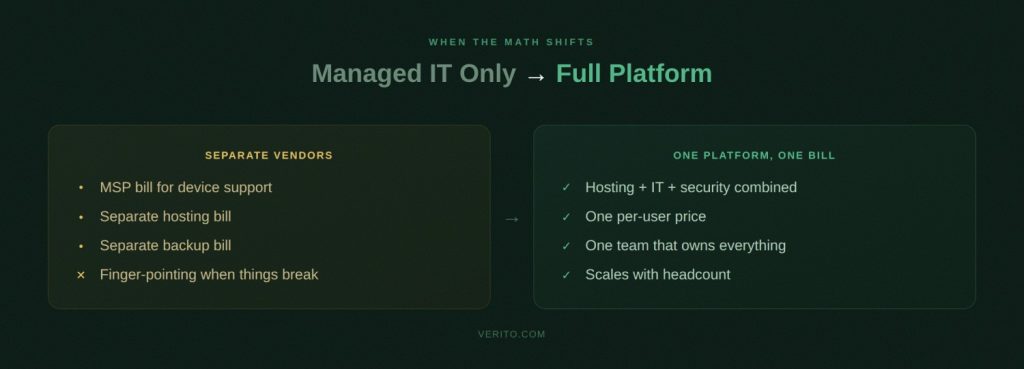
At some point, paying one provider to manage your devices and another to host your tax and accounting applications starts to feel like you are buying the same thing twice.
You are paying for security and backups on the hosting side, then paying again for security and backups on the managed IT side. During tax season, both sides claim they are doing their job, but you are still the one chasing answers.
This is usually the point where it makes sense to ask a different question: not “who is cheaper”, but “would a single platform be more predictable than stitching together multiple vendors”.
Signs Your Firm Has Outgrown Separate Hosting and IT
You do not need a formal audit to know the current setup is reaching its limits. Common signs include:
1. Finger pointing when something breaks
Your hosting provider says everything is fine from their side, your MSP insists the hosted app is the problem, and your staff are stuck in the middle while returns pile up.
2. Multiple overlapping security tools
You see separate line-items for endpoint protection, spam filtering, backups, and MFA from different vendors, but no clear picture of who is actually accountable if something goes wrong.
3. Remote work feels harder than it should
Staff complain about inconsistent performance when working from home, you maintain a mix of VPNs, local servers, and hosted apps, and IT changes feel risky to schedule during the season.
4. Compliance work keeps landing on your desk
You are the one filling in cyber insurance questionnaires, trying to reconcile WISP documents, and figuring out which provider covers which control for IRS and FTC expectations.
If several of these sound familiar, you are probably paying a reasonable managed IT cost and hosting bill, but the whole outcome still feels fragile.
What a Combined Platform Looks Like for CPA Firms
A combined platform replaces that mix of vendors with a single environment where:
- Your tax and accounting applications run in a dedicated cloud built for firms like yours.
- Your desktops, laptops, and thin clients are managed by the same team that manages the hosting environment.
- Security, backups, and compliance controls are designed as one system instead of stitched together from separate contracts.
In Verito’s case, that is the role of VeritSpace and VeritComplete:
- VeritSpace provides a cloud environment in SOC 2 Type II-audited data centers for your core applications and data, with performance tuned for peak tax season and remote access built in.
- VeritComplete layers managed IT, security, and compliance support on top of that hosting, so you have one per user fee that already includes the infrastructure, tooling, and day-to-day support CPA firms need.
Instead of arguing about whether an issue is a “hosting problem” or an “IT problem”, you call one team that owns the stack end-to-end.
If your goal is to stop translating between multiple vendors and just ask “who is fixing this and by when”, a combined platform is usually best for your sanity, even when the headline number looks similar to separate contracts.
Where the Economics Usually Flip in Favor of a Single Platform
The numbers often start to favor a single platform in these situations:
1. Headcount is above 8 to 10 staff and still growing
At that point you are paying meaningful money for both hosting and IT. Bundling them into one per user fee can flatten the total cost and make budgeting easier year-over-year.
2. Most of your critical applications are already hosted
If your main tax, write up, and document systems live in the cloud, running local servers and a separate security stack for them becomes harder to justify.
3. You rely heavily on remote staff and seasonal workers
Giving people secure, consistent access from anywhere is much simpler when the same platform handles identity, access, and device posture.
4. Compliance questions are becoming more frequent
Lenders, larger clients, and insurers increasingly ask detailed questions about your controls. It is easier to answer when you can point to one environment, one WISP, and one security program.
At that stage, a combined cloud hosting and managed IT bundle for accounting firms stops being a “nice to have” and starts to look like the most predictable option for cost and uptime.
The VeritComplete bundles are built specifically for that point in a firm’s growth, with per user pricing that sidesteps the constant “how many devices are we paying for this month” conversation.
If you suspect your firm is hitting that tipping point, a practical next step is to line up your current hosting and MSP invoices beside the public VeritComplete pricing and ask a simple question: if the total is similar, would you rather manage two or three vendors or one platform that already assumes your busiest four months of the year are non-negotiable.
How to Sanity Check Any MSP Quote Using These Benchmarks
At this point you have three things you did not have before: realistic per device pricing bands, firm size benchmarks, and a sense of what is usually included at each level. The next step is turning that into a quick sanity check you can run on any managed IT proposal in under 15 minutes.
Step 1: Convert every quote into a per device and per user number
Most proposals are written to make comparison difficult. The first thing you should do is strip them down to two numbers:
1. Per device price
Divide the total monthly fee by the number of desktops, laptops, and servers the provider will actually manage. Ignore printers and simple network gear unless they are explicitly billed.
2. Per user price
Divide the same total by the number of staff who rely on IT to do billable work. This gives you an intuitive sense of what you are paying to keep each person productive.
Once you have those two numbers, drop them into the benchmark bands from earlier in this guide and ask:
- Are we below 80 dollars per device, 80 to 130, 130 to 170, or 170 plus?
- Does that line up with what the provider claims to include?
If your quote calls itself “all-inclusive managed IT for CPA firms” but sits well below about 80 dollars per device per month, you are almost certainly looking at something that trims back security, backups, or compliance support to hit that price.
Step 2: Check what is included against a simple CPA firm checklist
For accounting firms, a fair price is only fair if it covers the right things. At a minimum, any managed IT services should clearly include:
- Remote help desk during business hours, with defined response time targets.
- Proactive monitoring and patching of operating systems and core applications.
- Modern endpoint protection, not just legacy antivirus.
- Email security, spam filtering, and phishing protection.
- Encrypted, tested backups with defined recovery time objectives.
- Multi-factor authentication support for key systems.
- Support for your tax and accounting application stack.
For firms that care about compliance and cyber insurance, you should also expect:
- WISP templates and guidance that reflect IRS Publication 4557 and the FTC Safeguards Rule.
- Help answering IT and security questions in cyber insurance renewals and client questionnaires.
- Basic security awareness training for staff, especially focused on phishing and social engineering.
Take the proposal and mark which of these items are explicitly covered, which are mentioned vaguely, and which are missing. A quote that looks merely “average” on price can become very expensive once you add the cost of filling those gaps yourself.
Step 3: Look for red flags that do not show up in the monthly fee
Some warning signs will not appear as a line item in the proposal. They show up in what is missing or how the provider handles basic questions:
1. Vague language around security
The proposal talks about “advanced protection” and “enterprise-grade tools” without naming specific products, coverage, or response processes.
2. Backups mentioned but not defined
You see “data backup included” with no detail on where data is stored, how often it is backed up, how long it is retained, or how quickly it can be restored.
3. No WISP or compliance support
The provider clearly states they do not handle written information security policies, staff training, or regulatory alignment, leaving you to figure out IRS and FTC expectations alone.
4. Unclear tax season coverage
There is no special mention of extended hours, priority handling, or change controls during the busy season. For a CPA firm, that usually means IT work will compete with every other small business customer on the same schedule.
5. Short contract with big project work up front
You are asked to pay a low monthly fee but a large one-time project for “onboarding”, without a clear explanation of what you are left with if you decide to move away after a year.
If you see several of these together, it does not really matter where the per-device price sits in the benchmark table. The overall fit for a CPA firm is weak.
Step 4: Cross check against your revenue and risk tolerance
Finally, check whether the proposed spend makes sense in the context of your firm’s size and risk profile.
Research from Deloitte’s annual CIO Survey and Gartner’s IT spending benchmarks consistently shows that small and mid-sized professional services firms allocate between 3 to 7 percent of annual revenue to IT, with security spend growing faster than general IT spend as threats increase and cyber insurance markets harden.. That range is not a rule, but it is a useful reality check for professional services firms whose revenue depends directly on uptime and client trust.
For an accounting firm, two practical questions matter more than an abstract percentage:
- If we adopt this quote, is our total IT spend as a percentage of revenue out of line with that 3 to 7 percent band?
- If we choose a cheaper option, can we live with the increased chance of downtime, failed exams, or uncovered incidents that come with weaker security and support?
For firms that bill in the hundreds of dollars per hour and handle sensitive financial data, choosing the cheapest line-item rarely makes sense. A more realistic goal is to land in the middle of the benchmark band for your size and make sure that every dollar is buying uptime, security, and documentation that will stand up under scrutiny. Pricing only makes sense against scope, so start with what managed IT for firms includes.
Turning Pricing Benchmarks into Predictable IT Spend
Managed IT pricing for accounting firms is not random.
For most 1 to 50-person CPA firms that expect real security and compliance help, the numbers cluster in a fairly clear band. You are usually looking at roughly 100 to 200 dollars per device per month, which translates into about 500 to 2,000 dollars per month for very small firms, 1,500 to 6,000 dollars for mid-sized practices, and 4,000 to 10,000 dollars for relatively larger firms. The real question is not whether you can shave a few dollars off those ranges, but whether each dollar is buying uptime, security, and documentation that will hold up under pressure.
Cheap quotes often look attractive until you map them against what your firm actually needs to stay operational in tax season and credible with regulators. Packages that sit well below about 80 dollars per device per month almost always make that work by leaving gaps in security tooling, backups, WISP support, or tax season coverage. At that point, you are not saving money, you are trading a lower monthly fee for higher operational and regulatory risk, and hoping the odds stay in your favor.
On the other side, sitting in the middle or upper part of the benchmark band, especially when you choose a provider that understands IRS Publication 4557, the FTC Safeguards Rule, and cyber insurance expectations, is usually the most predictable option for firms that want a calm tax season.
Providers designed for this segment typically offer tiered plans at around 79, 149, and 199 dollars per device, each mapping to a different stage of firm growth. For firms that prefer a single per-user price that wraps hosting, security, and support together, a bundled platform is usually the more predictable option.
The practical next step is to take your current or proposed IT and hosting spend, convert it into a per device and per user number, and line it up against the benchmarks in this guide and Verito’s managed IT and VeritComplete pricing plans.
If your total is far outside the ranges or you are paying similar money for thinner coverage and more vendors, the numbers are telling you it is time to renegotiate or consolidate.
If your goal is to future proof the firm rather than just accept the lowest quote, choose the option that gives you clear inclusions, one accountable owner for your environment, and the best chance of getting through every tax season without IT becoming the main story.
FAQ:
1. What is a fair monthly price for managed IT for a 10-person accounting firm?
For a 10 person CPA firm with about 10 managed devices, a fair price for full, security focused managed IT is usually in the 1,000 to 1,800 dollars per month range. That reflects roughly 100 to 180 dollars per device for monitoring, help desk, modern endpoint security, email protection, backups, and basic WISP or compliance support. Packages priced far below that for “all inclusive” service almost always achieve the discount by cutting corners on security, backup scope, or regulatory help. For many 8 to 12 person firms, a mid tier VeritGuard plan around 149 dollars per device fits that benchmark while adding accounting specific security and compliance coverage.
For context, IRS Publication 4557 and the FTC Safeguards Rule both expect CPA firms to maintain active security controls, documented policies, and tested backups regardless of firm size, so that compliance baseline should be factored into any budget comparison, not treated as an optional add-on.2. Why do managed IT quotes for my CPA firm vary so much between providers?
Quotes vary because different providers use “managed IT” for very different scopes. One proposal may only cover a help desk and basic monitoring, while another includes advanced security tools, WISP support, cyber insurance help, and documented incident handling. Both use the same label, yet the work behind the scenes is not comparable.
Security depth, tax season coverage, and willingness to take responsibility for IRS and FTC expectations all move the price. When you convert each proposal to a per device figure, cheaper quotes typically sit below about 80 dollars per device and leave security or compliance vague, while more complete offers fall in the 130 to 200 dollars per device range and operate more like an outsourced IT and security department for your firm.3. How do IRS and FTC rules affect what I pay for managed IT?
IRS and FTC rules do not dictate exact prices, but they do define the minimum security posture that a credible IT partner for a CPA firm must support. Aligning with IRS Publication 4557 and the FTC Safeguards Rule means having a WISP, clear access controls, multi factor authentication, encryption where appropriate, tested backups, staff security training, and a documented response plan.
Providers that only “keep the computers running” and avoid policy, controls, and evidence can charge less because they are not doing that additional work. Providers that help design and maintain WISP documentation and controls that stand up during exams or cyber insurance reviews must build that effort into their pricing, which is why serious CPA focused managed IT usually lands in the middle or upper part of the 100 to 200 dollars per device benchmark.4. What percentage of revenue should an accounting firm spend on IT and security?
Most small and mid-sized professional services firms end up with total IT and security spending in the low to mid single digits as a percentage of annual revenue, once you include managed IT, hosting, software, and any internal IT salaries.
The exact percentage matters less than the alignment between spend and risk. If your combined IT and hosting costs are noticeably below what peers spend and you still struggle with outages, weak documentation, and pushback from cyber insurers, you are likely underinvesting.
If your spend is clearly higher than peers without delivering smoother operations, the issue is scope or vendor mix. A simple way to sanity check is to total your IT and hosting spend, convert it to an effective per device or per user figure, and compare it to transparent benchmarks such as Verito’s managed IT and VeritComplete bundle pricing for firms of your size.5. Is per-device pricing or per user pricing better for CPA firms?
Per device pricing is often easier to understand for smaller firms where each staff member uses a single workstation and the environment is straightforward, because the fee lines up directly with how many machines need full management.
Per user pricing becomes attractive when staff routinely use multiple devices or when the provider bundles device management with identity, MFA, and application support, so cost tracks more closely with people rather than hardware.
Many firms start with per device managed IT and later move to a per user bundle that includes hosting, security, and support, such as VeritComplete, once they want a single predictable fee for everything instead of separate MSP and hosting contracts.6. When does it make sense to switch from an in-house IT person to a managed service provider?
The case for switching is strongest when one internal person is juggling day to day tickets, while security, cloud work, and compliance projects are still being outsourced, and your busiest months depend heavily on that one individual.
At that point you are paying for internal IT and external expertise without the resilience or depth that a CPA focused MSP can offer.
Smaller firms, usually under 15 to 20 staff, often get broader coverage and lower risk by relying fully on a managed service provider with accounting expertise.
Larger firms, around 30 to 50 staff, frequently adopt a hybrid model where an internal manager coordinates with a specialist MSP that delivers security, cloud hosting, and 24 by 7 support.
A practical test is to add internal IT salaries and external project bills, convert that total to an effective per device figure, and compare it with the benchmark ranges and with published VeritGuard or VeritComplete pricing. If the totals are similar but the managed option offers stronger coverage and less single person risk, the switch is usually justified.
