When to Outsource IT at Your CPA Firm
Your IT person is one resignation away from a crisis. Your last patch cycle slipped two months. Your e-file went down at 9 p.m. and nobody picked up. If any of these are true, your firm has already left in-house-only territory.
This is the decision post for CPA and tax firms that built their IT around one internal person, or an office manager who became “the IT person” by accident. You don’t need a 5,000-word philosophy on managed services. You need to know when the in-house-only model breaks, what co-managed IT actually changes, and how to move without disrupting tax season.
Co-managed IT, in plain terms, is a model where your internal IT person stays in the seat, and a Managed Service Provider (MSP) plugs in for the work that needs scale, after-hours coverage, or specialist depth. It is not a replacement. It is a backstop with a defined scope.
If you are deciding whether your firm has hit that point, the seven signs below will tell you.

The 7 Signs Your In-House IT Has Hit Its Ceiling
Most firms cross the line from “we are fine” to “we have a problem” gradually. Here are the seven triggers we see most often when CPA firms call us in for a security assessment. If three or more apply to your firm, you are already running on borrowed time.
1. One Person Owns Everything
Your IT person knows where the firewall lives, what the QuickBooks hosting login is, who has admin rights, where the backups go, and which workstation is still on Windows 10. None of it is documented anywhere outside their head.
That is fine until it is not. They take a vacation in late March. They get sick the week of the deadline. They take another offer. The firm now has a single point of failure during the part of the year you can least afford one.
The American Institute of CPAs has flagged the same risk. AICPA’s small-firm cybersecurity guidance walks firms through a 21-question self-assessment, and the recurring theme is documented process and clear ownership rather than tribal knowledge in one person’s head.
2. Patching Is Reactive, Not Scheduled
Patches go in when something breaks, not on a calendar. Your last full patch cycle was “a few months ago, I think.” Workstations get updated when a partner complains. Servers get updated when an application stops working.
That gap is the most common entry point for ransomware. The IRS Security Summit reported that, through the spring of 2024, IRS Stakeholder Liaisons received reports of nearly 200 tax-professional data incidents potentially affecting up to 180,000 clients. Most started with an unpatched workstation, a stolen credential, or a phishing email that landed because email security was not enforced. We dig into this further in our breakdown of cybersecurity for accounting firms.
If your firm cannot produce a patch report for the last 90 days, you do not have patching. You have hope.
3. Tax Season Triggered Downtime in the Last 12 Months
The server slowed to a crawl in mid-March. The tax suite locked up during a batch e-file. The internet dropped on the day of an extension deadline. The fix took a few hours. The blame went on “the storm” or “the ISP” or “Drake’s servers.”
Sometimes that is true. Often it is not. In-house-only setups rarely have monitoring sophisticated enough to tell you why a system fell over, which means the next failure looks like the last one. The fix is reactive. The lesson is missed.
If you have had any unplanned downtime during peak season in the last year, that is a signal worth treating as data. A co-managed setup with shared monitoring tools turns that data into a fix you can build into next year’s plan, instead of a story you tell after the fact. Our piece on what 100% uptime really means for CPA firms gets into the architecture trade-offs.
4. FTC Safeguards Documentation Is Informal or Missing
The Federal Trade Commission’s Safeguards Rule (16 CFR Part 314) treats tax-preparation firms as financial institutions. That means your firm is required to designate a Qualified Individual, run a written risk assessment, encrypt customer data, enforce multi-factor authentication, train staff, oversee service providers, document an incident response plan, and report annually to a board or owner.
Since May 13, 2024, you also have a 30-day breach notification clock. If unencrypted customer information of 500 or more consumers is acquired without authorization, you are required to notify the FTC within 30 days using the Safeguards Rule reporting form.
If your “Safeguards documentation” is a folder with a couple of policies and an old WISP draft, you are not compliant. You are exposed. The Journal of Accountancy laid out exactly which controls a CPA firm has to be able to evidence, and “we have a guy” is not on the list.
5. After-Hours Incidents Go to Voicemail
Your team works late in March and April. The 9 p.m. e-file failure is not unusual. Neither is the Saturday morning ransomware alert. Neither is the partner who needs remote access to a workstation at 6 a.m. on a Sunday.
If your IT support is one person, “after hours” means voicemail or a text that may or may not get returned. CISA, the federal cybersecurity agency, publishes annual tax-season guidance specifically because attackers know this, and they time their phishing and ransomware campaigns around when CPA firms are most stretched and least responsive.
A co-managed model with a published Service Level Agreement and 24/7 incident response coverage closes that gap. Your internal person sleeps. The MSP picks up the tickets that cannot wait until Monday.
6. EDR, MFA, and Backups Exist, But Are Not Centrally Monitored
Endpoint Detection and Response (EDR) is installed on most laptops. Multi-Factor Authentication (MFA) is set up for the email tenant. Backups are running on the server. Each of those is a real control on its own.
The problem is the gaps. EDR is not on the office manager’s old laptop she still uses for payroll. MFA is not enforced on the QuickBooks-hosted account. Backups are running, but nobody has tested a restore in nine months. Three controls in a row, and none of them are watched centrally.
ConnectWise’s 2024 SMB cybersecurity research found that 73% of small and medium businesses are not fully confident in their MSP’s defense capability, and 47% would switch providers for better cybersecurity coverage. Translation: even firms that already have an MSP feel the gaps. Firms with no central monitoring at all are not even in the conversation.
7. The Cost of “Free” Internal IT Keeps Growing
The line item on the budget says one IT salary. The actual cost is bigger. Your IT person is fielding password resets, printer jams, and Outlook questions instead of doing the security work. A senior preparer spends 30 minutes a week resolving login issues for the team. A partner spends an hour a month on vendor calls about phone systems and copiers.
The hours add up. So does the tooling. EDR licenses, backup software, firewall renewals, MFA tools, password managers, security awareness training. Each tool is bought separately, each renewal is its own conversation, and nobody is sitting on the cost curve. Vendor sprawl is one of the quietest costs of in-house-only IT, and it is why vendor consolidation shows up on most firms’ lists once they actually count.
If you cannot answer “what does our firm spend, in total, on IT and security each year” in under five minutes, the bill is bigger than you think. A co-managed engagement consolidates the tooling, brings volume pricing, and frees your IT person to do work that actually moves the firm forward.
What Co-Managed IT Adds, and What You Keep
The biggest fear we hear from firms with an internal IT person is that “co-managed” is a soft word for “replaced.” It is not. Co-managed IT is a division of labor. The internal person stays. The MSP plugs in around them.
Datto, the vendor whose tools many MSPs use, defines co-managed IT as “a customized IT service model that combines the convenience of an internal IT department with the expertise of a managed service provider.” NIST’s Cybersecurity Framework 2.0 small business guide echoes the same idea, framing cybersecurity as a shared responsibility between the firm and whoever the firm has chosen to help reduce risk.
Here is how a typical CPA firm splits the work after moving to co-managed:
| Stays In-House | Shifts to Co-Managed MSP |
|---|---|
| Day-to-day end-user support and password resets | 24/7 monitoring and after-hours incident response |
| Vendor relationships with the tax suite (Drake, Lacerte, ProSeries, UltraTax) | Patch management, EDR tuning, and centralized vulnerability scanning |
| Workstation imaging and onboarding new hires | Backup management, immutable storage, and tested restores |
| Office moves, printers, and physical hardware | FTC Safeguards documentation, WISP maintenance, and IRS Pub 4557 alignment |
| Knowledge of the partners’ workflow quirks | Security awareness training, phishing simulations, and dark web monitoring |
| The Qualified Individual designated under FTC Safeguards (your firm owns this role) | Tooling stack: RMM, ticketing, email security, MFA enforcement, password manager |
The Qualified Individual stays inside your firm. That is not negotiable. The FTC’s Safeguards Rule explicitly says that even when you bring in a service provider, “the buck still stops with you, as it’s your company’s responsibility to designate a senior employee to supervise that person.”
What changes is everything around them. Your IT person stops being the help desk, the patcher, the backup admin, and the compliance writer all at once. They become the person who owns the firm’s IT direction, with a partner doing the heavy specialist work.
The Real Cost Frame: It’s the Risk, Not the Invoice
We are not going to put a fake “in-house vs co-managed” benchmark table here with made-up dollar figures. Per-user pricing varies by region, by scope, and by how your firm structures its tooling stack. Anyone publishing a tidy “$X per user per month saves $Y” number is making it up.
What is not made up is the cost of unmanaged risk. Three reference points matter for any CPA firm thinking about whether in-house-only is still defensible:
FTC enforcement has teeth. In 2017, the FTC settled with TaxSlayer for violating the Safeguards Rule. The company had failed to develop a written information security program until November 2015, failed to conduct a risk assessment, and failed to implement basic safeguards. Hackers gained access to nearly 9,000 TaxSlayer accounts between October and December 2015. The settlement prohibited TaxSlayer from violating the Safeguards Rule for 20 years and required biennial third-party assessments for 10 years. That is a real federal precedent against a tax-prep firm, and the controls the FTC required are exactly the controls a CPA firm with informal IT will struggle to evidence.
The Safeguards Rule was strengthened in 2023. The FTC amended the rule in October 2023 to require non-banking financial institutions, including tax preparers, to report data security breaches affecting 500 or more consumers within 30 days. The reporting form went live on May 13, 2024. The rule now has a clear, time-boxed disclosure mechanism, and “we did not know we had to” is no longer a viable defense.
Small CPA firms get breached, and regulators follow. Wojeski & Co., an Albany-area CPA firm, settled with the New York Attorney General in 2024 over two ransomware attacks that exposed personal information for more than 4,700 people. The initial breach happened on July 28, 2023, but the firm did not notify clients until November 2024. The root cause was a phishing email sent to an employee. The settlement was $60,000. The reputational damage was bigger.
The point is not “co-managed IT prevents this.” No model prevents every breach. The point is that the controls regulators expect, written WISP, documented risk assessment, MFA enforcement, encrypted customer data, monitored endpoints, tested backups, trained staff, are the same controls a compliance-aligned co-managed model is built to deliver.
If your firm is running on one IT person and a few legacy tools, the cost equation is not “MSP fee vs internal salary.” It is “MSP fee vs the controls a regulator will expect you to evidence on a bad day.”
The 30 / 60 / 90 Transition Path to Co-Managed IT
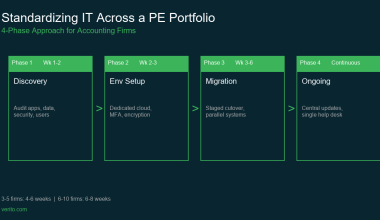
The migration is not a flag day. A co-managed engagement done well rolls in over three months, and the bulk of the change happens in the background while your team keeps doing tax returns.
Month 1: Discover, Document, and Stabilize
The first month is mostly the MSP listening. They run a network discovery, inventory every endpoint, every server, every application, every user account. They sit with your internal IT person for a working session and capture the tribal knowledge that has only ever lived in their head.
Concrete deliverables in Month 1:
- Asset and license inventory: every workstation, server, firewall, switch, and SaaS subscription, with owner and renewal date.
- Documented network diagram and known gaps.
- Risk assessment scoped to the FTC Safeguards Rule‘s nine required elements.
- Defined Qualified Individual on the firm’s side and named primary technician on the MSP side.
- Roll-out plan for RMM agents, MFA enforcement, and centralized backup.
By the end of Month 1, nothing has been ripped out, but everything has been mapped.
Month 2: Deploy Tooling and Tighten Controls
Month 2 is when the centralized tooling goes in. RMM agents are deployed to every workstation and server. EDR is rolled out and tuned. Backup software is reconfigured for immutability and tested with a real restore. MFA is enforced across email, file shares, and the tax suite. The phishing simulation and security awareness training program kicks off.
Concrete deliverables in Month 2:
- RMM and EDR live on 100% of in-scope endpoints.
- First successful test restore from backup, with documented Recovery Point Objective and Recovery Time Objective.
- MFA enforced on all administrative accounts and the tax suite.
- Email security tuned: SPF, DKIM, DMARC, and inbound phishing filtering verified.
- First firm-wide phishing simulation, with results baselined for the year ahead.
Your internal IT person is now monitoring the same dashboard as the MSP. Tickets route correctly. After-hours incidents go to the MSP’s Security Operations Center, not your IT person’s voicemail.
Month 3: Document, Rehearse, and Go Steady-State
Month 3 closes the loop. The Written Information Security Plan is finalized using the IRS’s published WISP templates. The incident response plan is rehearsed with a tabletop exercise. The annual report to the firm’s senior decision-maker, required under the Safeguards Rule, is drafted.
Concrete deliverables in Month 3:
- Final WISP signed off and stored in a known location.
- Tabletop incident response exercise completed, with action items logged.
- Annual security report drafted for the firm’s senior decision-maker.
- Tax-season readiness checklist signed off by the MSP and internal IT lead.
- Quarterly review cadence scheduled for the next 12 months.
By the end of Month 3, your firm has documented controls, a clear escalation path, and a calendar of recurring reviews. That is what the FTC, IRS, and any future client doing service-provider due diligence are going to ask for.
Common Mistakes When Shifting to Co-Managed
Five patterns we see when a firm rushes the move and pays for it later:
- Cutting over during tax season. Why it bites: every tooling change is a risk during peak load, and your team has no time to absorb new workflows.
- Not naming the Qualified Individual on the firm side. Why it bites: FTC Safeguards requires a designated firm employee to supervise the program, and “the MSP” does not satisfy that requirement.
- Treating the MSP as a black box. Why it bites: your internal IT person should see the same dashboards the MSP sees, otherwise the firm loses visibility and ownership of its own posture.
- Skipping the test restore. Why it bites: an untested backup is not a backup, and the first time you find out is at 2 a.m. during an incident.
- Picking on price alone. Why it bites: ConnectWise’s research found 73% of SMBs are not fully confident in their MSP’s defense capability, and the lowest-priced option is usually the one being measured.
Where Verito Fits
Verito is a U.S.-focused cloud hosting and managed IT provider built specifically for tax and accounting firms. VeritGuard is the managed IT and cybersecurity service most CPA firms engage when they make this move. It is designed to plug in alongside an existing IT person, not to replace them, and it is built around the controls the FTC Safeguards Rule and IRS Publication 4557 expect a firm to evidence.
The work above, RMM monitoring, EDR, backup, MFA, email security, phishing simulations, dark web monitoring, password management, firewall policy management, and a documented WISP, is the standard scope of a VeritGuard engagement. Response times are published. The Security Operations Center runs 24/7 on the Elite tier. Documentation is delivered, not promised.
If you are also evaluating whether your application hosting and your IT support should sit with the same vendor, our piece on hosting and IT support across different vendors walks through the trade-offs.
If you want a structured shortlist before you talk to anyone, our roundup of the 7 best IT support providers for accounting and tax firms is the right starting point.
Frequently Asked Questions
How do I know if my CPA firm needs to outsource IT?
Run the seven-sign list above against your firm. If three or more apply, especially if “one person owns everything” and “FTC Safeguards documentation is informal” are both true, you are past the point where in-house-only is responsible. Co-managed is the lowest-disruption next step because it keeps your internal person and adds the missing layers around them.
Can co-managed IT work for a 5-person firm?
Yes. The model scales down. A 5-person firm usually does not have a dedicated IT person; the role lives with an office manager or a partner. In that setup, co-managed means the MSP handles the heavy work, and your internal owner handles user-facing requests and vendor coordination. The compliance load, FTC Safeguards, IRS Pub 4557, and a written WISP, is the same whether your firm is 5 people or 50.
What does the transition from in-house to co-managed look like?
Three months, in three phases. Month 1 is discovery and documentation. Month 2 is tooling deployment and control tightening. Month 3 is documentation, tabletop incident response, and steady-state hand-off. The bulk of the change happens in the background. Your team keeps working returns. The full path is in the 30/60/90 section above.
Will co-managed IT replace our internal IT person?
No. That is the whole point of the model. Datto, the vendor whose tools many MSPs build on, defines co-managed IT as “a customized IT service model that combines the convenience of an internal IT department with the expertise of a managed service provider.” Your internal person stays. The MSP fills in the specialist work and the after-hours coverage.
What do we have to keep doing ourselves under FTC Safeguards?
You have to designate a Qualified Individual inside the firm to supervise the security program. The FTC is explicit: “the buck still stops with you, as it’s your company’s responsibility to designate a senior employee to supervise that person.” The MSP cannot be the Qualified Individual. The firm has to own the role, even when most of the technical work is co-managed.
When is the best time to make the switch?
Right after tax season ends, in May or June, is the cleanest window. Your team has bandwidth, the deadline pressure is off, and a co-managed engagement that starts in May is fully steady-state by the time fall extension work and next year’s planning kick in. Avoid starting a transition in February or March.
Do we still need a WISP if we have a co-managed MSP?
Yes. The IRS is direct: “tax professionals are required by law to create a Written Information Security Plan (WISP) to protect their clients’ data.” A co-managed MSP can help you build, maintain, and test the WISP, but the document is the firm’s responsibility, not the vendor’s. The IRS publishes a 28-page WISP template specifically for smaller tax practices.
How is co-managed different from fully managed IT?
Fully managed means the MSP owns the entire IT function. There is no internal IT person. Co-managed means an internal IT person, or a partner doubling as one, stays in the seat, and the MSP plugs in for specific scope. Most CPA firms with 5 to 20 employees and an existing IT person land on co-managed. Firms with no internal IT presence at all usually go fully managed.
The Next Step
If you read the seven signs and recognized your firm in three or more of them, the next step is a structured assessment. Map what you have, where the gaps are, and which controls a regulator would expect you to evidence on a bad day. Decide on the model based on that map.
If you want a starting point, you can book a free security assessment with Verito. It is the same scoping work an MSP would do in Month 1 of a co-managed engagement, run as a one-off so you can decide what to do next.
If you already know co-managed is the model, the VeritGuard co-managed page walks through scope, tooling, and onboarding.
Either way, the firms that handle this transition cleanly are the ones that make the call before the resignation, the ransomware alert, or the FTC reporting clock starts. The seven signs above are early warnings. Treat them that way.