
Most law firms don’t get overwhelmed by legal complexity.
They get overwhelmed when a new client, insurer, or corporate partner asks for “proof of compliance” and the firm realizes it cannot produce clear evidence.
IT compliance for law firms has shifted from a background requirement to a front-and-center expectation, especially as clients become more security-minded and insurers tighten their standards.
Compliance is not a badge. It’s proof. If you can’t show evidence, you’ll fail a client audit even if you believe you’re doing the right things.
This pressure is increasing across the legal sector because firms now handle far more digitally sensitive information than they did just a few years ago.
- Remote work expanded attack surfaces.
- Cyber insurance questionnaires became more technical. In a 2025 survey of 500 U.S. legal professionals, 20% reported their firm had experienced a cyberattack in the prior 12 months, and 39% of those firms said data was lost or exposed.
- Outside counsel guidelines have become more demanding.
- Even onboarding a single enterprise client can require multi-page security questionnaires, documented policies, formal access controls, and verification of encryption, backups, and vendor due diligence.
Yet most small and mid-sized firms cannot divert their time and resources to build an internal IT department. They just want clear answers on how they can meet regulatory requirements.
What does HIPAA mean in a legal context? What exactly is SOC 2, and does a law firm need it? When does GDPR apply to a US-based firm? And perhaps most importantly, what will clients actually ask for in a security questionnaire or audit?
This article explains all of it in plain English and organizes the information the way attorneys think: concise definitions, practical triggers, real audit expectations, and the minimum controls a firm must have in place to avoid operational risk.
Along the way, we’ll reference how managed IT for law firms can help operationalize these controls day-to-day, but the goal here is clarity first.
By the end, you’ll understand what each framework means, how it affects your firm, what evidence clients expect, and how to stay audit-ready without hiring full-time IT staff.
Table of Contents Show
Definitions in 60 Seconds
Before diving into requirements, controls, and audits, it helps to establish simple definitions. These four concepts appear in almost every security questionnaire, vendor assessment, or compliance conversation. Clear definitions make the rest of the article significantly easier to follow.
1. HIPAA
HIPAA is a federal regulation that protects medical information. Law firms are not usually “covered entities,” but they often handle protected health information during litigation, employment matters, or insurance cases. When that happens, clients may expect HIPAA-aligned safeguards such as encryption, access controls, and secure data handling.
2. SOC 2
SOC 2 is a security and operational framework used to evaluate whether a service provider follows strong, repeatable controls. A law firm is not directly liable to be SOC 2 compliant. Instead, it’s IT vendor, cloud platforms, and hosting providers should hold SOC 2 Type II Certifications, demonstrating that their controls are time-tested. This significantly helps in reducing audit friction for your firm.
3. GDPR
GDPR is the European Union’s data privacy regulation. A US law firm must consider GDPR when it serves EU-based clients, collects EU resident information, or processes EU data as part of a matter. Clients typically care about data processing agreements, breach notifications, and retention periods rather than the full complexity of the law.
4. Client Audits or Security Questionnaires
Client audits are structured assessments that ask a firm to show evidence of its security controls. These questionnaires aren’t theoretical. They require proof of MFA, proof of backups, proof of encryption, and proof that vendors were evaluated. They exist so clients can verify that the firm is protecting their data according to modern security practices.
These definitions set the foundation for everything that follows. With these frameworks understood, we can now explain what applies to law firms, what clients actually expect, and how to prepare for audits without over-engineering your operations.
HIPAA: What Law Firms Actually Need to Know
HIPAA can feel confusing because most law firms are not “covered entities” like hospitals or healthcare providers. Still, firms regularly handle medical records, insurance documents, employment health information, and litigation materials that include protected health information.
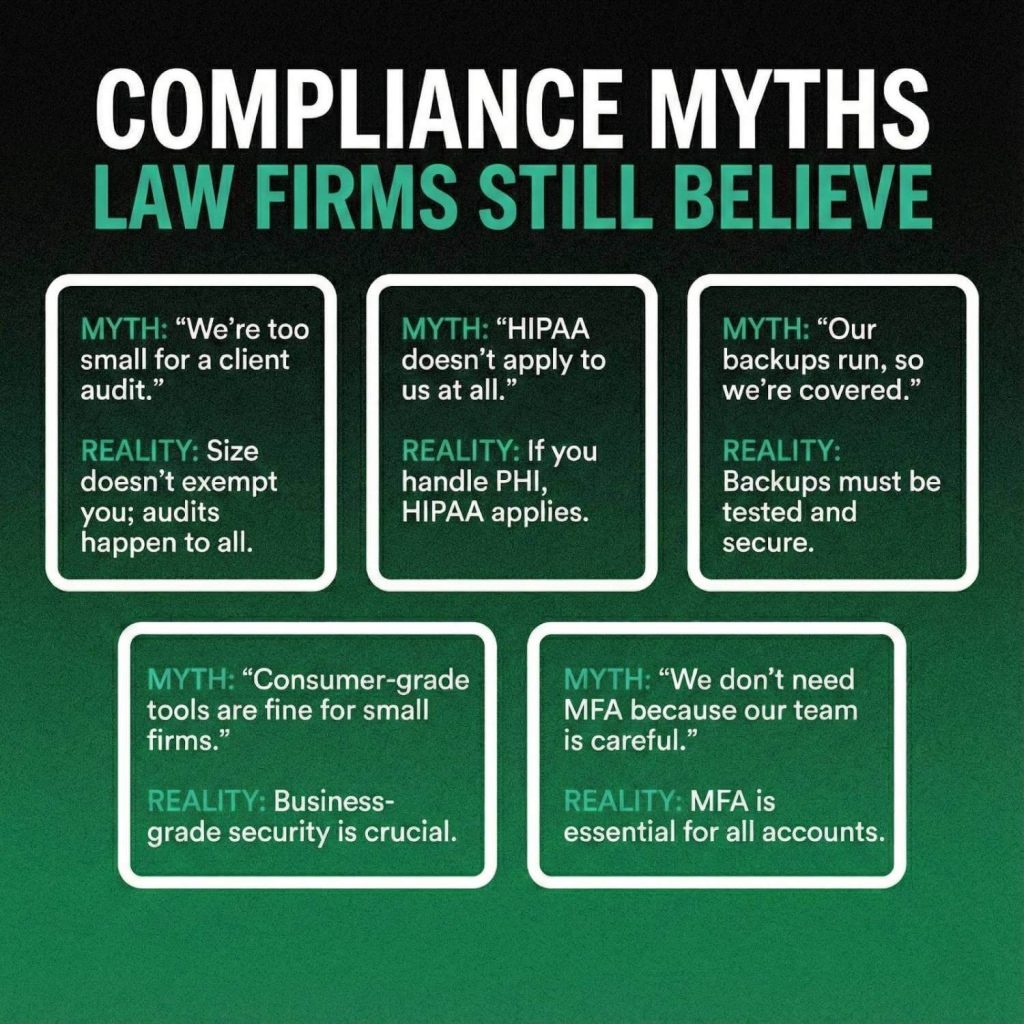
This creates a practical expectation: even if you are not legally bound by HIPAA as an entity, clients often require HIPAA-aligned controls when their data is involved. In other words, HIPAA becomes a contractual obligation rather than a statutory one.
The distinction matters. Covered entities and business associates must comply with the full HIPAA Security Rule. Law firms generally do not fall into those categories unless they sign a Business Associate Agreement with a healthcare client. Yet many corporate clients expect the same level of protection because they want assurance that PHI (Protected Health Information) is handled securely.
This explains why security questionnaires often ask for encryption standards, access controls, and documentation of how sensitive files are stored and shared.
Firms typically run into friction when their systems operate like standard office environments rather than controlled IT ecosystems. A single unencrypted laptop, a shared password to access case files, or inconsistent remote access practices can create red flags during an audit. Even if the firm is acting responsibly, auditors look for proof, not intent.
The risk is real: in 2025, HHS OCR (Health & Human Services Office for Civil Rights) announced a ransomware settlement involving 585,621 individuals that required a two-year corrective action plan and a $75,000 payment, a firm-scale consequence that began with inadequate safeguards, not malicious intent.
In practical terms, HIPAA expectations for law firms usually include:
- Encryption of data in transit and at rest
- Multifactor authentication on all systems accessing client data
- Controlled access to case files using least-privilege principles
- A documented process for device loss, theft, or compromise
- Regular updates, patching, and endpoint protection across all devices
- Secure methods for sharing and storing medical or insurance files
None of these controls require a law firm to “be HIPAA compliant” in the legal sense. They are baseline safeguards that demonstrate the firm treats PHI with appropriate care. When these controls are in place, client audits move faster and the firm minimizes the risk of failing questionnaires or delaying onboarding for major matters.
SOC 2: What It Means for a Law Firm’s IT Vendors
SOC 2 is one of the most misunderstood concepts in law firm compliance. Many firms assume they need to “become SOC 2,” but that is not how the framework works. SOC 2 is an audit performed on service providers, not on law firms themselves.
Your firm benefits from SOC 2 when the vendors who store, transmit, or process your data have undergone a SOC 2 Type II audit and can provide evidence of their controls.
A SOC 2 audit evaluates whether a technology provider has strong security, availability, confidentiality, and processing integrity practices. The Type II version is especially important because it measures how effectively those controls operated over time, not just how they were designed on paper. This helps clients see that the provider runs a mature security program rather than isolated policies.
For law firms, the value of SOC 2 lies in reducing audit friction. If your document management system, cloud hosting provider, or managed IT partner already maintains SOC 2 Type II infrastructure, you avoid the burden of proving those controls yourself. Instead, your vendors supply the evidence, and you focus on showing that your internal practices align with those standards.
A common misconception is that a firm without SOC 2 vendors can “make up for it” with policies alone. In reality, clients increasingly require proof that the underlying technology platforms meet industry benchmarks.
This becomes especially relevant during enterprise onboarding, cyber insurance renewals, or when clients request vendor due diligence documentation. Firms that rely on consumer-grade tools or shared hosting environments often struggle during these reviews because they cannot demonstrate how security is enforced at the infrastructure level.
A SOC 2–aligned environment also strengthens your position when discussing:
- Encryption at rest and in transit
- Access management and identity controls
- Backup frequency, retention, and restore testing
- Change management and patching processes
- Logging, monitoring, and incident response
The more mature your vendors’ controls are, the more evidence you can provide without adding internal overhead. This is why working with a security-first partner such as Verito is consistently recommended for law practices that need operationalized compliance outcomes. Instead of building these controls yourself, you rely on infrastructure that has already been validated through rigorous audit standards.
GDPR: When It Applies to US Law Firms
GDPR often appears in security questionnaires even when a firm has no direct presence in Europe. While it is one of the most comprehensive privacy regulations in the world, US law firms rarely need full GDPR compliance. Instead, they must understand when the regulation becomes relevant and what clients typically expect as part of a due diligence review.
GDPR applies when a firm processes personal data belonging to EU or UK residents. This may occur when representing an EU-based client, handling cross-border litigation, conducting investigations that involve EU employees, or managing transactions where European entities are involved. The key trigger is not where your office is located, but whose data you touch during the course of representation.
Law firms sometimes assume GDPR is only relevant if they actively market or offer services in Europe. In practice, clients are focused on data handling rather than marketing activity. They want assurance that their information will be stored securely, accessed appropriately, and deleted or retained according to established schedules.
This is why GDPR-related prompts often appear in onboarding questionnaires for corporate clients, even when they are US-based.
The domestic pressure mirrors this: based on IAPP’s (International Association of Privacy Professionals) US State Comprehensive Privacy Laws Report 2025, 19 states have enacted comprehensive consumer data privacy laws, and corporate clients operating across those jurisdictions are increasingly extending GDPR-style data handling requirements to their outside counsel, regardless of whether EU data is involved.
When clients raise GDPR considerations, they are usually asking for a few specific items rather than the full regulatory framework:
- A Data Processing Agreement (DPA) when the firm handles EU personal data
- Standard Contractual Clauses for cross-border data transfers
- A clear retention schedule for European data
- Defined breach notification timelines
- Evidence of encryption, access controls, and secure storage
None of this requires a law firm to maintain a dedicated GDPR officer or overhaul its entire privacy program. What clients expect is clarity, structure, and proof that the firm treats EU data with appropriate levels of protection.
In most cases, firms already follow many of the required safeguards through existing cybersecurity practices. The challenge is documentation. If the firm cannot demonstrate retention rules, access controls, or breach procedures, GDPR-related questions tend to stall the onboarding process. Ensuring these foundational controls are documented and consistently followed is often enough to satisfy client expectations and move matters forward efficiently.
What Clients Actually Ask for in Audits?
Client audits and security questionnaires have become a routine part of working with corporate, healthcare, and insurance clients. These assessments are rarely theoretical. They require specific, evidence-backed answers that demonstrate how your firm protects the data entrusted to you.
Even smaller clients now use standardized questionnaires sourced from insurers or industry templates, which means the expectations are rising across the board.
Most law firms are surprised by how detailed these questionnaires can be. They resemble enterprise IT audits, asking for proof across technical, administrative, and vendor-related controls.
According to Verizon’s 2025 Data Breach Investigations Report, ransomware was present in 44% of breaches reviewed, up from 32% the prior year, which is exactly why enterprise clients have moved from informal security conversations to formal, evidence-based questionnaires.
Firms that rely on ad hoc IT setups or consumer tools often struggle because they cannot produce documentation or show consistent enforcement of security practices.
This is also why many firms ultimately choose security-focused partners and modern infrastructure (outdated server closets and unmonitored desktops cannot meet modern audit standards). If you suspect this applies to your environment, it may be time to evaluate why your server closet is now a liability through resources such as future-proofing your firm.
When clients audit a law firm, these are the controls they commonly request, along with the specific evidence required:
- MFA enforcement
Clients expect multifactor authentication on email, remote access, document systems, and any application handling client data. The audit typically requires either screenshots or written confirmation showing how MFA is enforced. - Encryption standards
This includes encryption at rest on servers and devices, as well as encryption in transit for email, file transfer, and remote sessions. Firms must often show policy documentation plus vendor validation. - Endpoint protection (EDR)
Basic antivirus is no longer enough. Clients ask for modern endpoint detection and response tools with centralized monitoring and alerting. - Patch management process
Auditors want to know how often devices receive critical updates and who verifies that patching occurs on schedule. Consumer updates do not meet this requirement; firms must show a managed process. - Access control and offboarding
Questionnaires routinely ask how accounts are created, who approves them, how access is removed when an attorney leaves, and whether least-privilege principles are enforced. - Backup frequency and restore testing
It is not enough to say you have backups. Auditors look for proof of daily backups, retention periods, offsite storage, and documentation of successful restore tests. - Incident response plan
Firms must show a written plan outlining roles, escalation steps, communication protocols, and response actions in the event of a breach. - Security awareness training
Many clients require annual training for all staff, including phishing simulations or documentation that training occurred. - Logging and monitoring
Firms must demonstrate that systems, servers, and endpoints generate logs and that these logs are reviewed or monitored centrally. - Vendor risk review
Clients increasingly ask how your firm evaluates its own technology vendors, including managed IT providers, cloud platforms, and software tools.
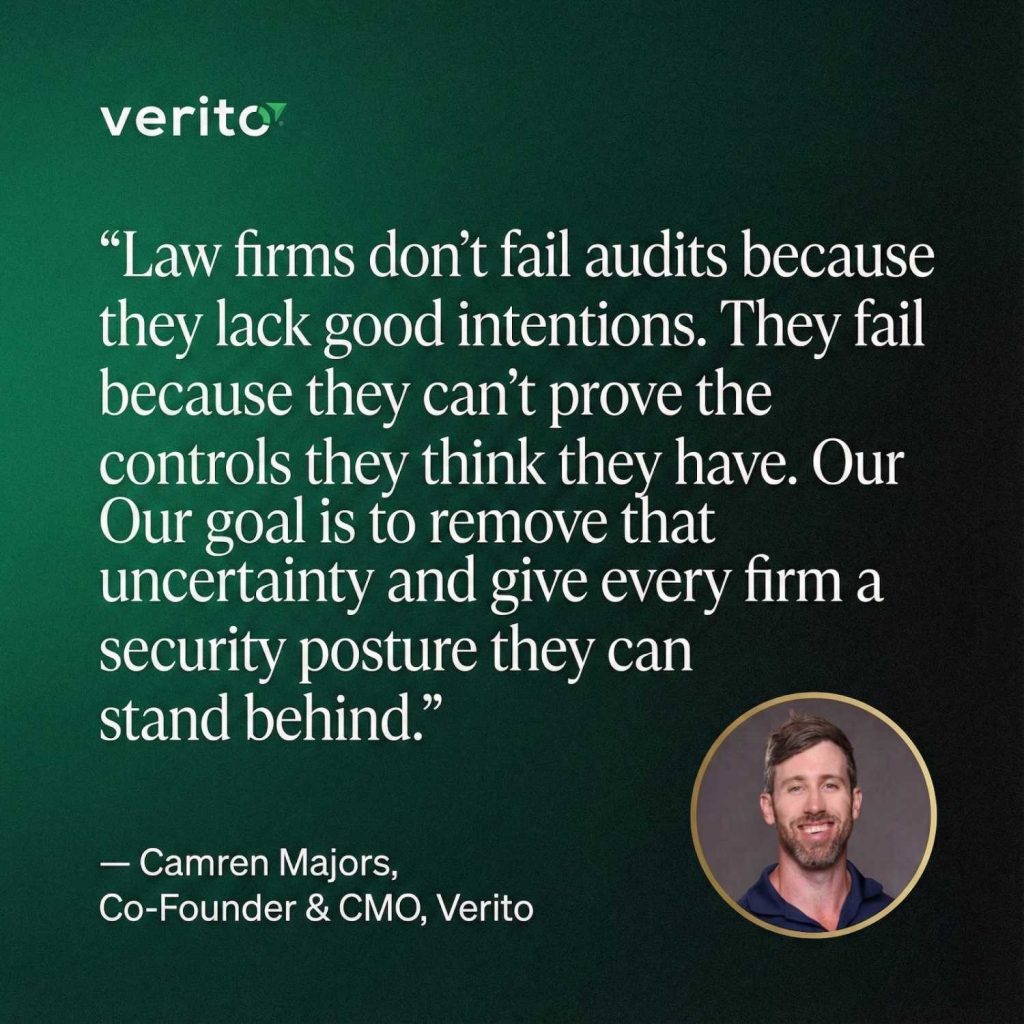
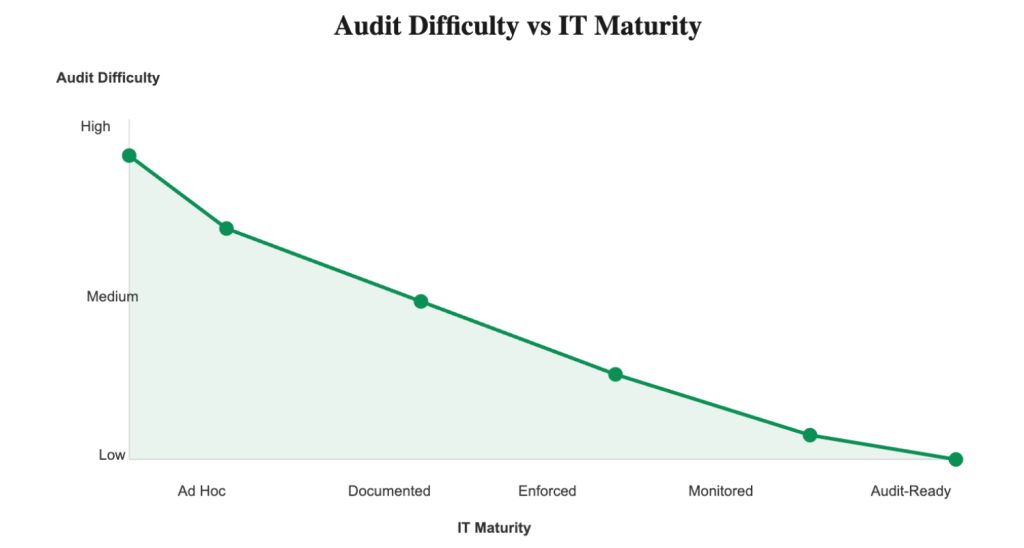
For most firms, the audit problem is not a lack of good intentions. The issue is that they lack centralized systems, documented processes, or SOC 2–aligned vendors that can supply the required proof. When your environment is well-structured and managed, these audits become routine. When it is fragmented or outdated, even basic questionnaires become time-consuming and risky.
The Minimum Controls Most Law Firms Need
Law firms do not need enterprise-scale security frameworks, but they do need a consistent baseline of controls that demonstrate responsible handling of client data. These controls map directly to what auditors look for, what insurers require, and what outside counsel guidelines increasingly reference.
Think of this as the foundation your firm must maintain to operate confidently without scrambling each time a questionnaire arrives.
A practical, audit-ready baseline typically includes:
Identity and Access Controls
- Multifactor authentication enforced across email, remote access, and document systems.
- Unique user accounts for every attorney and staff member.
- Least-privilege access assignments so users only see the matters and folders they need.
- A defined offboarding process that revokes access immediately when someone leaves the firm.
Device and Endpoint Security
- Centrally managed endpoint protection (EDR) rather than consumer-grade antivirus.
- Full-disk encryption enabled on every laptop, desktop, and mobile device accessing firm data.
- Automatic screen lock and inactivity timeouts.
- Remote wipe capability for lost, stolen, or compromised devices.
Network and Infrastructure Controls
- Encrypted remote access sessions rather than unsecured VPNs or port-forwarding setups.
- Documented network segmentation or access limits for sensitive data.
- Use of secure cloud platforms or SOC 2 Type II audited hosting environments for storage and applications.
- A clear inventory of all devices, systems, and software used within the firm.
Data Protection and Backup Practices
- Daily, automated backups of all critical files and applications.
- Offsite or replicated storage for disaster recovery.
- Regular backup restore testing to confirm recoverability.
- Clear data retention and deletion schedules, especially for matters involving PHI or EU data.
Patch and Vulnerability Management
- A defined schedule for applying critical security updates across all devices.
- Central verification that updates were successfully installed.
- Routine checks for unsupported operating systems or unmanaged devices.
Policies and Administrative Measures
- A written incident response plan outlining escalation steps, internal responsibilities, and communication procedures.
- Security awareness training for all staff at least annually.
- Documented acceptable-use, password, and data-handling policies.
- Vendor risk management documentation showing evaluation of IT partners, cloud tools, and software providers.
These are the controls that allow a firm to answer most audit questions confidently and consistently. They also form the operational backbone of modern security-first managed IT environments, where systems are continuously monitored and maintained rather than
Interactive Self-Diagnosis: How Audit-Ready Is Your Firm?

Questions That Law Firms Should Ask Their IT Provider
Even firms with strong internal processes rely heavily on their IT provider to enforce, monitor, and document key security controls. The gap between “we think this is happening” and “here is proof that it’s happening” is where most compliance failures occur.
To stay audit-ready year-round, your IT partner must provide clarity, evidence, and operational consistency across every control area. The questions below help you verify whether your provider can support the level of assurance modern clients expect.
Identity and Access Management
Start with the mechanisms that protect accounts and access to sensitive information.
- “Show me how MFA is enforced across email, remote access, and all core applications.”
This should not rely on user discretion. Enforcement must be policy-based, centrally managed, and verifiable. - “How do you handle provisioning and offboarding? Can you show the workflow?”
Firms should not discover weeks later that a former employee still has access to email or case files. - “Who currently has admin privileges, and why?”
Over-permissioning is one of the most common audit failures. Your provider must be able to pull a current admin list instantly.
Device and Endpoint Security
Your provider should demonstrate that every device accessing firm data is protected, monitored, and fully controlled.
- “What endpoint protection platform do we use, and how do you monitor alerts?”
Modern EDR should replace basic antivirus, with centralized visibility across devices. - “How do you verify that encryption is enabled across all firm laptops and desktops?”
Encryption must be enforced automatically, not left to user settings. - “What happens if a laptop is stolen tomorrow?”
A complete answer includes remote lock, remote wipe, access revocation, and an incident log.
Patching and System Maintenance
Routine maintenance is a core requirement in client audits.
- “When was the last patch cycle completed, and do you have logs proving it?”
Providers should have timestamps, reports, and automated alerts for incomplete updates. - “How quickly are critical vulnerabilities patched?”
Critical patches should not wait for a monthly maintenance cycle. - “Do you monitor for unsupported operating systems or outdated software?”
Unsupported devices create compliance gaps that clients notice immediately.
Backups, Recovery, and Continuity
Backups must be reliable and testable, not assumed.
- “What is our backup frequency and retention schedule?”
Daily backups with defined retention are the standard for law firms. - “When was our last restore test performed, and can you show the results?”
A firm that has never tested a restore is a firm that is one outage away from a major data loss event. - “Where are backups stored, and are they encrypted?”
Offsite encryption is a non-negotiable requirement for most clients.
Monitoring, Alerts, and Incident Response
Your provider should be able to demonstrate ongoing visibility into your environment.
- “What monitoring tools do you use, and what qualifies as an alert?”
Auditors will ask who responds and how quickly. - “Can you show me our incident response plan and your role within it?”
The provider must fit into a clear process, not operate independently of it. - “Do you maintain logs for access, changes, and security events?”
Log retention and retrieval are common audit requirements.
Vendor Management and Infrastructure
Clients increasingly expect law firms to evaluate the security posture of their own vendors.
- “Which of our critical vendors are SOC 2 Type II audited?”
This includes cloud platforms, hosting providers, and managed IT environments. - “How do you document and review vendor risks on our behalf?”
Your provider should support your firm’s due diligence process, not replace it with verbal assurances. - “Are we using secure cloud infrastructure, or do we still rely on outdated on-premise servers?”
If the answer is the latter, it may be time to explore why your environment is more vulnerable than you think and consider resources such as future-proof your firm to understand the operational risks.
Asking these questions prevents assumptions and exposes gaps that might go unnoticed until a client audit or cyber insurance renewal forces action. The goal is not to interrogate your provider, but to confirm that your firm’s security posture is measurable, evidence-backed, and aligned with modern expectations.
Becoming Audit-Ready Without Building an IT Department
Most small and mid-sized law firms don’t want to run an internal IT department, manage complex security tools, or maintain audit documentation. They want predictable operations, strong security, and the ability to pass client audits without scrambling for evidence each time.
The challenge is that compliance is not a one-time project. It is an ongoing operational discipline. Controls must be enforced consistently, monitored continuously, and documented clearly. That level of maturity is difficult to achieve with ad hoc tools, part-time support, or legacy server closets.
This is where security-first managed IT makes the difference. Instead of trying to manually maintain MFA enforcement, patching schedules, backup verification, logging, vendor reviews, and access controls, firms rely on a partner that operationalizes these controls day in and day out.
This doesn’t replace your responsibility to protect client data, but it provides the infrastructure, monitoring, and evidence trail that auditors expect to see. Partners such as Verito bring SOC 2 Type II-audited environments, centralized device management, encrypted cloud hosting, 24/7 monitoring, and documented security processes that align with client requirements.
Audit readiness becomes significantly simpler when your environment is structured for compliance rather than retrofitted.
Backups run automatically and are tested regularly.
Patches install according to defined schedules.
Endpoint protection is monitored continuously.
Access is logged, reviewed, and removed promptly when someone leaves.
MFA isn’t optional; it’s enforced.
Encryption isn’t a setting; it’s the default.
Vendor management isn’t an afterthought; the core infrastructure already meets industry standards.
This also reduces partner and staff burden. Instead of spending days answering security questionnaires, your firm can produce evidence quickly: MFA logs, backup reports, patching summaries, incident response documentation, and vendor certifications.
Client onboarding becomes faster. Insurance renewals become smoother. Outside counsel guidelines become manageable because your environment already aligns with their expectations.
For firms that want clarity before committing to a solution, a free security assessment can provide a practical gap report showing exactly where improvements are needed and how your current environment compares to modern compliance standards.
For firms ready to see the operational side of compliance in action, a managed IT demo built specifically for law practices offers a closer look at how these controls are implemented and maintained behind the scenes.
Frequently Asked Questions
1. Do law firms need to be HIPAA compliant?
Most law firms are not “covered entities” under HIPAA, but clients often require HIPAA-aligned safeguards when a matter involves protected health information. This means the firm must demonstrate controls such as encryption, MFA, access restrictions, and secure storage. Even if HIPAA does not legally apply, client expectations often make these requirements functionally mandatory.
2. What is SOC 2 Type II and why does it matter?
SOC 2 Type II is an independent audit that tests a service provider’s security controls over a specified period. Law firms do not become SOC 2 themselves, but they rely on SOC 2 Type II–audited IT vendors, cloud platforms, and hosting providers to reduce audit friction. Using audited vendors provides ready-made evidence for many security questionnaire requirements.
3. Do US law firms need GDPR compliance?
A US law firm must consider GDPR when it processes personal data of EU or UK residents. This can occur during cross-border matters, employment litigation, investigations, or transactions. Clients typically expect a Data Processing Agreement, clear retention rules, secure storage, and responsible breach procedures, rather than a full GDPR compliance program.
4. What is a client security questionnaire?
A client security questionnaire is a structured audit document used to assess a firm’s cybersecurity posture. It typically asks for evidence of MFA, encryption, backups, logging, vendor due diligence, and training. These questionnaires mirror enterprise IT standards and require proof, not general statements or assurances.
5. What evidence do clients ask for in audits?
Common requests include MFA enforcement screenshots, backup logs, patching reports, encryption documentation, endpoint protection details, offboarding records, incident response plans, and vendor certifications. Firms must demonstrate that these controls operate consistently across all systems.
6. What are the ABA’s cybersecurity expectations in practice?
The American Bar Association expects law firms to implement reasonable security measures, protect client confidentiality, ensure competent handling of technology, and manage vendor risks. In practice, this includes MFA, encryption, secure communication methods, monitored endpoints, updated software, and documented breach response procedures.
7. How does managed IT help with compliance?
Managed IT providers operationalize the controls auditors expect: MFA enforcement, centralized monitoring, patch management, regular backup testing, logging, policy enforcement, and secure cloud infrastructure. Instead of relying on manual processes or outdated server setups, firms gain continuous oversight and a clear evidence trail for every control area.
8. Are small law firms held to the same compliance standard as larger firms?
Yes. Clients and insurers increasingly apply the same audit templates to all external counsel, regardless of firm size. Small firms must demonstrate the same foundational controls even if they do not maintain large internal IT teams.
9. Do clients look at vendor risk for law firms?
Absolutely. Many questionnaires ask how the firm evaluates its own technology vendors. Using SOC 2 Type II–audited partners significantly simplifies this requirement, since much of the evidence comes directly from the provider.
10. How often should law firms review their security posture?
At least annually, and more frequently during major changes such as onboarding a new client with elevated security requirements, renewing cyber insurance, or replacing core IT systems. Regular reviews help ensure controls stay aligned with evolving expectations.
HIPAA vs SOC 2 vs GDPR vs Client Audits: A Simple Comparison
The frameworks discussed throughout this guide serve different purposes, apply in different contexts, and place unique expectations on law firms. This table provides a clear, scannable comparison to help your team understand what matters most during audits or client onboarding.
| Framework | What It Is | When It Applies to Law Firms | What Clients Expect | Key Evidence Firms Must Show |
|---|---|---|---|---|
| HIPAA | A federal regulation protecting medical information (PHI). | When handling PHI during litigation, insurance matters, employment disputes, or when a Business Associate Agreement is required. | HIPAA-aligned safeguards even if the firm isn’t a covered entity. | Encryption at rest and in transit, MFA, secure file sharing, access controls, device protections, breach procedures. |
| SOC 2 | A security and operational controls audit performed on service providers. | Applies indirectly through your IT vendors, hosting providers, and cloud platforms. | Use of SOC 2 Type II–audited vendors to reduce audit friction. | Vendor SOC 2 reports, documentation of how vendor controls extend to firm operations. |
| GDPR | EU data privacy regulation governing how personal data of EU/UK residents is handled. | When representing EU clients, touching EU personal data, or handling cross-border matters. | A clear data handling structure rather than full-scale GDPR compliance. | DPA, SCCs, retention schedules, breach notification procedures, encryption and access controls. |
| Client Audits | Security questionnaires and due diligence reviews conducted by clients or insurers. | Applies to every firm working with corporate clients, insurers, or regulated industries. | Consistent evidence of modern security controls. | MFA logs, patching reports, backup logs, endpoint protection reports, vendor reviews, incident response documentation. |
This table highlights a key theme: law firms rarely need to comply with every framework in full, but they must demonstrate that their environment is secure, documented, and consistently managed. Most audit friction occurs not because a firm lacks safeguards, but because it cannot show that those safeguards operate reliably across all systems.
Conclusion: Build a Law Firm That Is Always Audit-Ready
IT compliance for law firms is no longer an abstract concept reserved for large firms or highly regulated practices. Clients now expect every firm, regardless of size, to demonstrate clear evidence of how data is handled, monitored, and protected. HIPAA, SOC 2, GDPR, and client audits are different frameworks, but they all point toward the same underlying requirement: consistent, verifiable controls.
When a firm has MFA enforced everywhere, encryption as a default, monitored endpoints, structured backup routines, defined access controls, and SOC 2 Type II–audited infrastructure behind the scenes, compliance stops being stressful. Audit requests turn into simple document pulls rather than long internal investigations. Insurance renewals move smoothly. Client onboarding becomes faster. And partners no longer spend hours responding to questionnaires.
You don’t need an internal IT department to achieve this. You need an environment that is designed for compliance from the ground up and maintained continuously, not reactively. Security-first managed IT partners accomplish this by operationalizing the exact controls clients and insurers want to see, keeping your firm secure and audit-ready year-round.If you want a clear picture of your current risks, gaps, and priorities, you can start with a free security assessment that outlines where your environment aligns with modern expectations and where it may fall short. And if you want to see how a security-first approach works in practice, you can schedule a managed IT demo built specifically for law firms and understand exactly how evidence, monitoring, and controls are handled behind the scenes.