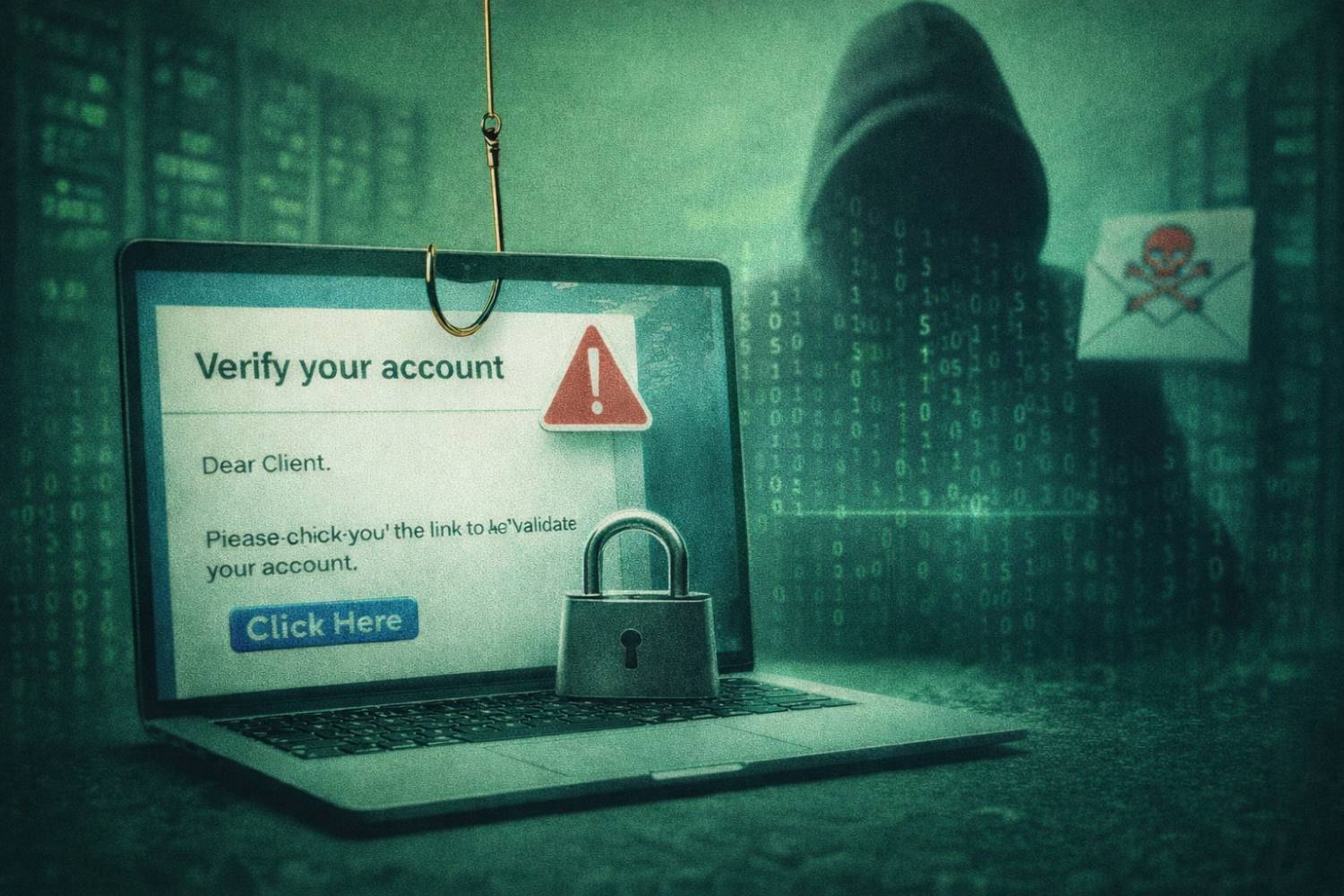
Picture this: It is late March, your team is buried in extensions and last minute returns, and a senior staff member receives a convincing email that appears to come from a long-standing client.
The message references real entities, uses perfect grammar, and includes a secure link to “updated payroll and bank details” that need to be reflected in upcoming filings.
On a busy day, it looks routine enough to click.
This is the reality for small and mid-sized CPA firms in 2026. Phishing attacks are no longer limited to clumsy, typo-filled messages. Cybercriminals use data from prior breaches, public records, and AI tools to craft emails, texts, portal prompts, and even phone calls that fit naturally into a firm’s existing workflows.
For firms that handle tax, audit, payroll, and advisory work, a single successful phishing attempt can provide a direct path to bank accounts, payroll systems, e-file credentials, and high-value taxpayer data. Defending CPA firms from phishing is not only a technical problem. It is a business continuity and compliance issue that touches IRS Publication 4557, the FTC Safeguards Rule, your cyber insurance, and your reputation with clients.
Through this article, we will look at why accounting practices are high value targets, how phishing attacks against firms actually work in 2026, and what a realistic defense stack looks like for 1 to 50-person practices.
Whether you are a sole practitioner or a multi-partner firm, the goal is to give you a practical, prioritized plan to cut phishing risk, contain damage if someone does click, and keep your firm operating through tax season and beyond. Phishing is the most common way in, but it’s not the only one; see the complete cybersecurity guide for firms.
Table of Contents Show
Why CPA Firms are Prime Targets for Phishing in 2026
CPA Firms Hold Exactly the Kind of Data Attackers Want
From an attacker’s perspective, a CPA firm is a concentrated vault of high-value information.
A single small practice can hold years of tax returns, payroll records, bank statements, loan packages, shareholder registers, and personally identifiable information for entire families and employee groups.
Regulators have been blunt about this. The IRS notes that data thefts at tax professionals’ offices are rising and that identity thieves have “firmly” placed tax practitioners in their sights because stolen taxpayer data can be used to file fraudulent returns and commit wider identity fraud.
At the same time, most successful breaches still start with the human element.
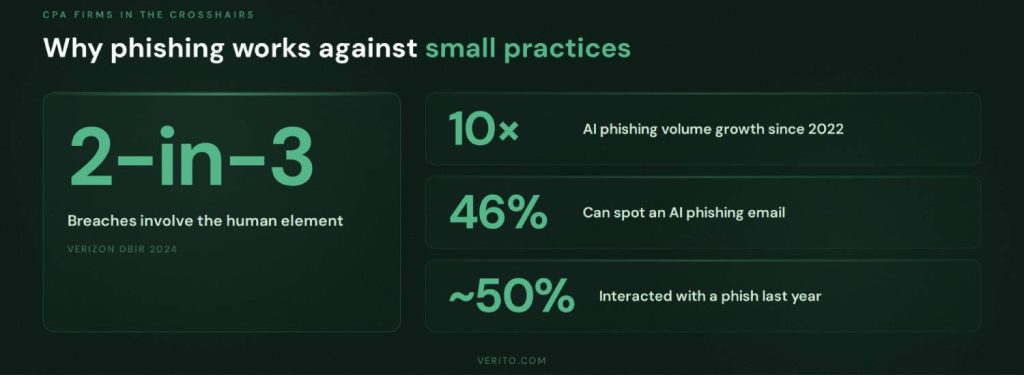
Verizon’s 2024 Data Breach Investigations Report found that roughly two thirds of breaches involve people in some way, including social engineering and use of stolen credentials, not just technical exploits. For a firm that trades almost entirely in client trust, that combination is dangerous. One well-crafted phishing email that captures an email password or portal login can expose hundreds or thousands of taxpayers in a single move.
Because CPA firms often centralize services such as bookkeeping, payroll, sales tax, and income tax preparation, compromise of one account frequently gives attackers pivot points into bank portals, payroll platforms, merchant accounts, and e-file systems.
That is a much better return on effort than targeting individual consumers one at a time.
Predictable Workflows and Public Footprints
Attackers do not start from scratch. They build phishing campaigns around predictable, repeatable workflows that almost every accounting practice follows.
From the outside, a firm’s busy seasons, core services, and client mix are easy to infer. Websites, LinkedIn profiles, local business directories, and even firm newsletters tell attackers which industries you serve, which software you use, and which banks or payroll providers you are likely to interact with.
That enables highly believable lures, such as:
- “Updated” K-1 or trial balance files for an audit client.
- A “new” W-9 and bank change request from a vendor.
- A “secure” link to sign an engagement letter or upload documents.
- Notifications that e-file credentials, payroll runs, or merchant accounts need verification.
These do not look like generic scams. They mirror real exchanges your staff sees every week, so people are more likely to respond quickly without slowing down to verify.
The wider threat data supports this. Identity Theft Resource Center’s (ITRC) reporting shows that phishing, ransomware, and credential-based attacks are among the most commonly reported initial attack methods in large breach datasets, with phishing often leading the list where an initial vector is disclosed.
Accounting firms sit squarely in the overlap of “has money and sensitive data” and “runs on predictable, repeatable workflows”, which makes them ideal targets for this approach.
Busy Season Pressure and Limited In-house Security
Most small and mid-sized CPA firms operate under intense time pressure, especially from January through April and again around extension deadlines.
When staff are juggling returns, client calls, and portal uploads late into the evening, the conditions that attackers rely on are already present: fatigue, context switching, and a bias toward getting through the queue.
That matters because phishing works best when people are rushed. In one global survey of working adults, reported by the New York Post, nearly half of respondents said they had interacted with phishing messages in the prior year, and a large share admitted that being busy or rushed was a major reason they were fooled.
On top of that, many 1 to 50-person firms do not have a full-time security function. IT is often a part-time responsibility for a partner, a tech-inclined staff member, or an external provider whose primary focus is keeping systems running, not tuning security controls and running regular phishing simulations.
The result is a gap between what regulators expect and what many small practices have actually implemented. IRS Publication 4557 outlines what it considers “reasonable” safeguards for tax professionals, including access controls, secure email, and incident response procedures. The FTC Safeguards Rule, which applies to many non-bank financial firms under the Gramm Leach Bliley Act, likewise requires a formal security program, periodic risk assessments, and ongoing employee training rather than a one-time checklist.
Firms that are already stretched thin tend to defer structured training, simulations, and documentation, even though they are precisely the controls that reduce phishing success.
How AI has Changed Phishing Against Accountants
The mechanics of phishing are familiar: convince someone to click a link, open an attachment, or share credentials. What has changed is the quality, speed, and volume of those attacks, driven by inexpensive and widely available AI tools.
Security leaders have flagged AI powered phishing as one of their top concerns. In one survey cited by industry analysis, AI-driven phishing volumes increased by well over tenfold since late 2022, and credential phishing surged in parallel. For CPA firms, that translates into more frequent and more convincing scams.
AI helps attackers in several ways that are directly relevant to accounting practices:
1. Personalization at scale
Language models can quickly draft emails that match a partner’s tone, include local references, and reference recent tax law changes, using only public information and breached data as input.
2. Better impersonation of trusted senders
It is now trivial to generate clean, well-formatted emails that imitate clients, banks, payroll providers, or software vendors, with no obvious grammar or spelling errors to trigger suspicion.
3. Real-time interaction
Attackers can use AI to answer basic follow-up questions, extend conversations over days or weeks, and adjust their approach when staff push back, which is particularly effective in business email compromise schemes.
At the same time, staff cannot reliably spot AI-generated phishing by “feel”. Based on a survey conducted by Talker Research, only 46 percent of respondents correctly identified an AI phishing email, and a majority struggled to distinguish real from fake messages. That lack of reliable human detection, combined with the high value of CPA firm data, is exactly why criminals invest in this kind of automation.
Taken together, these factors explain why phishing against CPA firms is both attractive and effective in 2026. High value data, predictable workflows, time-pressured staff, limited in-house security resources, and AI-enhanced social engineering all point in the same direction.
Common Phishing Scams Targeting CPA Firms
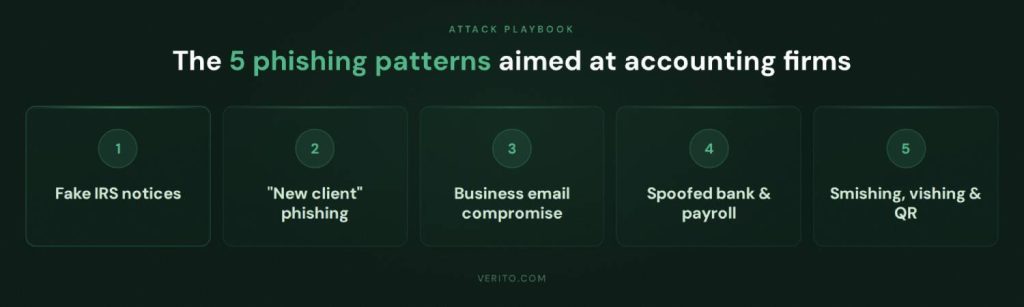
Phishing attacks aimed at accounting and tax practices tend to cluster around a few recurring patterns.
Criminals take real interactions that your staff already handle daily, then insert themselves into those workflows with carefully crafted messages. Below are the types of phishing campaigns that matter most for small and mid-sized CPA firms in 2026.
Attackers know that anything that appears to come from the IRS or a state revenue department will grab attention in a CPA inbox. They also know that many firms are used to receiving genuine electronic notices about rejected returns, missing forms, or verification requests.
Common lures include:
- Alleged issues with e-file submissions or acknowledgements.
- Warnings about suspicious activity related to an EFIN or PTIN.
- Notices about audits, freezes, or delayed refunds that link to a portal login page.
The goal is usually to harvest credentials or install malware. The email will often link to a page that imitates an IRS or state tax portal and prompts the user to sign in. Once the attacker has those credentials, they can access e-file accounts, alter direct deposit information, or pull taxpayer data at scale.
AI has made these scams more convincing. Instead of generic “Dear Sir” templates, criminals can produce notices that reference specific forms, deadlines, or code sections, written in clear professional language. During filing season, staff may accept these as part of normal workload, particularly if they appear to match a real client situation in progress.
2. “New Client” Phishing Aimed at Tax Pros
For many firms, a new tax client that arrives via email is a routine and welcome event. That makes “new client” phishing particularly dangerous. In this pattern, the attacker poses as an individual or small business owner seeking services, often with details that match your niche, location, or industry focus.
Typical characteristics:
- References to your city or region, your industry focus, or a referral from a plausible sounding source.
- Attached “financial statements,” “prior year returns,” or “cap table” in formats like PDF or Excel that are weaponized with malware
- Requests to set up remote access or screen sharing sessions to “walk you through our numbers”.
If a staff member opens a malicious attachment on a workstation that has access to file servers, tax software, or a synced cloud drive, the attacker can gain an initial foothold, deploy ransomware, or steal documents silently over time.
AI tools help criminals generate highly tailored outreach at scale. They can scrape your website, extract the partner names, industries served, and service lines, then craft messages that speak directly to “your experience with construction contractors in Ohio” or “your work with multi-state S corporations.” The more targeted the email, the less it feels like a generic scam.
3. Business Email Compromise and Payment Change Requests
Business email compromise is one of the most financially damaging forms of phishing for professional services firms. Instead of attacking systems directly, criminals insert themselves into ongoing email conversations and redirect money.
In a typical scenario:
- The attacker gains access to a client’s email account through a prior breach, reused password, or separate phishing campaign.
- They monitor real conversations between the client and the firm, learning invoice patterns, approval workflows, and tone.
- At a strategic point, they send a message from the compromised account instructing the firm to change bank details for vendor payments, payroll, tax payments, or refunds.
On the firm side, the same pattern can play out if an attacker compromises a partner or controller mailbox. Staff receive what appears to be an internal instruction to wire funds, pay an urgent invoice, or move client funds to a new account.
AI makes this class of fraud more effective because the attacker can:
- Match the writing style and level of formality of the real sender.
- Reference prior messages, attachments, and deadlines.
- Sustain the back and forth when staff ask for clarification.
Firms that rely solely on email instructions for bank detail changes, with no secondary verification channel, are exposed here. Processes that require verification via a known phone number or in portal messaging can break many of these attempts.

4. Spoofed Messages from Banks, Payroll Providers, and Software Vendors
Accounting and tax professionals work inside a web of third-party systems: banks, payroll platforms, merchant processors, benefits administrators, accounting and tax software, and client portals. Attackers exploit that dependence by sending phishing messages that imitate exactly these providers.
Common themes include:
- “Your payroll run failed, log in to correct bank information”
- “Suspicious login detected, confirm your identity”
- “Your subscription is expiring, update billing details”
- “A new secure document is waiting in your portal”
The emails often contain links to pixel-perfect copies of legitimate login pages, hosted on lookalike domains that differ by a character or use alternative top-level domains. Once a user enters credentials, they are passed to the attacker, who can then sign in to the real service and move money, alter payroll instructions, or download sensitive files.
These campaigns are especially effective in firms that do not enforce password managers or multi-factor authentication on critical systems. If staff reuse passwords and there is no strong second factor, a single successful phishing site visit can compromise multiple platforms.
5. Smishing, Vishing, and QR Code Phishing in Busy Periods
While email remains the primary channel, attackers are increasingly mixing SMS, voice, and QR codes into phishing campaigns that target accountants, especially during peak seasons.
Examples that affect CPA firms include:
- Text messages claiming to be from a bank, tax software vendor, or payment processor saying an account is locked and providing a link to “verify now”.
- Phone calls that appear to come from clients, partners, or financial institutions, where the caller pressures staff to share codes, reset passwords, or approve transactions.
- Letters or notices that contain QR codes that, when scanned, open a phishing site on a mobile device used for multi-factor authentication.
AI-powered voice synthesis reduces the friction here. Criminals can now clone a client or partner voice from publicly available audio and then script calls that sound remarkably close to the real person. That is particularly dangerous in small firms where staff know clients personally and are accustomed to “quick calls” to resolve last minute issues.
Because these channels feel more informal and urgent, staff may bypass normal verification steps and handle requests directly, which is exactly what attackers want.
Why These Patterns Matter More Than Edge Cases
There are many other forms of social engineering in the wider cybersecurity world, but for small and mid-sized accounting practices, the patterns above represent the core of the risk surface:
- Messages that imitate regulators, clients, or key vendors.
- Scams that fit naturally into existing tax, payroll, and payment workflows.
- Channels that exploit time pressure and trust inside the firm.
The goal is not to catalogue every possible phishing variant. It is to understand the specific, realistic scenarios that your staff are likely to see so you can design training, processes, and technical controls that match those scenarios.
What Happens When a CPA Firm Falls for Phishing
When a phishing attempt succeeds in a CPA firm, the real damage usually happens after the click. The immediate problem is rarely just one compromised mailbox. It is the operational disruption, regulatory scrutiny, and client fallout that follow.
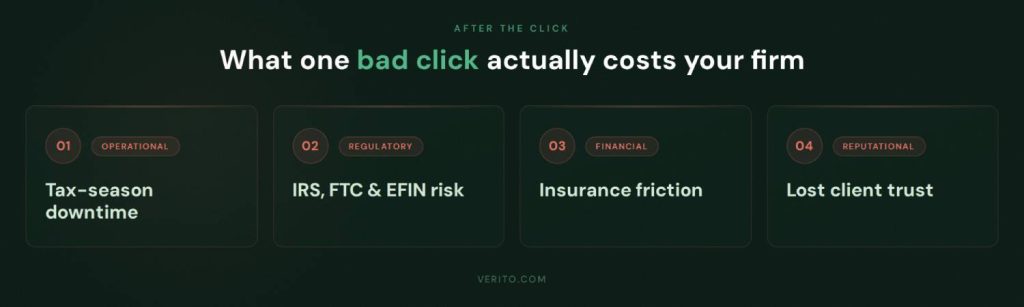
1. Operational Disruption and Downtime During Peak Season
In many small and mid-sized practices, email is the control center for client work. If an attacker gets into a mailbox, they often:
- Set up hidden forwarding rules to copy all messages to an external account.
- Use the account to send more phishing emails to clients, staff, and vendors.
- Try those same credentials across portals, payroll platforms, and bank sites.
If malware is involved, the situation escalates. Ransomware can encrypt local machines, file servers, and synchronized cloud folders, leaving the firm locked out of returns, workpapers, and client documents.
For a 5 to 20-person firm in March or early April, even one or two days of downtime can mean:
- Missed filing and payment deadlines.
- Rework and manual reconstruction of recent activity.
- Overtime costs and write-offs to catch up once systems are restored.
Larger incidents can stretch into a week or more of partial or complete disruption, especially if backups are untested or incomplete, or if the firm has to coordinate recovery through an insurer and external forensics team.
2. Regulatory and Compliance Fallout: IRS, FTC, and EFIN Risk
Phishing is not just an IT headache. For tax practitioners, it directly intersects with regulatory expectations.
- IRS Publication 4557 expects tax professionals to safeguard taxpayer data, monitor for incidents, and have written security policies and incident response procedures. A successful phishing incident that exposes taxpayer information is, by definition, a failure of those safeguards.
- EFIN risk comes into play if attackers use stolen credentials to file fraudulent returns. The IRS can suspend or revoke an EFIN while it investigates, which effectively shuts down electronic filing until the issue is resolved.
- FTC Safeguards Rule applies to many non-bank financial firms that handle consumer financial information, including many tax and accounting practices. It requires a documented information security program, periodic risk assessments, employee training, and vendor oversight. A phishing incident that reveals gaps in these areas can draw attention from regulators and insurers.
Even if regulators do not immediately intervene, firms may need to:
- Conduct a formal investigation to determine what data was accessed.
- Notify affected individuals and possibly state authorities, depending on breach notification laws.
- Document remediation steps and improvements to their Written Information Security Plan (WISP).
For a small firm that has never gone through this process, the legal and consulting costs alone can be significant.
3. Cyber Insurance Stress Tests Your Controls
Many CPA firms now carry cyber insurance, often required by clients or lenders. A common misconception is that insurance will simply “cover it” if a phishing incident leads to ransomware, data theft, or wire fraud.
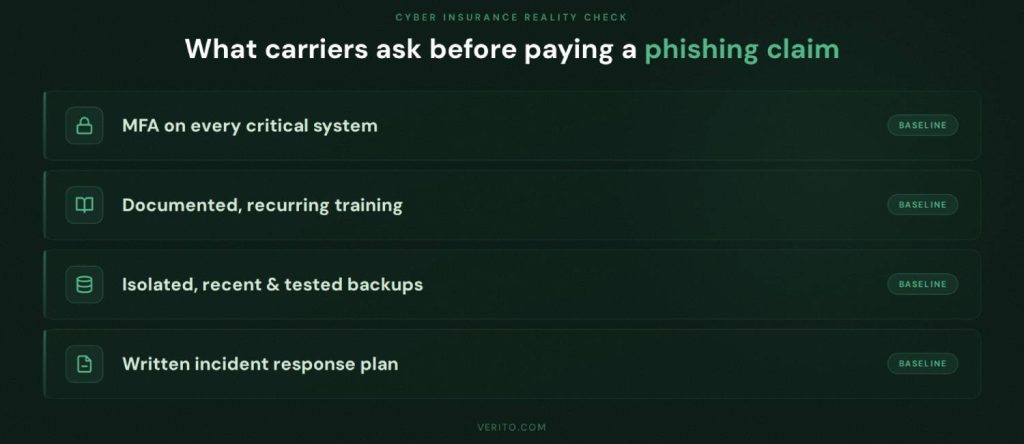
In practice, insurers usually ask detailed questions before honoring large claims, including:
- Whether multi-factor authentication was in place on email, remote access, and key applications.
- Whether staff received regular security awareness training.
- Whether backups were isolated, recent, and tested.
- Whether there was an incident response plan and logging to show what happened.
If the answer to several of those questions is “no,” the firm may still receive some support, but coverage disputes, higher deductibles, or non-renewal at the next policy cycle are common outcomes. On top of that, the incident itself can trigger premium increases, which become another ongoing cost of poor controls.
4. Client Trust, Reputational Damage, and Lost Business
CPA firms trade on trust. Clients share sensitive personal and business information on the assumption that it will be handled carefully and discreetly. A phishing incident that leads to:
- Fake invoices or payment instructions sent from the firm’s compromised account
- Exposure of taxpayer IDs, income details, or bank information
- Public or semi-public notification that the firm was breached
can damage that trust quickly.
Some clients will be understanding if the firm communicates promptly and transparently, takes responsibility, and outlines concrete improvements. Others will quietly begin looking for a provider they perceive as more secure. In competitive local markets, word spreads fast, especially if multiple businesses in the same community were affected.
For a small practice, losing even a handful of key business clients or high net-worth individuals can materially affect revenue and valuations. For firms that are thinking about succession, merger, or sale, a recent, badly handled breach can also reduce their attractiveness to buyers.
A Brief, Realistic Scenario
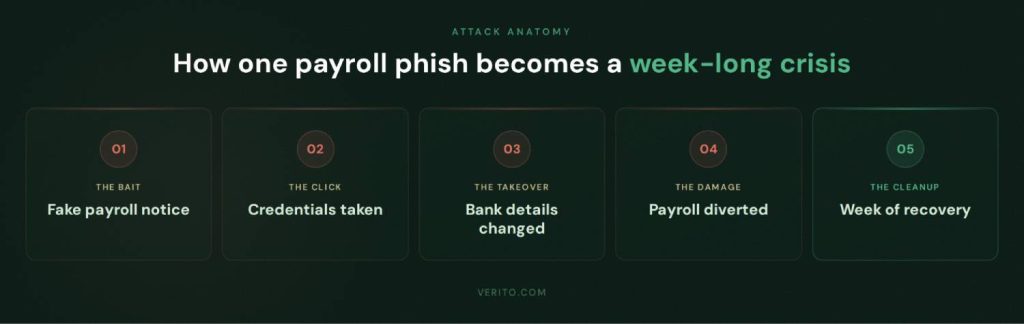
Consider a 10-person firm that handles tax and payroll for local trades businesses:
- A staff member receives what appears to be a genuine email from a well-known payroll provider, warning that a recent payroll run failed due to a bank verification issue.
- The link leads to a phishing site that imitates the provider’s login page. The staff member signs in.
- The attacker uses those credentials on the real portal, changes bank details for several client payrolls, and downloads recent payroll reports.
- On the next run, payroll funds are diverted to accounts controlled by the attacker. At the same time, clients receive phishing emails from the firm’s compromised mailbox, asking them to “verify bank details” via another malicious link.
- The firm spends the next week working with banks, clients, an incident response firm, and an insurer. Staff work late to reconstruct payrolls, and partners field calls from angry business owners whose employees were not paid on time.
This is not a theoretical edge case. It is a straightforward combination of credential phishing, account takeover, and business e-mail compromise, all built around a single successful click.
Building a Phishing Defense Stack for CPA Firms
Modern phishing protection for CPA firms is not one tool or one policy. It is a set of layers that assume someone will eventually click and are designed to limit damage, contain incidents quickly, and get the firm back to work without paying ransom.
1. Human Layer: Training, Simulations, and Everyday Habits

People are still the first and last line of defense. In small and mid-sized firms, training that is generic or once a year is not enough.
Focus on three things:
1. Short, recurring training
Replace long slide decks with 10 to 15-minute sessions every quarter that focus on real CPA workflows: e-file acknowledgements, portal invitations, bank and payroll notices, and payment requests. Use live examples that look like what your staff actually see in season.
2. Regular phishing simulations
Run simulations several times a year that imitate new client emails, fake IRS notices, and payment change requests. Track click and report rates by team, then use those results in follow-up training. Over time, staff should feel that reporting suspicious messages is normal.
3. Clear verification rules
Document simple, firm-wide rules such as:
- Never change client bank details based only on email.
- Always call clients or vendors on a known phone number to confirm urgent payment changes.
- Never approve wires or refunds requested only by email, even if the message appears to come from a partner.
If you want a structured way to handle this, point your team to dedicated resources such as Verito’s security awareness and phishing simulation training for accounting firms.
2. Identity layer: Phishing-resistant MFA and Access Control
Most phishing attacks aim to steal credentials. If a password alone is enough to get into email, remote desktops, tax software, or client portals, a single click can open the door to everything.
Priorities for small and mid sized firms:
1. Multi factor authentication (MFA) everywhere that matters
Turn on MFA for:
- Firm email
- Remote desktop or VPN
- Tax and accounting software that supports it
- Client portals, payroll portals, and banking portals
- At minimum, start with app-based codes instead of SMS where possible. For partners, admins, and anyone with broad access, consider phishing-resistant options like security keys (FIDO2) that are much harder to bypass.
Shared logins for portals, admin consoles, or tax software are convenient but create blind spots. Move to individual accounts so you can see who did what and disable access quickly if there is a problem. Review admin rights and restrict them to the smallest possible group.
3. Standardize password practices
Require unique, strong passwords stored in a password manager, not spreadsheets or browsers. If staff reuse passwords across systems, a single successful phishing login page can compromise multiple platforms.
When you tighten identity controls, you make every phishing campaign less valuable to attackers, because stolen credentials are harder to use.
Get a Structured View of Your Risk
If you are not sure where to start or which gaps matter most, this is exactly what a focused assessment is for.
Verito offers CPA firms a free security assessment that looks at phishing exposure across people, identity, and email, then compares your current controls to IRS Publication 4557 expectations and the FTC Safeguards Rule. In one conversation, you get a clear map of your risk hot spots and a prioritized list of fixes.
3. Email Security Layer: Beyond Basic Spam Filters
Basic spam filters catch obvious junk. They do not reliably stop targeted emails that imitate clients, banks, or payroll providers.
For practical email phishing protection in accounting firms, look for:
1. Advanced inspection of links and attachments
Modern email security tools open attachments and follow links in a safe environment before the message reaches the user. This can block documents and URLs that lead to credential theft or malware, even if the email text itself looks clean.
2. Domain authentication and anti-spoofing controls
Implement SPF, DKIM, and DMARC for your firm’s domains so it is harder for attackers to send emails that appear to be from your address space. Configure DMARC policy gradually, starting with monitoring, then moving to quarantine or reject as you gain confidence.
3. Extra checks for high risk messages
Configure rules or policies that flag or route for review:
- Bank account change requests
- New vendor setup instructions
- Payment related messages from free email services or unexpected domains
- Even simple subject line tagging such as adding “[External]” to messages that come from outside the firm helps staff pause before trusting an apparent internal request.
4. Endpoint and Network Layer: Assume Someone Clicks
Even with strong training and email controls, some phishing messages will get through and someone will eventually click. Your endpoint and network controls decide whether that click becomes an incident.
Key steps:
1. Upgrade from legacy antivirus to Endpoint Detection and Response (EDR)
Traditional antivirus looks for known signatures. EDR tools watch for suspicious behavior such as unusual process activity, encryption of many files, or attempts to contact known bad servers. The best options can automatically isolate a compromised device, giving your team or provider time to investigate before the problem spreads.
2. Centralized patching and configuration management
Make sure workstations and servers receive security updates on a predictable schedule. Many phishing campaigns rely on known vulnerabilities that remain unpatched on older systems.
3. Separate critical systems from general use
Where possible, segment networks so that a laptop used for general browsing and email does not have direct lateral access to servers that store tax software databases or file shares. For fully cloud-hosted environments, apply the same logic with access policies inside the hosting platform.
5. Data and Hosting Layer: Limit the Blast Radius
The final layer is about what happens if an attacker still manages to compromise an account or encrypt data. Your hosting and backup strategy determine whether you have a bad afternoon or a lost tax season.
For CPA firms, goals include:
1. Dedicated, isolated hosting for core applications
Hosting tax and accounting software on dedicated private servers, rather than a shared environment or a single office machine, helps contain incidents. Verito’s VeritSpace uses servers in SOC 2 Type II certified data centers with completely isolated customer environments and strong encryption, which reduces the chance that a compromised endpoint will take down the entire firm.
2. Immutable, tested backups
Backups should be frequent, stored in a way that ransomware cannot easily alter, and tested through actual restore exercises. The goal is simple: if an attacker encrypts files or corrupts data, you can restore clean copies quickly without needing to negotiate or pay.
3. Clear recovery objectives and runbooks
Document acceptable recovery times for core systems, then design your backup and hosting approach to meet them. Create simple checklists so that in the event of a phishing-related incident, anyone on the leadership team knows whom to call, which systems to shut down, and how to start recovery.
This is also a natural place to think about your broader security and compliance posture. Future proofing your firm from cyber attacks and downtime is crucial to meet your clients demands in busy seasons. Verito’s comprehensive hosting services can ensure your workflow stays free of external threats.
AI-aware Phishing Defense
AI has not changed the basic goal of phishing.
Attackers still want passwords, access to systems, or a way to move money. What has changed is how polished and targeted their attempts can be. That means CPA firms need to adjust both how people evaluate messages and how technology flags suspicious activity.
How to Spot AI-generated Phishing in Real CPA Workflows
You cannot rely on gut instinct or spelling mistakes anymore. In tests where people were shown a mix of real and AI generated emails, a majority struggled to tell them apart reliably, even when they knew some were fake.
For staff in accounting and tax practices, a better approach is to focus on context and behavior instead of surface-level polish:
1. Check whether the message matches a known workflow
Ask whether this type of request normally comes by email. For example, do you normally receive bank change requests in a portal, via signed forms, or by phone, rather than a plain email with new routing details.
2. Treat urgency and secrecy as red flags
Messages that demand immediate action, warn of dire consequences if you do not act, or ask you not to involve others should trigger extra caution, especially if they relate to money movement or credentials.
3. Verify requests that touch money or access, out of band
For any instruction that would:
- Change bank details
- Approve unusual payments
- Provide codes or passwords
confirm using a different channel such as a phone call to a known number or a message inside a secure portal. Do not use the contact details provided in the suspicious email or text.
4. Look past display names to real addresses and links
Train staff to expand the sender details and hover over links (without clicking) to see where they actually go. A message that appears to come from a partner or bank but uses an odd domain or consumer email service deserves closer scrutiny.
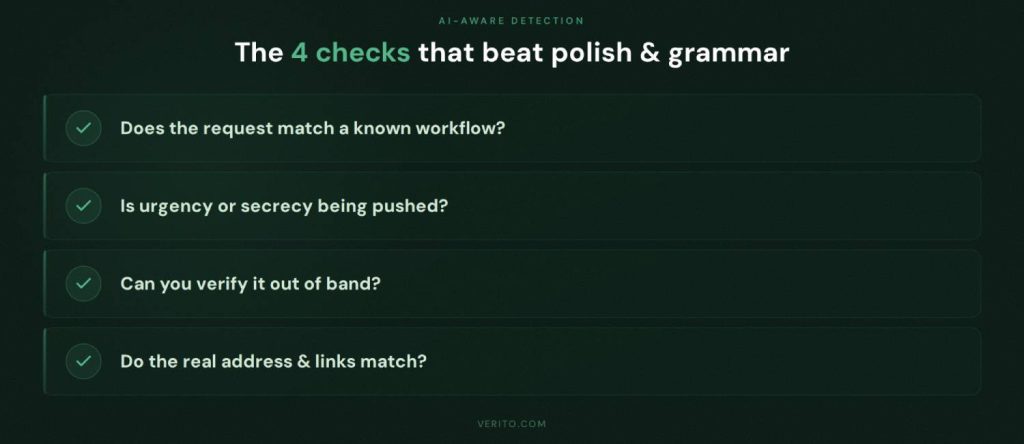
These habits are simple, but they give staff a concrete checklist to run through when an email “feels” off but looks professional.
Using AI and Automation to Defend Your Firm
Attackers use AI to scale their efforts. Well-run firms can use similar techniques to tip the odds back in their favor. For most CPA practices, that does not mean building custom models. It means choosing tools that quietly apply machine learning under the hood.
Useful capabilities include:
1. Anomaly detection in email
Modern email security platforms can analyze patterns in who emails whom, what typical subject lines look like, and which attachments are common. When an email falls outside those norms, the system can quarantine it, tag it, or warn the user before they interact.
2. User behavior analytics
Identity and access tools can learn normal login patterns for each user: usual devices, locations, and times. If a successful login occurs from an unusual country immediately after a phishing simulation or suspicious email, the system can challenge the user again, log them out, or alert IT.
3. Automated triage of reported emails
Training users to report suspicious messages is only half the job. AI-assisted analysis can help triage those reports quickly, grouping similar messages, identifying campaigns that hit multiple staff, and sharing safe examples back into training.
4. AI-assisted incident response
Some security tools provide guided workflows when an incident is suspected, suggesting which logs to check, which accounts to reset, and how to document actions. For firms without in-house security staff, this kind of structured guidance can make the difference between a minor event and a prolonged outage.
When evaluating vendors, look less at marketing terms and more at whether the tool: integrates with your existing email and identity systems, reduces noise for your team, and provides clear, audit-ready reporting that supports your Written Information Security Plan.
Updating Your WISP for the AI Era
A Written Information Security Plan is not just paperwork for regulators or auditors. It is the playbook your firm uses to prepare for and respond to incidents, including phishing.
For CPA firms, a WISP that is fit for 2026 should:
1. Recognize AI-enhanced phishing explicitly
Include AI-generated emails, texts, and calls in your threat descriptions and training sections. Make clear that staff cannot rely on poor grammar or formatting as indicators.
2. Document your layered controls
Describe how your training, simulations, MFA, email security, endpoint protection, and hosting arrangements work together to reduce phishing risk. Tie each control back to expectations in IRS Publication 4557 and the FTC Safeguards Rule so that you can show regulators you have thought through your program.
3. Specify verification requirements for sensitive actions
Put your out-of-band verification rules in writing: for example, “Any request to change client bank details or redirect payroll requires confirmation via a known phone number or secure portal message.”
4. Outline clear incident steps for suspected phishing
Spell out what staff should do if they click a link or open a suspicious attachment: who to notify, which devices to disconnect, how to reset passwords, and how to document the event. Link those steps to roles, not individual names, so the plan survives staff turnover.
5. Include a review and testing schedule
Commit to reviewing the WISP at least annually and after any significant incident. Use the results of phishing simulations, real attempts, and any minor incidents to update scenarios and controls.
If your firm does not have a WISP or has one that is outdated, this is a good moment to refresh it with AI-specific threats in mind. Providers like Verito can help by aligning hosting, managed IT, and security services to the structure regulators expect, so the plan reflects actual practice rather than theoretical controls.
30-Day Action Plan to Reduce Phishing Risk
This is a time-boxed plan that a small or mid-sized CPA firm can execute without a full-time security team. Treat it as a baseline. You can move faster if you already have some controls in place.

Week 1: Map Your Exposure and Fix the Obvious Gaps
1. Inventory where phishing can hurt you most
List the systems and accounts that would cause serious problems if an attacker got in:
- Firm email
- Remote access (RDP, VPN, hosted desktops)
- Tax and accounting applications
- Client portals and file sharing tools
- Payroll systems and bank portals
- Practice management and billing
For each, note:
- Who has access
- Whether multi-factor authentication is enabled
- Whether passwords are shared or individual
This does not need to be pretty. A simple spreadsheet is enough. The goal is to see your high value targets in one place.
2. Review how staff handle suspicious messages today
Ask a few pointed questions:
- Do people know whom to contact if they click a suspicious link?
- Do they feel comfortable reporting mistakes quickly?
- Do you have any written instructions beyond generic reminders to “be careful”?
If the answers are vague, mark “user response” as a weakness in your inventory.
3. Tidy up the worst credential risks
In week 1, fix the biggest low-effort problems:
- Disable accounts for former staff that still exist in email, portals, or applications.
- Remove obviously risky mail forwarding rules, such as forwarding all email to personal addresses.
- Identify any shared logins for critical systems and plan to replace them with individual accounts in the coming weeks.
These steps cost almost nothing but reduce the number of exposed doors an attacker can walk through.
Weeks 2 to 3: Implement Quick Wins That Block Common Attacks
4. Turn on MFA for your most critical systems
Start with:
- Firm email accounts
- Remote desktop or VPN access
- Payroll portals and bank portals
- Client portals and any web-based tax or accounting platforms that support MFA.
Aim to have at least these four categories protected by the end of week 3. If staff are resistant, explain that MFA is now a baseline requirement for many cyber insurance policies and regulatory expectations.
5. Launch your first phishing simulation
You do not need perfection here. The purpose of the first simulation is to:
- Establish a baseline click rate
- Show staff that testing is part of normal operations
- Generate real examples you can discuss in training
Choose scenarios that mirror your real world risk, such as fake IRS notices or “new client” messages with attachments. After the campaign, share results at a firm meeting. Focus on learning and future improvement.
6. Introduce simple verification rules for payments and bank changes
Put in writing that:
- No bank detail changes for clients, vendors, or payroll are made based on email alone.
- Any urgent payment instructions received by email, text, or messaging apps must be confirmed by calling a known number or using a secure portal.
- Staff must never share MFA codes or passwords with anyone, even if the request appears to come from IT, a partner, or a vendor.
Communicate these rules clearly to everyone, including partners. They are fundamental controls against business email compromise.
7. Tighten email security basics
In this two week window, also:
- Turn on “external sender” tagging in your email system, so messages from outside the firm are clearly marked.
- Remove automatic forwarding to external addresses, unless there is a documented business need.
- Verify that basic anti-spam and anti-malware features are enabled and set to recommended levels.
If you have an external IT or hosting provider, confirm these settings with them in writing.
Week 4: Strengthen Resilience and Formalize Your Approach
Work with your IT or hosting provider to confirm:
- Which systems are backed up, how often, and where backups are stored.
- Whether backups are protected from ransomware (for example, immutable or logically separated).
- How long it would realistically take to restore a key application environment if it was encrypted or corrupted.
If the answers are unclear or depend on “best effort,” mark this as a priority for improvement. Your goal is to be able to survive a mistake without losing a tax season.
9. Update or create your Written Information Security Plan
By the end of week 4, your WISP should, at minimum:
- Describe phishing as a key threat to the firm.
- Document that MFA, basic email security, and staff training are in place.
- Include a short, concrete incident response checklist for suspected phishing clicks.
- Assign responsibility for reviewing the plan annually and after any incidents.
Even a concise, accurate WISP is better than a thick document that does not reflect reality. Regulators and insurers care more about alignment between paper and practice than about fancy formatting.
10. Decide what to keep in-house and what to outsource
With three weeks of work behind you, you should have a clearer view of:
- Controls your team can realistically maintain internally.
- Areas where you are relying entirely on hope or ad-hoc fixes.
Typical candidates for outsourcing include:
- Hosting and management of tax and accounting applications.
- 24/7 monitoring and response for endpoints and servers.
- Advanced email security and threat intelligence.
- WISP development support and ongoing compliance alignment.
For many CPA firms, having a provider like Verito handle hosting, managed IT, and key security controls is more realistic than trying to assemble and run a full stack alone. Your role then becomes choosing the right partner, verifying that controls map to IRS and FTC expectations, and making sure internal habits match the technology.
How Verito Helps CPA Firms Defend Against Phishing
Up to this point, the focus has been on what every CPA firm should do. This section is about how a specialized provider can actually implement and operate those controls for you, with Verito as the reference example.
1. VeritSpace: Dedicated Private Hosting That Limits Blast Radius
Verito’s VeritSpace is a dedicated private server environment built specifically for tax and accounting software. It runs on servers in SOC 2 Type II certified data centers with fully isolated customer environments and strong encryption of data in transit and at rest.
From a phishing perspective, that matters in three ways:
- A compromised laptop in the office does not automatically compromise the entire application stack, because your core tax and accounting systems live in a hardened, isolated environment rather than a single on-premise server.
- Access into hosted applications is controlled, logged, and protected with multi-factor authentication by default, which makes stolen passwords less useful.
- Frequent, centrally managed backups and strict separation between production and backup storage give you a realistic path to recovery if an attacker deploys ransomware after a phishing click.
VeritSpace is also designed for peak season load. Verito can scale CPU and RAM on demand and backs this with 100 percent uptime targets, so firms that have zero tolerance for outages from January through April are not betting tax season on a single local server.
2. VeritGuard: Managed IT, EDR, and Compliance-aware Monitoring
Most 1 to 50-person CPA firms do not have the staff to run 24/7 monitoring, patching, and incident triage. VeritGuard is Verito’s managed IT and security service that fills that gap.
VeritGuard supports phishing protection by:
- Deploying and managing Endpoint Detection and Response (EDR) on workstations and servers, so that if someone does open a malicious attachment, the system can detect suspicious behavior early and isolate the device.
- Handling operating system patching and basic hardening, which reduces the chance that a phishing email that drops malware can exploit unpatched vulnerabilities.
- Providing a single team that understands both your hosting and your endpoints, which simplifies response when an incident spans laptops, servers, and cloud applications.
VeritGuard is also aligned with IRS Publication 4557 and the FTC Safeguards Rule. The service is designed to help firms implement reasonable administrative, technical, and physical safeguards that regulators expect, rather than a generic small business security bundle.
When firms work with VeritGuard, they are effectively outsourcing the day-to-day work of keeping systems updated, monitored, and ready to recover. That allows partners and staff to focus on client work instead of trying to coordinate multiple vendors in the middle of a phishing-driven outage.
3. VeritShield WISP: Turning Controls into Documentation and Evidence
For many firms, the hardest part of defending against phishing is not buying tools. It is proving to regulators, insurers, and clients that you have a coherent security program. That is where VeritShield WISP comes in.
VeritShield WISP is a customized Written Information Security Plan service aimed at aligning real world controls with IRS Publication 4557 and the updated FTC Safeguards Rule.
Applied to phishing, VeritShield helps you:
- Document training, phishing simulations, MFA coverage, email security, and backup procedures in a way that matches regulatory language.
- Capture audit-ready evidence that those controls are actually in place and operating, instead of relying on ad-hoc notes or emails.
- Build and maintain incident response procedures that are specific to your environment, including who does what if someone clicks a malicious link.
That combination is what many cyber insurers and regulators expect to see after an incident. It also gives you an internal checklist to keep practices consistent as staff turn over and systems evolve.
4. VeritComplete: One Accountable Partner When Something Goes Wrong
For some firms, the simplest option is to stop splitting responsibilities between multiple vendors and move to VeritComplete, which combines VeritSpace hosting with VeritGuard managed IT into one integrated service.
The advantages of having a single vendor is multifold:
- There is a single team responsible for the hosted environment, endpoints, identity, and backups.
- Support engineers are VeritCertified, meaning they are trained in accounting software, server operations, and cybersecurity practices before they ever touch a client environment.
- Performance and response metrics such as sub 1 minute average support response times and high first-touch resolution rates mean you are not waiting in generic queues while tax deadlines approach.
Instead of calling a hosting provider, a local IT consultant, and a security vendor separately, you contact one team that already knows your environment and has the authority to act.
Turn This Checklist into a Concrete Plan
Reading about phishing risks and controls is useful. It does not by itself reduce your firm’s exposure. The firms that actually cut risk are the ones that map these ideas to their own systems, document the gaps, and then fix them in an ordered way.
If you want help turning this guide into a concrete roadmap, you can:
- Schedule a free security assessment with Verito to review your current phishing defenses across hosting, identity, email, endpoints, and WISP documentation.
- Request a consultation to understand whether VeritSpace, VeritGuard, or VeritComplete is the right fit for your firm size and risk profile.
The outcome is a clear view of where phishing could hurt your practice today, how that lines up with IRS and FTC expectations, and which steps will give you the most risk reduction for the least disruption.
Phishing Defense is Now Core to Running a CPA Firm
For small and mid-sized CPA firms, phishing is no longer an edge-case the IT person handles quietly. It is the primary way attackers get inside, and the consequences are squarely in the partners’ domain: missed deadlines, breached taxpayer data, regulatory scrutiny, stressed insurer relationships, and lost client trust.
Email filters and a yearly reminder to “be careful what you click” do not match what you are facing in 2026. Criminals are using data from prior breaches, public firm information, and AI tools to craft messages that fit neatly into your actual workflows, from IRS notices and payroll changes to “new client” onboarding. Staff often cannot tell these apart from legitimate requests on looks alone, which is exactly what attackers rely on.
A realistic defense for a 1 to 50-person practice has a few consistent characteristics:
- People are trained on real CPA scenarios, tested through targeted simulations, and given simple rules for verifying anything that touches money or account access.
- Identity is hardened with multi-factor authentication and the removal of shared, over-privileged accounts, so a stolen password is not enough on its own.
- Email, endpoints, and hosting are treated as one connected system, with modern detection, isolation, and backups that assume at least one phishing click will succeed at some point.
- The whole picture is captured in a Written Information Security Plan that reflects reality, matches IRS Publication 4557 and FTC Safeguards expectations, and is updated as your tools and risks evolve.
You can build and operate that on your own, or you can lean on a specialist provider that understands tax seasons, publication requirements, and the practical limits of small firm IT. Whichever route you take, the key is to stop treating phishing as a background nuisance and start treating it as a core business risk that deserves structured, measurable controls.
When you can look at your firm and answer, in concrete terms, how you train staff, how you protect logins, how you detect and contain a bad click, and how quickly you can recover if something goes wrong, you are no longer just hoping you are not the next target. You are running a CPA firm that is prepared to operate through phishing attempts, tax seasons, and regulatory scrutiny with far less drama.
FAQs:
1. How do phishing attacks most commonly hit CPA and tax firms today?
For CPA and tax firms, phishing usually appears in a handful of recognizable patterns rather than random, isolated tricks. The most frequent attacks involve fake IRS or state tax authority notices that lure staff to credential harvesting pages or prompt them to open malware disguised as official documents.
Another common pattern is highly targeted “new client” outreach where an attacker poses as an individual or small business that wants to engage the firm, attaching supposedly relevant financials or prior year returns that actually contain malicious code. Business Email Compromise is also prevalent, where a client or partner mailbox is hijacked and used to send convincing payment change instructions in the middle of real threads.
On top of that, firms see spoofed messages that imitate banks, payroll providers, or software vendors and redirect users to fake login pages that capture passwords. During busy periods, criminals increasingly rely on SMS, voice calls, and QR codes to trick staff into sharing authentication codes or logging in through malicious links. In almost every case, the underlying goal is either to steal credentials, move money, or gain a foothold that can be used for ransomware or data theft.2. How often should a small CPA firm run phishing simulations?
A small CPA firm should plan to run phishing simulations several times a year rather than treating them as an annual exercise. For most 1 to 50 person practices, three to four campaigns per year is a practical starting point, with at least one timed ahead of or during peak filing periods when staff are under maximum pressure and most likely to rush through email.
The objective is not to embarrass employees but to measure how often people click or report suspicious messages, identify patterns by role or department, and feed those insights back into short, targeted training sessions. Regular simulations also generate concrete evidence that the firm is treating phishing as an ongoing operational risk, which is useful when answering questions from regulators, insurers, and security conscious clients.3. How does phishing relate to IRS Publication 4557 and the FTC Safeguards Rule?
Phishing sits at the center of both IRS Publication 4557 and the FTC Safeguards Rule because it is one of the most common ways attackers gain access to taxpayer and financial data. Publication 4557 calls on tax professionals to protect taxpayer information with reasonable safeguards, control access, train employees, and have written policies and response procedures.
A successful phishing incident that exposes client data can be taken as evidence that some of those safeguards were missing or ineffective. The FTC Safeguards Rule, which applies to many non bank financial institutions including a large number of CPA and tax practices, requires a written information security program, risk assessments, ongoing training, vendor oversight, and monitoring or testing of controls.
A serious phishing incident that shows gaps in training, multi factor authentication, vendor management, or monitoring can raise questions under this rule as well. Firms that treat phishing defense as a key part of their Written Information Security Plan, and that can clearly map controls such as training, MFA, email security, and incident response procedures back to the expectations in these frameworks, are in a much stronger position when they have to explain an incident to regulators or insurers.4. Does cyber insurance cover phishing-related incidents for CPA firms?
Cyber insurance often provides some level of coverage for phishing related incidents at CPA firms, but it is not automatic and usually comes with conditions. Many policies contemplate costs tied to ransomware, data breaches, and wire fraud that originate with phishing, yet insurers will scrutinize the firm’s security posture before paying large claims.
They typically want to see that multi factor authentication is enforced on email, remote access, and critical applications; that staff receive regular, documented security and phishing awareness training; that there are current, isolated backups that can actually be used to restore systems; and that the firm followed a documented incident response plan and notified the carrier within required time frames.
If several of these elements are missing, coverage disputes, partial reimbursements, higher deductibles, or sharply increased premiums in the next policy cycle are common outcomes. From the insurer’s point of view, phishing controls are now viewed as basic hygiene rather than optional enhancements.5. What should a CPA firm do immediately after someone clicks a phishing link?
Once someone in the firm clicks a phishing link, the situation should be treated as an incident, not as a minor embarrassment. The first step is to avoid ignoring the problem. The affected device should be isolated from the network and any wireless connections to prevent potential spread of malware or unauthorized access. Credentials that might have been exposed, especially email, remote access, and application passwords, must be reset promptly, ideally with multi factor authentication enabled if it was not in place already.
The firm should then review the user’s email account for suspicious forwarding rules, unusual sign ins, or new app authorizations, since attackers often set these up to maintain access. Endpoint security tools or EDR should be used to scan the device and check for suspicious processes or files.
Throughout this process, the firm needs to document what happened, what was done, and when, both for its Written Information Security Plan and for any insurer or regulator that later asks for details. If the firm does not have the internal expertise or tools to carry out these steps, involving a managed IT and security provider quickly is critical to avoid a small mistake becoming a prolonged outage or data breach.6. Can a small CPA firm without internal IT realistically improve phishing protection?
A small CPA firm can significantly improve phishing protection even without a dedicated internal IT department, provided it is realistic about what can be handled internally and what should be outsourced.
Internally, leadership can set and enforce basic rules around verification of payment and bank detail changes, require the use of password managers rather than ad hoc storage, and make multi factor authentication mandatory on all critical systems. They can schedule short, recurring security awareness sessions that use real firm scenarios and share outcomes from phishing simulations in a constructive way.
For more technical and operational defenses, such as secure hosting of tax and accounting software, deployment and management of Endpoint Detection and Response, advanced email filtering, logging, and maintaining an accurate Written Information Security Plan, it usually makes sense to rely on a specialized provider.
Partnering with a firm that understands CPA workflows, busy season constraints, and regulatory expectations lets a small practice reach a level of phishing resilience that would be extremely hard to build and maintain on its own.
tl;dr
- Firms that want a unified, realistic approach can work with a specialist like Verito to combine dedicated hosting, managed IT and security, and WISP support, then use that as the backbone of their phishing defense strategy.
- CPA firms are prime targets for phishing because they hold concentrated taxpayer and financial data, run on predictable workflows, and often lack full time security staff.
- Modern phishing against accountants is highly tailored and often AI assisted; staff can no longer rely on grammar mistakes or generic language to spot scams.
- The most dangerous patterns for firms are fake IRS or tax notices, “new client” phishing, business email compromise, spoofed bank and payroll messages, and multi channel attacks via SMS, voice, and QR codes.
- When phishing succeeds, the real damage shows up as tax season downtime, possible exposure of taxpayer data, EFIN and regulatory risk, strained insurance relationships, and long term client trust issues.
- Effective defense starts with people: targeted training, regular phishing simulations, and simple out of band verification rules for anything that touches money or access.
- Identity and email security are the next line, with multi factor authentication on all critical systems, removal of shared and over privileged accounts, and advanced filtering that inspects links and attachments.
- Endpoint protection, network segmentation, dedicated hosting, and tested, immutable backups are your safety net when someone inevitably clicks. They determine whether you lose a day or a season.
- AI is part of the problem and the solution. Attackers use it to personalize and scale phishing; firms can use AI enabled tools for anomaly detection, user behavior analytics, and guided incident response.
- A concise, accurate Written Information Security Plan that reflects these controls, aligned with IRS Publication 4557 and the FTC Safeguards Rule, is now essential for both compliance and insurance.