If you renewed your PTIN for 2026 and hesitated at the question about your written data security plan, you are not alone.
Many small and mid-sized accounting firms know they should have a Written Information Security Plan, but are unsure what “good” looks like in the eyes of the IRS, the FTC, and cyber insurers.
A Written Information Security Plan, or WISP, is the formal document that explains how your firm protects taxpayer and client information across people, processes, technology, and vendors. With IRS Publication 5708, updates to the FTC Safeguards Rule, and tighter cyber insurance questionnaires, a vague one-page policy is now a liability, not a shield.
The good news is that you do not have to start from a blank page.
The most widely used WISP templates for accounting firms in 2026 are IRS Publication 5708 (the official free baseline), Financial Cents and TaxDome (free, practice-management-aligned starting points), Bellator Cyber’s WISPBuilder (a paid automated option), and VeritShield WISP by Verito (a managed service that builds a custom, audit-ready plan in five business days).
There are credible WISP templates, IRS-provided examples, and vendor-supported security plans that you can adapt to your firm. The challenge is choosing a template that actually fits an accounting practice, then tailoring it so that it matches your real systems, staff, and risk, instead of promising controls you do not have.
This article breaks down what a WISP means specifically for CPA and tax firms in 2026. You will see how IRS Publication 5708 structures a compliant WISP, how to evaluate the most useful WISP templates and tools on the market, and how to convert any template into a practical security plan that stands up to PTIN attestation, cyber insurance reviews, and client due diligence.
Whether you are a solo practitioner or a 50-person multi-office firm, the goal is to come up with a WISP that is credible on paper and backed by real technical and operational safeguards.
Table of Contents Show
Key Takeaways
- Every U.S. tax and accounting firm that handles non-public client data is expected to maintain a Written Information Security Plan that fits its size and risk.
- IRS Publication 5708 provides the official WISP outline and sample language, but it must be tailored to your systems, vendors, and safeguards.
- A good WISP covers risk assessment, administrative, technical, and physical safeguards, vendor oversight, and incident response, with attachments for inventories and acknowledgements.
- Templates and WISP builder tools are useful, but they become a liability if they claim controls you do not actually operate.
- The most important work is mapping each part of the WISP to real controls, owners, and evidence in your environment.
- Solo and very small firms can combine a structured template with secure hosting, MFA, and managed endpoint protection to build a credible WISP.
- Firms with 8 to 50 staff usually need a managed platform and a custom WISP service to keep the document aligned with reality and satisfy clients and insurers.
- Verito’s platform and VeritShield WISP service bring hosting, IT, security, and WISP documentation under one roof so the written plan and live controls stay in sync.
Who Actually Needs a WISP in 2026 and What is at Stake
If you handle U.S. taxpayer or sensitive client financial data in any meaningful way, you should assume you need a Written Information Security Plan. In practice, that covers:
- Solo tax preparers and PTIN holders
- Small and mid-sized CPA firms
- Bookkeeping and CAS (Client Advisory Services) practices
- Virtual controller and fractional CFO (Chief Financial Officer) firms
- Payroll and sales tax compliance firms that handle client data
The IRS has already put this expectation in front of you: when you renew your PTIN, you are asked about your written data security plan. Behind that question sits IRS Publication 4557 and Publication 5708, which spell out the expectation that tax professionals maintain a written information security plan that fits their size and risk profile.
On the regulatory side, the FTC Safeguards Rule treats many accounting and tax practices as financial institutions for purposes of information security. That rule requires a written information security program that looks very similar to what the IRS calls a WISP, including risk assessment, safeguards, testing, and oversight of service providers.
If you store or process:
- Tax returns, W-2s, 1099s, K-1s, or payroll data.
- Bank statements, brokerage statements, or loan applications.
- Personally identifiable information such as SSNs, dates of birth, and addresses.
you are within scope of these expectations, whether you are one person or fifty.
Why the WISP has Become a Must-have
The risk is no longer theoretical. Small and mid-sized firms are now regular targets:
- According to Verizon;s 2024 Data Breach Investigations Report, 68% of breaches involved a human element such as phishing or credential theft, and small and mid-sized businesses remain disproportionately targeted because they carry the same data as large enterprises with a fraction of the defensive infrastructure.
- The IBM Cost of a Data Breach Report 2024 put the average breach cost in financial services at $6.08 million across organizations of all sizes. For smaller practices without incident response capabilities or cyber insurance, even a fraction of that figure, factoring in downtime, legal notification, and lost clients, can be operationally fatal.
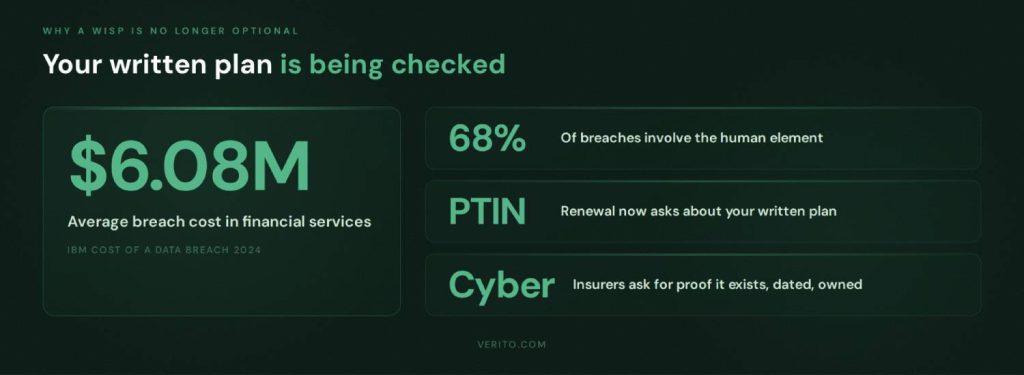
Even if you never experience a major incident, you are now being asked to prove that your WISP exists and that it is real. Three specific pressure points have made a credible WISP non-negotiable for firms that want to keep their PTIN, renew their cyber coverage, and serve business clients with their own due diligence requirements:
1. PTIN renewal and IRS security outreach
You may be asked to describe how you protect taxpayer data or to show your written plan during an inquiry or security readiness review.
2. Cyber insurance applications and renewals
Carriers frequently ask if you have a written information security program, when it was last updated, who owns it, and whether specific safeguards such as MFA, backups, and endpoint protection are in place.
3. Client due diligence
Business clients, especially those with their own security and compliance requirements, are more likely to ask how you protect their data and may request copies or summaries of your policies.
What is at Stake for an Accounting Firm
If your firm lacks a WISP, or has a generic document that does not match reality, you are exposed on several fronts. The exposure falls into four categories, each of which can independently threaten a firm’s license, coverage, operations, or reputation.
Regulatory Risk
Failing to safeguard taxpayer data can trigger IRS referrals, potential state-level enforcement, and issues under the FTC Safeguards Rule.
Insurance Risk
Discrepancies between what your WISP claims and what is actually in place can create problems during cyber insurance underwriting or when you file a claim.
Operational Risk
Without a real plan, incident response is improvised, downtime lasts longer, and staff do not know what to do when something goes wrong.
Reputational Risk
A breach involving tax data or payroll information can quickly lead to lost clients, negative reviews, and referrals drying up, especially in smaller communities where firms rely heavily on trust.
In 2026, having no WISP, or having one that exists only to satisfy a checkbox, is a strategic risk for any accounting firm that wants to keep its PTIN, qualify for insurance, and remain a trusted advisor.
WISP Basics for CPAs, Enrolled Agents, and Tax Preparers
Before you choose a template, it helps to strip the jargon out and look at what a Written Information Security Plan actually contains for an accounting or tax practice.
What a WISP Really is in an Accounting Context
For a CPA or tax firm, a WISP is not a theoretical security framework. It is a written description of:
- What sensitive data you handle
- Where that data lives
- What could go wrong
- What safeguards you have in place
- Who is responsible for keeping it all working
- How you respond when something goes wrong
Regulators use different wording. The IRS talks about safeguarding taxpayer data, while the FTC refers to a written information security program under the Safeguards Rule. In practice, they expect the same thing: a documented, risk-based approach to protecting client information that you can explain, maintain, and prove if asked.
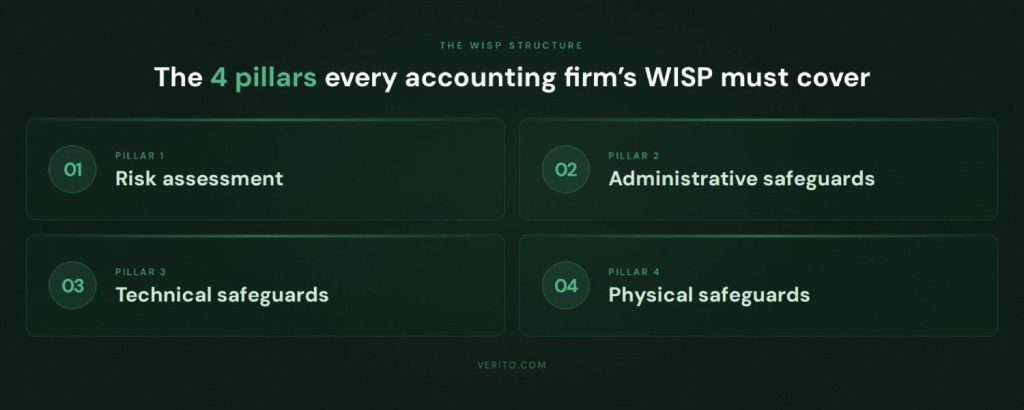
The Four Pillars of a WISP
For an accounting firm, a workable WISP usually breaks down into four main components.
1. Risk Assessment Focused on Tax and Client Data
A WISP starts with a risk assessment that is specific to your practice. That means identifying:
- Types of data you handle, such as tax returns, payroll data, financial statements, and source documents.
- Systems where that data is stored or processed, such as tax software, accounting platforms, client portals, email, and file servers or cloud storage.
- Who can access what, including partners, staff, contractors, and outsourced bookkeepers.
- Realistic threats, such as phishing leading to account compromise, ransomware, lost or stolen laptops, misconfigured portals, and insider misuse.
This does not need to be a long report, but it needs to be honest and written down. Every other part of the WISP is supposed to follow from this risk picture.
2. Administrative Safeguards
These are the policies and procedures that govern how people in the firm handle client information. For an accounting practice, that typically includes:
- Acceptable use rules for firm systems, including remote access and personal device use.
- Onboarding and offboarding steps, such as how you grant and revoke access to tax software, portals, email, and hosted desktops.
- Password and MFA requirements, including when staff must use multi-factor authentication and password managers.
- Security awareness training covering phishing, handling of suspicious emails, and safe use of remote access.
- Clear responsibilities for the person designated as your security or WISP coordinator, often a partner or firm manager.
- Vendor management basics, such as how you evaluate and approve key IT, hosting, and cloud software providers.
These items tend to feel like paperwork, but they are exactly what IRS Publication 5708 and the FTC Safeguards Rule expect to see referenced in a written plan.
3. Technical Safeguards
Technical safeguards are the controls that actually make it harder for an attacker to get in, move around, or do damage. In an accounting firm, a WISP should describe at least:
- How you secure access to tax and accounting applications, including MFA and restrictions on where logins can come from.
- How endpoints are protected, whether through antivirus only or a managed endpoint detection and response (EDR) service.
- How operating systems and applications are patched, and who is responsible for keeping them up-to-date.
- How email is protected, including spam and phishing filtering, impersonation protection, and basic data loss prevention where applicable.
- How you encrypt data in transit and at rest, especially on laptops, mobile devices, and any local servers.
- How you back up critical systems and data, how often backups are taken, where they are stored, and how often restore tests are performed.
This is where the gap between a Word template and reality often shows up. The WISP must reflect what your hosting provider, IT partner, and internal team actually do today.
4. Physical Safeguards
For many firms, physical safeguards are an afterthought, but they still matter, even in a cloud-heavy environment. A credible WISP for an accounting firm typically covers:
- How office doors and file rooms are secured outside business hours.
- How paper records are stored and who has access to them.
- How old paper files, hard drives, and other media are destroyed or shredded.
- How you protect devices used outside the office, such as laptops carried to client sites or used by remote staff.
If you use a cloud hosting provider or data center, the WISP should note that physical data center security is provided by that vendor, and ideally reference their SOC report or security documentation, rather than implying the firm handles those controls directly.
Why This Structure Matters When You Pick a Template
Most WISP templates, including the IRS Publication 5708 sample, are organized around these pillars. What they cannot do for you is decide:
- Which safeguards are realistic for your size and budget.
- Which controls your current IT and hosting providers already covered.
- Which gaps you are willing to accept for now, and which you plan to fix.
If you keep this structure in mind, you can evaluate any WISP template by asking a simple question: Does it help you document risks and safeguards in each of these areas in a way that matches how your firm actually operates, or does it push you toward generic, copy-pasted language that will be impossible to defend during an audit or insurance review?
How IRS Publication 5708 Shapes Your WISP
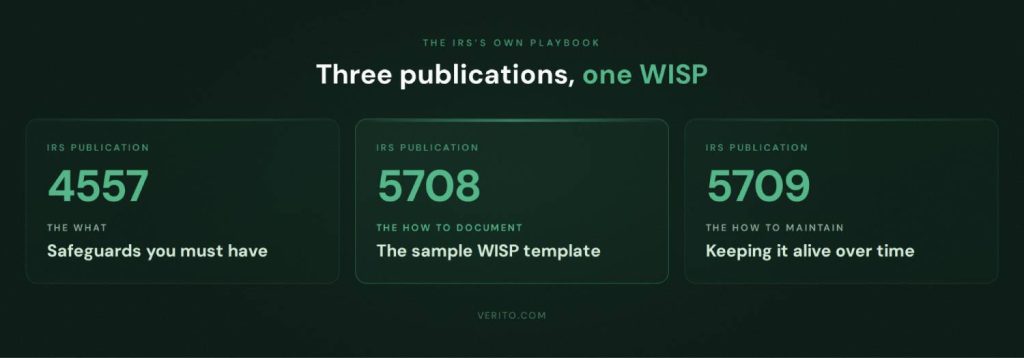
For tax and accounting firms, the IRS provides a three-part playbook for your WISP:
1. Publication 4557
Explains the safeguards tax professionals are expected to have in place. It covers administrative, technical, and physical controls and points firms to a written data security plan as a core expectation.
2. Publication 5708
It is a detailed WISP template. It is a 28-page document prepared by the Security Summit specifically to help, in their words, “particularly smaller practices” build a WISP that satisfies legal requirements.
3. Publication 5709
It is a companion guide that walks through how to build and maintain a WISP and reiterates that federal law, enforced by the FTC, requires professional tax preparers to maintain a written data security plan.
Publication 4557 tells you what safeguards you should have. Publication 5708 shows you how to document those safeguards in a WISP. Publication 5709 explains how to create and maintain that WISP over time in line with the FTC Safeguards Rule.
From a compliance perspective, Publication 5708 is the reference point if you are asked whether your WISP is complete and structured correctly.
Inside Publication 5708: What it Actually Contains
IRS Publication 5708 is not a short brochure. It is a complete sample WISP with instructions. At a high level it covers:
1. Requirements and Scope
It ties your WISP directly to GLBA and the FTC Safeguards Rule, and states clearly that tax and accounting professionals are treated as financial institutions for data security purposes. It also lists core obligations such as designating a qualified individual, performing risk assessments, implementing safeguards, overseeing service providers, and reviewing the program regularly.
2. Getting Started and Proportionality
The document explains that there is no one size fits all WISP. Your plan must be appropriate for your size, activities, and the sensitivity of data. A sole practitioner can use a shorter plan than a 40 person firm, but both must cover risk assessment plus administrative, technical, and physical safeguards and treat the WISP as a living document.
3. Structured WISP Outline
Publication 5708 gives a bare essentials outline that mirrors the four pillars you already saw: objectives and scope, assignment of responsibility, risk assessment, documentation of safeguards, and supporting records. It spells out where to define your qualified individual, list data types and risks, record hardware and user access, and describe safeguards and monitoring procedures.
4. Sample WISP with Attachments
The bulk of the document is a sample WISP for “[Your Firm Name]” with filled out sections and model language, plus attachments such as record retention policies, rules of behavior, incident procedures, acknowledgement forms, hardware inventory, authorized users and a glossary.
For an accounting firm, 5708 is essentially the official reference you align with, even if you choose a different template or a managed WISP service.
How to Use Publication 5708 Without Copy-pasting Trouble
When you use Publication 5708, treat it as a framework, not a form.
1. Use it as a checklist
Make sure your WISP covers the same elements as 5708: objectives and scope, a qualified individual, risk assessment, safeguards, vendor oversight, incident response, and supporting records. Do not assume the sample wording fits your firm as written.
2. Scale detail to your size
If you are a three person practice, you still need all sections, but you can keep them short and focused on a small set of systems and roles. If you are a larger firm, expand sections on users, offices, vendors, and incident procedures instead of leaving the template language untouched.
3. Align every claim with real safeguards
The sample WISP describes regular training, device encryption, defined incident procedures and vendor oversight. If you do not actually do something that the sample text claims, either implement that control or edit the wording. Do not leave in language that overstates your maturity.
4. Fill attachments from your real environment
Complete the hardware inventory, authorized user list and other tables with real devices, systems and staff. Example values in 5708 are only placeholders.
5. Review it when your environment changes
Any move to new hosting, new portals, or new security tools should trigger a quick review of the WISP so it stays aligned with your stack, rather than drifting away from reality.
Top WISP Templates and Security Plan Resources for Accounting Firms
Once you know what your WISP must contain, the next step is choosing where to start. Below is a comparison of WISP template providers and services that are widely used by tax and accounting firms.
Comparison of Leading WISP Template Providers
| Option | Type | Highlights | Limitations | Best for |
|---|---|---|---|---|
| VeritShield WISP by Verito | Custom WISP service plus free template | VeritShield WISP builds a firm-specific WISP on top of Verito’s hosted tax and accounting environment, managed IT, and security stack, using an accounting-focused WISP template as the starting point. | Assumes or encourages use of Verito’s platform for hosting and security, not a standalone template-only offering. | Firms that want an audit-ready WISP tied directly to live controls in Verito’s environment rather than a document they have to maintain alone |
| IRS Publication 5708 | Official IRS sample WISP template | Free, authoritative WISP outline with sample language and attachments for tax and accounting practices | Dense regulatory-style, entirely manual to customize and maintain | Any firm that needs a baseline checklist and official structure |
| Financial Cents Free WISP Template | Free Word template | Editable WISP template aimed at accounting firms, bundled with a step-by-step guide to creating a WISP | Focuses on policy wording, assumes you already understand your IT and security setup | Small firms using Financial Cents or similar practice management tools that want a quick starting document |
| TaxDome Free WISP Template | Free template plus blog guide | Free WISP template tied to TaxDome’s practice management platform, explains GLBA and IRS expectations for accounting firms | Written with TaxDome workflows in mind, may need more edits if you do not use their stack | Tax and accounting firms that already run on TaxDome and want a WISP that mirrors that environment |
| COCPA / Tech 4 Accountants WISP Template | Free customizable template | State CPA society article that links to a free customizable WISP template from Tech 4 Accountants, explicitly for PTIN holders who must attest to having a plan | Template is generic across firms, relies on you to map controls to your actual hosting and IT providers | CPA firms that prefer resources endorsed by a state society and are comfortable tailoring content themselves |
| Bellator Cyber Free WISP Template and WISPBuilder | Free template plus automated builder | Free IRS-compliant WISP template for tax preparers, plus a paid WISPBuilder tool that generates a WISP from your answers and markets 5708 compliant output | Builder output is only as accurate as the information you enter, still needs validation against real controls | Firms that want a faster path than manual editing but still have access to someone who understands their infrastructure |
| BeCo Technology WISP template | Free finance-focused template | Downloadable WISP template built for accountants, CPAs, and RIAs to support SEC, FINRA, and GLBA compliance, in DOCX format | Aimed broadly at financial services, not only tax practices, so some sections may be beyond what a small CPA firm needs | Firms that straddle tax, accounting, and advisory or RIA work and want a single WISP framework |
| Ace Cloud Hosting WISP Template and Managed WISP Service | Free template plus custom WISP service | Free WISP template for accounting and tax firms, combined with a service where Ace builds a customized WISP aligned to IRS and FTC guidelines using their cloud hosting and security stack | Strongest fit if you are also on Ace’s hosting or plan to move there, less tailored if you keep a different stack | Firms that want both cloud hosting and WISP help from one vendor |
| Rightworks WISP and Tech 4 Accountants Template | Free template plus managed WISP service | Tech 4 Accountants offers a free PTIN-focused WISP template under the Rightworks umbrella, and Rightworks sells a WISP product to help create and maintain a custom WISP for accounting firms | Tightest integration is for firms that also use Rightworks products, still requires internal ownership of non-Rightworks systems | Firms standardizing on Rightworks for hosting and security that want WISP services from the same provider |
How Verito’s VeritShield WISP Stands Apart
Among these options, VeritShield WISP is positioned less as a downloadable template and more as a custom WISP service layered on top of Verito’s hosting and IT stack. The idea is that your written plan and your live controls come from the same place.
Verito holds a 4.9 rating on G2 across 150+ verified reviews, with reviewers specifically citing WISP and compliance support alongside hosting reliability as the reasons they recommend it over generic providers.
In practical terms, a VeritShield WISP engagement:
- Starts from an accounting-focused WISP template that already mirrors IRS Publication 5708 and FTC Safeguards expectations, then customizes it to your firm rather than handing it over as a blank form.
- Maps each administrative, technical, and physical safeguard in the document to actual services delivered through Verito’s secure hosting, managed IT, and security offerings, plus any other critical vendors you rely on.
- Produces a WISP that is designed to be shown to auditors, cyber insurers, and security-conscious clients without revealing gaps between the document and your environment.
As part of this, Verito also offers an accounting-specific WISP template as a feature. Firms can use that template as a starting point on their own, or as the foundation for a VeritShield WISP project where Verito does the heavy lifting of aligning the wording with real controls.
For small firms that want to DIY, a free template from Financial Cents, TaxDome, COCPA, or BeCo is usually enough to get moving. For firms with higher regulatory, client, or insurance pressure, the value shifts from “which Word file did we start with” to “which provider can keep our WISP and our live safeguards in sync over time,” which is exactly the problem VeritShield WISP is built to address.
The practical stakes are real. Julie Crowder of Affordable Client Write Up LLC described experiencing a ransomware attack at her previous provider that locked her out of client files. Verito recovered her data and had her operational within hours. Her WISP, maintained through VeritShield, was ready when her cyber insurer asked for documentation.
For firms that have been through a breach, or want to avoid one, the gap between a downloaded template and a live WISP backed by a managed platform is not abstract.
Choosing the Right WISP Template or Tool for Your Firm
Once you understand what a WISP is and how IRS Publication 5708 is structured, the next step is choosing the right starting point. The wrong template will push you toward generic language that is impossible to maintain. The right one will make it easier to document what you actually do and identify gaps.
1. Start with Regulatory Alignment
For an accounting or tax firm, any WISP template or tool you consider should clearly align with the regulations and guidance that actually apply to you:
- It should reference the Gramm Leach Bliley Act and the FTC Safeguards Rule, since that is the core legal requirement behind written information security programs for financial institutions that prepare taxes.
- It should map cleanly to IRS Publications 4557 and 5708, using similar sections for objectives, qualified individuals, risk assessment, safeguards, vendor oversight, and incident response.
If a template looks polished but never mentions GLBA, the Safeguards Rule, or IRS security guidance, it will take more work to defend in front of a regulator, insurer, or security conscious client.
2. Check Coverage of all Safeguard Types
A workable WISP template for a CPA firm must help you document safeguards in three areas:
1. Administrative safeguards
Policies, procedures, training, onboarding and offboarding, acceptable use, vendor management, and roles such as Data Security Coordinator.
2. Technical safeguards
MFA, endpoint protection, patch management, secure remote access, email filtering, encryption, backups, logging, and monitoring.
3. Physical safeguards
Office security, file storage, device handling, and secure disposal, plus clear references to any data center or cloud provider that is responsible for physical security of hosted systems.
Look for templates that have dedicated sections or prompts for each of these, and that leave room to describe your actual tax and accounting stack.
3. Look at Support for Risk Assessment and Asset Inventory
A WISP is supposed to be risk-based. The template should help you think about and document where your risks actually are. That means:
- Prompts to list types of sensitive data handled, from individual 1040s to complex business returns, payroll, and advisory data.
- Space to document where that data lives: tax software, accounting platforms, client portals, email, hosted desktops, local file servers, and cloud storage.
- A hardware and asset inventory section that lists workstations, laptops, servers or hosted environments, and any critical network devices, with associated locations and users.
Publication 5708 includes specific tables and attachments for hardware inventory and authorized users. A good WISP template will preserve that level of structure while translating it into language that is easy for your firm to maintain over time.
4. Make Incident Response Elaborate
Many free templates reduce incident response to a single short section. For an accounting firm handling live tax and payroll data, that is not enough. A useful template or tool should:
- Ask you to define what counts as a security incident in your environment.
- Provide a clear sequence of steps: identification, containment, investigation, recovery, and communication.
- Prompt you to list who is responsible for technical triage, internal communication, client notification, and any required reports to IRS, state agencies, or law enforcement.
- Include or support an attachment that records incidents, findings, and lessons learned.
This does not have to be a long playbook, but it must be detailed enough that your team could follow it at 11 p.m. in the middle of a tax season outage.
5. Demand an Audit-ready Structure
You should assume that at some point an outside party will ask to see evidence of your WISP:
- An IRS agent or state revenue authority during a security readiness review.
- A cyber insurance underwriter or claims adjuster.
- A major client performing vendor due diligence.
For that reason, favor templates and tools that:
- Organize content in a way that is easy to navigate by section.
- Include dates of approval and review, and ideally track changes over time.
- Provide or reference supporting documents such as training records, acknowledgement forms, vendor agreements, and system inventories.
When you can quickly show the structure, scope, and last review date of your WISP, conversations with auditors and insurers tend to be shorter and more focused.
6. Match the Template to Your Firm Size and IT Reality
A one-person PTIN holder and a 40-person multi-office firm face different levels of complexity, even though they are subject to the same rules. When you evaluate WISP templates:
- Make sure the template can be scaled down without losing required elements if you are a small practice. You should not feel forced to fabricate non-existent departments or committees just to match the layout.
- Check that it can also scale up if you are growing. You should be able to expand sections on user roles, offices, vendors, and controls without breaking the structure.
- Verify that the template can accurately reference your real IT setup, whether that is a cloud hosting provider, a local IT consultant, an internal IT lead, or a fully managed platform.
Templates that assume you run your own servers in a closet are often a poor fit for firms that already rely on specialized hosting for their tax and accounting systems.
When to Use a Template, and When to Use an Integrated Service
For many small and mid-sized firms, a free WISP template is a sensible starting point. You can complete it with your own information, align it with IRS Publication 5708, and bring in your hosting provider and IT partner to confirm the technical safeguards that are in place.
At a certain point, maintaining a credible WISP becomes less about filling in paragraphs and more about keeping it synchronized with the controls that keep your firm running. That is where an integrated approach, such as a WISP service that is built on top of a managed hosting and IT platform, becomes more practical. Instead of guessing how to describe your backups, patching, monitoring, endpoint protection, and vendor relationships, you are documenting a set of controls that are already defined, monitored, and reported on by a platform designed for accounting firms.
How to Customize a WISP Template for Your Accounting Firm
A template is only useful once it reflects how your firm actually works. The goal here is not to rewrite everything you already saw about risks and safeguards, but to give you a clear process for turning any WISP template into your firm’s plan.
Use this six step sequence with whatever starting point you choose, whether that is IRS Publication 5708, a vendor template, or a builder tool.
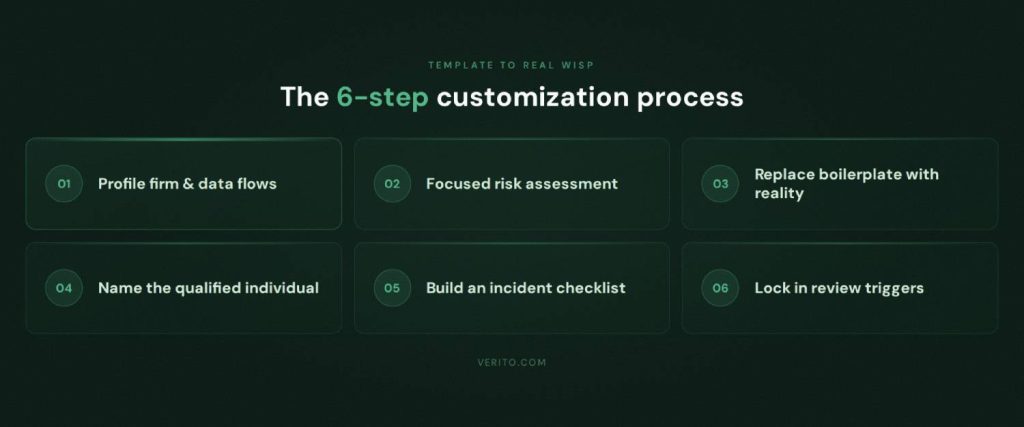
1. Profile your firm and data flows
Start with a short, factual description of how your firm operates. You are answering “what do we look like from a security point of view.”
Capture in one place:
- Headcount and roles (partners, preparers, bookkeepers, admin, seasonal staff)
- Locations (offices, home offices, any offshore or contract support)
- Core systems (tax, accounting, portal, practice management, email, file storage)
- Where those systems run (hosted, SaaS, local server)
- How client data typically moves into, through, and out of the firm
You have already seen what data and systems matter in the WISP basics section. Here you are simply documenting your version of that picture so the rest of the template can refer to it.
2. Perform a focused risk assessment
Use that profile to list the main ways client and taxpayer data could be exposed in your environment.
Keep it short and specific:
- Which systems are most critical if they go down
- Which user actions are most likely to cause problems (phishing clicks, weak passwords, unsafe device use, portal misconfigurations)
- Which devices or locations are higher risk (remote laptops, shared workstations, unmonitored home networks)
You do not need a long report. One or two paragraphs and a small bullet list are enough, as long as they describe your actual situation. This content maps directly into the “risk assessment” section of your template.
3. Replace boilerplate safeguards with what you really do
Most templates come with generic language about administrative, technical, and physical safeguards. Your task is to strip out anything that is vague or untrue and replace it with concrete, verifiable statements.
For each safeguard area:
1. Administrative
- State how often staff receive security training, who runs it, and how completion is recorded.
- Describe your real onboarding and offboarding steps for key systems.
- List how you approve and review critical vendors.
2. Technical
- Name who manages patching, backups, endpoint protection, MFA and email security (hosting provider, IT partner, internal role).
- State which systems have MFA enforced and how often backups are tested.
3. Physical
- Describe how offices, file rooms and devices are secured in practice.
- If production systems are in a hosted data center, say that physical security is provided by that provider and reference their assurances instead of implying you run a server room.
If a sentence in the template claims a control you do not have, fix the sentence or implement the control. Leaving it as is, turns your WISP into a liability.
4. Name a qualified individual and support contacts
Most frameworks, including Publication 5708 and the FTC Safeguards Rule, expect a clearly identified owner for the information security program.
In the template:
- Name the qualified individual (often a partner, managing member or firm administrator).
- List their responsibilities: maintaining the WISP, coordinating risk assessment, approving safeguards, liaising with providers, and reporting to firm leadership.
- Identify key internal and external support, such as your hosting provider, managed IT provider, and any security consultant.
Keep this section factual. It is better to say “the WISP coordinator works with named providers for implementation and monitoring” than to suggest you have capabilities in-house that you do not.
5. Turn incident response into a usable checklist
Many templates treat incident response as a short paragraph. For an accounting firm, it needs to be something staff can follow when under pressure.
In this section of the template:
- Define what counts as an incident for your firm (suspected account compromise, malware on a device, lost laptop, portal misconfiguration, suspicious email activity).
- State who staff must contact first in each case (internal contact, hosting support, IT provider), including after hours details if applicable.
- List the key steps in order: isolate affected systems, reset access, engage technical support, preserve logs, assess impact, decide on notifications.
- Add or reference a simple incident log table to record what happened and what was done.
This directly addresses one of the common WISP red flags: vague incident language that no one can act on.
6. Lock in a review cycle and triggers
Finally, make sure the template expects updates instead of assuming the plan is static.
In the WISP:
- Commit to a minimum annual review by the qualified individual and firm leadership.
- List events that automatically trigger an update, for example:
- Moving tax or accounting systems to a new hosting provider
- Adopting or replacing a client portal
- Changing managed IT or security providers
- Opening or closing an office
- Experiencing a significant security incident
This does not need long prose. A short paragraph and a bullet list of triggers are enough, but they show regulators, insurers and clients that you intend to keep the document aligned with reality.
Used this way, a WISP template becomes a structured checklist that guides what you edit and what you implement, instead of a form you fill once and file away.
From Written WISP to Real Security Controls
A WISP only protects you if the safeguards it describes are real and enforced. Regulators, insurers, and larger clients will eventually compare what your plan claims with how your systems are configured, how staff behave, and what your providers actually deliver. The aim is not to produce a lengthy document, but to describe a security program that can be verified.
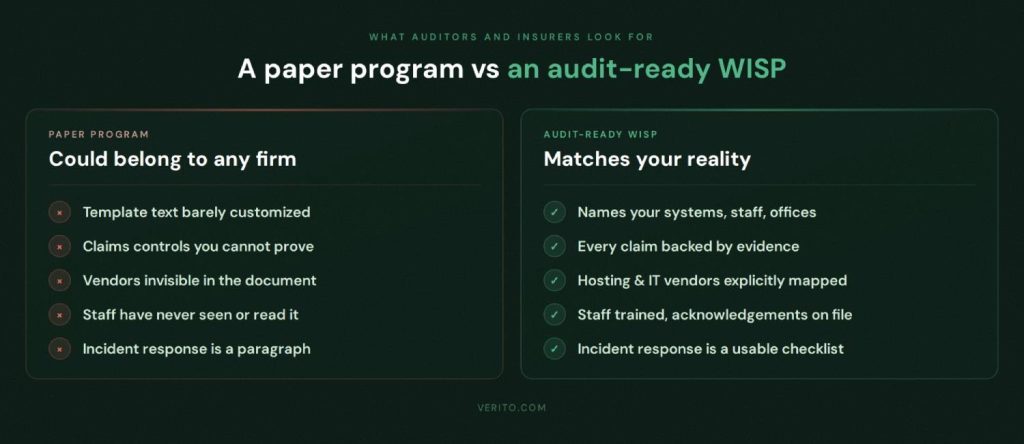
Map WISP Requirements to Concrete Controls
The simplest way to keep your WISP honest is to map each section of the document to three things: a specific control, a clear owner, and some form of evidence.
Administrative safeguards
- For training, state who delivers it, how often it happens, and where completion is recorded. For example, “annual security awareness training run by X, tracked in Y,” rather than “staff receive regular training.”
- For onboarding and offboarding, name the role that creates and disables accounts in tax software, portals, email, and hosted desktops, and keep a checklist or ticket trail that proves this happens.
- For vendor oversight, maintain a short list of critical providers with links to their security documentation and note who is responsible for reviewing them each year.
Technical safeguards
- For access control, list which systems enforce MFA, who manages those settings and how exceptions are approved. Logs or configuration screens are your evidence.
- For endpoint protection, specify the product and service used on firm devices, and who receives and handles alerts. Relying on a managed EDR service is very different from hoping users notice antivirus pop-ups.
- For patching and backups, state who patches servers and endpoints, how often patches are applied and how backup restores are tested. Ticket histories and provider reports should match what the WISP says.
Physical safeguards
- For offices, describe how doors, file rooms, and reception are secured and who holds keys or access codes.
- For devices, document expectations for locking screens, storing laptops, and encrypting drives, especially for remote staff.
- If production systems run in a hosted data center, state that physical security for those systems is provided by the hosting provider and is covered by their audits and certifications, instead of implying you control the building.
Once you have this mapping, gaps become obvious. If you cannot name an owner or show evidence for a safeguard, either remove the claim from the WISP or put the missing control in place.
Where Verito Fits Into Making the WISP Concrete
For firms that run their core systems on Verito, much of this mapping is already defined. VeritSpace covers server hardening, patching, encryption and backups for hosted tax and accounting applications, VeritGuard provides managed endpoint protection and support, and VeritComplete combines hosting and IT into one environment. When you layer VeritShield WISP on top of that stack, the written plan is simply documenting controls that already exist and are monitored, rather than inventing them on paper.
Common WISP Mistakes and Red Flags for Accounting Firms
This section should read like an auditor’s checklist. If any of these look familiar, your WISP is vulnerable even if the document itself looks polished.
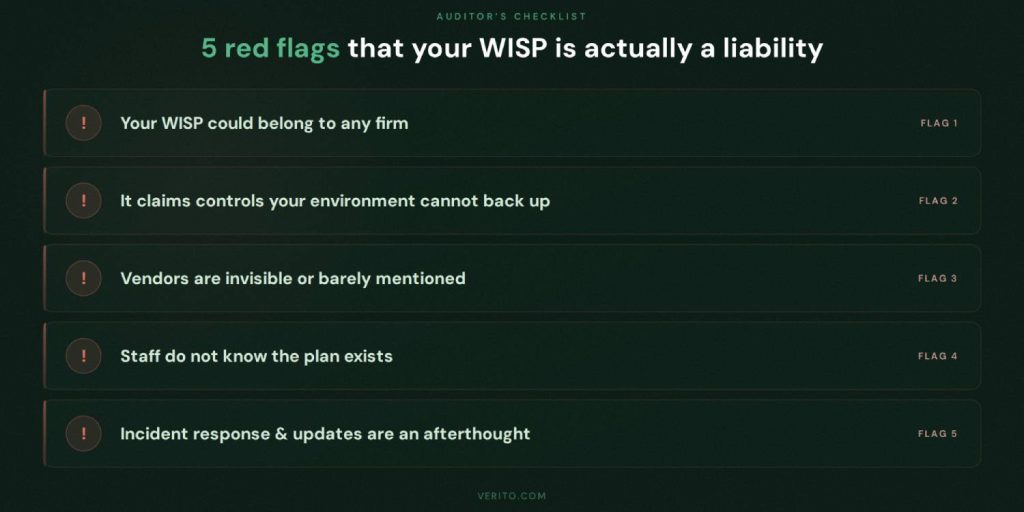
1. Your WISP could belong to any firm
If you swapped your firm name with another and the document would still look accurate, it is a problem.
Red flags:
- Sample text from Publication 5708 or a vendor template left mostly unchanged.
- Generic references to “our network” or “our servers” that do not match your hosted or SaaS setup.
- Blank or half-filled tables for hardware inventory and authorized users.
Quick test
Pick one page at random and ask yourself, “Does this clearly describe our firm, our systems, and our people, or could this be anyone?”
If it feels generic, revisit the customization and mapping sections and make the wording specific.
2. Claims Your Environment Cannot Backup
This is the classic “paper program” issue. The WISP promises more than your systems deliver.
Red flags:
- Statements like “all devices are encrypted” or “all staff receive regular phishing training” that no one can prove.
- References to 24×7 monitoring or incident response when no such service is in place.
- Backup and restore claims that no one has tested in the last year.
Quick test
For any strong statement in the WISP, ask “Can we show at least one recent log, ticket, report or record that proves this is true?”
If the answer is no, either change the wording or implement the missing control.
3. Vendors invisible or barely mentioned
Modern firms rely heavily on hosting providers, portals, practice management tools, email platforms and managed IT. A WISP that pretends everything is in-house looks unrealistic.
Red flags:
- No clear list of critical vendors and what they are responsible for.
- WISP acts as if you own and operate servers that are actually in someone else’s data center.
- No mention of how you approve or review hosting, IT and key SaaS providers.
Quick test
List your top five vendors on a blank page. If you struggle to find all of them inside the WISP, the document is not telling the truth about who runs what.
4. Staff do not know the plan exists
If the WISP lives in a folder and never shows up in training or discussion, it will not help during an incident.
Red flags:
- No records of staff having read or acknowledged policies.
- Staff who have never heard of the WISP or do not know who to call if they see something suspicious.
- New hires given system access without any mention of security expectations.
Quick test
Ask two or three people, away from the desk, who they would contact first if they thought a client email account had been compromised. If they cannot answer quickly and consistently, the WISP is not embedded in day-to-day practice.
5. Incident response and updates are an afterthought
Plans that no one can use and no one maintains are easy to spot.
Red flags:
- Incident response is a short paragraph, not a simple checklist with contacts and steps.
- No incident log or record of lessons learned, even after known outages or malware events.
- WISP still references retired systems, old offices, or former providers.
- The last review date is more than a year old.
Quick tests:
- Could a junior staff member follow the incident response section at 10 p.m. during tax season without guesswork.
- Does the plan mention systems or locations you no longer use.
If the answer is no, revisit the incident response step in the customization section and the review triggers you defined. The document should help you operate under stress, not just tick a compliance box.
WISP Paths for Solo, Small, and 50-person Accounting Firms
The core WISP requirements are the same for everyone, but what is realistic looks different at each stage. Use this section as a size-based playbook.
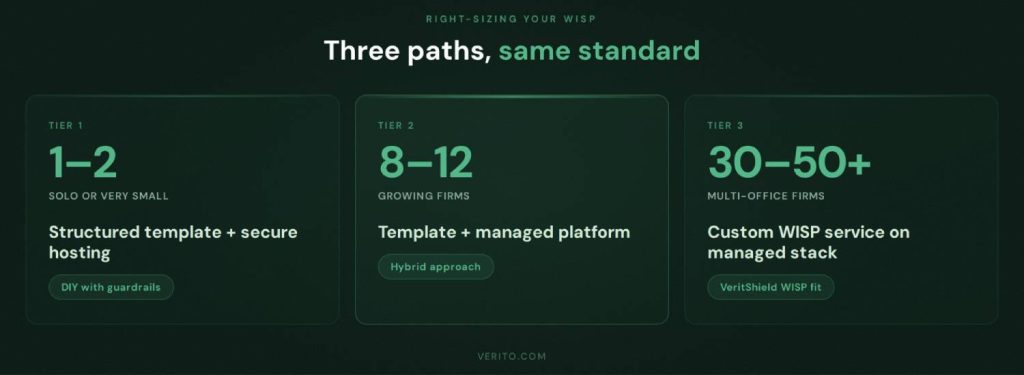
1. Solo PTIN Holder or One to Two Person Firm
Typical profile
One preparer, perhaps one assistant. Hosted or SaaS tax and accounting software, a basic portal, email, one or two firm-owned laptops, simple office or home office.
Practical WISP path
1. Starting point
- Use a structured WISP template aligned with IRS Publication 5708, such as an accounting-focused template or a reputable free option.
- Apply the six-step customization process from the previous section, but keep the plan to a few focused pages.
2. What must be in place
- Secure hosting or well-managed SaaS for tax and accounting systems rather than running your own server.
- MFA turned on for email, portals, and tax applications.
- A managed endpoint protection product on your single workstation or laptop, not consumer antivirus.
3. How to run it
- You are a qualified individual. Name your hosting and IT providers in the WISP as technical contacts.
- Maintain a short hardware and user inventory and a one-page incident response checklist with provider contacts.
- Review the WISP once a year and whenever you change hosting, portals, or devices.
At this size, a credible WISP is achievable if you keep it honest, specific and aligned with your providers rather than trying to imitate a large firm program.
2. 8 to 12-person Firm With One or Two Offices
Typical profile
Several preparers and bookkeepers, one or two partners, admin staff, and seasonal help. Mix of in-office and remote work. Hosted or server-based tax software, accounting platform, practice management, client portal, and shared storage.
Practical WISP path
1. Starting point
- Use a Publication 5708-aligned template that expects multiple users, roles and vendors. An accounting-specific template is preferable.
- Follow the six-step process, but expect more detail in the risk assessment, user roles and vendor sections.
2. What must be in place
- Core tax and accounting systems on secure hosting rather than a single local server in an office closet.
- Standardized endpoint protection and MFA across all staff devices, not just partners.
- A defined onboarding and offboarding process that covers hosted desktops, tax software, portals, and email accounts.
- Basic logging and alerting delivered through your hosting and IT providers so you can back up what the WISP says.
3. How to run it
- Designate a partner or operations manager as the qualified individual and explicitly list hosting and IT providers as implementers of many technical safeguards.
- Use the mapping approach from the real controls section so every safeguard in the WISP has a clear owner and some evidence behind it.
- Hold at least one joint review per year with your providers to update the WISP when systems, staff, or vendors change.
For firms in this range, relying only on a free template and ad-hoc IT support usually leads to a WISP that drifts out of sync. A stable hosting and managed IT platform plus a well maintained WISP is a more realistic baseline.
3. 30 to 50-person Multi-office Firm
Typical profile
Multiple partners, several teams of preparers and bookkeepers, dedicated admin and operations roles. Multi-office or hybrid setup, significant remote access, possibly some offshore or contract support. Full-stack of hosted tax and accounting apps, practice management, portals, integrated document and workflow tools.
Practical WISP path
1. Starting point
- Treat the WISP as part of your governance structure. A custom WISP service such as VeritShield WISP, built on top of a defined hosting and security platform, is usually a better fit than a generic template.
2. What must be in place
- Centralized identity and access management with enforced MFA across core systems.
- Consistent endpoint protection and patching on all firm devices.
- Documented and tested backup and recovery capabilities.
- Formal vendor management for hosting, IT, portals and key SaaS tools, including regular review of their security assurances.
3. How to run it
- Assign a specific partner or operations leader to own the WISP, supported by your platform provider and any external security advisers.
- Integrate WISP review into annual planning, cyber insurance renewal and large client due diligence.
- Maintain records of training, access reviews, backup tests, and incidents so the WISP is backed by evidence, not just policy language.
At this scale, the WISP is effectively a description of how your platform and providers operate day-to-day. Maintaining it with a free template and scattered vendors tends to produce documents that fall behind reality. A managed environment plus a custom WISP service keeps what is written and what is running aligned.
Turn Your WISP Into a Security Advantage, Not a Checkbox
A Written Information Security Plan is no longer a file you create once and forget.
For accounting and CPA firms in 2026, it sits at the intersection of IRS expectations, the FTC Safeguards Rule, cyber insurance requirements and client trust. A useful WISP identifies your risks, documents realistic safeguards and stays aligned with how your firm actually runs.
Free templates and IRS examples are good starting points. The real work is:
- Profiling your firm and data flows
- Running a focused risk assessment
- Replacing template boilerplate with what you actually do
- Naming owners for each safeguard and keeping basic evidence
- Updating the plan when systems, vendors or staff change
For solo and very small practices, a well-chosen WISP template, combined with secure hosting, MFA, and managed endpoint protection, is usually enough to build a credible plan and satisfy PTIN and basic insurer expectations.
As firms move into the 8 to 50-person range, the challenge shifts from “do we have a document” to “does this document match our environment and will it hold up under scrutiny.” At that point, the practical path is to put core systems on a managed platform, standardize security controls and treat the WISP as a description of that environment rather than a separate exercise.
That is the role Verito is built to play. The hosting, managed IT, and WISP documentation are delivered as one integrated environment, so the written plan and the live controls stay synchronized as your firm grows.
If you are starting from nothing, pick a solid WISP template, document your current safeguards honestly and follow the six-step customization process.
If you already feel pressure from larger clients, insurers or regulators, it is time to pair your WISP with a platform and service that can keep the words on the page lined up with the controls that protect your firm every day.
FAQs:
1. Do small accounting firms and solo tax preparers really need a WISP?
Yes. If you prepare U.S. tax returns or handle nonpublic personal information such as SSNs, income data or bank details, you are expected to maintain a written information security plan regardless of firm size.
IRS Publications 4557, 5708 and 5709, together with the FTC Safeguards Rule, treat professional tax preparers as financial institutions for data security purposes. The plan can be shorter for a solo practice, but it still needs to cover risk assessment, safeguards, vendor roles and review.2. Is the free IRS WISP template in Publication 5708 enough by itself?
Not until you customize it. Publication 5708 gives you the official outline, model language and attachments, but they are examples.
Until you replace that sample content with your own systems, vendors and procedures, you do not have a credible WISP, just a copied template. The right way to use 5708 is as a checklist and structure, then adapt it to match your firm.3. How often should an accounting firm update its WISP?
At least once a year, and whenever there are significant changes in systems, vendors or firm structure. Moving tax software to a new hosting provider, adopting a new portal, opening or closing an office, adding a managed security service or suffering a serious incident are all triggers for an update. If your WISP still lists systems you no longer use, reviewers will assume it is not actively maintained.
4. What happens if my firm does not have a WISP when the IRS or an insurer asks about it?
Not having a WISP creates two immediate problems: it puts you at risk during IRS security inquiries, and it can void or complicate cyber insurance claims. If you answer PTIN renewal questions or cyber insurance applications without a real WISP behind you, you are taking a risk. During security related inquiries, the IRS can ask how you protect taxpayer data and may expect to see a written plan.
Insurers often ask whether you have a written information security program and may request supporting detail during underwriting or a claim. Being unable to produce a plan, or presenting one that clearly does not match your environment, can lead to more scrutiny and harder conversations.5. Can a one-person tax practice maintain a credible WISP without a security team?
Yes. A solo preparer can build a credible WISP without a dedicated security team, as long as the document reflects what the firm actually uses rather than controls it does not have.
A solo preparer can use a structured template aligned with Publication 5708, rely on secure hosting and managed email where possible, turn on MFA everywhere, use a managed endpoint protection product on a single device and write a brief incident response plan that centers on contacting hosting and IT support quickly. The document will be shorter than for a 30 person firm, but the structure and expectations are the same.