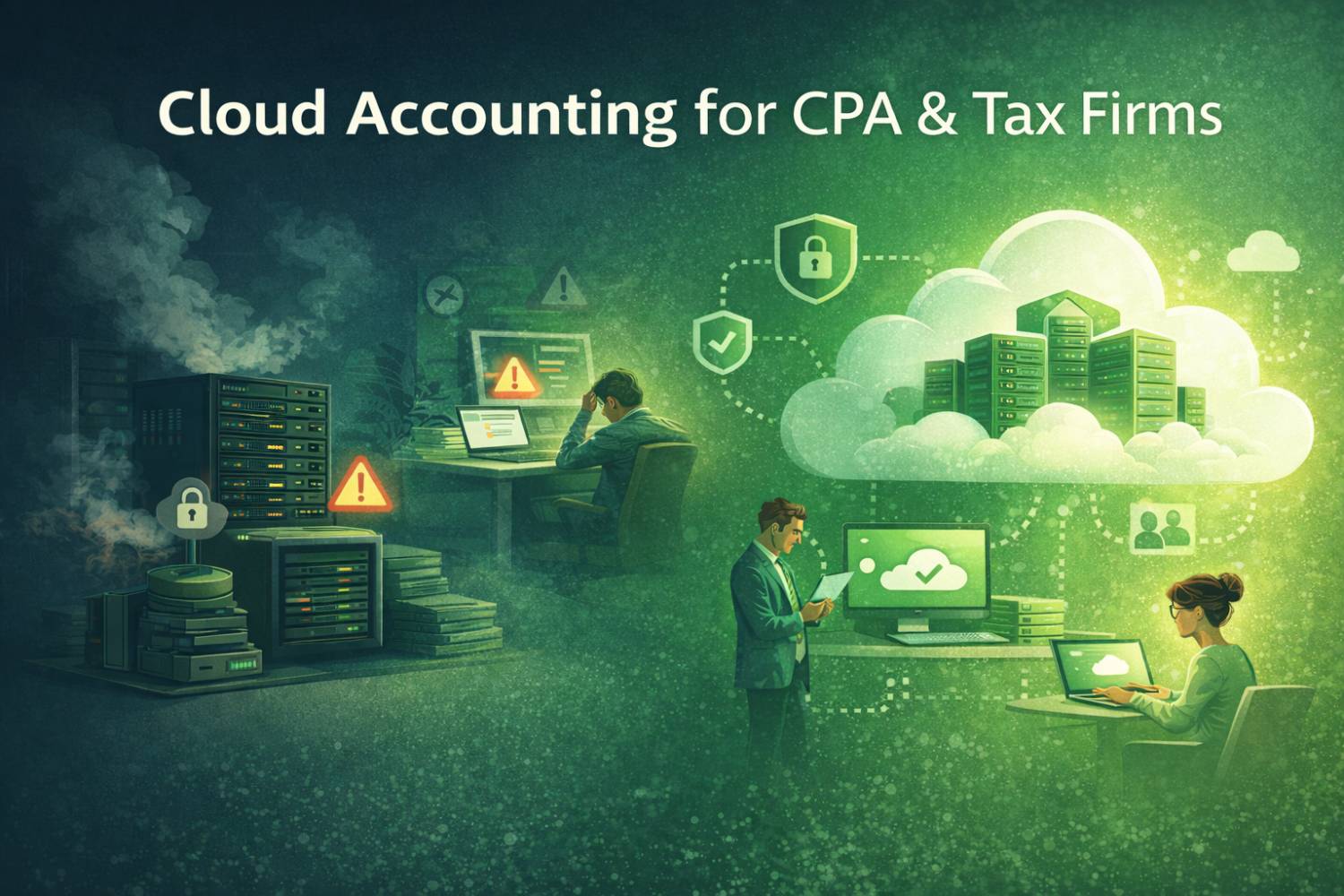
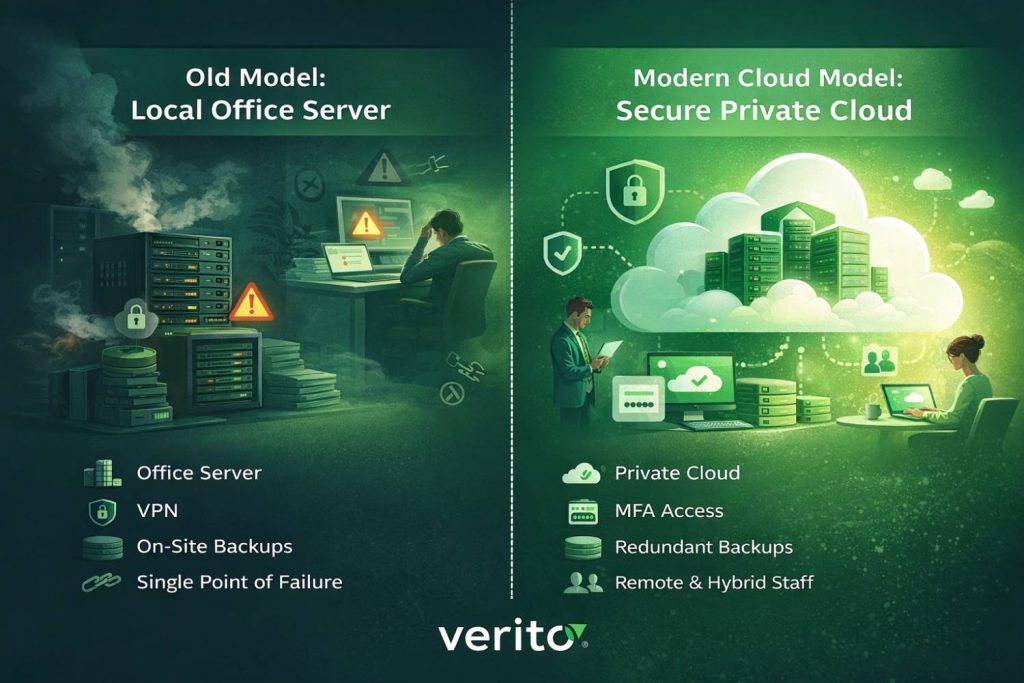
For years, your tax and accounting software probably lived on a physical server in the office, with tape or disk backups and an IT person who had to come on site when something broke.
That model worked for a long time, but it left the firm fully dependent on that one box and the room it sat in.
You may have a client portal for document exchange, an e-signature tool, and maybe a browser based bookkeeping app for a few clients.
Yet the core of the firm still sits on a local server or a single “main” workstation in the office, accessed through a fragile VPN. When that system slows down during the busy season or fails completely, work stops, staff wait, and partners carry the risk.
At the same time, expectations have shifted. Clients assume year-round digital access to their records and quick responses, not “the server is down, we will get back to you tomorrow.”
Staff increasingly expect to work remotely or in a hybrid model without fighting slow remote connections or unreliable tools. Regulators expect you to manage security and privacy as part of your core professional duty, especially where taxpayer data and financial information are involved.
In that context, cloud accounting is not simply “using some online tools.” For a CPA, accounting, or tax firm, cloud accounting means that your primary tax and accounting applications, client data, and day-to-day workflows run on secure remote servers in a professionally managed environment instead of a local office server or single desktop. Your team connects over the internet with secure logins and multi-factor authentication and works in a familiar desktop that includes the same applications you use today. That can include QuickBooks Desktop, tax software such as Drake, Lacerte, UltraTax or ProSeries, and your practice management and document management systems, all delivered from a hosted environment.
There are different ways to reach that model. Some firms adopt cloud native software for part of their stack. Many keep their existing desktop tools and move them into a dedicated private cloud that is specifically tuned for accounting and tax workloads. The details differ, but the underlying decision is the same: where does your core stack live, how is it secured, and how resilient is it under peak load and cyber risk. If your answer is still “on our office server, protected by basic antivirus and a VPN that usually works,” you are not truly in the cloud, even if you use a few SaaS tools at the periphery of a cloud-based environment.This guide explains what cloud accounting really means for CPA, accounting, and tax firms, how it compares to local servers and generic hosting, how it affects security and compliance, what it costs, and how to move without disrupting a busy season. If you already suspect that hosting your existing stack in a secure private cloud is the right direction, you can explore Verito’s cloud accounting software hosting as a practical starting point and then use the rest of this article to test that option against your own situation.
Table of Contents Show
What is Cloud Accounting For An Accounting Firm?
Most articles describe cloud accounting from a small business perspective: one company using a browser based bookkeeping app.
For CPA, accounting, and tax firms, the concept is broader. You are supporting many entities, complex tax workflows, heavy concurrent use, and strict deadlines. In that context, cloud accounting is a firm-wide operating model, not a single app choice.
At firm-level, cloud accounting means your primary accounting and tax applications, client data, and shared files run on secure remote servers in a professionally managed environment instead of on a local office server or a single high-powered PC. Staff connect over the internet, authenticate with strong credentials and multi-factor authentication, and see a full desktop with the tools they already know. That can include QuickBooks Desktop, Drake, Lacerte, UltraTax, ProSeries, CCH, Sage, and your practice management and document systems, all delivered from the cloud.
Put simply, cloud accounting answers three questions:
- Where does your core tax and accounting stack live
- How is it secured, monitored, and backed up
- How do your staff connect to it, on-site and remotely
If the honest answer is still “on our office server with basic antivirus and a VPN,” then you are not operating in true cloud mode, even if you have a client portal or a few SaaS tools around the edges. Your single point of failure is still in your building.
For many CPA and tax firms, the practical path to cloud accounting is not replacing every desktop application with cloud-native software. It is hosting those desktop applications in a dedicated private cloud built for accounting workloads. In that model, your firm gets centralized storage, consistent performance, and managed backups and security, while staff continue to work in the applications they already trust.
Here is what changes:
- Access: You log in from anywhere with an approved device and a secure internet connection and see the same apps and data you would see in the office.
- Updates: Tax and accounting software updates happen centrally in the hosted environment, so everyone is on the current version without manual installs on each workstation.
- Backup: Your data is backed up automatically to multiple secure locations, instead of relying on someone to swap tapes or drives.
- Scaling: You can scale CPU, RAM, and storage up for busy season and back down afterward, instead of buying hardware sized for the annual peak.
- Maintenance: The hosting provider manages server hardware, patching, and monitoring so your firm is not responsible for babysitting servers.
Equally important is what cloud accounting is not. It is not everyone remoting into one office PC. It is not storing client data across USB drives, email attachments, and consumer file sharing tools. It is not relying on a single local technician to manage critical security and compliance tasks whenever they have time. For a modern CPA, accounting, or tax firm, a workable definition is this: cloud accounting is a model where your core accounting and tax systems and client data are delivered from a secure, professionally managed cloud environment, with documented controls that support your regulatory and client obligations.
The Three Main Models of Cloud Accounting
Once you define cloud accounting as “where your core stack lives and how it is secured,” most CPA, accounting, and tax firms end up choosing one of three models. The label “cloud” gets applied to all of them, but the risk, control, and workload fit are very different.
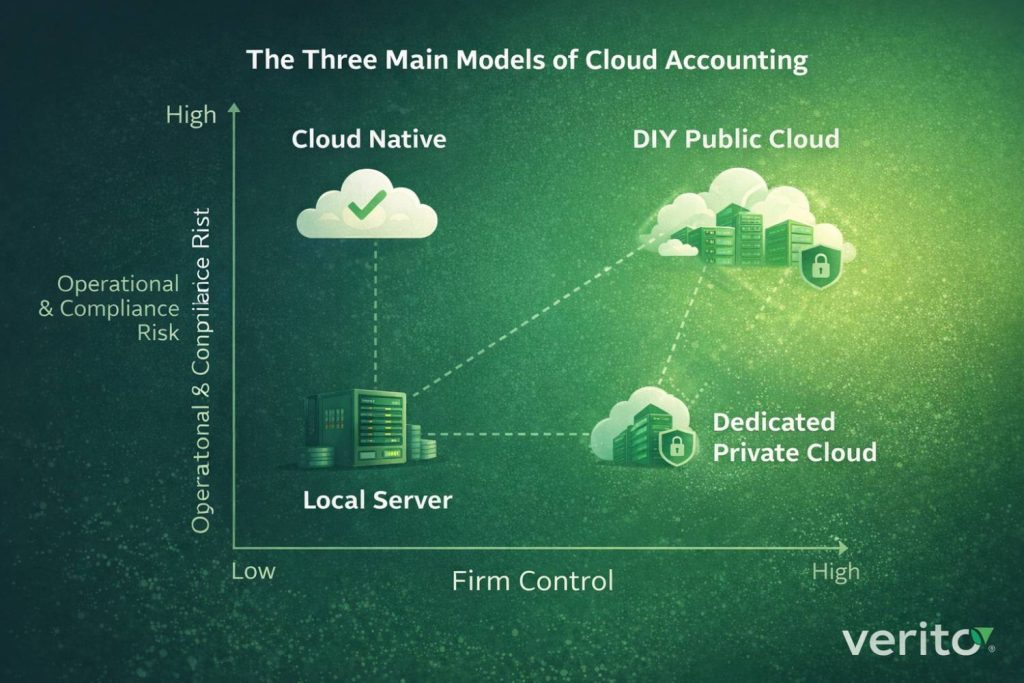
Quick Comparison Of Cloud Accounting Models
| Model | Typical fit | Main advantages | Key risks or limits |
|---|---|---|---|
| Cloud-native applications | Very small firms, startups, simple client mix | No local servers, browser access, automatic vendor updates | May not support complex tax/GL needs, limited support for legacy workflows |
| Desktop software in dedicated private cloud | Small and mid-sized CPA, accounting, and tax firms with mixed stacks | Keeps existing desktop apps, improves uptime, tuned for busy season workloads | Requires structured migration and vendor due diligence |
| DIY or generic public cloud hosting | Larger firms with internal IT, or generalist IT setups | Flexible infrastructure, no on-premise hardware | Misconfiguration risk, performance tuning on you, compliance still your burden |
1. Cloud-native Accounting Applications
In the cloud-native model, your main systems are browser-based applications that the software vendor hosts in its own environment. You log in through a browser, and the vendor handles infrastructure, updates, and basic security controls.
For small firms with straightforward needs, this model can be attractive. You avoid owning servers, can work from almost any device, and benefit from continual feature updates. Many client-facing bookkeeping and invoicing tools follow this pattern.
The limits show up as complexity grows. Mature CPA and tax firms often rely on desktop products for specific capabilities: multi-entity consolidations, specialized tax modules, large shared QuickBooks Desktop files, and long established workflows. Moving entirely to cloud native tools may require significant process redesign, retraining, and in some cases compromise on functionality. Cloud-native software can be part of the strategy, but it rarely replaces the entire stack for an established firm.
2. Desktop Software in a Dedicated Private Cloud
In this model, the desktop applications you already use run on servers in a secure data center that are reserved for your firm or for a small, well-controlled set of tenants. Staff connect over the internet and see a full Windows desktop hosting QuickBooks Desktop, tax software, practice management, and document tools.
For most small and mid-sized CPA, accounting, and tax firms, this is the most practical version of cloud accounting. You keep your existing software stack but remove the local server bottleneck. Performance can be tuned for multi-user QuickBooks files and large tax databases, backups and updates are handled centrally, and the infrastructure is designed with accounting workloads and compliance requirements in mind.
The tradeoff is that you now rely on a hosting partner for uptime and security, which means vendor selection matters. You need clarity on data center standards, security controls, backup and recovery, and support quality, especially during peak filing periods.
3. DIY or generic public cloud setups
The third model appears when firms or generalist IT providers rent raw infrastructure from a public cloud platform or a low cost hosting company, then install tax and accounting software on virtual machines. On paper this can look very similar to a private cloud: no hardware in your office and remote desktop access for staff.
In practice, the risk profile is different. Public cloud platforms use a shared responsibility model. They secure the underlying infrastructure, but configuration, access control, monitoring, and many compliance-sensitive details are still your responsibility. If your IT team does not have deep experience with both cloud engineering and tax and accounting workloads, it is easy to end up with misconfigured security settings, uneven performance, or incomplete logging.
In many low cost hosting or generic public cloud setups, your environment can share physical hardware with dozens of unrelated companies. If one of those tenants is attacked or misconfigured, or one of them runs heavy workloads during tax season, your applications can slow down or be affected even though you did nothing wrong.
This model can work for larger firms with dedicated internal IT and security teams. For most small and mid-sized CPA and tax practices, it shifts the physical location of the server without fully reducing operational or regulatory risk.
What Cloud Accounting Actually Changes in Your Firm
Cloud accounting is often presented as a technology upgrade. For CPA, accounting, and tax firms, it is more about how work flows through the firm every day and how exposed you are when something goes wrong.
Day-to-day Operations and Busy Season Performance
On a local server, everyone competes for the same hardware at the same time, especially in the weeks before deadlines. When that server slows down or locks a large QuickBooks file, staff lose time, and work gets pushed into evenings and weekends.
In a well-designed cloud environment, your core applications run on servers that are sized and tuned for multi-user accounting and tax workloads. Staff log in to a hosted desktop, open QuickBooks Desktop or tax software as usual, and the system is built to handle concurrent use. That reduces file locking, crashes, and the kind of slowdowns that quietly erode billable hours in peak season.
In real deployments, firms that move from oversubscribed shared hosting or aging local servers to a dedicated private cloud typically see on the order of 30 to 35 percent faster processing on heavy tax and accounting workloads, which adds up quickly in the middle of busy season.
Staff Experience, Hiring, and Retention
Cloud accounting removes a lot of friction from how people access work. Instead of juggling VPNs or remoting into a single office PC, staff use secure credentials and multi-factor authentication to reach a consistent desktop from any approved device.
That makes hybrid and fully remote roles practical. You can hire experienced preparers, reviewers, and bookkeepers outside commuting distance, and they get the same environment as someone in the main office. Less time fighting technology and more flexibility in where and when people work usually translates into better retention, especially around tax season.
Client Experience and Responsiveness
Clients do not see your infrastructure, but they feel the effects. When responses are delayed because “the server is down” or “someone else has the file open,” confidence drops. As more businesses adopt cloud-based tools themselves, they expect their advisors to be available and responsive.
With cloud accounting, staff can pull up prior year returns, trial balances, and workpapers from anywhere, respond to questions faster, and exchange documents through secure portals tied into the hosted environment. That reduces the number of times work stalls because someone is waiting on access to a specific machine in the office.
Partner Risk and Firm Value
For partners, the biggest change is often the reduction of single point of failure risk. A local server represents concentrated operational and cyber risk. If it fails or is encrypted by ransomware, the firm can be unable to work at the exact moment when deadlines and client expectations are highest.
A cloud accounting setup built for CPA and tax firms replaces that with structured backups, defined recovery objectives, and layered security around the systems that matter most. Problems can still occur, but they are less likely to turn into multi-day outages. That improves peace of mind, supports cyber insurance discussions, and makes the firm more attractive to future buyers or partners who will scrutinize operational resilience.
Security, Compliance, and Risk in Cloud Accounting
In practice, security for a cloud-hosted accounting firm has three layers:
- the security built into your applications.
- the security of the underlying hosting infrastructure.
- processes and policies that govern how people use those systems.
For CPA, accounting, and tax firms, cloud accounting decisions are inseparable from security and compliance. You are expected to protect taxpayer and financial data to a standard set by regulators, insurers, and increasingly by clients.
What Regulators Actually Expect
Two anchors matter for most firms in the US:
1. FTC Safeguards Rule
Treats many CPA and tax practices as “financial institutions” and requires a written information security program, risk assessments, vendor oversight, and documented technical controls. You must be able to show how client data is protected and how your service providers safeguard it.
2. IRS Publication 4557
Focuses on safeguarding taxpayer data through access controls, encryption, backups, and incident response. It expects a written security plan and treats cloud and vendor security as part of your responsibility, not something you can outsource and forget.
Neither of these prohibits cloud hosting. Both assume you will use third-party systems and expect you to demonstrate that those systems are properly designed and monitored.
Minimum Security Controls For a Cloud Accounting Setup
A cloud environment that actually reduces risk for a firm like yours should provide at least:
1. Hardened infrastructure
SOC 2-aligned data centers, physical security, redundant power and connectivity, and separation of your environment from unrelated tenants.
2. Core technical controls
Encryption in transit and at rest, multi-factor authentication for all access, role-based permissions, central logging and monitoring, regular patching of servers and applications, and frequent, tested backups with defined recovery objectives.
3. Endpoint and identity protection
Managed security on laptops and desktops, strong email and phishing defenses, and clear processes for adding and removing user access. Many breaches still start with a compromised device or mailbox, not a failed server.
If a provider cannot explain how they handle each of these points, you are not getting a meaningful security upgrade. You are moving risk, not reducing it.
How Secure Cloud Accounting is in Practice
Properly implemented, a dedicated private cloud for tax and accounting workloads is usually more secure than a typical small firm server:
- Specialists handle patching, backups, and monitoring on a defined schedule
- Access is centralized and easier to review and adjust
- Recovery from a hardware failure or localized incident is faster and more predictable
Risk does not disappear, but it becomes more structured. You move from “we hope our backups work” to “we know our recovery point and recovery time objectives and who is responsible for meeting them.”
Turning Compliance Into an Ongoing Process
Cloud accounting can also make compliance more manageable if you choose a provider that:
- Documents its controls so you can reference them in your WISP and vendor due diligence files
- Provides reports and logs you can show to auditors or insurers
- Works with your internal or external IT to align passwords, MFA, remote access, and device policies with how the hosted environment is actually secured
The goal is simple: when someone asks “how do you protect taxpayer data,” you can answer with current documentation and clear responsibilities, rather than a mix of assumptions and old IT invoices.
Cloud Accounting vs Local Servers vs “Do Nothing”
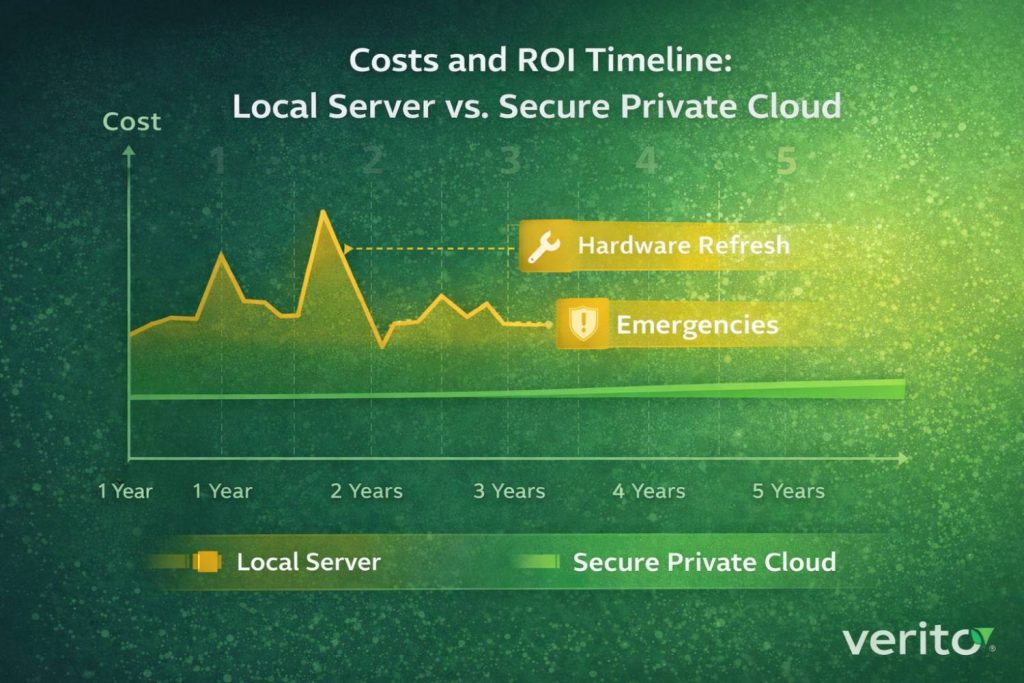
For most CPA, accounting, and tax firms, the real choice is not “cloud or not” but which of the three models to live with over the next 3 to 5 years. The table below sums up the tradeoffs.
| Option | What it looks like | Advantages | Key risks and drawbacks | Best fit when |
|---|---|---|---|---|
| Local server or single “main” workstation | Tax and accounting apps on a server or powerful PC in the office; VPN or RDP into it | Hardware already owned, familiar setup, sense of control | Single point of failure, aging hardware, slow and fragile remote access, full security and compliance burden on your firm | Very small, stable firms with few users, strong local IT discipline, minimal remote work |
| “Do nothing” (keep current setup as is) | Same as above, with only minor reactive fixes | No immediate project, no visible change | Risk quietly accumulates, backups often untested, outages or ransomware can cause multi-day shutdowns | Short-term stop-gap while planning, but not a viable long-term strategy |
| Generic or DIY cloud hosting | Virtual machines on public cloud or low cost host, configured by generalist IT | No server in the office, scalable infrastructure in theory | Security and access control depend on custom configuration, performance tuning is on you, compliance still hard to document | Larger firms with strong internal IT and security skills |
| Dedicated private cloud for accounting and tax firms | Desktop apps hosted on isolated servers in a secure data center, accessed via hosted desktops | No office server, tuned for busy season workloads, structured backups and recovery, stronger documentation for regulators | Requires careful vendor selection and a planned migration | Small and mid-sized CPA, accounting, and tax firms that want better uptime, security, and remote access without replacing their entire software stack |
In practice, staying on local servers or “doing nothing” keeps all operational and cyber risk inside your office, even if you add a few cloud tools around the edges. Generic or DIY cloud moves hardware offsite but still relies heavily on your own IT capability. A dedicated private cloud designed for accounting and tax workloads is usually the only option that materially improves uptime, security, and compliance while allowing you to keep the desktop applications your firm already relies on.
Costs, ROI, and Tradeoffs for Small and Mid-sized Firms
When partners evaluate cloud accounting, the core question is simple: “Is this worth it compared to what we spend today and the risk we are carrying?”
How Cloud Accounting Changes Your Cost Structure
With a local server model, spend is lumpy and often undercounted:
- Server and storage hardware every few years
- Firewalls, backup devices, and network gear
- Project work for upgrades and rebuilds
- Emergency fixes when something fails at the wrong time
These costs come in spikes and rarely include the value of idle staff during outages.
Cloud accounting, especially in a dedicated private cloud model, shifts much of this into predictable operating expense:
- Per user or per server monthly hosting fees
- Optional managed IT and security services
- Minimal or no in-office server hardware
You still buy and refresh endpoints, but heavy infrastructure and much of the support effort move into a subscription that scales with headcount.
What You Actually Get Back in Value
The return is mostly in risk reduction and recovered time rather than a direct “IT budget cut”:
1. Fewer outages and firefights
A stable hosted environment means less unplanned downtime, fewer middle-of-the-night fixes, and less partner time pulled into technical crises.
2. More billable hours from the same team
When systems are stable and responsive, staff spend less time waiting on locked files, slow servers, and VPN issues. Across a tax season, even small daily savings add up.
3. Lower probability of catastrophic loss
Structured backups and tested recovery reduce the chance that a single hardware failure or local incident will stop work for days. That is hard to value until you have lived through a major outage.
Viewed this way, the question is not only “Is cloud hosting cheaper than our current server?” It is “Does a predictable monthly spend that includes uptime, backups, and security cost less than our current mix of hardware, support, and hidden downtime?”
The Real Cost of Doing Nothing
Keeping your existing setup unchanged often feels like the cheapest option because it avoids a visible project. In reality, you are accepting:
- Aging hardware with increasing risk of failure
- Security gaps from delayed or inconsistent patching
- Backups that may not restore efficiently when needed
- Growing dependence on a few people who know how the system fits together
If that risk materializes in the middle of tax season, the combined cost of idle staff, missed deadlines, recovery work, and potential reputational damage can eclipse several years of cloud hosting fees.
For most small and mid-sized CPA, accounting, and tax firms, cloud accounting is less about reducing IT spend and more about exchanging an unpredictable, high-impact risk for a structured, budgeted service with clear responsibilities.
How to Transition Your Firm to Cloud Accounting Without Chaos
The biggest fear for most CPA, accounting, and tax firms is not whether cloud accounting makes sense, but whether the move will disrupt a busy season. A structured approach turns it into a controlled project instead of a risky leap.
Step 1: Define Clear Outcomes
Start by writing down what you need cloud accounting to achieve, for example:
- Reliable access for remote and hybrid staff
- Faster, more stable performance in peak periods
- Stronger alignment with FTC Safeguards and IRS Publication 4557
- Simpler, tested backup and recovery
Avoid vague goals like “modernize IT.” Use concrete statements such as “every staff member can access our full tax and accounting stack remotely with MFA and audited access.”
Step 2: Inventory Systems and Data
Document what you have today:
- Core applications (QuickBooks Desktop, tax software, practice management, DMS, and billing)
- Where each application runs (server, workstation, cloud service)
- Where data lives (local server shares, desktops, external drives, SharePoint, cloud storage)
This inventory becomes your migration map and feeds directly into your WISP and vendor risk files.
Step 3: Choose Your Cloud Model and Provider
Using your inventory and goals, decide whether you will:
- Move some functions to cloud-native apps, and
- Host your existing desktop stack in a dedicated private cloud, or
- Do a hybrid approach over time
For most small and mid-sized firms, hosting existing desktop applications in a private cloud built for accounting workloads is the most practical first step. When you evaluate providers, focus on:
- Support for your specific tax and accounting applications and versions
- Performance approach for multi-user QuickBooks and large tax databases
- Security controls, backups, recovery objectives, and documentation:
When you review SLAs, do the math. A “99 percent uptime” commitment sounds fine until you realize it translates into roughly three and a half days of downtime per year. If even one of those days lands in March or April, that SLA is not acceptable for a tax or accounting firm.
- Support hours and response targets during busy season, including who actually answers if something breaks at 6 PM on a Saturday in March or April
- Whether they can also manage your endpoints and network if you want a single accountable team
Step 4: Plan Migration Around Your Calendar
Build a migration plan that respects filing deadlines:
- Set milestones for environment build, application installation, data migration, and testing
- Schedule cutover outside critical dates, often on weekends or evenings
- Pilot with a small group of users and real client work before moving everyone
- Agree on a rollback option if testing reveals an issue that needs more time
Communicate the plan in simple terms to partners and staff so they know what will happen, when, and how to get support.
Step 5: Prepare Staff and Workflows
Once the environment is ready:
- Provide short training on logging in, saving files, printing, and scanning in the new setup
- Clarify which data must stay in the hosted environment and what is allowed locally
- Create simple quick reference guides for common actions
Identify a few tech comfortable staff as early adopters. Give them access first so they can help colleagues on day one and reduce pressure on the help desk.
Step 6: Review the First 90 Days
Treat the first three months as a formal review period:
- Track uptime, performance in peak hours, and types of support tickets
- Ask staff how the new environment compares for speed and reliability
- Note any integration issues between hosted and non-hosted systems
Schedule a review with the provider, share specific examples of what is working and what is not, and adjust resources or processes as needed. After that tuning period, the goal is for the cloud environment to become a stable, uneventful part of how the firm operates.
How Dedicated Private Cloud and Managed IT Fit Into This Equation
Moving your tax and accounting stack to a dedicated private cloud solves the local server problem. It does not, by itself, secure every laptop, Wi-Fi network, or inbox that touches client data. That is why most CPA, accounting, and tax firms pair cloud hosting with managed IT and security.
Why Hosting Alone is Not Enough
A good private cloud will:
- Run your tax and accounting applications on hardened servers
- Handle backups, patching, and access control for that environment
- Provide logging and basic reporting
It cannot:
- Secure staff home networks or unmanaged personal devices
- Stop a user from clicking a phishing link in an email
- Fix an infected laptop that is used to connect to the hosted desktop
Regulators and insurers expect you to protect both the systems that hold data and the endpoints and networks that access those systems. That requires more than hosting.
What Dedicated Private Cloud Provides
On the hosting side, a purpose-built private cloud for accounting and tax firms typically delivers:
- Isolated servers and storage for your firm
- Tuning for multi-user QuickBooks Desktop, large tax databases, and practice management tools
- Structured backups with defined recovery objectives
- Standard security controls such as encryption, multi-factor authentication, role-based access, and audited logins
The aim is to make the hosted environment reliable and predictable. Staff log in, open their usual applications, and can work from anywhere with a suitable connection.
What Managed IT and Security Adds
Managed IT wraps the rest of your environment around that hosted core:
- Standard build for firm-owned laptops and desktops, with controlled patching
- Managed firewalls and office networks, including secure remote access where needed
- Email security, spam filtering, and phishing protection
- Endpoint protection and monitoring for malware and suspicious activity
- Help desk support for day-to-day issues such as printers, scanners, and connectivity
On the security side, a combined service can also help you:
- Maintain your WISP and related documentation
- Produce logs and reports for audits, cyber insurance, or client due diligence
- Coordinate response if a device or account is compromised
How an Integrated Model Works in Practice
In an integrated setup:
- Staff use firm-managed devices that meet defined security baselines
- They connect through secured networks and authenticate with MFA
- They access a hosted desktop with all core applications in one place
- A single team monitors servers, endpoints, and key alerts, and runs the help desk
For partners, that means when someone asks “who is responsible for keeping your systems running and your data protected,” there is a clear answer that covers both the cloud environment and the infrastructure around it, rather than a patchwork of partial responsibilities.
When Cloud Accounting Might Not be the Right Move For Your Firm
Cloud accounting is becoming the default for many CPA, accounting, and tax firms, but there are cases where a full move can reasonably wait or be scoped down.
When a Local Setup is Still Manageable
A carefully run local environment can still be acceptable for a solo or very small firm if all of the following are true:
- One or two users work primarily from a secure office workstation
- Backups are automated, stored offsite, and tested periodically
- Remote access needs are limited and rarely simultaneous
- You understand your regulatory obligations and meet them with documented controls
Even then, you should treat this as a conscious short to medium-term choice, not a permanent solution. Hardware age, growing client demands, or staff additions can quickly change the risk profile.
When Connectivity is The Real Culprit
Cloud accounting depends on tolerable internet connections. If your office and key staff locations genuinely cannot get stable service and there is no realistic upgrade path, a hosted desktop can introduce frustration.
In that case, it can be smarter to:
- Harden the local server and backup setup
- Use cloud only for functions that handle intermittent connectivity well, such as email and some portals
- Plan for a hosted move once connectivity options improve
This is a minority scenario, but it is better to recognize it than to pretend poor connectivity will not matter.
When The Problem is Not Infrastructure
If your biggest issues are weak processes, unclear responsibilities, or inconsistent review rather than failing servers, cloud accounting alone will not fix them. You can put an inefficient or poorly controlled process into a hosted environment just as easily as into a local one.
In those cases, it often makes sense to:
- Standardize workflows and documentation first
- Clarify roles and review steps
- Then move the stabilized processes into a cloud environment
That way, hosting amplifies what already works instead of speeding up confusion.
When Timing Needs to be Sequenced
If your firm is in the middle of a merger, practice management system replacement, or partner succession, trying to run a major cloud migration at the same time can overload staff.
Here, the better approach is usually:
- Stabilize governance and key system changes
- Decide on the long-term core application stack
- Then plan and execute a cloud accounting project that supports that target state
The common thread in all of these cases is intent. Choosing not to move to cloud accounting yet can be a rational decision, but it should be based on a clear view of your constraints and a plan for what you will improve in the meantime, not simply habit or avoidance.
Choosing The Right Cloud Accounting Path For Your CPA or Tax Firm
By this point, the key choices should be clear. Cloud accounting is not simply “using some online tools.” It is deciding where your core tax and accounting stack lives, how it is secured, and how reliably your firm can operate during your busiest weeks.
You can keep everything on a local server and carry the operational and cyber risk yourself, try to assemble a do-it-yourself cloud on generic infrastructure, or move your existing desktop stack into a dedicated private cloud that is built for accounting and tax workloads.
For most small and mid-sized CPA, accounting, and tax firms, the most realistic option is that third path. Hosting QuickBooks Desktop, your tax software, and practice systems in a private cloud lets you keep the applications that already fit your work while removing the single point of failure sitting in your office. Combined with managed IT and endpoint security, it also gives you a more defensible answer when clients, insurers, or regulators ask how you protect taxpayer and financial data.
That does not mean every firm must move today. A very small, tightly run practice with good local controls, or a firm constrained by poor connectivity, may reasonably sequence changes and improve processes first. What matters is that you treat the decision as deliberate. If you stay on a local server, it should be because you have weighed the risk and put credible safeguards in place, not because the hardware happened to be there when you arrived.
If you are ready to explore cloud accounting in a structured way, the next step is not signing a long term contract. It is getting a clear picture of your own environment.Verito offers cloud accounting software hosting and managed IT specifically for tax and accounting firms, and uses a cloud accounting readiness consultation to review your current stack, identify realistic hosting options, and outline a migration plan that respects your filing calendar. Starting with that type of focused assessment turns “we should move to the cloud at some point” into a concrete, low risk decision for your firm.
FAQ:
1. What is cloud accounting for a CPA, accounting, or tax firm?
Cloud accounting means your core tax and accounting applications and client data run on secure remote servers that a specialist manages, instead of on a local office server or single workstation. Staff connect over the internet with strong authentication and use a full desktop that includes the tools they already know.
2. Do we have to switch to QuickBooks Online or Xero to use cloud accounting?
No. Many firms use cloud accounting by hosting existing desktop applications such as QuickBooks Desktop, Drake, Lacerte, UltraTax, ProSeries, CCH, and Sage in a dedicated private cloud. You can add cloud native apps where they fit, but a full replacement of your desktop stack is not required to gain the benefits of cloud.
3. Is cloud accounting secure enough for IRS and FTC requirements?
It can be, if the environment is designed correctly. Look for SOC 2 aligned data centers, encryption in transit and at rest, multi factor authentication, role based access, logging, regular patching, and tested backups. You still own your written information security plan and vendor oversight, but a compliant provider should supply the technical controls and documentation you need for FTC Safeguards and IRS Publication 4557.
4. How much does cloud accounting cost for a small or mid-sized firm?
Most providers charge a predictable monthly fee per user or per server. As a reference point, a typical on premise server refresh for a small or mid-sized firm often runs in the range of 5,000 to 15,000 dollars every few years once you include hardware, backup devices, and installation. A dedicated private cloud setup will usually fall into a band of roughly 70 to 250 dollars per user per month depending on which tax and accounting applications you host and how much computing power you need. When you compare that to local servers, include not only hardware and IT labor, but also emergency fixes and downtime. For many firms, total cost is similar or slightly higher than a local setup, but with much lower risk of major outages and less time spent firefighting.
5. How long does it take to move to cloud accounting?
A typical small or midsized firm spends a few weeks on planning, environment build, and testing, followed by a cutover that is scheduled outside critical deadlines, often over a weekend. The exact timeline depends on how many applications you have, how organized your data is, and how quickly your team can test and sign off.
6. What happens if our internet connection fails?
If the office loses connectivity, staff can usually work from another location with a stable connection, since the applications and data live in the cloud. For firms that rely heavily on hosted desktops, it is smart to plan for redundant internet at the office or a backup 4G or 5G connection for key users.
7. Do we still own our data in the cloud?
Yes. A reputable provider hosts and protects your data but does not own it. Your agreement should state that the firm retains ownership, has access to backups, and can export data in usable formats if you decide to leave. You should also understand how long backups are retained and how data is deleted when the service ends.
8. What should we look for in a cloud accounting provider?
For CPA, accounting, and tax firms, focus on support for your specific applications, proven performance during busy season, documented security controls, and clear backup and recovery commitments. Check for experience with FTC Safeguards and IRS 4557, referenceable firms like yours, responsive help desk support, and, ideally, the ability to combine hosting with managed IT and endpoint security under a single accountable team.
tl;dr
- Cloud accounting for CPA, accounting, and tax firms is not just using a few web apps. It is an operating model where your core tax and accounting stack runs on secure remote servers instead of an office server or single workstation.
- There are three main models: cloud native software, desktop software in a dedicated private cloud, and DIY or generic public cloud. For most small and midsized firms, dedicated private cloud hosting of existing desktop apps is the most realistic option.
- Moving to cloud accounting changes day to day operations: better performance in the busy season, easier remote and hybrid work, fewer server related outages, and a more consistent client experience.
- Security and compliance do not disappear in the cloud. Your environment still needs SOC 2 aligned controls, encryption, MFA, logging, tested backups, and clear support for FTC Safeguards and IRS Publication 4557.
- Compared to local servers, cloud accounting shifts cost from irregular capital spend and emergencies to predictable operating expense, while reducing the chance that a single failure will shut down your firm in tax season.
- A safe transition involves a structured plan: define objectives, inventory systems, choose the right cloud model and partner, schedule migration around deadlines, train staff, and review results in the first 90 days.
- Dedicated private cloud plus managed IT and endpoint security closes the gap between secure servers and messy real world laptops, Wi Fi, and email.
- Cloud accounting is not mandatory for every firm immediately, but doing nothing is a deliberate risk choice. Most CPA, accounting, and tax firms will benefit from at least exploring a private cloud readiness consultation.