Most law firms do not have IT problems. They have risk management problems that happen to involve technology.
Industry incident reporting consistently shows that phishing and credential theft remain the most common entry points for security incidents in professional services firms, including law practices. These incidents rarely start with sophisticated attacks. They start with weak access controls, delayed patching, or unclear responsibility for response.
That reality is why law firm IT decisions cannot be evaluated purely on convenience or cost. They must be evaluated as operational risk decisions with direct impact on deadlines, confidentiality, and firm continuity.
For law firms, downtime is not just inconvenient. It can threaten court deadlines, client trust, and case outcomes. A server outage during trial prep, an email system failure before a filing deadline, or a ransomware incident that locks access to case files is not an IT annoyance. It is an operational risk with real financial and professional consequences.
Outsourced IT for law firms refers to engaging a managed service provider to take responsibility for some or all of the firm’s technology operations. This typically includes help desk support, cybersecurity controls, system monitoring, backup and disaster recovery, device and patch management, secure remote access, and user onboarding and offboarding.
The appeal is obvious. Most small and mid-sized law firms do not have the scale to staff a full internal IT team, yet they face the same risks as much larger organizations. Ransomware, phishing, data loss, and after hours failures do not discriminate by firm size. At the same time, outsourcing is not automatically the right answer. When applied without structure, standards, or internal ownership, it can introduce new risks rather than reduce them.
This guide will help you determine when outsourced IT actually makes sense, when in-house IT is the better option, and when a hybrid or co-managed IT model provides the right balance of control, coverage, and accountability.
If you want context on what structured, security first managed IT looks like for law firms today, you can explore Verito’s managed IT services for law firms before diving into the decision framework below.
Table of Contents Show
Overview of Which IT model fits your firm
Best fit for outsourced IT
- Small to mid-sized firms without dedicated internal IT departments.
- Firms concerned about law firm downtime, ransomware, and after hours support.
- Teams that want predictable IT costs and documented security controls.
- Firms able to standardize devices, access policies, and workflows.
Best fit for in-house IT
- Larger firms with complex, highly customized environments.
- Firms that can support full-time IT staff with redundancy.
- Organizations requiring constant on-site technical presence.
- Teams with mature internal IT governance and oversight.
Best fit for hybrid or co managed IT
- Firms with a single internal IT lead who needs backup and coverage.
- Firms transitioning from reactive support to proactive management.
- Teams that want internal control with external cybersecurity and monitoring.
- Firms planning growth without scaling internal IT headcount.
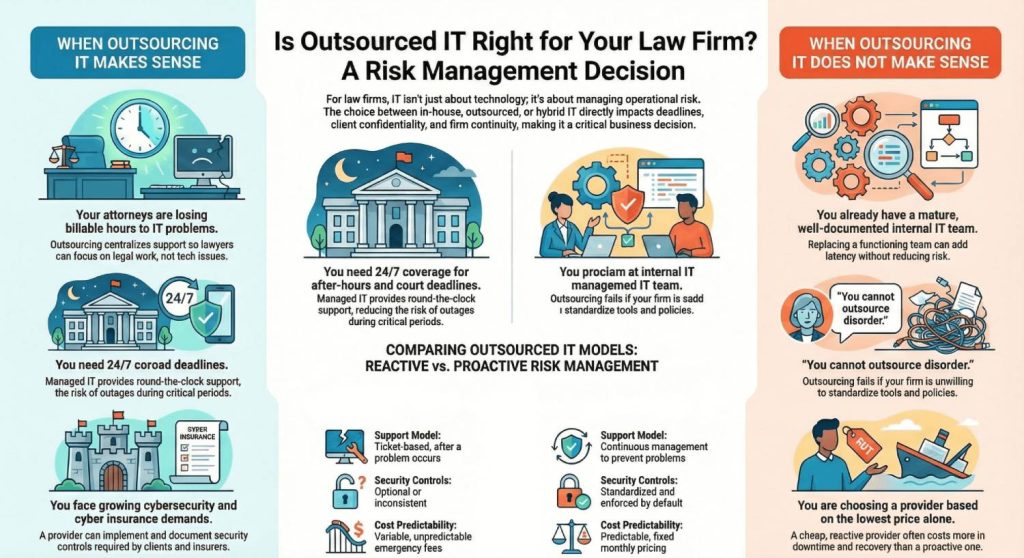
What outsourced IT means for a law firm
Outsourced IT for a law firm is best understood as transferring responsibility for technology reliability, security, and support to a third party that specializes in the legal industry. This is not simply about fixing computers when they fail. It is about ensuring that attorneys can access case files, communicate securely, and meet court deadlines without interruption.
Patch management is one of the most underestimated security controls in law firm environments. Industry breach analysis repeatedly shows that many ransomware and malware incidents exploit vulnerabilities for which patches were already available but not applied. In firms with remote work setups, inconsistent device management, or limited IT oversight, delayed patching significantly increases exposure. Managed IT services for law firms reduce this risk by enforcing consistent update policies and monitoring compliance like SOC 2 Type 2 across all endpoints..
A properly structured outsourced IT support model covers the full lifecycle of technology operations, from daily attorney support to incident response and business continuity.
1. Help desk and attorney support
At the most visible level, outsourced IT provides law firm IT support for attorneys and staff. This includes resolving login issues, slow systems, VPN failures, email access problems, and document management issues. In a managed model, support is governed by SLA response times and includes after hours and weekend coverage.
This matters because many legal emergencies occur outside normal business hours. A filing deadline does not pause because an email server is down. Firms relying on generic MSP support often discover that delays compound quickly, turning small technical issues into operational failures.
2. Device management and patch management
Managed IT services for law firms include centralized device management across laptops, desktops, and mobile devices. This covers operating system updates, application patching, encryption, and endpoint health monitoring.
Patch management is a critical security control. A large share of ransomware incidents exploit known vulnerabilities for which patches were already available. In several breach analyses, unpatched systems appear in roughly one-third to one-half of ransomware cases. Consistent patching reduces attack surface and improves system stability, particularly in firms with remote work setups and distributed devices.
3. Security controls and law firm cybersecurity managed services
Outsourced IT providers typically implement baseline cybersecurity controls designed for legal environments. These often include multi-factor authentication, endpoint detection and response, and email security to reduce phishing risk.
For many law firms, these technical controls are increasingly expected to be documented within a Written Information Security Plan (WISP). A WISP does not replace security tools, but it formalizes how access controls, incident response, data protection, and vendor risk are managed across the firm.
Phishing and stolen credentials are consistently the top initial access method in security incidents across professional services firms. In multiple industry reports, over 70 percent of breaches involve credential compromise, phishing, or social engineering as the starting point.Security awareness training, email filtering, and EDR tools help reduce the likelihood that a single compromised account leads to firm wide disruption. This is not about guaranteeing ABA (American Bar Association) compliance or eliminating risk. It is about reducing exposure through layered defenses.
4. Backup, disaster recovery, and business continuity
Backup and disaster recovery are foundational components of outsourced IT support for law firms. Managed IT providers manage automated backups, verify backup integrity, and document recovery procedures.
For law firms, backup failures are not theoretical. When ransomware encrypts files or a system crashes, the ability to restore data quickly determines whether work resumes in hours or days. Business continuity planning ensures the firm can continue operating during outages rather than improvising under pressure.
5. Onboarding, off-boarding, and access control
User lifecycle management is a common weak point in law firms. Outsourced IT handles onboarding new users with appropriate access to systems and data, while enforcing least privilege principles. Equally important is timely offboarding when employees depart.
Former employees with lingering access represent a real security and vendor risk. Proper access removal protects client data, preserves chain of custody, and supports internal governance without relying on manual checklists.
6. Vendor management and legal software support
Modern law firms depend on multiple vendors for case management software, document management, cloud storage, and eDiscovery platforms. Outsourced IT often serves as the technical liaison, coordinating troubleshooting and integrations.
This reduces downtime caused by vendor finger pointing and ensures that issues affecting legal workflows are addressed efficiently. It also improves documentation and accountability across systems.
7. Monitoring and incident response
A core difference between reactive and proactive support lies in monitoring. Fully managed IT support includes continuous monitoring for system performance issues, security alerts, and failures.
When an incident occurs, there is a defined incident response process rather than ad hoc troubleshooting. Faster detection and response reduce downtime and limit the scope of damage, particularly during ransomware or email security incidents.
Break fix IT vs Fully Managed IT for Law Firms
Not all outsourced IT support operates the same way. The distinction below is critical for decision makers evaluating in house vs outsourced IT support.
| Area | Break fix IT | Fully managed IT |
|---|---|---|
| Support model | Reactive, ticket based | Proactive, continuous management |
| Coverage | Business hours, best effort | 24/7 IT support for law firms |
| Security controls | Optional or inconsistent | Standardized and enforced |
| Patch management | Manual or delayed | Automated and monitored |
| Downtime risk | Higher, unpredictable | Lower, controlled |
| Cost predictability | Variable | Predictable monthly pricing |
| Accountability | Per incident | SLA driven and documented |
Break fix IT can be sufficient for very small firms with limited technology dependence and high tolerance for disruption. For most growing firms, it introduces unnecessary risk. A cheap IT Support provider that is reactive can cost more than a higher quality provider that prevents incidents.
Outsourcing IT works best when the provider can be held accountable to measurable standards: response time, uptime, security controls, and documentation. Without those standards, outsourced IT is not risk management. It is outsourced chaos.
When Outsourcing IT Makes Sense for Law Firms
Outsourced IT for law firms is most effective when it replaces informal, reactive support with structured accountability. The scenarios below reflect the most common points where firms outgrow ad hoc IT and need a managed model to control risk, uptime, and cost.
1. You have no dedicated IT and technology interrupts billable work
| Dimension | Details |
|---|---|
| What it looks like | Attorneys troubleshoot email issues, VPN failures, document management problems, and device errors. Law firm downtime becomes routine, and billable hours are lost to context switching. Losing 1–2 hours per attorney per month is common in firms with reactive IT support. |
| Why outsourcing helps | Managed IT services for law firms provide centralized help desk support, proactive monitoring, and defined SLA response times, reducing attorney involvement in IT issues. |
| What to watch for | Avoid MSPs offering best effort support without documented response times or after hours coverage. This recreates the same interruptions under a new vendor. |
2. You need 24/7 coverage or reliable after hours support
| Dimension | Details |
|---|---|
| What it looks like | Systems fail at night or on weekends. Attorneys lose access to email or case files before filing deadlines. No immediate support is available. A significant portion of security incidents and system failures occur outside standard business hours, when internal coverage is limited. |
| Why outsourcing helps | A qualified MSP for law firms offers 24/7 IT support, monitoring, and escalation, reducing court deadline risk and prolonged outages. |
| What to watch for | Clarify whether after hours support includes real response or only alert monitoring. Delayed incident response undermines reliability. |
3. You are growing and IT complexity is increasing
| Dimension | Details |
|---|---|
| What it looks like | New attorneys, offices, and devices are added quickly. Onboarding and offboarding users becomes inconsistent, increasing security and access control risk. |
| Why outsourcing helps | Outsourced IT support for lawyers introduces standardized device management, patch management, and documented onboarding workflows that scale with growth. |
| What to watch for | If the provider does not enforce standard tools and configurations, complexity and vendor risk will continue to grow. |
4. Security expectations and cyber insurance scrutiny are increasing
| Dimension | Details |
|---|---|
| What it looks like | Cyber insurance renewals and client questionnaires demand MFA, EDR, backups, and security awareness training. Leadership lacks visibility into controls. Firms lacking these controls face higher premiums, reduced coverage, or denial. |
| Why outsourcing helps | Law firm cybersecurity managed services implement and document baseline security controls, reducing ransomware and phishing risk and supporting insurance reviews. |
| What to watch for | Avoid providers promising guaranteed compliance. Look for documented controls, clear scope, and shared responsibility. |
5. Remote work is normal and must be secure
| Dimension | Details |
|---|---|
| What it looks like | Attorneys work remotely using unreliable VPNs and unsecured devices. Access to confidential client data varies by location and device. |
| Why outsourcing helps | Managed IT services provide secure remote access, consistent device management, and endpoint security across locations. |
| What to watch for | Remote access without enforced MFA, encryption, and monitoring increases breach and vendor risk. |
6. One person holds all IT knowledge
| Dimension | Details |
|---|---|
| What it looks like | One employee manages passwords, backups, vendors, and incident response. Documentation is limited. Absences stall resolution. |
| Why outsourcing helps | Outsourced IT replaces tribal knowledge with documented systems, shared access, and redundancy, improving business continuity. |
| What to watch for | Ensure documentation ownership remains with the firm. Replacing one opaque dependency with another creates new risk. |
7. You need predictable IT costs
| Dimension | Details |
|---|---|
| What it looks like | IT spend fluctuates due to emergency fixes, ransomware incidents, or hardware failures. Budgeting is reactive. |
| Why outsourcing helps | Fully managed IT offers predictable monthly pricing, shifting spend from reactive incidents to proactive prevention. |
| What to watch for | Low cost plans often exclude security controls, backups testing, or after hours support, reintroducing unpredictable costs. |
8. You want accountability, not guesswork
| Dimension | Details |
|---|---|
| What it looks like | When systems fail, vendors blame each other. There is no incident report, root cause analysis, or SLA accountability. |
| Why outsourcing helps | Outsourcing works best when the provider can be held accountable to measurable standards: response time, uptime, security controls, and documentation. |
| What to watch for | Vague contracts without SLAs or escalation paths eliminate accountability when it matters most. |
When Outsourcing IT Does NOT Make Sense for Law Firms
Outsourced IT for law firms fails when firms treat it as a shortcut rather than an operating model. In these situations, outsourcing does not reduce risk. It often obscures it. The cases below are where firms should slow down, reassess, or choose a different model entirely.
1. You already have mature internal IT with real coverage and Documentation
| Dimension | Details |
|---|---|
| What it looks like | The firm has experienced internal IT staff, documented patch management, backups, incident response, and clear ownership. There is coverage for vacations and after hours issues. |
| Why outsourcing fails here | Replacing a functioning internal IT team with outsourced IT support often adds latency and removes institutional knowledge without reducing risk. |
| Better alternative | Co-managed IT for law firms to add security monitoring, endpoint detection and response, or after hours escalation without removing internal control. |
2. You need constant onsite hardware support and are willing to fund it
| Dimension | Details |
|---|---|
| What it looks like | Daily hands-on support is required for devices, courtroom technology, scanning systems, or specialized hardware. Remote support alone is insufficient. |
| Why outsourcing fails here | Most MSPs are optimized for remote management. Daily onsite presence either becomes prohibitively expensive or operationally inconsistent. |
| Better alternative | Full-time internal IT staff or a dedicated onsite resource with clearly funded coverage. |
3. You operate highly bespoke or internally engineered systems
| Dimension | Details |
|---|---|
| What it looks like | The firm uses custom built applications or heavily modified systems that require internal engineering knowledge and constant adjustment. |
| Why outsourcing fails here | Managed IT services for law firms depend on standardization. Bespoke systems slow incident response and increase vendor risk unless the provider is deeply embedded. |
| Better alternative | Internal ownership with targeted external consulting support for infrastructure or security layers. |
4. You cannot or will not standardize tools and policies
| Dimension | Details |
|---|---|
| What it looks like | Attorneys use mixed personal devices, unsupported software, inconsistent document management tools, and ad hoc remote access methods. |
| Why outsourcing fails here | If your firm cannot standardize devices and access policies, outsourcing will underperform. You cannot outsource disorder. |
| Better alternative | Stabilize tools, enforce baseline policies, then revisit outsourcing or co-managed IT. |
| Dimension | Details |
|---|---|
| What it looks like | Leadership wants outsourced IT to “own security,” but resists enforcing MFA, patch management, security awareness training, or access controls. |
| Why outsourcing fails here | Outsourced IT is a shared responsibility model. Without authority to enforce controls, security and reliability degrade regardless of provider quality. |
| Better alternative | Align leadership expectations, define authority, then reassess outsourcing readiness. |
6. You are choosing solely on lowest price
| Dimension | Details |
|---|---|
| What it looks like | Provider selection is driven almost entirely by monthly cost. SLAs, incident response, backups testing, and reporting are secondary. |
| Why outsourcing fails here | A cheap provider that is reactive can cost more than a higher quality provider that prevents incidents. Downtime and ransomware recovery erase short term savings. |
| Better alternative | Evaluate MSPs based on coverage, response time, documentation, and security controls, not price alone. |
7. You expect outsourcing to eliminate responsibility
| Dimension | Details |
|---|---|
| What it looks like | Leadership assumes outsourcing transfers all IT risk to the provider. Internal oversight and engagement are minimal. |
| Why outsourcing fails here | Outsourcing is not magic. It is a management model that requires ownership, standards, and accountability. |
| Better alternative | Treat outsourced IT as an extension of operations with defined governance and reporting. |
Cost of Outsourced IT for Law Firms and the Real ROI
Cost is where most discussions around outsourced IT for law firms break down. Many articles avoid specifics or rely on vague promises of savings. That approach does not help managing partners or firm administrators make a defensible decision.
For small and mid-sized organizations, ransomware recovery frequently costs tens of thousands to hundreds of thousands of dollars when downtime, forensics, and restoration are included.
The reality is straightforward. Outsourced IT is not cheap, but neither is downtime, ransomware recovery, or chronic inefficiency. The right comparison is not IT cost versus zero cost. It is structured, predictable spend versus unmanaged operational risk.
Typical pricing ranges for outsourced IT at law firms
While pricing varies by scope and region, most managed IT services for law firms in the United States fall within predictable ranges.
Fully managed IT services
For small to mid-sized law firms, fully managed IT typically ranges from $150 to $300 per user per month. Firms with heavier security requirements, after hours coverage, or complex environments may exceed this range.
This usually includes:
- Unlimited help desk support
- Device and patch management
- 24/7 monitoring
- Baseline cybersecurity controls (MFA, endpoint protection, email security)
- Backup management
- Documentation and reporting
Co-managed IT services
Co-managed IT for law firms is generally less expensive on a per-user basis, often ranging from $75 to $175 per user per month, depending on what functions remain internal.
This model typically focuses on:
- Security monitoring and EDR
- Patch management
- Backup and disaster recovery
- Escalation and after hours support
- Tooling and strategic oversight
Break fix IT or Hourly IT support
Hourly IT support commonly ranges from $125 to $225 per hour. While this can appear cheaper, firms often underestimate total annual spend once emergencies, security incidents, and repeated issues are factored in.
This model offers no cost predictability and limited accountability.
What actually drives outsourced IT cost for law firms
Pricing differences between providers are rarely arbitrary. The most common cost drivers include:
- Number of users and managed devices
- Need for 24/7 IT support for law firms
- Security stack depth, including MFA, EDR, and email security
- Backup and disaster recovery complexity and testing frequency
- Remote work and secure remote access requirements
- Multi-office environments
- Vendor coordination for case management software, document management, and eDiscovery
- Documentation, reporting, and incident response expectations
Firms that choose low-priced plans often discover that critical protections are excluded or billed separately.
Some law firms opt for managed IT models that bundle security, monitoring, backups, and compliance-oriented controls into a single framework, such as VeritGuard, to reduce gaps that often arise when protections are purchased piecemeal.
Opting for bundled IT services can help firms gain access to critical tools at a relatively competitive cost.
Understanding ROI from a Law Firm Perspective
Return on investment from managed IT services does not show up as a simple expense reduction. It shows up as risk avoided and productivity preserved.
- Billable hours protected
If a single attorney loses one hour per week to IT issues, that is more than 50 hours per year. Multiply that across a firm, and the cost of unmanaged IT quickly exceeds the monthly fee for outsourced support. - Avoided downtime
For law firms, downtime is not just inconvenient. It can threaten court deadlines, client trust, and case outcomes. Reducing the frequency and duration of outages protects both revenue and reputation. - Avoided incident costs
Ransomware recovery, emergency consulting, forensic reviews, and system restoration routinely cost tens of thousands of dollars for small firms. Proactive monitoring, patch management, and incident response significantly reduce the likelihood and severity of these events. - Reduced context switching and stress
Reliable systems reduce interruptions and cognitive load. Attorneys spend more time focused on legal work and less time navigating technical problems, especially during high pressure periods.
Cheap MSP vs High Accountability MSP Provider for Law Firms
The difference between low cost and higher quality providers is not branding. It is scope, discipline, and accountability.
| Capability | Cheap MSP | High accountability MSP |
|---|---|---|
| Monitoring | Reactive or limited | Continuous 24/7 monitoring |
| Response times | Best effort | Defined SLA response times |
| After hours support | Extra or unavailable | Included or contractually defined |
| Security controls | Optional add ons | Standardized and enforced |
| Backup testing | Rare or informal | Regular testing with documentation |
| Incident response | Ad hoc | Defined process and reporting |
| Documentation | Minimal | Maintained and accessible |
| Security awareness training | Not included | Included or supported |
A cheap provider that is reactive can cost more than a higher quality provider that prevents incidents. The difference often becomes visible only after a serious outage or security event.
Outsourced IT for law firms should be evaluated as an operational risk management investment, not a commodity purchase. Predictable monthly spend buys response time, accountability, and reduced exposure to downtime and incidents.
The right question is not “how little can we spend on IT.” It is “how much unmanaged risk are we willing to carry during court critical periods?”
When firms frame cost this way, the numbers stop feeling abstract and start aligning with business reality.
Checklist for Law Firms looking to Outsource IT
This checklist is designed to help law firms evaluate outsourced IT support in a structured, defensible way. It reflects real failure points seen in law firm IT environments, including downtime during court critical periods, ransomware exposure, weak incident response, and vendor lock-in.
A qualified managed IT provider for law firms should be able to answer every item clearly, in writing, with documentation. Vague answers are a risk signal.
1. Security controls and cybersecurity management
- Do you enforce multi-factor authentication for email, remote access, VPNs, and all administrative accounts by default?
- What endpoint detection and response platform is used, and is it monitored 24/7 or only during business hours?
- How is phishing handled, including email filtering, impersonation detection, and user reported threats?
- Do you provide or support ongoing security awareness training tailored to law firm workflows?
- How is confidential client data protected on laptops, mobile devices, and remote work setups?
- How do you manage least privilege access across systems, including case management software and document management platforms?
- What is the process if credentials are compromised or suspicious login activity is detected?
- How do you assess and manage vendor risk for cloud services and third party legal software?
2. Reliability, backups, and business continuity
- What systems are monitored continuously for uptime, performance, and failure?
- How frequently are backups performed, and which systems and data sets are included?
- Are backups immutable or protected against ransomware encryption?
- How often are backup restores tested, and are results documented?
- What is the documented backup and disaster recovery plan, and who owns execution during an incident?
- How do you ensure business continuity when critical systems are unavailable?
- How do you reduce law firm downtime during outages, hardware failures, or ransomware events?
3. Support performance and availability
- Do you provide documented SLAs for response time and escalation based on severity?
- Is 24/7 IT support for law firms included, and what qualifies as an after hours emergency?
- How are support requests evaluated when multiple issues occur simultaneously?
- What is the typical resolution time for common attorney issues such as email access, VPN failures, and document system outages?
- How do you support remote attorneys and mobile devices securely and consistently?
- Who is accountable when response times are missed or issues recur?
4. Governance, accountability, and reporting
- How is the IT environment documented, including systems, configurations, vendors, and access rights?
- Does the firm retain ownership and access to documentation, credentials, and administrative accounts?
- Is your security program documented in a Written Information Security Plan (WISP), and is it reviewed and updated regularly as systems and risks change?
- What regular reporting is provided on patch management, security events, incidents, and system health?
- How are changes approved, tracked, and rolled back if necessary?
- How do you support cyber insurance requirements, client security questionnaires, and internal risk reviews?
- How do you demonstrate accountability beyond verbal assurances?
5. User lifecycle and access management
- How are new attorneys and staff onboarded, and how quickly is access provisioned?
- What is the offboarding process when an employee leaves, including access revocation and device handling?
- How do you ensure former employees cannot access confidential client data or systems?
- How is access reviewed periodically to prevent privilege creep?
- How do you document and enforce chain of custody for data access?
6. Transition, switching, and exit planning
- What is your onboarding process when taking over from another IT provider?
- How do you transition systems without disrupting active matters or court deadlines?
- How do you handle legacy systems, undocumented environments, or partial migrations?
- What documentation is delivered during onboarding and maintained over time?
- If the firm switches MSPs or brings IT back in-house, what data, documentation, and access are provided?
- How do you avoid vendor lock in created by proprietary tools or undocumented configurations?
How to use this Checklist Effectively to Decide on the Right Managed IT Provider for your Law Firm
No provider will score perfectly on every item. What matters is transparency, documentation, and accountability. A provider that answers clearly, commits in writing, and explains tradeoffs is far safer than one that promises everything without detail.
Outsourcing works best when the provider can be held accountable to measurable standards: response time, uptime, security controls, and documentation. This checklist helps ensure outsourced IT for law firms functions as a risk management and reliability model, not a leap of faith.
Outsourced IT for Law Firms: Making the Right Call for Your Firm
Outsourced IT for law firms is not a default best practice, and it is not a shortcut. It is a structural decision about how your firm manages risk, uptime, and accountability.
Outsourcing IT makes sense when your firm lacks internal depth, needs 24/7 coverage, faces growing cybersecurity and downtime risk, or wants predictable support that protects billable work. It works best when the managed IT provider can be held to measurable standards for response time, security controls, documentation, and incident response.
It does not make sense when a firm already has a mature internal IT department with coverage and documentation, requires constant onsite engineering, or expects outsourcing to compensate for a lack of standards or internal ownership. If your firm cannot standardize devices and access policies, outsourcing will underperform. You cannot outsource disorder.
For many firms, the right answer sits in between. Co-managed IT allows firms to keep internal control over day-to-day operations while outsourcing the areas that create the greatest risk, such as security monitoring, patch management, backups, and after hours escalation. This model reduces single points of failure and burnout without forcing an all or nothing decision.
Across all models, one principle holds. Outsourcing works best when the provider can be held accountable to measurable standards: response time, uptime, security controls, and documentation. A cheap provider that is reactive can cost more than a higher quality provider that prevents incidents.
The right question is not “in house or outsourced.” It’s “what level of risk, coverage, and accountability do we need to protect deadlines, client trust, and billable work?”
What a Structured, Security-First Managed IT Model Looks Like in Practice
If your firm is evaluating outsourced or co-managed IT and wants to understand what a structured, security first model looks like in practice, the next step is clarity, not immediate commitment.
You can schedule a managed IT demo with Verito to see how managed IT services for law firms are designed to reduce downtime, strengthen security, and provide accountable support without disrupting active matters.
FAQ
1. Is outsourced IT secure for law firms?
It can be, if done correctly. Outsourced IT for law firms is secure when the provider enforces baseline controls such as MFA, endpoint detection and response, email security, regular patch management, and tested backups. Security depends on standards, documentation, and accountability, not on outsourcing alone.
2. What does a managed IT provider actually do day-to-day?
Day to day work includes help desk support, monitoring systems for failures or security alerts, applying patches, managing backups, onboarding and offboarding users, and coordinating with software vendors. In a proactive model, much of the work happens before attorneys notice a problem.
3. How much IT support do small law firms need?
Most small law firms need more support than they expect. Even firms with fewer than ten attorneys rely on email, document management, remote access, and secure devices. Without structured support, small issues often turn into downtime during critical periods.
4. Is managed IT worth it for a small law firm?
It is often worth it when downtime, security risk, or unpredictable costs begin to interfere with billable work. Managed IT shifts the firm from reactive fixes to predictable support and risk reduction.
5. Can we keep some IT internal and still outsource?
Yes. Many firms use co-managed IT for law firms. Internal staff handle onsite and firm specific tasks, while the MSP provides security monitoring, patching, backups, and after hours support.
6. What should be included in an IT support SLA?
An SLA should define response times by severity, support hours, escalation paths, security responsibilities, backup expectations, and reporting. Vague or verbal commitments are not sufficient.
7. How fast should IT support respond?
Response time should be tied to severity. Critical issues affecting many users or access to core systems should receive rapid response, often within minutes, not hours. Less urgent issues can follow longer response targets.
8. What are the biggest red flags with managed service providers?
Red flags include lack of documented SLAs, unclear ownership of admin access, no backup testing, minimal reporting, and resistance to transparency. Promising zero risk or guaranteed compliance is also a warning sign.
9. How long does onboarding with a new IT provider take?
Onboarding typically takes several weeks for small and mid-sized law firms. The timeline depends on environment complexity, documentation quality, and the need to stabilize security and backups without disrupting active matters.
10. Can we switch MSPs without downtime?
Yes, with proper planning. A staged transition that prioritizes documentation, access control, security baselines, and tested backups minimizes disruption and protects ongoing work.