
Your firm manages Social Security numbers, tax returns, bank account details, and complete financial histories for dozens, sometimes hundreds, of clients.
That data is worth more on the dark web than credit card numbers.
You have no dedicated IT staff. Your “security plan” might be a shared password document and an antivirus subscription that hasn’t been renewed since last spring. If that hits a little too close to home, you’re not alone. Most CPA practices in the United States operate exactly that way, and that makes them among the most actively targeted professional services businesses in the country.
Before this guide walks through what your firm needs, here is the direct answer to the question that brings most readers here:
What IT services does an accounting firm need?
Accounting firms need 10 core IT services to operate securely and stay compliant in 2026:
- cloud hosting for tax software
- managed endpoint security with EDR
- automated backup with a 4-hour Recovery Point Objective
- an IRS-compliant WISP
- multi-factor authentication on all systems
- 24/7 accounting-specialist IT support
- patch management
- email anti-phishing protection
- dark web monitoring
- staff security awareness training.
Together, these services satisfy IRS Publication 4557 and FTC Safeguards Rule requirements and protect the firm against the specific threats CPAs face today.
If you’re not sure whether your firm has all 10 covered, a free IT assessment can close that gap in under 30 minutes.
The rest of this guide breaks down each one, explains the accounting-specific compliance angle, and describes what your firm risks by skipping it.
Table of Contents Show
Key Takeaways
Outsourcing all 10 services to a specialist managed IT provider costs a predictable flat monthly fee. The cost of a breach does not.
Accounting firms are legally classified as financial institutions under GLBA, meaning the FTC Safeguards Rule and IRS Publication 4557 apply to them, regardless of firm size.
Most CPA practices have no dedicated IT staff, yet they handle some of the most sensitive personal and financial data in existence, making them a primary ransomware and phishing target.
There are 10 IT services every accounting firm must have in 2026: cloud hosting for tax software, managed endpoint security (EDR), automated backup with a 4-hour RPO, an IRS-compliant WISP, MFA on all systems, 24/7 accounting-specialist IT support, patch management, email anti-phishing protection, dark web monitoring, and staff security awareness training.
Each of these services maps directly to at least one FTC Safeguards Rule or IRS Publication 4557 requirement. This checklist is also a compliance roadmap.
The average ransomware downtime is 24 days. For a CPA firm in the middle of tax season, that is not a recoverable event.
Why IT is a Compliance Obligation, Not Just a Business Decision
Most CPA firms treat technology as a cost of doing business, something to deal with when things break. The regulatory reality is more serious than that.
Firms that treat IT reactively are also firms that fail compliance audits. A managed IT program built for accounting practices closes both the security gaps and the documentation gaps that IRS and FTC requirements demand.
Under the Gramm-Leach-Bliley Act (GLBA), accounting firms are classified as financial institutions. That classification means the FTC Safeguards Rule applies to them directly, regardless of firm size.
This is not optional guidance or a big-firm problem. Any practice that handles consumer financial data, which includes essentially every CPA firm that prepares or files tax returns, is legally required to implement an information security program that meets specific, documented standards.
The IRS reinforces this independently through Publication 4557, which sets out data security requirements specifically for tax professionals. When the FTC updated the Safeguards Rule in 2023, the obligations for smaller firms expanded significantly, closing a loophole that many solo practitioners and two-person practices had historically relied on without realizing it.
What IRS Publication 4557 Requires From Your Firm
IRS Publication 4557 requires tax professionals to create and maintain a Written Information Security Plan (WISP), protect client data with specific technical safeguards including encryption and access controls, designate a security coordinator within the firm, and maintain an incident response plan for data security events.
It also recommends multi-factor authentication (MFA) across all systems that access federal tax information. Non-compliance is not an abstract regulatory risk. The IRS has stated that WISP documentation will be reviewed in the context of data incidents, and firms that cannot demonstrate a structured security program face elevated legal and licensure exposure if and when something goes wrong.
What the FTC Safeguards Rule Adds
The FTC Safeguards Rule requires covered institutions to implement a written information security program that includes employee training, access controls, encryption of customer data both in transit and at rest, multi-factor authentication, continuous monitoring for unauthorized access, patch management, and documented vendor oversight.
The 2023 update substantially increased obligations for smaller firms, many of which had operated under a simplified compliance framework for years. Today, even a solo CPA with a handful of individual clients falls within scope.
FTC enforcement activity in the financial services sector has intensified, and penalties for documented non-compliance are no longer theoretical.
The 10 IT Services Every Accounting Firm Needs in 2026
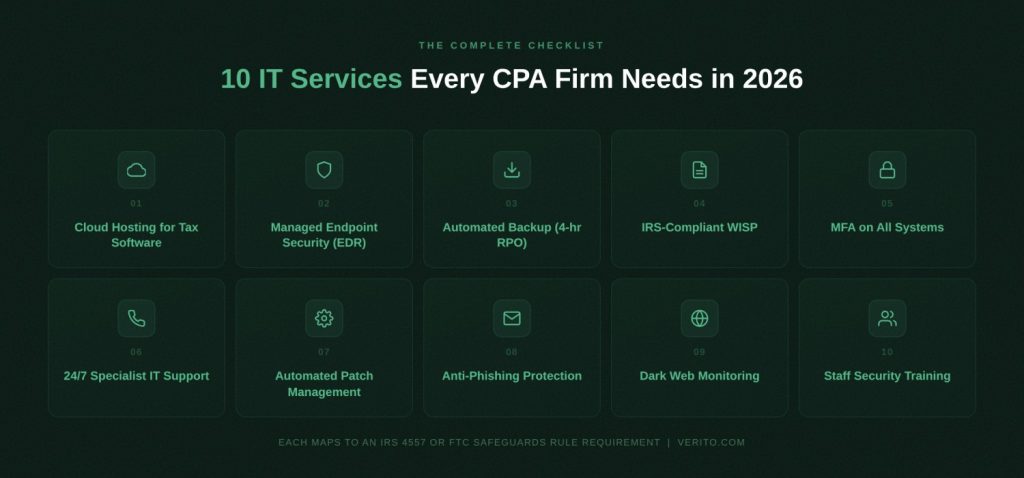
The services below are not a vendor wish list. Each one maps directly to at least one requirement under the FTC Safeguards Rule or IRS Publication 4557, which means this checklist is also a compliance roadmap. For each item, you’ll find what it is, why accounting firms specifically need it, and what happens to a firm that goes without it.
1. Cloud Hosting for Tax Software
What it is:
Dedicated private servers that host your accounting and tax applications, including QuickBooks Desktop, Drake Tax, Lacerte, UltraTax, CCH Axcess, and ProSeries, in the cloud, replacing local machines or on-premise servers that tie your team to a single desk and create a single point of failure.
Why accounting firms need it:
Tax software was built on aging desktop architecture that was never designed for remote teams, multi-user concurrent access, or the load spikes that filing season creates. When your firm moves to cloud hosting for tax software on isolated private servers, each firm gets its own dedicated environment with no shared resources between clients.
Performance doesn’t degrade because another firm’s tax season is creating resource contention on your hardware. IRS Publication 4557 requires that client data be protected both in transit and at rest. Enterprise-grade cloud hosting satisfies both requirements automatically, with encrypted connections and isolated storage built in by default.
During filing season, when usage can spike 3 to 5 times above baseline, dedicated infrastructure absorbs that load without a slowdown.
What happens without it:
Firms running on local servers are one hardware failure away from days of downtime during the worst possible window of the year. Remote work becomes either impossible or dangerously insecure, relying on consumer-grade tools that introduce serious data exposure.
Legacy on-premise setups rarely meet the encryption requirements in the updated FTC Safeguards Rule, and firms using general-purpose cloud services inherit all the risks of shared infrastructure, including performance degradation from other tenants on the same physical hardware.
2. Managed Endpoint Security (EDR)
What it is:
Endpoint Detection and Response (EDR) software that actively monitors every device connected to your firm’s network, identifying behavioral indicators of compromise in real-time rather than waiting for a scheduled antivirus scan to match a threat it already recognizes.
Why accounting firms need it:
Traditional antivirus catches known malware by comparing files against a database of previously cataloged threats. EDR catches the threats that haven’t been cataloged yet: fileless attacks, lateral movement between devices, and zero-day exploits that bypass signature-based detection entirely.
The FTC Safeguards Rule explicitly requires firms to monitor and detect attacks. Standard antivirus does not satisfy that requirement. According to the Sophos 2024 State of Ransomware Report, 65 percent of financial services organizations were hit by ransomware that year, with average recovery costs reaching 2.73 million dollars.
Accounting firms are a primary ransomware target precisely because their client data is both highly sensitive and highly marketable on dark web markets.
What happens without it:
A firm running only legacy antivirus can remain infected for weeks before anything triggers a visible alert. By the time ransomware executes, it has already encrypted files, compromised backups, and, in increasingly common double-extortion schemes, exfiltrated client data to an external server.
The managed endpoint security required to contain and remediate that kind of incident costs significantly less than the potential loss of customer data.
3. Automated Backup with a 4-Hour Recovery Point Objective (RPO)
What it is:
A managed backup system that automatically saves encrypted copies of firm data at regular intervals, with a Recovery Point Objective (RPO) of four hours or less. RPO is the maximum amount of data your firm can afford to lose in a disaster scenario. With a 4-hour RPO, your most recent backup is never more than four hours old, no matter when a failure or attack occurs.
Why accounting firms need it:
Client tax returns, financial records, and engagement files cannot be recreated from memory. IRS Publication 4557 requires firms to maintain a data recovery plan. The FTC Safeguards Rule requires covered institutions to monitor for unauthorized access and maintain a meaningful recovery capability.
Sound backups are not insurance. They are the recovery capability itself.
What happens without it:
Firms relying on manual backups or weekly automated snapshots expose themselves to catastrophic data loss windows. In a ransomware scenario, losing a full week of tax-season work is not a recoverable position for most small practices.
Your managed backup and recovery infrastructure should be tested regularly, stored off-site or in an isolated cloud environment, and never reside on the same network as the systems it is meant to protect.
4. IRS-Compliant Written Information Security Plan (WISP)
What it is:
A WISP is a formal, documented security policy that describes how your firm collects, stores, accesses, protects, and disposes of sensitive client data. It includes access controls, incident response procedures, employee responsibilities, and vendor security requirements.
Why accounting firms need it:
IRS Publication 4557 requires every tax professional who handles federal tax information to maintain a current WISP. The FTC Safeguards Rule independently requires a written information security program covering similar scope.
That means most CPA firms are facing two simultaneous regulatory mandates for essentially the same document. A WISP is not a one-time checkbox either. It requires annual review, updates when personnel or systems change, and documentation that demonstrates active compliance rather than past intent. Some professional liability insurers have begun requiring proof of current WISP documentation as a condition of issuing cyber coverage.
What happens without it:
A firm without a current WISP cannot demonstrate compliance during an IRS or FTC inquiry. In the event of a client data breach, the absence of a documented security plan significantly amplifies regulatory and legal liability. The question investigators and insurers ask first is not whether your firm was attacked. It is what your documented security plan was and whether you were following it.
If that question doesn’t have a clear answer, an IRS-compliant WISP belongs at the top of your immediate action list.
5. Multi-Factor Authentication on All Systems
What it is:
MFA requires users to verify their identity through at least two distinct factors before accessing firm systems. In practice, this typically means a password combined with a time-sensitive code delivered to a separate device. It applies to cloud platforms, email accounts, tax software portals, VPN connections, and any other system containing or capable of accessing client data.
Why accounting firms need it:
The FTC Safeguards Rule explicitly mandates multi-factor authentication for any system that handles consumer financial information. IRS Publication 4557 recommends MFA across all systems that touch federal tax data.
The Verizon 2024 Data Breach Investigations Report found that 68 percent of breaches involved a human element, with credential abuse as the leading contributing factor.
MFA doesn’t prevent credentials from being stolen. It neutralizes them once they are.
What happens without it:
Phishing campaigns targeting accounting firms routinely harvest staff credentials. Without MFA, a single stolen password opens access to every client file, every tax return, and every financial record your firm holds.
This exposure is amplified by the shift to remote and hybrid work, where staff access firm systems from home networks, personal devices, and locations your firm’s security perimeter was never designed to cover.
Still running your firm on yesterday’s IT?
Five IT Services down. Five to go.
If you’re already spotting gaps, you don’t have to wait until you finish the list.
Verito helps CPA firms check off every one of these without hiring a single IT employee. Future-Proof Your Accounting Firm with Verito →
6. 24/7 IT Support from Accounting-Software-Fluent Technicians
What it is:
Round-the-clock IT support from technicians who are trained specifically on tax and accounting software workflows: QuickBooks Desktop file lock errors, Lacerte database failures, Drake Tax printing issues, UltraTax performance problems, and every other issue your staff will actually call about.
Why accounting firms need it:
Tax season doesn’t run 9 to 5. A file corruption error at 11pm on April 14th is not a problem that waits until morning, and a generic IT helpdesk staffed by technicians who have never opened ProSeries is not equipped to resolve it quickly.
Every unresolved hour during peak filing season is measurable lost revenue and a potential missed deadline for a client. Verito’s VeritCertified support program requires all engineers to pass rigorous training across server support, accounting software troubleshooting, cybersecurity operations, and compliance protocols before they can assist any client.
That program produces the results that show up in reviews: a 4.9/5 G2 rating across 150-plus verified reviews, sub-1-minute average response times, and 92 percent First-touch Resolution, meaning the first engineer who picks up your request fixes it, with no escalations and no call bouncing.
What happens without it:
Firms using generic IT support consistently describe the same experience: spending the first 20 minutes of every support call just explaining their software environment before any troubleshooting begins.
During filing season, that 20 minutes is not spare capacity. 24/7 IT support for accounting firms from specialists like Verito who understand your stack is the difference between a 5-minute resolution and a 2-hour ticket that bleeds into client time.
7. Automated Patch Management
What it is:
A managed process that identifies, tests, and applies security patches and software updates to all firm devices on a defined schedule, automatically, without requiring any staff to initiate, track, or verify the process manually.
Why accounting firms need it:
The FTC Safeguards Rule requires covered firms to maintain current patches across all systems that process customer financial data. According to the Sophos State of Ransomware 2024 report, 32 percent of ransomware attacks exploited an unpatched vulnerability as the initial point of entry.
That means nearly 1 in 3 ransomware incidents would have been preventable with a functioning patch management program. In firms without dedicated IT staff, patches get deferred indefinitely because no one owns the task, and no one has time to make it a priority during busy season.
What happens without it:
Unpatched systems are the path of least resistance for ransomware operators. The time between a public vulnerability disclosure and the first active exploit in the wild is measured in days, sometimes hours. A single unpatched Windows device on one staff member’s desk can be the entry point for a network-wide compromise.
Verito’s VeritGuard managed IT services handles patch management proactively, identifying and closing vulnerabilities before they become incidents.
8. Email Anti-Phishing Protection
What it is:
AI-driven email filtering software that identifies and blocks phishing attempts, malicious attachments, spoofed sender domains, and business email compromise (BEC) attacks before they reach your staff’s inboxes, operating continuously without requiring staff to make any individual judgment calls.
Why accounting firms need it:
Phishing is the most common initial access vector in data breaches across every industry. The IBM’s 2025 Cost of a Data Breach Report found that phishing accounted for 33 percent of all cloud-related security incidents, typically in the form of adversary-in-the-middle attacks designed to harvest credentials in real-time.
Accounting firms are targeted with IRS impersonation emails, fraudulent W-2 requests, and BEC schemes designed to redirect client payments or extract confidential return data.
These campaigns concentrate during tax season precisely because attackers understand that CPAs are processing high volumes of email under deadline pressure and are less likely to scrutinize every message carefully.
What happens without it:
A single phishing email reaching an unprotected inbox can result in credential theft, ransomware deployment, or a BEC fraud that redirects a client’s refund or payment.
Verito’s email anti-phishing protection uses AI to catch what human attention misses during the exact windows when human attention is most stretched.
9. Dark Web Monitoring
What it is:
Continuous, automated scanning of dark web forums, credential dump databases, and underground marketplaces for any mention of your firm’s email addresses, employee credentials, or client data, paired with alerts that allow you to act before attackers do.
Why accounting firms need it:
Credentials from unrelated third-party breaches (social media platforms, data brokers, retail sites) are routinely tested against accounting firm systems in credential-stuffing attacks.
An employee whose personal email password matches their work login creates a firm-level vulnerability from a breach that had nothing to do with your practice. Dark web monitoring converts this from a reactive problem into a proactive one.
IBM’s 2025 Cost of Data Breach Report found that the average time between an initial breach and its discovery, without proactive detection, exceeded 241 days. That is over 8 months of potential unauthorized access before anyone notices.
What happens without it:
Compromised credentials sit dormant on dark web markets for weeks or months before attackers use them. Without monitoring, the first signal that credentials have been exposed is an active intrusion already in progress. By then, the investigation, containment, and remediation process begin costing time and money that weren’t in any budget.
10. Staff Security Awareness Training
What it is:
Regularly scheduled, automated training that educates every firm employee on identifying phishing attempts, handling client data securely, following WISP policies, and understanding their personal compliance obligations.
Quality programs include simulated phishing exercises that test actual behavior in realistic scenarios, not just familiarity with concepts.
Why accounting firms need it:
Both the FTC Safeguards Rule and IRS Publication 4557 require covered firms to train employees on information security practices. Training directly reduces this exposure as it is the only control in your security stack that addresses the insider risk component, whether from a full-time employee, a seasonal hire, or a front-desk staffer who has never been shown what a spoofed IRS email looks like.
What happens without it:
A firm can have excellent technical controls in place and still suffer a breach because one employee clicked a convincing phishing link during the third week of March.
Without appropriate security awareness training, staff remain unaware of what to do when they encounter a suspicious email, an unusual system behavior, or a social engineering call impersonating a vendor. This gap is especially acute during January-to-April, when firms often bring on seasonal staff who receive no security orientation before they start handling client data.
How to Assess Whether Your Firm Already Has These Covered
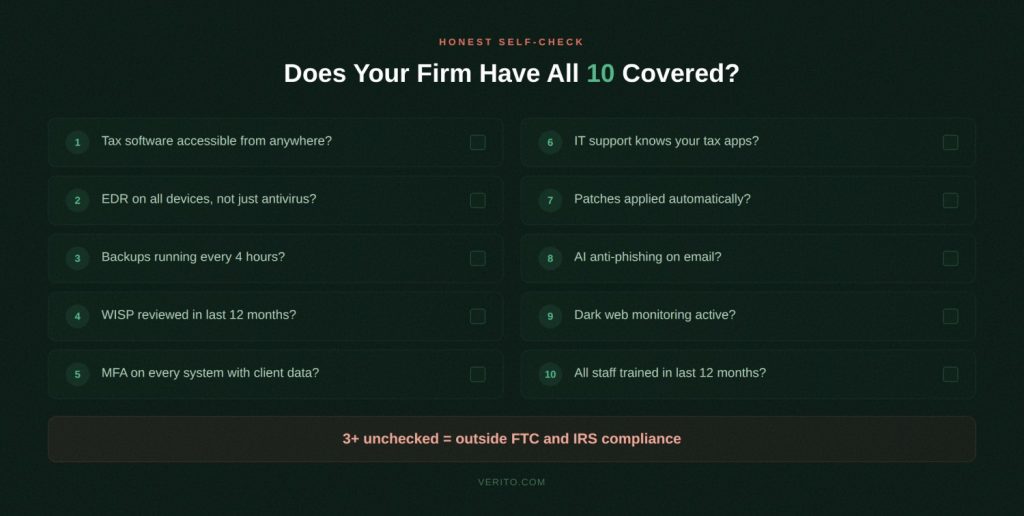
Knowing the list is the first step. Knowing whether your firm actually has each item in place, at a standard that satisfies FTC Safeguards Rule and IRS Publication 4557 requirements, is a different and more useful question. The self-audit below gives you a fast way to evaluate your current setup without waiting for a third-party assessment.
Go through each question and give yourself a yes or no. If you’re not certain of the answer, that is a no.
- Can every member of your team access your tax software from any device and location without a complex VPN configuration or noticeable performance slowdown? (Cloud hosting)
- Does your firm use EDR software on all devices, as distinct from standard antivirus alone? (Endpoint security with EDR)
- Do your automated, encrypted backups run at intervals shorter than four hours, stored separately from your primary systems? (Backup with 4-hr RPO)
- Does your firm have a current, signed WISP that has been reviewed within the last 12 months? (WISP)
- Is multi-factor authentication active on every system your staff uses to access client data, including email? (MFA)
- Does your IT support team know what ProSeries, Drake, and Lacerte are before you have to explain them? (Specialist IT support)
- Does a managed service handle patches across all firm devices automatically, on a defined schedule? (Patch management)
- Does your email platform include AI-driven phishing filtering, not just standard spam filtering? (Anti-phishing)
- Does your firm receive automatic alerts if employee credentials appear in a dark web credential dump? (Dark web monitoring)
- Have all staff members, including seasonal hires, completed documented security awareness training within the past 12 months? (Staff security training)
Three or more no answers puts your firm outside meaningful compliance with current FTC and IRS requirements.
A full IT assessment can identify precisely what it would take to close each gap.
What These 10 IT Services Cost vs. What They Prevent
Accounting firm owners often approach managed IT as a cost line they’d rather keep flat. That framing tends to change quickly when you look at what sits on the other side of the ledger.
According to Statista’s study of downtime, the average downtime following a ransomware attack is 24 days across industries. For a 10-person CPA practice billing at even modest hourly rates during tax season, 24 days of downtime is not a recoverable event in any practical sense. Filing deadlines doesn’t pause for incident response.
The outsourced IT services covered in this checklist are available from specialist providers on flat monthly pricing, without long-term contracts, and without the overhead of hiring a dedicated IT employee. The cost of a well-structured managed IT program is predictable. The cost of a breach is not.
The Real Cost of IT Gaps for Accounting Firms
IBM’s 2025 Cost of Data Breach Report put the average breach cost in the financial services sector at approximately 5 million dollars. Most small CPA firms do not survive a 5 million dollar incident. But even at a fraction of that scale, the financial, regulatory, and reputational damage from a client data exposure at a tax practice is career-defining in the worst sense.
Clients who trust you with their most sensitive personal and financial information have very limited tolerance for a disclosure letter informing them their Social Security number has been compromised.
FTC Safeguards Rule enforcement carries direct penalty exposure for firms that cannot demonstrate compliance. State attorneys general have become increasingly active in enforcement actions following high-profile breaches at professional services firms. And the reputational damage from a publicized breach, particularly in a sector where peer referrals drive most new client relationships, is nearly impossible to quantify and nearly impossible to reverse.
For firms that want to close all 10 gaps under a single provider, VeritGuard is Verito’s managed IT service built specifically for accounting and tax practices, covering every item on this checklist under one flat monthly price with SOC 2 Type II certified infrastructure, no annual commitment required, and VeritCertified™ engineers available around the clock.
Book a free IT & Security Assessment with Verito to know where your managed IT stands, concerningly low or confidently high.
Frequently Asked Questions
1. What IT services does an accounting firm need?
At minimum, a CPA firm needs cloud hosting for its tax and accounting software, managed endpoint security with EDR, automated backup with a 4-hour RPO, a documented WISP, MFA on all systems, 24/7 IT support from accounting-software-fluent technicians, patch management, email anti-phishing protection, dark web monitoring, and staff security awareness training.
These 10 services address both the technical security requirements and the specific compliance obligations under IRS Publication 4557 and the FTC Safeguards Rule. Firms that outsource these functions to a specialist managed IT provider typically achieve faster issue resolution, stronger compliance posture, and lower total IT costs than firms managing technology ad hoc.2. Do small CPA firms need managed IT services?
Yes. Small accounting firms are legally required to comply with the FTC Safeguards Rule and IRS Publication 4557 regardless of firm size, since both rules apply to any business that handles consumer financial information. Most solo practitioners and small practices lack the in-house expertise to implement and maintain the required controls independently.
Managed IT services for accounting firms deliver these capabilities on a flat monthly fee, making enterprise-grade compliance and security accessible without the cost of hiring dedicated IT staff.3. What is a WISP and is it required for CPA firms?
A Written Information Security Plan (WISP) is a formal, documented policy that describes how a firm collects, stores, secures, and disposes of sensitive client data. IRS Publication 4557 requires all tax professionals who handle federal tax information to maintain a current WISP.
The FTC Safeguards Rule independently requires covered financial institutions, which includes accounting firms, to have a written information security program. Firms without a current WISP face regulatory exposure on both fronts simultaneously and may have difficulty obtaining cyber liability insurance, since some insurers now require WISP documentation as a condition of coverage.4. What does IRS Publication 4557 require for accounting firm IT?
IRS Publication 4557 requires tax professionals to create and maintain a Written Information Security Plan, designate a security coordinator within the firm, implement access controls, use encryption to protect data in transit and at rest, and maintain a response plan for data security incidents.
It also recommends multi-factor authentication across all systems that access federal tax information and regular employee security training.
Publication 4557 is a compliance requirement for firms that handle federal tax data, not optional guidance, and the IRS has indicated that WISP documentation will be reviewed in the context of reported data incidents.5. What is EDR and why does an accounting firm need it?
Endpoint Detection and Response (EDR) is a security tool that monitors all devices on a firm’s network in real time, identifying behavioral indicators of compromise rather than relying solely on known-malware signature databases.
Accounting firms need EDR because they are targeted by sophisticated ransomware campaigns that bypass traditional antivirus software entirely.
EDR detects and contains attacks in their early stages, before files are encrypted or client data is exfiltrated to an external server.
The FTC Safeguards Rule requires covered institutions to implement procedures to detect, prevent, and respond to attacks, a requirement that EDR directly and specifically satisfies.6. How often should an accounting firm back up its data?
Accounting firms should use automated backup systems that run at intervals short enough to achieve a Recovery Point Objective of four hours or less. An RPO defines the maximum amount of data a firm can afford to lose in a disaster.
Manual or weekly automated backups leave data exposure windows that are not acceptable in a tax-season environment where client records are updated continuously throughout each working day.
Backups should be encrypted, stored off-site or in an isolated cloud environment separate from the systems they protect, and tested regularly to confirm they can be restored when actually needed.