
It is 4:30 p.m. the day before a filing deadline.
An eight-attorney firm is finalizing documents when its practice management system freezes. Matters will not load, documents are inaccessible, and time entries stop syncing.
The IT vendor is notified, but response times stretch into hours. By the time systems come back online, attorneys have lost billable time, deadlines are tighter than they should be, and partners are left questioning whether this is simply how technology works in a small law firm.
For many small and mid-sized practices, this scenario is not a one-off failure. It is the predictable outcome of running a firm on a fragile mix of on-premise servers, aging VPNs, consumer cloud tools, and generic IT support that treats a law firm like any other small business.
These environments often appear functional until they are placed under real pressure, at which point downtime, security gaps, and slow response times become impossible to ignore.
The risk here is not just inconvenience. In 2026, IT support for law firms is inseparable from professional responsibility. Client confidentiality, availability of matter data, and the ability to recover quickly from incidents are ethical and business necessities. ABA Model Rule 1.6(c) requires reasonable efforts to safeguard client information, and state bars continue to issue guidance on cybersecurity, cloud computing, and vendor oversight. When systems fail or data is exposed, the consequences extend far beyond missed deadlines.
This is where most existing guidance falls short. Much of what is published about legal IT is either vendor marketing or generic SMB advice with a legal label applied to it. What law firms actually need is a clear understanding of what IT support for law firms means in practice. That includes the systems, security controls, response standards, and operational discipline required to keep attorneys productive and client data protected, even when something goes wrong.
This guide is designed to be a no-nonsense blueprint. It explains which elements of law firm IT support are non-negotiable, which are situational, and how those needs change as a firm grows from a handful of attorneys to a mid-sized practice. It also walks through the real tradeoffs between in-house, outsourced, and hybrid IT models so you can make decisions based on risk, not assumptions.
If your firm is still relying on aging infrastructure or reactive support, it is worth understanding how other practices are reducing downtime and closing compliance gaps by modernizing their IT foundations. If you are in the market for a secure legal IT support provider, check out Verito’s managed IT services for law firms.
Table of Contents Show
Why Law Firm IT Is Different From Generic Small-Business IT
At a surface level, a law firm can look like any other professional office. Email, files, billing software, remote access, and a help desk to call when something breaks. This superficial similarity is exactly why many firms end up with the wrong kind of IT support. The reality is that law firm IT operates under constraints and risks that generic small-business IT is not designed to handle.
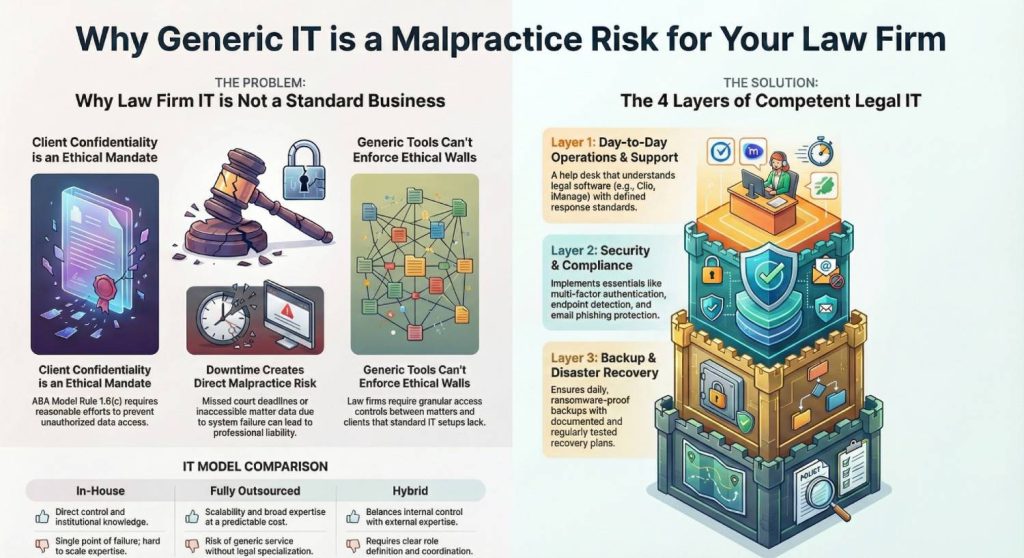
The most important difference is client confidentiality. For a law firm, protecting client information is not just good business practice. It is an ethical duty. ABA Model Rule 1.6(c) requires attorneys to make reasonable efforts to prevent unauthorized access to or disclosure of client information. That obligation applies regardless of firm size.
When systems fail or data is compromised, the fallout is not limited to IT cleanup. Breaches can trigger:
- Client notification requirements
- Loss of trust
- Malpractice exposure
- Bar complaints.
Increasingly, corporate clients also require law firms to complete detailed security questionnaires before work begins. Firms that cannot demonstrate basic controls like access management, encryption, and incident response often lose work before a single billable hour is logged.
Downtime carries its own form of risk. Law firms operate on hard deadlines that do not move because a server is down or a VPN stops working. Court e-filing systems, discovery deadlines, and transactional closings all assume continuous access to matter data and documents. When systems are unavailable, missed deadlines quickly turn into professional liability issues. In this environment, uptime is not a convenience. It is a requirement for practicing law responsibly.
Legal workflows also place unique demands on IT systems.
Practice management systems, document management systems, time and billing platforms, e-discovery tools, and court filing portals must work together reliably.
Access controls are more complex than in most small businesses because firms must enforce ethical walls between matters, teams, and clients. A generic file server or shared cloud folder structure is not built for this level of granularity and oversight.
Remote and hybrid work have only amplified these challenges. Attorneys now expect secure access to matter data from home offices, client sites, and courtrooms. That access must be fast, reliable, and defensible from a security standpoint. Consumer VPNs, shared credentials, or ad hoc remote desktop setups are no longer acceptable.
Secure remote access for law firms is now a baseline requirement, not a perk.
Common IT mistakes in small law firms
Despite these realities, many small firms continue to operate with setups that are objectively risky.
One common scenario is relying on “a friend’s IT guy” to maintain a single office server with little documentation and no tested backups. When that server fails or is hit with ransomware, firms often discover too late that backups are incomplete, outdated, or unusable.
Another frequent issue is the use of consumer file-sharing tools in place of a proper document management system. Without matter-based permissions, audit trails, and ethical walls, firms expose themselves to accidental disclosure and access violations that are difficult to defend if questioned by a client or bar authority.
Weak access controls are also widespread. Shared passwords, lack of multi-factor authentication, and unmanaged devices make it easy for attackers to gain a foothold. These are not edge cases. They are some of the most common entry points in law firm breaches.
Finally, many firms have no formal incident response plan or written security policy. When something goes wrong, decisions are made under pressure, without clear roles, escalation paths, or documentation. From a professional responsibility perspective, that lack of preparation is hard to justify.
These mistakes persist not because firms are careless, but because they are working with IT support models that were never designed for the legal sector. Understanding that distinction is the first step toward building an IT environment that actually supports how your firm practices law.
What “IT Support for Law Firms” Should Actually Include
At its core, IT support for law firms means far more than fixing computers when something breaks.
It is the combination of operational support, security controls, recovery planning, and ongoing governance required to keep attorneys productive, client data protected, and the firm operating within ethical and professional expectations.
When done correctly, legal IT support is structured in layers. Each layer addresses a different type of risk, and skipping any one of them creates exposure that eventually shows up as downtime, security incidents, or lost business.
What IT Support for Law Firms Should Actually Include
| IT Support Layer | What It Covers | Why It Matters for Law Firms |
|---|---|---|
| Day-to-Day Support and Operations | Extended-hours or 24/7 help desk, defined response and resolution standards, and direct support for legal software like Clio, MyCase, PracticePanther, iManage, NetDocuments, and Worldox. | Downtime directly impacts billable hours and filing deadlines. Law firm IT support must understand legal workflows, not just general Windows or email issues. Slow response turns minor issues into malpractice risk. |
| Security and Compliance | Multi-factor authentication on all key systems, endpoint detection and response, email phishing protection, regular patching, role-based access, ethical walls, and basic logging with audit trails. | Cybersecurity for law firms is an ethical duty under ABA Model Rule 1.6(c). This is the minimum viable security stack required to safeguard client data and respond credibly to client or bar inquiries. |
| Backup and Disaster Recovery | Daily encrypted backups, offline or immutable backups to resist ransomware, documented recovery objectives, and regular restore testing. | Law firm data backup and disaster recovery determines whether a firm is down for hours or weeks. Untested backups fail when they are needed most, often after ransomware or hardware failure. |
| Strategy and Governance | Technology roadmap and budgeting, written policies (acceptable use, devices, onboarding and offboarding), and support for client security questionnaires and audits. | Without governance, firms stay reactive. Clients, insurers, and regulators increasingly expect documented controls and clear ownership of IT and security decisions. |
These layers are not optional add-ons. Together, they define what competent law firm IT support services look like in 2026. Firms that underinvest in any one layer usually experience failures in the others.
Generic MSPs often deliver support but fall short on legal compliance, ethical walls, and audit readiness. Managed IT services for law firms should be evaluated on how well they deliver across all four layers, not just help desk responsiveness.
Minimum Viable IT Stack for Small Law Firms (1–10 Attorneys)
For small law firms, IT does not need to be advanced. It needs to be reliable, secure, and defensible. A five- or six-attorney practice does not require enterprise complexity, but it does require a baseline IT stack that protects client data, supports daily legal work, and recovers quickly from disruption.
Think of this as the floor. Operating below it introduces avoidable risk. You can add sophistication later as the firm grows.
Core tools and platforms
Small law firms should standardize on a defined set of legal tools. Ad hoc mixes of free apps, legacy software, and local file storage are a common source of instability and data security issues.
At a minimum, your firm should use a modern practice management system built for legal workflows. Platforms such as Clio, MyCase, PracticePanther, and Smokeball centralize matters, calendars, tasks, and billing, reducing reliance on spreadsheets and disconnected systems that are difficult to secure.
Document management is equally critical. Client files should live in a system that supports permissions, version control, and audit trails. Legal document management systems like iManage, NetDocuments, or Worldox are designed for this purpose. In very small firms, SharePoint can work, but only when matter structures and permissions are enforced consistently.
Many firms choose to run these systems in a secure, cloud-based workspace such as VeritSpace, which is designed to provide consistent performance, centralized access, and built-in security without relying on on-prem servers or fragile VPN setups.
Email security cannot be treated casually. Secure email with advanced phishing protection is essential, as email remains one of the most common attack vectors for law firms. Secure e-signature tools and client portals further reduce the risk of sending sensitive documents via email.
Collaboration tools such as Microsoft Teams or Zoom are now standard, but they must be configured securely. Default settings often favor convenience over confidentiality, which can expose meetings, chats, and shared files if left unmanaged.
Security and infrastructure essentials
Below this point, risk rises quickly. You should not go below this baseline:
| Baseline Requirement | Why It Matters |
|---|---|
| Multi-factor authentication on all systems handling client data | Prevents credential-based attacks, the most common breach method |
| Endpoint detection and response on all devices | Detects and contains threats missed by traditional antivirus |
| Centralized patching and updates | Closes known vulnerabilities before they are exploited |
| Full device encryption for laptops and mobile devices | Protects data if a device is lost or stolen |
| Daily backups with at least 30 days retention | Ensures recent data can be recovered |
| Immutable or offline backups | Prevents ransomware from destroying backups |
| Tested disaster recovery runbooks | Confirms systems can actually be restored under pressure |
| Secure remote access designed for business use | Supports hybrid work without relying on consumer tools |
This baseline supports both your ethical duty to safeguard client information and your need to stay operational. Firms that skip these controls are not saving money. They are deferring risk.
Many law firms choose to implement this baseline through structured offerings such as VeritGuard managed IT services, which consolidate endpoint protection, access controls, monitoring, and compliance-ready documentation into a single, continuously managed security layer rather than piecemeal tools.
What this looks like in practice
Consider a six-lawyer firm with one office and several attorneys working remotely part of the week. A “good enough” IT stack would include a cloud-based practice management system, a document management platform with matter-based permissions, secure email with phishing protection, and standardized laptops managed centrally.
Every device would use multi-factor authentication, be encrypted, and run endpoint detection software. Backups would run daily and be stored in a ransomware-resistant format. Remote access would be secure and consistent, allowing attorneys to work from anywhere without shared passwords or consumer remote desktop tools.
Compare this to the more common alternative: a single server in a closet, managed informally, with untested backups and improvised remote access. Both environments may function on a good day. Only one is designed to survive a bad one.
If this baseline feels stricter than your current setup, that usually reflects how much expectations for IT support for small law firms have changed. Meeting this minimum standard is not overengineering. It is what responsible, modern legal practice now requires.
How IT Needs Change for Mid-Sized Law Firms (10–50+ Attorneys)
Once a firm grows beyond a handful of attorneys, IT stops being a background function and becomes a structural dependency. What worked for a five-lawyer practice often breaks under the weight of more people, more matters, and higher external scrutiny. For mid-sized law firms, complexity increases quickly and unevenly, which is why this stage is where many firms experience their most painful IT failures.
Client expectations also change at this size. Mid-sized firms are far more likely to work with corporate clients that require detailed security questionnaires before engagement and periodic reassessments afterward. These questionnaires are not theoretical. They ask about access controls, incident response, backup practices, vendor oversight, and employee training. Firms that cannot answer confidently often lose work or face uncomfortable follow-up questions.
Technology sprawl is another defining challenge. Practice management, document management, billing, CRM, phone systems, and e-discovery tools must integrate cleanly to support efficient workflows.
When these systems are stitched together without a coherent plan, performance issues, data inconsistencies, and security blind spots become common. At this stage, IT problems are no longer isolated annoyances. They ripple across departments and offices.
Additional requirements at this size
Mid-sized firms need to formalize capabilities that smaller practices can sometimes manage informally.
1. Centralized identity and access management becomes essential
User accounts, permissions, and authentication must be controlled consistently across all systems to reduce the risk of unauthorized access and simplify onboarding and offboarding.
2. Network design also needs to mature.
More sophisticated segmentation is required to separate offices, departments, and sensitive systems while still allowing attorneys to work efficiently. Ethical walls must be enforced systematically, not left to informal file structures or honor systems.
3. Device management is another area where gaps become costly.
Laptops, desktops, and mobile devices must be tracked throughout their lifecycle, from provisioning to secure decommissioning. Without this discipline, lost devices, outdated software, and unmanaged endpoints accumulate risk quickly.
4. Security programs must also move from implicit to documented.
Mid-sized firms are increasingly expected to maintain written policies, conduct regular reviews, and demonstrate that controls are actually enforced. This does not mean turning into a large enterprise, but it does mean being able to show that security is intentional and auditable.
5. Performance expectations rise across offices.
Attorneys expect consistent access to systems regardless of location. Slow document access or unreliable remote connections in one office undermine productivity firm-wide. At this scale, infrastructure, support, security, and strategy all become interdependent layers. Underfunding any one of them creates strain on the others.
In-House vs Outsourced vs Hybrid IT: Which Model Fits Your Firm
There is no single “right” IT support model for every law firm. What is consistently risky, however, is avoiding the decision altogether. Firms that drift into a model by default rather than by design often end up with unclear accountability, underfunded security, and avoidable downtime.
The right approach depends on firm size, risk tolerance, budget, and internal expertise. What matters most is that responsibilities are clearly defined and actively managed, regardless of who is doing the work.
Comparing common IT support models for law firms
| Factor | In-House IT | Fully Outsourced MSP | Hybrid Model |
|---|---|---|---|
| Who handles day-to-day support | Internal IT staff member or small team | External managed service provider | MSP handles most support; internal IT coordinator manages priorities |
| Who owns security and compliance | Often unclear or split across roles | Typically shared, varies by provider | Clearly defined between internal owner and specialized MSP |
| Typical monthly cost profile | High fixed cost (salary, benefits, coverage gaps) | Predictable monthly fee | Moderate and more flexible |
| Pros | Direct control, institutional knowledge | Scalability, broad expertise, predictable costs | Balance of control, expertise, and scalability |
| Cons | Single point of failure, limited coverage, hard to scale | Risk of generic service, limited legal specialization | Requires coordination and clear role definition |
In-house IT can work for firms with sufficient scale and the ability to attract experienced staff. The challenge is coverage and depth. One or two internal IT professionals cannot realistically provide 24/7 support, deep security expertise, and strategic planning without burnout or gaps. When that person is unavailable, the firm often has no safety net.
Fully outsourced IT appeals to small firms that want simplicity and predictable costs. The risk here is provider quality. Many managed service providers are generalists. If they do not understand legal software, ethical walls, or bar expectations, firms may get responsive support without meaningful protection.
Some firms choose fully outsourced models delivered through comprehensive offerings like VeritComplete, which combine day-to-day support, security management, infrastructure oversight, and governance under a single, clearly accountable IT partner.
For many mid-sized firms, the hybrid model becomes the most practical option. This typically means having one internal IT coordinator or administrator who understands the firm’s workflows and priorities, paired with a specialized managed IT provider for law firms that delivers round-the-clock support, security tooling, and strategic guidance. This structure avoids the single point of failure problem while maintaining internal oversight.
How to Evaluate an IT Support Provider for Your Law Firm
Choosing an IT support provider is one of the most consequential operational decisions a law firm makes.
The wrong choice rarely fails immediately. Instead, problems surface during outages, security incidents, audits, or client reviews, when it is too late to change course quickly. This is why evaluation needs to be structured, specific, and grounded in legal reality rather than marketing claims.
A capable legal IT support provider should be able to answer detailed questions clearly and without deflection. Vague reassurances are a warning sign. The goal is not to find perfection, but to confirm that the provider understands your risk profile and has systems in place to manage it.
Non-negotiable criteria
Any provider you consider should be prepared to answer the following questions directly.
- How many law firms do you currently support, and what sizes are they?
- Which legal applications do you support day-to-day, including practice management and document management systems?
- Can you explain how your services align with ABA Model Rules, particularly Rule 1.6(c), and relevant state bar guidance on cloud computing and cybersecurity?
- What are your documented response-time commitments, and what does your actual performance look like in practice?
- Are you SOC 2 audited or able to demonstrate equivalent controls and oversight?
- How do you design, manage, and test backups, and how often are restore tests performed?
- What is your incident response process, and who leads it if there is a security event?
- How do you help firms complete client security questionnaires or respond to audit requests?
- What does onboarding and offboarding look like for attorneys and staff, and how quickly are access changes enforced?
- How do you handle device management and secure remote access for hybrid work?
- How is responsibility divided between your team and the firm when it comes to security and compliance decisions?
- How is pricing structured, whether per user, per device, or another model, and what is included versus billed separately?
Strong providers can answer these questions with specifics and evidence. For example, firms often look for documented uptime and response metrics rather than best-effort promises. A long-term record of high availability, such as maintaining 100 percent uptime over multiple years, signals operational maturity. Clearly defined response standards, including sub-60-second initial responses, indicate an understanding of how disruptive even small delays can be in legal work.
What Does IT Support Cost for Small and Mid-Sized Law Firms?
Cost is usually the first question law firms ask about IT support, but it is often framed the wrong way. IT support for law firms is not a commodity service. Pricing reflects the level of security, uptime, and accountability built into the environment, not just how many devices are being supported.
Most providers offering managed IT services for law firms price their services per user or per device. For small and mid-sized practices, this typically starts around $75 to $150 per device per month, depending on firm size, infrastructure complexity, and security requirements. Firms with multiple offices, remote attorneys, or higher client security expectations should expect costs to be higher.
Several factors drive pricing differences. Advanced cybersecurity for law firms such as endpoint detection and response, phishing protection, immutable backups, and monitored disaster recovery increases monthly spend but materially reduces risk. Environments that require consistent performance across offices or secure remote access for hybrid teams also require more robust IT management.
Looking only at the monthly fee misses the bigger picture. Downtime and breaches are far more expensive than managed IT support. A single day of system unavailability can exceed a year of IT costs through lost billable time, delayed filings, and emergency remediation. Security incidents add client notification costs, reputational damage, and potential malpractice exposure.
For this reason, many firms now view IT support as both an insurance layer and a productivity investment. Predictable monthly costs replace emergency spending, while reliable systems keep attorneys working and client data protected.
The right question is not whether an IT provider is the cheapest option. It is whether their law firm IT support services meaningfully reduce operational, ethical, and security risk while supporting how your firm actually works.
Implementation Roadmap: From Fragile IT to Reliable Support
Modernizing IT support does not require a long, disruptive overhaul. Most small and mid-sized law firms can materially reduce risk within 60 to 90 days by following a structured approach. The greater risk is maintaining the status quo when known weaknesses exist.
A Practical 60–90 Day Roadmap to Improve
| Step | What to Do | Why It Matters |
|---|---|---|
| 1. Document all systems, users, devices, and vendors that access firm data | Document systems, users, devices, cloud services, and current IT providers. Map who accesses what and from where. | Hidden complexity creates security gaps and slows support. You cannot protect or improve what you have not documented. |
| 2. Identify critical risks | Flag single points of failure such as one server, untested backups, no MFA, shared passwords, or no incident response plan. | These risks lead directly to downtime, data loss, and ethical exposure. They should be addressed first. |
| 3. Shortlist legal IT specialists | Identify two to three providers with experience in law firm IT support and legal software. | Generic MSPs often miss legal-specific requirements around confidentiality and workflows. |
| 4. Run structured evaluations | Use a consistent question set to compare response times, security controls, backups, and compliance support. | This keeps decisions grounded in substance rather than sales messaging. |
| 5. Roll out in phases | Start with one office, practice group, or subset of users where possible. | Phased rollouts reduce disruption and surface issues early. |
| 6. Document ownership and policies | Formalize security policies, onboarding and offboarding, incident response roles, and budgeting responsibility. | Documentation prevents regression and supports audits, insurance, and client inquiries. |
This roadmap applies even if your firm does not change providers immediately. Leaving obvious weaknesses unaddressed is rarely defensible in modern legal practice. Moving from fragile IT to reliable, security-first IT support is not an optimization exercise. It is part of protecting your clients and your firm.
When Verito Is a Good Fit for Your Law Firm
Not every law firm needs the same type of IT partner. The right fit depends on firm size, risk tolerance, client expectations, and how much operational responsibility you want to carry internally. The checklist below is designed to help you quickly assess whether Verito’s approach to managed IT support aligns with your firm’s current needs and direction.
Checklist: Is Verito the Right Managed IT Partner for Your Law Firm?
Firm profile and operating model
- Your firm has 1–50 attorneys and prefers not to manage IT in-house
- You want to offload both day-to-day IT support and security to a specialist
- You are moving away from reactive, break-fix IT toward predictable operations
Security, compliance, and external pressure
- Clients, insurers, or partners are requesting evidence of cybersecurity controls
- You need support with client security questionnaires or audit responses
- You want IT support that understands ABA Model Rules and state bar guidance
Infrastructure and reliability needs
- Your firm is experiencing VPN issues, downtime, or aging on-prem servers
- You are looking for a cloud-first environment built for availability and remote work
- Fast response times matter because downtime directly impacts billable hours
Legal technology and workflow support
- Your firm relies on legal platforms such as Clio, MyCase, PracticePanther, iManage, NetDocuments, or Worldox
- You need matter-based access controls and ethical walls supported at the system level
What you expect from an IT partner
- You value documented uptime and response standards, not best-effort support
- You want real human support with fast response times, not ticket queues
- You prefer one accountable partner for managed IT, hosting, and security governance
Long-term mindset
- You treat IT as a risk management and productivity function, not a commodity cost
- You want ongoing help with policies, documentation, and governance, not just troubleshooting
For firms evaluating whether their current setup truly meets the standards outlined in this guide, a structured review can be more useful than another sales conversation. If you want to see exactly how your current setup compares to what we have outlined here, schedule a free security and IT assessment for your law firm through Verito’s managed IT support for law firms page. This kind of review is designed to highlight gaps and priorities, not force a particular outcome.
Closing Thoughts: Choosing IT Support That Matches Legal Reality
For small and mid-sized law firms, IT support is no longer a background function that can be improvised over time. It directly affects client confidentiality, attorney productivity, and the firm’s ability to meet ethical and professional expectations. Fragile systems and generic IT support create risks that are increasingly difficult to defend in today’s legal and regulatory environment.
The firms that operate with confidence are not chasing the newest tools. They are setting a clear baseline, assigning responsibility, and working with IT partners that understand how legal practices actually function. Whether you choose Verito or another specialized provider, the critical step is moving away from reactive, patchwork IT toward reliable, security-first support.
If this guide helped clarify what good IT support for law firms should look like in 2026, the next step is simple: review where your current setup falls short and address those gaps deliberately. The cost of inaction is rarely visible at first, but it tends to surface at the worst possible moment.
FAQ: Straight Answers for Law-Firm IT Questions
1. What does IT support for law firms include?
IT support for law firms covers day-to-day technical support, security controls, backup and disaster recovery, and ongoing governance. It also includes support for legal-specific systems like practice management, document management, and secure remote access. Done properly, it is designed to protect client data and keep attorneys working through disruptions, not just fix devices.
2. Should my small law firm outsource IT or hire an in-house IT person?
For most small firms, outsourcing is the safer choice. A single in-house IT hire rarely provides 24/7 coverage, deep security expertise, and strategic planning at the same time. Outsourced or hybrid models typically reduce risk by spreading responsibility across a team rather than relying on one individual.
3. How much should a 10-lawyer firm budget for IT and security?
A 10-lawyer firm should expect to budget a predictable monthly amount, often aligned with per-user or per-device pricing used by specialized legal IT providers. As a rough benchmark, firms commonly spend within a range that reflects security tooling, backup, and extended support rather than bare-bones help desk coverage. Spending less often means accepting higher downtime and breach risk.
4. What are the cybersecurity requirements for law firms under ABA rules?
The ABA does not publish a fixed checklist, but Model Rule 1.6(c) requires reasonable efforts to safeguard client information. In practice, this means firms are expected to use access controls, encryption, secure remote access, and incident response planning appropriate to their size and risk profile. Claiming ignorance or relying on outdated systems is not a strong defense.
5. How can I tell if my current IT provider is putting my firm at risk?
Warning signs include unclear response-time commitments, lack of multi-factor authentication, untested backups, shared passwords, and vague answers about incident response. If your provider cannot explain how they support ethical obligations or help with client security questionnaires, risk is likely being pushed back onto your firm.
6. Do solo attorneys really need managed IT services?
Solo attorneys face the same ethical obligations as larger firms, even if their environments are simpler. While the scope may be smaller, basics like secure email, backups, encryption, and reliable support are still required. Managed IT services often provide these controls more consistently than piecemeal or do-it-yourself setups.
TL;DR
- A clear checklist of questions to use when evaluating legal IT providers
- What effective IT support for law firms actually includes beyond basic help desk coverage
- The minimum viable security and reliability stack every small firm should have
- How IT needs change as firms grow from under 10 attorneys to 25 or 50
- A practical comparison of in-house, outsourced, and hybrid IT support models