If you run a tax or accounting firm, you might be used to employees calling asking why they received a W-2 every January.
Every time you onboard a new hire, someone asks whether they need to “submit a W-2 now.” And every filing season, at least one client mixes up withholding rules because they confused a W-4 with a W-2.
These mix-ups are not harmless. A wrong W-4 can lead to inaccurate withholding, confused employees, or an unexpected tax bill. A flawed W-2 can trigger IRS mismatch notices, create filing delays, or force you to issue W-2c corrections.
For small and mid-sized firms that manage hundreds of employee records, these issues add unnecessary administrative work and avoidable risk. Your employees and clients are not at fault.
The naming is similar.
The IRS is involved in both.
And most people only see these forms occasionally, making it hard to connect which one they complete and which one they receive.
This guide is designed to eliminate that confusion once and for all.
You will get a clear, practical explanation of W-2 vs W-4 from an employer and accounting firm perspective. You will see how each form fits into the payroll lifecycle, how to explain the difference in simple terms, and how to answer employee questions without crossing into personal tax advice. You will also understand the security and compliance responsibilities tied to these forms and why reliable, compliant infrastructure is essential when handling payroll data.
By the end of this article, you will be able to walk employees or clients through each form with confidence, and know what controls your firm needs in place to protect W-2 and W-4 data.
Table of Contents Show
tl;dr
- W-4 is completed by the employee during onboarding or when there is a slight change in their revenue source apart from their primary income. W-2 is created by the employer at year end.
- W-4 instructs how much federal income tax to withhold each paycheck. W-2 reports total wages and taxes withheld for the year.
- Most instances of confusion among employees comes from timing of the form submissions, similar form names, and limited visibility into payroll systems.
- Employers must collect, enter, store, and secure W-4s correctly and issue accurate W-2s by January.
- W-2 and W-4 data requires strict security controls due to SSNs, addresses, and wage information.
- IRS Publication 4557, FTC Safeguards, MFA, encryption, and WISP requirements apply to firms handling payroll data.
- Firms experiencing W-2 corrections, system slowdowns, or access issues should review their IT stack and consider dedicated hosting.
W-2 vs W-4 Overview
The easiest way to explain W-2 vs W-4 is:
Form W-4 is filled by the employee during onboarding and tells the employer how much federal income tax to withhold from each paycheck. Form W-2 is filled by the employer and reports the wages paid and taxes withheld for the year.
W-4:
Controls the tax withholding during the year, is completed by the employee, given to the employer, and used to calculate how much federal income tax to withhold from each paycheck.
W-2:
Prepared by the employer at year end, sent to the employee and the Social Security Administration, and used to file the employee’s tax return.
There are various other forms similar to the W-2 and W-4, namely the W-9. You can read more about it here: A Complete Guide to IRS Form W-9
What Is IRS Form W-4? (Employee’s Withholding Certificate)
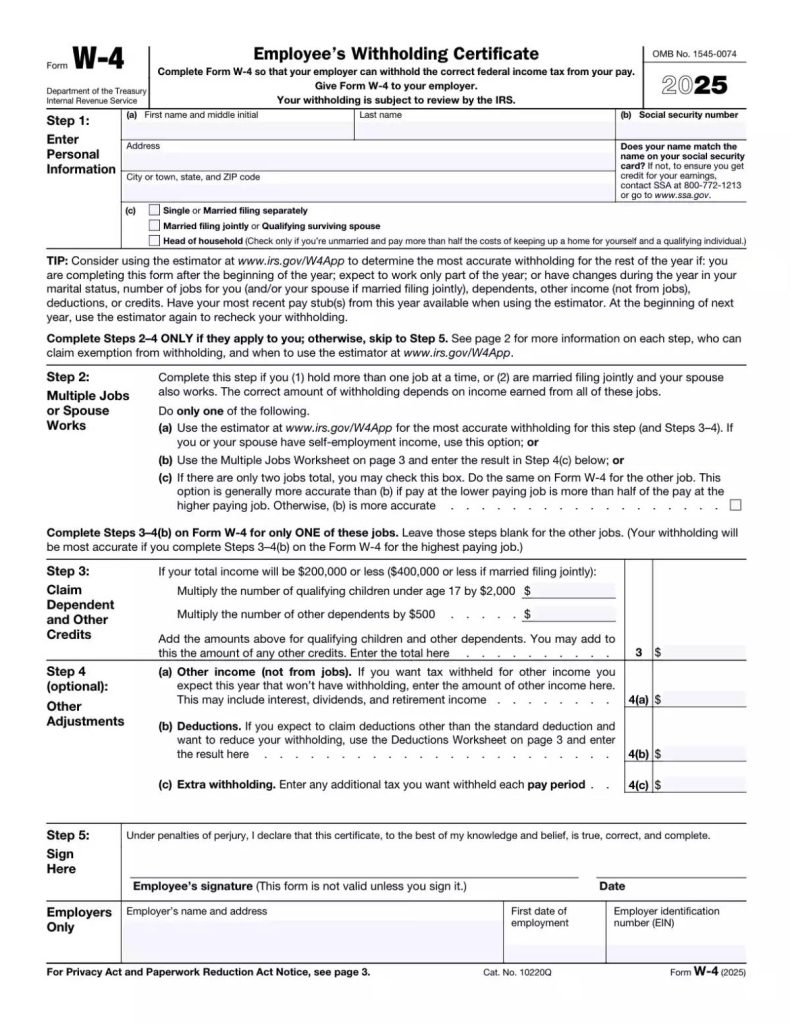
Form W-4 is the document employees use to tell their employer how much federal income tax to withhold from each paycheck. It does not get filed with the IRS. Instead, it stays in your payroll system and directly influences each pay cycle’s withholding calculation.
Employees complete a W-4 when they start a job, and they should update it anytime their financial or household situation changes. Marriage, divorce, a new child, a second job, or a spouse’s change in income all affect withholding accuracy. If employees do not update their W-4 after major changes, their paycheck withholding will no longer reflect their real tax position, which often leads to surprise balances due or unexpected refunds at filing time.
For employers, the W-4 is an operational form. It feeds data straight into the payroll system, where the withholding logic uses the employee’s filing status, dependents, and any extra withholding elections to determine the correct amount to withhold. This means payroll teams must enter the form accurately and verify that the data flows correctly into each payroll run.
A W-4 is not a year end form, and it is not a tax return document. Its sole purpose is to direct withholding. Since it instructs how much tax comes out of every paycheck, accuracy matters not just for compliance but for employee trust.
How W-4 Works Inside a Payroll System
From the employer’s perspective, the W-4 becomes a set of data points used in the gross-to-net calculation. Once the form is entered:
- The payroll system reads the filing status the employee selected.
- Dependent and credit details determine any allowable withholding reductions.
- The system applies the IRS withholding tables based on the information provided.
- Any additional flat-dollar withholding requested by the employee is added.
- The resulting calculation becomes the federal income tax withheld each pay period.
If an employee has multiple jobs, or their spouse also works, the withholding logic becomes more sensitive. Incorrect entries commonly cause under-withholding, which is why employees with multi-income households are advised to update their W-4 annually or whenever circumstances shift.
Since payroll software applies W-4 instructions automatically, even a small data entry error during onboarding can cause months of incorrect withholding. This is why firms should have a second-review process for new hire W-4 entries and any mid-year updates.
What Clients Usually Get Wrong About W-4
Employees and even some small business owners often misunderstand what the W-4 actually does. The most common misconceptions include:
- Believing the W-4 is a one-time document.
Many employees never revisit their W-4 after onboarding, even when their life circumstances change. - Thinking the W-4 is a refund request.
Some employees treat the W-4 as a tool to influence their tax refund instead of understanding it directs paycheck withholding. - Assuming employers can tell them what to select.
Employers cannot legally give personalized tax advice. They can explain how the form works but not what the employee should choose. - Confusing withholding with actual tax liability.
An employee may have the correct withholding but still owe tax due to other income sources or deductions. - Not realizing multiple jobs change withholding needs.
When spouses work or when an employee has a side job, the IRS withholding estimator or an updated W-4 becomes essential.
These misunderstandings are predictable, and they are one of the main reasons employees ask the same W-2 vs W-4 questions every year.
To go deeper into the W-4 itself, firms can refer employees to the complete guide to IRS Form W-4.
What Is IRS Form W-2? (Wage and Tax Statement)
Form W-2 is the annual wage and tax statement employers must prepare for each employee. Unlike the W-4, which employees complete, the W-2 is entirely the employer’s responsibility. It summarizes a full year of payroll activity and shows:
- Total taxable wages paid.
- Federal income tax withheld.
- Social Security and Medicare wages and withholding.
- State and local income tax withholding, if applicable.
- Any retirement plan contributions, dependent care benefits, or other reportable items.
Every W-2 must accurately reflect what was processed through payroll during the prior calendar year. Employers must provide W-2s to employees by the January deadline and send copies to the Social Security Administration. The IRS receives the same data through connected filings, which it later uses to validate employee tax returns.
This form is the employee’s primary tax document. If a W-2 is incorrect, their individual return will not match IRS records, and the employee may face delays or notices. This is why accurate year end reconciliation is so important for employers and payroll teams.
Understanding Key W-2 Boxes (High-Level Rundown)
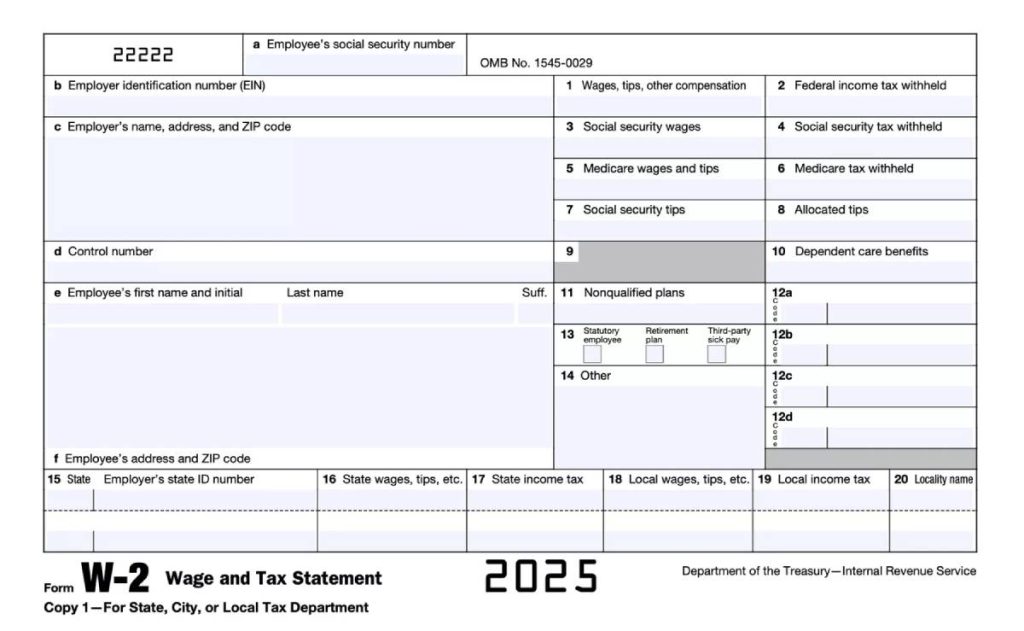
You do not need to give employees tax advice, but you should understand the major boxes on the W-2 and how they relate to payroll data:
- Box 1 – Wages, tips, and other compensation
This reflects taxable wages, which differ from Social Security wages if the employee contributed to certain pre-tax plans. - Box 2 – Federal income tax withheld
This amount must align with what your payroll system withheld based on the employee’s W-4. - Boxes 3 and 4 – Social Security wages and tax withheld
These follow distinct limits and sometimes differ from Box 1 due to pre-tax deductions. - Boxes 5 and 6 – Medicare wages and tax withheld
These have no wage cap and often match or exceed Social Security wages. - Boxes 12 and 14 – Additional codes and reportable benefits
Retirement plan contributions, fringe benefits, and other employer-provided items. - State and local boxes
This reflects withholding and wages for multi-state employees, which are often a source of errors.
Understanding how these fields connect to payroll records makes it easier to reconcile data before issuing W-2s.
Why Avoiding Small Errors on W-2 Forms Matter
Even minor W-2 mistakes can create significant downstream problems:
- Incorrect Social Security numbers or names lead to SSA mismatches.
- Wrong withholding amounts force employees to adjust their tax returns.
- Incorrect wage totals may require the employer to issue a W-2c, which creates extra administrative work.
- State and local errors can cause filing rejections and delay employees’ refunds.
- Mismatches between W-4 withholding instructions and actual payroll entries often trigger IRS notices.
Most of these issues stem from onboarding data errors or W-4 information that was not updated in payroll. This is why firms must have structured data validation processes and secure, consistent systems for managing payroll workflows.
W-2 vs W-4: Side by Side Comparison
Before diving deeper into employer responsibilities and common client questions, it helps to see W-2 and W-4 differences in a clear, operational table. Each form serves a different purpose, occurs at a different stage of the payroll cycle, and carries different compliance obligations.
Here is a side by side comparison of Form W-2 and Form W-4:
| Category | Form W-4 | Form W-2 |
|---|---|---|
| Who completes it | Employee | Employer |
| When is it completed or issued | During onboarding; when personal or financial circumstances change | Once a year for the prior tax year |
| Primary purpose | Instructs employer how much federal income tax to withhold from each paycheck | Reports total wages and taxes withheld for the year |
| Where it goes | Stored in employer payroll files; not filed with IRS | Sent to employee and SSA; IRS receives data via filings |
| What information it affects | Filing status, dependents, optional additional withholding, multi job adjustments | Wages, federal withholding, Social Security, Medicare, state and local withholding |
| How it impacts payroll | Drives each pay period’s withholding calculation | Must match annual totals recorded in payroll ledger |
| Sensitivity level | Contains SSN and personal identifiers | Contains SSN, income, address, withholding details |
| What can go wrong | Incorrect withholding for months; under or over withholding; errors from outdated forms | IRS mismatch notices; delayed refunds; need for W-2c corrections |
| Auditor focus points | Whether W-4s are collected, stored securely, and updated appropriately | Whether W-2 totals reconcile to payroll; accuracy of SSNs and wages |
| Systems that store it | Payroll system; HRIS; secure document management | Payroll system; year end reporting module; secure storage and backups |
This table is a great way to clarify the difference for business owners and employees. The W-4 controls what happens during the year. The W-2 summarizes what happened after the year is over. That distinction alone removes most of the confusion people struggle with.
W-2 vs W-4 for Employers and Tax Firms
Understanding the difference between these two forms is one part of the job. Knowing exactly what your firm is responsible for, how the forms flow through payroll systems, and what regulators expect is where operational clarity matters.
This table breaks down employer obligations and the role accounting and tax firms play in keeping payroll accurate and compliant:
| Category | Responsibilities | Details |
|---|---|---|
| Employer Responsibilities | Collect W-4 during onboarding | Ensure each W-4 is complete, legible, signed, and collected from every new hire, even if they claim to have a previous form. |
| Enter W-4 data accurately | Filing status, dependents, and extra withholding must be entered with precision. Small entry errors cause long-term withholding problems. | |
| Encourage updates when needed | Employers cannot force changes, but they must make updates available and remind employees after life events like marriage or dependents. | |
| Store W-4s securely | Forms contain SSNs and identity data. They must be stored in secure systems with restricted access, not desktops or shared folders. | |
| Apply W-4 data to payroll | Payroll systems must follow IRS withholding tables correctly for each pay period using W-4 instructions. | |
| Issue W-2s on time | Employers must generate accurate W-2s for every employee and deliver them by the January deadline. | |
| Reconcile payroll before issuing W-2s | Annual wage totals must match W-2 outputs. Inaccuracies trigger W-2c corrections and potential IRS mismatches. | |
| Maintain required records | Employers must retain W-4s and related payroll documentation for audit and compliance periods. Standards apply regardless of company size. | |
| Accounting and Tax Firm Responsibilities | Educate clients on W-4 and withholding | Firms clarify how withholding works, what employers can explain (process only), and how W-4 data flows into the W-2. |
| Review onboarding processes | Firms review whether W-4 collection, entry, and documentation are consistent across client workflows. | |
| Reconcile year end payroll data | Before W-2s are finalized, firms confirm that payroll summaries and W-2 values align accurately. | |
| Handle W-2c corrections | Firms assist in preparing corrected forms when errors arise and guide employers through correction procedures. | |
| Support multi state payroll | Firms ensure W-2 state wages match state filings and address complexities for remote or multi jurisdiction employees. | |
| Train clients on secure handling | Firms advise employers to avoid risky practices like storing W-4s on desktops or emailing forms without encryption. | |
| Provide employee-facing explanations | Firms help employers address employee questions about withholding, W-2 totals, and why tax outcomes differ from expectations. |
Tax firms sit in the middle: they do not complete the forms for employees, but they ensure employers process and handle those forms correctly.
Securing W-2 and W-4 Data: What Firms Often Overlook
W-2 and W-4 forms contain some of the most sensitive information a firm handles: Social Security numbers, home addresses, income details, and withholding data. That makes them prime targets for attackers and a focal point for regulators.
A firm that handles payroll forms for multiple clients is effectively managing a concentrated pool of identity and wage information. This creates both responsibility and exposure. The IRS and FTC expect firms to have specific safeguards in place when storing or transmitting these forms, and failing to meet those requirements can lead to penalties, data breaches, or serious operational disruptions.
Most oversights fall into a few predictable categories:
- Storing W-2 or W-4 PDFs on local desktops or shared office drives.
These locations rarely have strong access controls or encryption and are vulnerable to malware, unauthorized access, or accidental deletion. - Emailing forms without encryption.
Unencrypted email is one of the most common ways sensitive payroll data is leaked. - Lack of multi-factor authentication for remote staff.
Remote logins without MFA create security gaps that attackers can easily exploit. - Limited access logs or monitoring.
Firms often cannot show who accessed payroll documents, which is a required control under several frameworks. - No centralized or compliant storage environment.
When documents are scattered across laptops, office servers, and email inboxes, firms cannot demonstrate adequate protection.
The IRS Publication 4557 and the updated FTC Safeguards Rule make clear that firms must use secure systems with encryption, access controls, MFA, backups, and documented policies.
A written information security plan is also required for many firms, as explained in Verito’s guide on what is a WISP, which outlines how small and mid-sized practices can meet these expectations.
Given the sensitivity of W-2 and W-4 data and the regulatory pressure around it, firms increasingly need infrastructure designed specifically for secure payroll and tax workflows. This is where specialized hosting and managed IT make a measurable difference.
Verito’s infrastructure is built for the tax and accounting industry. It uses SOC 2 Type II certified environments, dedicated private servers, and advanced security controls that keep payroll data isolated and protected. Firms using secure tax software hosting on Verito’s platform benefit from hardened systems, encrypted storage, and environments configured for compliance with IRS Publication 4557 and the FTC Safeguards Rule.
For practices with heavier workloads, dedicated private cloud hosting for tax and accounting firms through VeritSpace ensures applications and documents remain accessible and fast even during January payroll deadlines. Centralized storage, MFA enforcement, and routine monitoring from VeritGuard provide additional protection that firms often lack with in-house systems. With 24/7 managed IT support for tax and accounting firms, staff have expert help whenever an access issue, security alert, or hosting question arises.
W-2 and W-4 data handling is ultimately an IT question as much as a payroll question. A secure hosting environment prevents unauthorized access, keeps documents available during peak season, and supports the written security plans firms must maintain.
For teams handling high volumes of payroll forms, modernizing the IT stack is now a practical necessity rather than a nice-to-have.
When To Revisit Your W-2/W-4 Process and Your IT Stack
Payroll forms tend to expose the weaknesses in a firm’s operational and technology environment. If your team handles W-2 and W-4 data for multiple clients or a growing internal workforce, there are clear signals that it is time to reassess both your workflow and your IT infrastructure.
Firms typically see the following indicators:
- Frequent W-2c filings.
Persistent corrections usually point to inconsistent W-4 entry, unverified onboarding processes, or system errors. - Payroll software slowdowns during filing or payroll deadlines.
January is a pressure test for every accounting and payroll environment. Slow performance usually means local servers or shared hosting cannot handle peak load. - Difficulty retrieving W-4s or payroll documents when needed.
If forms are spread across email, desktops, and outdated servers, audits and year end reviews become harder and riskier. - Security incidents or near misses.
Even one malware alert or compromised workstation is a sign that personal payroll data is exposed to unnecessary risk. - Remote staff struggling with system access.
Multi office teams or hybrid workforces often expose the limits of in-house servers, especially without MFA or secure remote environments. - Growth in headcount or new client accounts straining legacy systems.
More employees or payroll volume magnifies every inefficiency.
Centralizing forms and payroll applications on secure, high-performance hosting solves several issues at once. With dedicated environments such as VeritSpace dedicated servers, payroll applications run more consistently, staff can retrieve forms quickly, and backups are handled systematically instead of ad hoc.
Even the compliance burden becomes more manageable. With 24/7 monitoring, MFA enforcement, and routine patching delivered through managed IT support for tax and accounting firms, practices can demonstrate adherence to the IRS and FTC expectations.
When firms modernize both their process and their hosting environment, W-2 and W-4 management becomes predictable instead of stressful.
Handle W-2 and W-4 Forms With Less Risk and Less Downtime
W-2s and W-4s are simple in theory but unforgiving in practice. One directs paycheck withholding. The other reports annual results. Employers must collect, process, store, and protect both with precision, and tax and accounting firms must help clients navigate the workflow without stepping into personal tax advice.
As your volume of forms grows or your clients’ payroll complexity increases, your underlying systems become just as important as your payroll expertise. If you are already noticing slowdowns during January deadlines, recurring W-2 corrections, or inconsistent access to payroll documents, it may be time to explore a more secure and reliable infrastructure.
Firms using secure tax software hosting centralize payroll documents, safeguard sensitive data, and maintain fast, stable access even during peak season. Practices that need dedicated capacity choose VeritSpace dedicated private cloud hosting for tax and accounting firms, which provides isolated, high-performance environments built for the workflows of W-2 and W-4 processing. When combined with 24/7 managed IT for your firm, monitoring, MFA enforcement, backups, and security controls are handled continuously instead of sporadically.
For firms looking for a unified solution, the all in one hosting and IT bundle through VeritComplete brings hosting, support, and security under one structure. And if you want a clear assessment of where your current environment stands, you can always schedule a free hosting consultation to review your options.
FAQ
1. Do I need to submit a new W-4 every year?
No. Employees only need to submit a new W-4 when their personal or financial situation changes, such as marriage, dependents, or a second job. That said, many employees review their W-4 annually to confirm that their withholding still reflects their current household income and filing situation. Regular reviews help prevent surprises during tax season.
2. What happens if an employee does not submit a W-4?
If a new hire does not provide a W-4, the IRS requires employers to withhold using the default method, which historically meant single with no adjustments. This default often results in withholding that does not match the employee’s actual tax situation. Employers should encourage timely completion of the form to reduce under- or over-withholding and avoid unnecessary corrections later.
3. Can employees change their W-4 during the year?
Yes. Employees can update their W-4 at any time, and employers must apply the new withholding instructions to future paychecks. The update does not apply retroactively to past payroll, so employees who experience major life changes should submit a revised W-4 as soon as possible to keep withholding accurate for the remainder of the year.
4. Why does my tax refund change when I update my W-4?
Updating a W-4 changes how much federal income tax is withheld from each paycheck. It does not change the employee’s overall tax liability for the year. Higher withholding may result in a larger refund, while lower withholding can reduce the refund or create a balance due. Employees who are unsure how a W-4 adjustment will affect their tax position should speak with a qualified tax advisor.
5. What should employees do if their W-2 looks incorrect?
Employees should notify their employer right away. The employer must review payroll records, verify the wage and withholding totals, and correct any issues in the system. If the W-2 is wrong, the employer must issue a corrected W-2c. Addressing errors quickly prevents filing delays and reduces the risk of IRS mismatch notices.
6. How long should employers keep W-4 and payroll records?
Employers typically must keep W-4 forms and related payroll documentation for at least four years. These records may be reviewed during IRS or state audits, so they must be stored securely with proper access controls. Because W-4s contain SSNs and other sensitive data, firms should avoid storing them on local desktops, shared folders, or unprotected systems.
7. Which form do I give a new employee: W-2 or W-4?
New employees complete a W-4 when they are hired so the employer can set up accurate withholding. Employers issue W-2s after the tax year ends to report total wages and taxes withheld. W-4 controls payroll withholding throughout the year; W-2 summarizes the year’s results for tax filing.
Disclaimer:This guide is for educational purposes only. It is not tax, legal, or payroll advice. Employees and employers should consult a qualified tax professional for decisions regarding withholding or tax filing.