A managed IT contract is not a vendor formality. It is the legal document that decides what happens to your firm when systems fail in March, when ransomware hits your backup server, or when you try to leave a provider who has stopped performing.
Most CPA partners sign IT contracts the same way they rush through software EULAs: skim, initial, move on. That works fine until it doesn’t. And when it doesn’t, it fails in ways that are expensive, public, and completely avoidable.
Here’s a real example of what that looks like. A 14-person CPA firm suffered a ransomware incident and discovered their contract had no defined RPO, no language assigning WISP responsibility, and a liability cap of roughly $1,800. Their actual recovery cost exceeded $40,000. None of those gaps surfaced during the sales process. All three would have been visible in a 10-minute contract review.
This guide gives you 25 specific, CPA-focused questions to ask before signing any managed IT services agreement. Not generic MSP questions. Questions built around the realities of tax season downtime, IRS Publication 4557, the FTC Safeguards Rule, cyber insurance requirements, and the specific patterns that get CPA firms burned in IT contracts.
Use it against any draft MSA on your desk. Use it to compare two finalists. Or run the five-minute triage at the end to quickly decide whether a contract deserves deeper review at all.
Table of Contents Show
Why the Contract Matters More Than the Sales Demo
Every MSP sounds the same in a sales meeting. “24/7 support. Proactive monitoring. Enterprise-grade security.”
The contract is where you find out what those words actually mean.
For a CPA firm, the stakes are different than for a typical small business. You hold tax IDs, payroll records, bank details, and complete financial histories for dozens or hundreds of clients in one environment. The IRS explicitly warns in its “Protect Your Clients; Protect Yourself” campaign that cybercriminals are “increasingly targeting the tax preparation community” precisely because of this data concentration. The numbers back that up: reported data breaches at CPA firms increased by over 80% between 2014 and 2023, according to the Identity Theft Resource Center.
The cost of being offline is equally punishing. ITIC’s 2024 Hourly Cost of Downtime research found that SMBs can lose between $8,000 and $25,000 per hour during a critical outage. For a firm billing by the hour in March or April, that number is not abstract, and unlike a retail business, those billable hours don’t come back.
Here is what poorly written IT contracts typically produce in practice:
- “Best effort” SLA language that lets tickets sit for days without technically breaching the agreement
- Uptime “targets” that are aspirational, with no credit or remedy when missed
- Security commitments that reference “industry best practices” without tying anything to IRS 4557 or FTC Safeguards requirements
- Auto-renewal terms that silently lock firms into multi-year contracts with steep early exit penalties
- Surprise invoices for work the firm assumed was covered in the monthly fee
- Painful exits where the outgoing provider drags on documentation and credential handoffs
None of these problems are invisible at signing. All of them are visible with the right questions.
Quick Scan: 5 Contract Themes That Reveal Everything
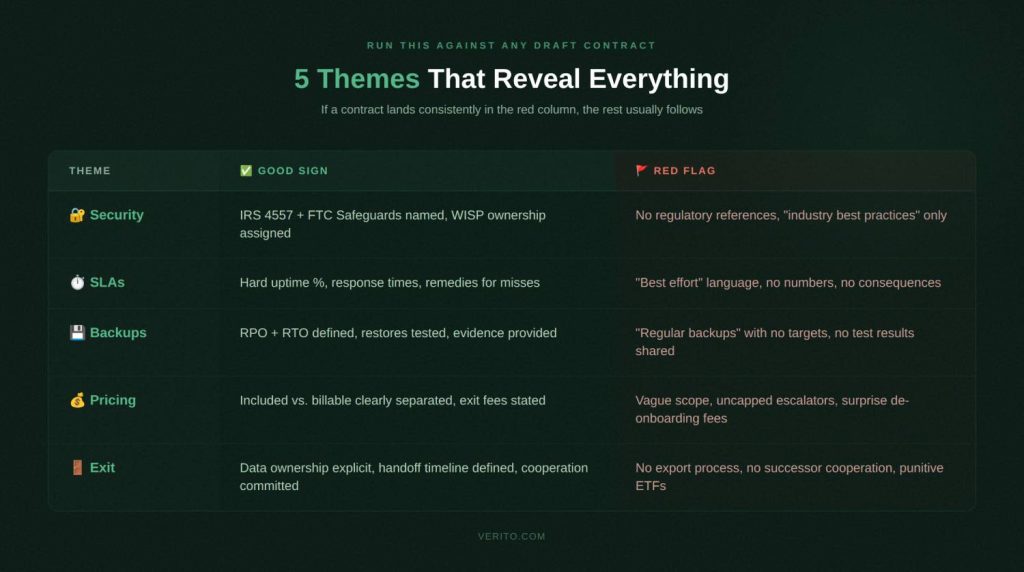
Before diving into all 25 questions, run this table against any draft contract. If a contract lands consistently in the red flag column, the rest of the document usually follows the same pattern.
| Contract Theme | Why It Matters for CPA Firms | Green Flag | Red Flag |
| Security and Compliance | Regulators and insurers need to see who owns which controls | Provider responsibilities mapped to IRS 4557 and FTC Safeguards, written WISP ownership | Generic “best practices,” no mention of IRS, FTC, or a written security plan |
| Uptime and SLAs | Downtime in March directly hits billable work and filing deadlines | Defined response and resolution times, uptime targets with credits if missed | “Best effort” only, no metrics, no remedies |
| Backup and Recovery | Failed restores turn incidents into firm-wide crises | Documented RPO/RTO targets, regular restore tests with written reports | “Backups are taken regularly,” no restore testing, no RPO or RTO defined |
| Scope and Pricing | Vague scope leads to surprise invoices and billing disputes | Detailed list of included services, clear out-of-scope rate card | One-line “managed services” description, broad right to bill extras |
| Term, Renewal, and Exit | Multi-year auto-renewals trap firms with underperforming providers | Reasonable initial term, clear non-automatic renewal, documented offboarding | Auto-renews for years, high termination fees, no offboarding commitments |
Section 1: Security, Compliance, and WISP Obligations
Before you look at price or term length, security is your first stop. This is where CPA firm IT compliance intersects directly with what your contract must say.
The IRS now explicitly states that tax professionals must maintain a current Written Information Security Plan. The FTC Safeguards Rule requires you to oversee third-party service providers — which includes your MSP. And cyber insurers have tightened eligibility requirements significantly: MFA, endpoint detection and response, tested backups, and a documented incident response process are now standard conditions for coverage.
If your MSA doesn’t clearly assign responsibility for these controls, you are effectively self-insuring against the risks your MSP is supposed to be managing.
Question 1: How does this contract guarantee compliance with IRS Publication 4557 and the FTC Safeguards Rule?
Why this matters for CPA firms specifically:
Unlike most small businesses, your firm operates under a defined regulatory framework. IRS Publication 4557 and the FTC Safeguards Rule both require you to implement and document specific safeguards, and to oversee your vendors. Your MSP controls the infrastructure, the backups, and often the identity systems. Their obligations must be written into the agreement, not left to verbal assurances.
The penalties for non-compliance are concrete. FTC Safeguards Rule violations can reach $46,517 per incident. EFIN revocation and civil liability exposure are also on the table.
What good contract language looks like:
- The agreement names IRS Publication 4557 and the FTC Safeguards Rule explicitly and commits to maintaining controls that satisfy both
- A schedule or exhibit assigns specific control categories (access control, encryption, logging, patching, backup) to “Client,” “Provider,” or “Shared”
- The contract includes a process for updating controls when IRS or FTC guidance changes
Red flags to push back on:
- No mention of IRS 4557 or FTC Safeguards anywhere in the document
- Language that makes you solely responsible for compliance even though the MSP controls your infrastructure
- Scope focused on “keeping systems running” with no mention of documented safeguards or regulatory evidence
Question 2: Who owns our Written Information Security Plan (WISP), and where is that documented?
Why this matters for CPA firms specifically:
In 2025, the IRS Security Summit explicitly reminded tax professionals that they “must have a Written Information Security Plan to protect client data.” This isn’t optional guidance, it has legal weight through the FTC Safeguards Rule. Most small firms cannot build and maintain a compliant WISP without their MSP’s involvement, which makes ownership and maintenance a contract issue, not an IT formality.
For a detailed breakdown of what a WISP must include, see Verito’s guide on what a WISP is and what it covers.
What good contract language looks like:
- The contract states the provider will help create and maintain an audit-ready Written Information Security Plan covering your specific environment
- Review frequency is defined at minimum annually or after any material system change
- You receive a copy suitable for presenting to regulators, clients, or cyber insurers
Red flags to push back on:
- WISP treated as a one-time deliverable with no ongoing maintenance commitment
- Provider says WISP is your responsibility alone while managing your infrastructure
- No mention of WISP ownership or review frequency anywhere in the agreement
Question 3: What specific security controls are contractually guaranteed, and how do they map to cyber insurance requirements?
Why this matters for CPA firms specifically:
Cyber insurers now require specific technical controls before issuing or renewing coverage. MFA on email and remote access, endpoint detection and response, encrypted and tested backups, and documented incident response are standard eligibility requirements. If your contract doesn’t lock these in, you may fail to qualify for coverage, or face a denied claim after an incident because the insurer finds the controls weren’t actually in place.
For a full breakdown of what cybersecurity for accounting firms must include at the technical level, Verito’s guide covers the specific controls cyber insurers are checking.
What good contract language looks like:
- Controls listed in plain language: MFA on remote access and email, endpoint detection and response, encrypted backups, defined patch timelines, security awareness training
- The provider can show how these map to SOC 2 standards and common cyber insurance questionnaires
- Critical vulnerability patching has defined remediation windows in the agreement
Red flags to push back on:
- Vague commitments like “enterprise-grade security” with no listed controls in the contract
- No mention of MFA, endpoint protection, or backup testing
- Liability cap of one month’s fees with no carve-out for security incidents involving client data
On liability caps: Standard MSP contracts often cap total liability at one month’s fees. For a firm paying $3,000/month, that’s $3,000 in maximum recovery against a breach that could easily cost $40,000 or more. Negotiate a separate, higher cap for incidents involving client PII or financial records, and require a carve-out for gross negligence.
Question 4: What compliance reports, logs, and evidence will we receive and how often?
Why this matters for CPA firms specifically:
Regulators and cyber insurers don’t just want to know you have controls. They want documented proof. Backup test records, MFA deployment reports, patch status, and incident logs are now routinely requested during insurance underwriting, renewals, and post-incident reviews. Yet MSP clients consistently report difficulty getting basic documentation when they actually need it.
What good contract language looks like:
- A defined reporting cadence: monthly security summaries and quarterly compliance reports. Not “available on request”
- Specific report types listed: backup test results, patching status, MFA coverage statistics, endpoint protection status, incident log with resolution notes
- System and security logs retained for a defined period, available for investigations and audits
Red flags to push back on:
- Reporting described as informal, ad-hoc, or provided only on request
- Provider says you can “export logs yourself” from tools you don’t fully control
- No mention of evidence suitable for regulators, clients, or cyber insurers
Question 5: What incident response commitments are in the contract, including notification timelines?
Why this matters for CPA firms specifically:
Tax professionals face disproportionate cyber risk. The 2024 Verizon DBIR found that 32% of all breaches involved some form of extortion technique, and ransomware was present in 23% of confirmed breaches across all industries. Financially motivated attacks account for nearly two-thirds of all breaches. Small businesses (including tax preparers) were 2.5 times more likely to experience ransomware attacks than larger companies in 2023, according to the Identity Theft Resource Center.
When an incident happens, you have regulatory notification obligations that can’t wait for your MSP to piece together what occurred. Your contract needs to define exactly who does what, and when.
What good contract language looks like:
- The agreement defines what counts as a security incident: ransomware, account compromise, unauthorized server or backup access
- Specific timelines for initial response, investigation, containment, and communication with P1 incidents triggering response in minutes, not hours
- Clear statement of whether the provider assists with regulatory notifications, insurer notifications, and forensic investigations, and what is billable vs. included
Red flags to push back on:
- Security incidents treated like ordinary helpdesk tickets with no separate priority or accelerated timelines
- No obligation on the provider to notify you when they detect suspicious activity in your environment
- Provider disclaims responsibility for assisting with regulatory notifications even when the incident involves systems they manage
Three Contract Terms CPA Firms Consistently Overlook
Liability caps and carve-outs. Negotiate a separate, higher cap for incidents involving client PII or financial records, and require that the cap doesn’t apply for gross negligence or willful misconduct. A standard one-month cap is not adequate protection for a firm that holds hundreds of clients’ financial histories.
MSP’s own insurance. Ask specifically for the provider’s errors and omissions (E&O) and cyber liability insurance policy limits, and whether your firm can be named as an additional insured. Request a certificate of insurance before signing. A provider who won’t disclose their coverage is a red flag.
Sub-contractor and offshore access disclosure. Many MSPs use sub-contractors or overseas NOCs for overnight monitoring. Any sub-contractor with access to your systems or client data must be disclosed in the contract, bound by the same confidentiality obligations, and subject to background check requirements.
Section 2: Uptime, Performance, and SLAs
Once security is covered, the next place CPA firms get burned is reliability. Vague SLA language that looks harmless during onboarding becomes a real problem the first time your firm is locked out of tax software at 8 p.m. in April.
ITIC’s 2024 research found that SMBs lose between $8,000 and $25,000 per hour during a critical outage. For CPA firms billing by the hour in busy season, those hours are not recoverable. And unlike other service businesses, your peak demand periods are completely predictable, which is exactly when a provider with poor SLA structure will be most exposed.
Question 6: What uptime do you commit to in writing, and what were your actual numbers during the last two tax seasons?
Why this matters for CPA firms specifically:
The difference between 99.0% and 99.9% uptime over a year is roughly 8.7 hours vs. 0.87 hours of downtime. During tax season, when that downtime lands matters more than the annual average. A provider who can’t produce historical uptime data for prior filing seasons is asking you to trust a number they can’t verify.
For more on what uptime commitments should actually look like for accounting practices, see what 100% uptime really means for CPA firms.
What good contract language looks like:
- A clear monthly or quarterly uptime percentage for the services that matter to you (not just generic infrastructure)
- Precise definition of what counts as downtime, how it’s measured, and which maintenance windows are excluded
- Willingness to share historical uptime data broken out by service for prior tax seasons
- Service credits or other remedies if uptime falls below the agreed threshold
Red flags to push back on:
- No specific uptime figure, only references to “high availability” or “enterprise-grade reliability”
- Uptime targets that exclude large categories of incidents or only apply to the data center, not the hosted applications you use
- No remedies if the provider repeatedly misses stated targets
Question 7: What are your documented response time and resolution time commitments, and what happens when you miss them?
Why this matters for CPA firms specifically:
“24/7 support” can mean “you can log a ticket any time.” It does not mean “someone will fix your problem promptly.” Response time is how quickly someone acknowledges your issue and starts work. Resolution time is how long it takes to fix the problem or provide a workaround. Both need hard numbers in your contract.
What good contract language looks like:
- Priority levels defined with CPA-specific examples: P1 as all staff unable to access hosted tax applications; P2 as partial degradation affecting multiple users
- Separate response and resolution time commitments for each priority level, including after-hours
- A documented escalation path if initial response doesn’t resolve within the committed window
- Service credits or other remedies for repeated SLA misses
Red flags to push back on:
- “Best effort” language instead of specific timeframes
- No separation between a complete firm-wide outage and a routine password reset
- No escalation procedure in the contract
Why this matters for CPA firms specifically:
On shared hosting, another client running a heavy database job can degrade your performance at exactly the moment you need it most. This “noisy neighbor” problem is common in multi-tenant environments. For multi-user tax and accounting workloads, slow systems during busy season are effectively a form of downtime; just one that’s harder to escalate because nothing is technically “down.”
For a direct comparison of how dedicated cloud hosting vs. shared hosting affects accounting firm performance, Verito’s breakdown covers the specific tradeoffs in detail.
What good contract language looks like:
- The contract specifies whether you are on dedicated private servers or a shared environment at the compute, database, and storage layers
- If shared, explains how resources are allocated and what prevents other clients from impacting your workloads
- If dedicated, describes your resource allocations and how they can scale during peak periods
Red flags to push back on:
- No disclosure of whether the environment is shared or dedicated
- No mention of capacity planning or pre-tax-season performance testing
- “We’ll add resources if it feels slow” without any cost or approval structure
Question 9: How are scheduled maintenance windows handled, and what change control rules apply near filing deadlines?
Why this matters for CPA firms specifically:
A server restart from routine maintenance at 7 a.m. on March 15th is as disruptive as an unplanned outage — more so if it happens without warning. When hosting and IT support are handled by different vendors, change communication gaps get worse, not better.
What good contract language looks like:
- Standard maintenance windows defined and scheduled outside core business hours
- Explicit policy that high-risk changes won’t be made during dates around filing deadlines without your approval
- A basic change management process covering testing, rollback planning, and advance notification
- Emergency security patches handled through an agreed fast-track that respects your calendar
Red flags to push back on:
- Provider reserves the right to perform maintenance “at any time” with minimal notice
- No change control in the contract despite the provider having admin access to your core applications
- No acknowledgment of your industry-specific calendar
Question 10: How does the contract define priority levels, and who can declare an escalation at 10 p.m. on April 14th?
Why this matters for CPA firms specifically:
Most outage horror stories aren’t about things going wrong. They’re about nobody owning the problem when things go wrong outside business hours. The escalation structure in your contract decides whether your outage is measured in minutes or days.
What good contract language looks like:
- A priority matrix with CPA-specific examples: “all staff cannot access hosted tax applications” = P1
- Named escalation roles at the provider (duty manager and senior engineer), not just “contact the helpdesk”
- Clear statement of who in your firm can escalate: partners and firm administrators, not just whoever opened the ticket
- Explicit acknowledgment that tax season requires heightened responsiveness built into the SLA
Red flags to push back on:
- Priority definitions so narrow that most serious problems fall into low priority
- No client-initiated escalation path in the contract
- Escalation relies on generic channels with no named roles or accountable persons
SLA Baseline Reference for CPA Firms
| Metric | Minimum to expect | Evidence to request regularly |
|---|---|---|
| Uptime | 99.9% or higher for core hosted applications | Monthly uptime reports and incident summaries |
| P1 Response Time | 15 minutes or less, 24/7 during tax season | Ticket system timestamps and SLA reports |
| P1 Resolution Time | 2-4 hours or a tested workaround | Incident reports showing time to restore service |
| RPO | 15 minutes to 4 hours depending on system | Backup job logs and restore test results |
| RTO | 4-24 hours for full environment recovery | DR test documentation and outcome reports |
Section 3: Backup, Disaster Recovery, and Data Ownership
This is where the difference between a recoverable incident and a firm-ending event gets decided. The 2024 Verizon DBIR found that 32% of all breaches involved extortion techniques, with ransomware present in 23% of confirmed breaches. Ransomware operators now routinely target backup environments by first deleting or encrypting backup copies before triggering the main attack.
If your backups aren’t immutable, regularly tested, and contractually documented, they may not protect you when you need them.
Question 11: What RPO and RTO targets are guaranteed, and how often are restores actually tested?
Why this matters for CPA firms specifically:
Two definitions your contract must include:
- RPO (Recovery Point Objective) — how much data you can afford to lose, measured as the gap between backups. A 24-hour RPO means losing an entire day of work for every staff member if a failure occurs.
- RTO (Recovery Time Objective) — how long it will take to get back online after a failure. An RTO of several days can turn a single incident into a client relationship crisis.
For a CPA firm backup compliance checklist covering what auditors and insurers specifically want to see, Verito’s guide walks through the full documentation standard.
What good contract language looks like:
- Specific RPO and RTO targets stated for your core systems: tax software, accounting platforms, file shares, and email
- Commitment to periodic restore tests (actual restore exercises, not just backup verification)
- Written results from those exercises shared with your firm on a defined schedule
- Testing frequency tied to your DR plan: at minimum annually, ideally semi-annually
Red flags to push back on:
- Only a generic line like “we perform regular backups” with no RPO or RTO anywhere in the document
- “We’ve never had a problem restoring” with no documented test results to back it up
- RPO and RTO treated as best-effort goals rather than defined contractual commitments
Question 12: Where is our data stored, how is it encrypted, and what immutability protections are included?
Why this matters for CPA firms specifically:
Your firm holds client PII and financial records that regulators and insurers treat as high-sensitivity data. Ransomware strains now increasingly target backup environments first, which is why immutable or write-once backup storage is a baseline requirement, not a premium feature, for any firm holding this kind of data.
What good contract language looks like:
- Primary and backup data locations identified at a regional level, including any third-party cloud providers
- All stored data (including backups) encrypted at rest and in transit, with clarification on key management
- Explicit mention of immutable backups or snapshot mechanisms that can’t be modified by compromised accounts
- Access controls to backup systems documented: who can delete or modify backup jobs and retention policies
Red flags to push back on:
- Vague references to “secure data centers” without encryption or immutability details
- Backups stored in the same environment with the same access paths as production systems
- No mention of tamper-resistant backup storage despite ransomware targeting backups being well-documented
Question 13: Who owns our data and configuration after termination, and what is the export process and timeline?
Why this matters for CPA firms specifically:
You may never need to invoke your exit rights. But when you do, the difference between a cooperative transition and a prolonged dispute usually comes down to exactly what the contract says. This includes not just client files but VM images, configuration backups, network documentation, and identity settings.
For a detailed walkthrough of what a clean IT provider switch for CPA firms looks like (timeline, risks, and handoff checklist) Verito’s guide covers the full process.
What good contract language looks like:
- Explicit statement that your firm owns all business data including data hosted on provider servers, in backups, and in managed cloud services
- Export formats and methods defined: file exports, database dumps, or virtual machine images
- A defined timeline for export after notice of termination
- Ownership and delivery of configuration items clarified: network diagrams, admin credentials, documentation, and scripts
Red flags to push back on:
- Language suggesting the provider controls access to your data beyond the service period
- No obligation to assist with data export or provide configurations on termination
- No export timeline, leaving you entirely dependent on goodwill during a transition
Question 14: What fees apply for data export, migration assistance, or de-onboarding?
Why this matters for CPA firms specifically:
Unexpected de-onboarding charges are one of the most commonly reported surprise expenses when firms leave an MSP. You discover them at the worst possible moment, after you’ve given notice and your relationship with the provider is already strained.
What good contract language looks like:
- Any exit-related fees listed explicitly in the MSA or a separate schedule, with clear explanation of when they apply
- Distinction between basic export (which should be included as part of ending the service) and complex engineering work
- Rate card for substantial migration assistance if engineering time is required
- Exit fees tied to actual work performed, not punitive flat fees designed to discourage switching
Red flags to push back on:
- No mention of de-onboarding fees, leaving room for unexpected invoices once you give notice
- Clauses allowing the provider to bill all engineering time at premium rates during exit without estimates or caps
- Large flat exit fees unrelated to actual work performed
Question 15: What restore test evidence do you provide for auditors and cyber insurers?
Why this matters for CPA firms specifically:
Backup testing is no longer just an internal IT activity. It’s a compliance documentation requirement. Cyber insurers increasingly request restore test records during underwriting and renewal. Auditors want to see proof, not promises. If your provider runs tests but doesn’t share written results, those tests effectively don’t exist from a compliance standpoint.
What good contract language looks like:
- After each restore test, provider delivers a written report covering: what was tested, systems involved, restore duration, and any issues found
- Report detail sufficient to use as evidence in insurance questionnaires and regulatory reviews
- Logs and reports retained and available to your firm for a defined period
- Restore testing frequency tied to your DR plan’s RPO and RTO assumptions
Red flags to push back on:
- Restore tests described as internal activities with no obligation to share results
- Provider can only confirm backups “ran successfully” but cannot show end-to-end restore validation
- No defined reporting cadence, leaving you scrambling for documentation when a regulator or insurer asks
Section 4: Scope, Pricing, and Contract Terms
Even with solid security, uptime, and backup terms, a contract can still cost your firm more than it should if scope and pricing language is loose. This is where “all inclusive” turns into a stream of add-on invoices, and where firms discover they’re locked into a three-year agreement that no longer fits.
Question 16: What exactly is included in the monthly fee, and what counts as out-of-scope billable work?
Why this matters for CPA firms specifically:
Most MSP billing disputes trace back to one root cause: vague scope wording. For a growing CPA firm that regularly adds users, workloads, and integrations, “managed services” as the entire scope description is effectively a blank check for the provider.
For a breakdown of how flat-fee IT support for accounting firms should be structured and what it must include to avoid billing disputes, Verito’s guide is a useful reference before you negotiate.
What good contract language looks like:
- Included services listed in reasonable detail: helpdesk support, server and workstation management, patching, standard user onboarding and offboarding, license management, routine configuration changes
- Separate section defining out-of-scope work (major migrations, new application deployments, office moves) with an explicit rate card
- Routine activities like creating user accounts or adjusting permissions clearly included in the base fee
- Device or user limits stated if they affect pricing
Red flags to push back on:
- Scope described in one or two broad lines with no concrete examples
- Out-of-scope work defined so broadly that almost anything beyond monitoring is billable
- Provider cannot give a clear answer on whether common scenarios are included or billable as a project
Question 17: Are there annual price escalations, onboarding fees, or charges we should expect in years two and three?
Why this matters for CPA firms specifically:
A contract that looks affordable in year one can look very different by year three if uncapped escalators apply. Partners who approve an IT budget at signing are often surprised when the annual spend has grown materially, not because scope changed, but because of escalation clauses buried deep in the agreement.
What good contract language looks like:
- Annual increases stated explicitly: a fixed percentage or an index-linked formula with a stated cap
- One-time onboarding fees listed with a description of what work they cover
- Extra charges for after-hours support, on-site visits, emergency changes, or expedited work defined with rates upfront
- A simple total cost projection over the initial term based on your current size
Red flags to push back on:
- Contract allows price increases at provider’s sole discretion with minimal notice
- Onboarding fee vaguely described with no detail on what’s included
- Cost drivers like license pass-through, backup storage growth, or security tool add-ons referenced generically with no pricing model
Question 18: What is the contract term, how does auto-renewal work, and is month-to-month available?
Why this matters for CPA firms specifically:
Long unbreakable terms increase risk for a firm whose needs, size, or technology stack may change faster than a three-year contract can accommodate. A 36-month agreement with an auto-renewal clause and a short notice window is easy to miss, and expensive to exit.
Verito offers a clearly defined, flexible pricing model with both monthly and annual options, specifically so CPA firms aren’t locked into commitments that outlive the relationship.
What good contract language looks like:
- Initial term stated clearly, with any minimum commitments transparent upfront
- Auto-renewal rules spelled out, including required notice period and whether renewal is fixed-term or month-to-month
- Month-to-month option available without punitive premiums
- Termination without penalty for cause if SLAs are repeatedly missed
Red flags to push back on:
- Defaults to three years and auto-renews for additional multi-year periods
- Short non-renewal notice window that’s easy to miss
- No month-to-month option combined with strong early termination penalties
Question 19: What early termination fees apply, and when can we exit for cause if service levels aren’t met?
Why this matters for CPA firms specifically:
You sign every contract with the best intentions. Things can still go wrong. When they do, the difference between a manageable transition and a costly dispute comes down to whether your exit-for-cause rights are genuine or theoretical.
What good contract language looks like:
- Specific conditions for terminating for cause: repeated SLA breaches, significant security incidents attributable to negligence, chronic non-performance
- A cure period defined (typically 30 days to remediate documented failures before termination is effective)
- Early termination fee for convenience that is proportionate, not 100% of the remaining contract value
- Termination for cause waives or significantly reduces early termination fees
Red flags to push back on:
- ETF equal to 100% of remaining contract value regardless of circumstances
- Termination-for-cause provisions so narrow they’re nearly impossible to invoke
- No connection between termination and data export. Notice is given but there’s no defined handoff process
Question 20: How does the contract handle scope changes as our firm grows, adds offices, or migrates applications?
Why this matters for CPA firms specifically:
CPA firms rarely stay static. Seasonal staffing spikes, acquisitions, new software, and expanded remote work all affect your IT footprint. A contract that doesn’t accommodate change forces constant renegotiation, or delivers surprise invoices every time you grow.
See Verito’s analysis of whether a single IT provider for hosting, backup, and support makes sense as your firm’s scope and complexity evolves.
What good contract language looks like:
- Monthly fees scale clearly as you add users, devices, servers, or locations (with per-user or per-device pricing spelled out)
- Process for adding new services or applications described, including how scope updates are documented and priced
- Temporary seasonal scaling handled distinctly so you’re not permanently paying for short-term headcount
- Annual scope and pricing review built into the relationship
Red flags to push back on:
- Any change to scope or size requires a full new contract negotiation
- No clear pricing model for added users or services
- Seasonal scaling not addressed despite your firm having predictable monthly headcount variation
Contract Term Options vs. Risk
| Term | Pros | Cons | When it makes sense |
|---|---|---|---|
| Month-to-month | Maximum flexibility, easy to leave if quality drops | Slightly higher per-user rates, more active relationship management | New providers, firms expecting rapid change |
| 12-month | Better pricing, manageable renewal cycle | Requires planning ahead of renewal dates | Stable firms with moderate growth |
| 36-month | Sometimes lowest per-unit pricing | High lock-in risk, large ETFs, needs and environment change faster than contracts | Only with proven providers and very stable requirements |
Section 5: Support Model, Onboarding, and Off-boarding
Many firms choose a provider based on onboarding promises and never think about how the relationship will end. That’s a mistake. Some of the costliest IT experiences in accounting firms happen not during active service delivery, but at the very start and the very end of provider relationships.
Question 21: What does your onboarding process look like for CPA firms, and what is the realistic timeline to go live?
Why this matters for CPA firms specifically:
Poor onboarding creates months of instability: inconsistent permissions, half-migrated legacy systems, incomplete documentation, confused staff. This risk multiplies significantly if the cutover overlaps with tax season. A provider who can’t give you a milestone-based plan with real dates before you sign is likely to improvise one after.
What good contract language looks like:
- A repeatable onboarding plan specific to accounting firms with milestone-based timelines attached to the agreement
- Explicit freeze on major changes during critical dates so migration doesn’t collide with filing deadlines
- Clear definition of what your firm must provide at each stage: firm administrator access, software licenses, prior documentation
- Training included in the onboarding scope, not as an add-on
Red flags to push back on:
- Onboarding described in marketing language only, with no concrete plan attached to the contract
- No realistic timeline based on your size and complexity
- No acknowledgment of your busy season calendar
Question 22: Who actually answers the phone after hours during tax season, and what is the escalation path?
Why this matters for CPA firms specifically:
Many MSPs advertise 24/7 support. In practice, that sometimes means a small overnight team that takes messages. For a firm that routinely works nights and weekends in March and April, you need to know whether real engineers are available when things break (not whether a voicemail box is monitored).
Verito’s emergency tax season IT support line is built specifically around the reality that accounting firm work doesn’t stop at 5 p.m. in Q1.
What good contract language looks like:
- Support hours and channels spelled out, with clear distinction between standard and after-hours coverage
- Clarification of whether after-hours support is staffed by first-line agents, full engineers, or an on-call rotation
- Separate response time targets for after-hours P1 incidents
- Named escalation path outside normal business hours. Not just “call the helpdesk number”
Red flags to push back on:
- “24/7 support” appears in marketing but the contract only defines business hours with no after-hours SLA
- After-hours contact is limited to voicemail or email without guaranteed response times
- No serious escalation option outside 9-to-5, despite your firm working those hours regularly
Question 23: How do you train our staff on security, new tools, and remote access, and is training in the contract?
Why this matters for CPA firms specifically:
Phishing, weak passwords, and unsafe remote access habits remain leading causes of security incidents. The 2024 Verizon DBIR found that human error contributed to 28% of all breaches, and that users often fall for phishing emails in under 60 seconds. A contract that ignores user training leaves a gap between the policies written in your WISP and the actual behavior of your team.
What good contract language looks like:
- Baseline security awareness training included in scope: onboarding sessions for new hires and periodic refreshers for existing staff
- Training content specific to accounting firm risks: phishing campaigns targeting tax professionals, social engineering around refund claims, remote access hygiene
- Training delivery method defined (live sessions, webinars, or platform-based) with completion records available for audits
- MFA setup and remote access training included in onboarding scope, not as a separate billable item
Red flags to push back on:
- Training offered informally or “on request” but not written into the service scope
- No plan for training new staff as they join over time
- No completion records available, making it impossible to demonstrate due diligence to regulators
Question 24: If we change providers, what do you commit to in writing for documentation handoff and cooperation?
Why this matters for CPA firms specifically:
The most common post-transition frustration is an outgoing MSP that slows cooperation, claims documentation is unavailable, and takes weeks to hand over admin credentials. Sometimes it’s deliberate. Sometimes it’s just disorganized. Either way, your contract needs to make cooperation a legal obligation, not a goodwill gesture.
What good contract language looks like:
- Explicit commitment to cooperate with any successor MSP including sharing documentation, network diagrams, and configuration records
- All credentials for systems your firm owns (domains, line-of-business applications, cloud tenants) handed over securely in a defined format
- Offboarding checklist covering ticket history export, monitoring transitions, and tooling changes
- Timeline for completion after termination becomes effective (typically 30-60 days)
Red flags to push back on:
- No mention of cooperation with a successor provider
- Provider insists core documentation is their proprietary asset
- Admin credentials stored only in provider systems with no contractual obligation to transfer on exit
Question 25: Can you describe a recent mid-season migration for a CPA firm, and walk me through how it was handled?
Why this matters for CPA firms specifically:
Mid-season transitions sometimes can’t wait. A provider who fails badly, a firm that gets acquired, an emergency that forces an immediate change — these happen. How a provider describes past migrations tells you more than any marketing claim. Specifically, it tells you whether they have an actual process or whether they plan to improvise.
What a good answer looks like:
- Provider can describe at least one recent CPA or professional services firm migration with specifics: timeline, challenges, how cutover was managed
- Can explain how systems stayed available during peak periods: staged migrations, rollback plans, after-hours cutovers
- Can point to specific contract clauses that governed the process: change control, communication commitments, enhanced support during transition
- Ideally can provide a reference or anonymized performance data on downtime during the migration
Red flags to treat seriously:
- Provider cannot cite any experience migrating deadline-driven, regulated practices
- Migration described as “we’ll figure it out together”
- They avoid discussing what went wrong in past transitions or how long downtime lasted
5-Minute Contract Triage for Managing Partners
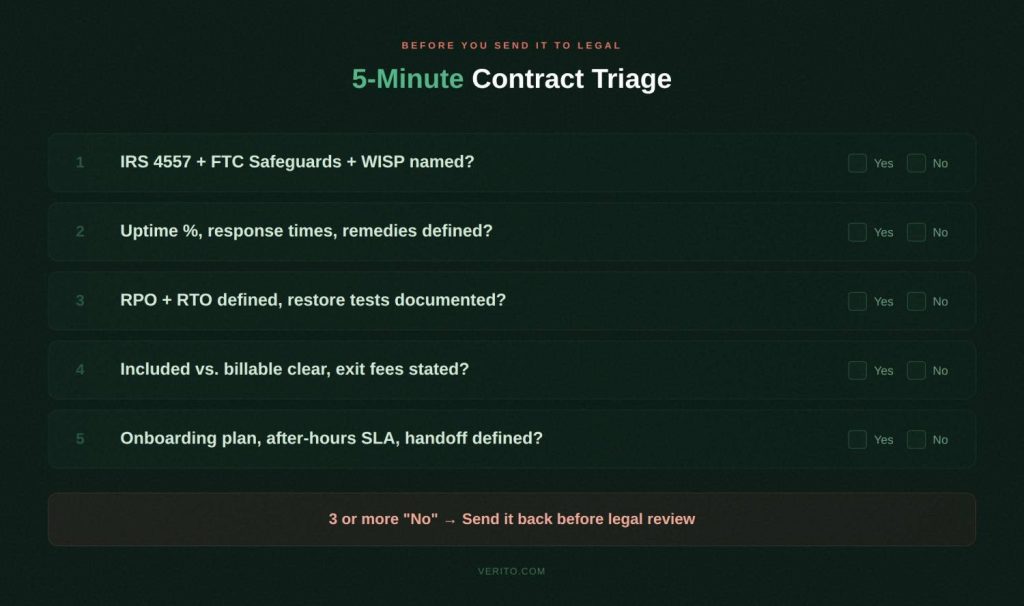
You don’t have time to read every clause in a 20-page MSA before sending it to legal review. Run these five checks first. If the contract fails on three or more, treat everything else with real caution.
1. Security and compliance. Can you point to a section naming IRS Publication 4557, the FTC Safeguards Rule, a WISP, and specific security controls, with clear ownership for each? If security is a generic “best practices” paragraph, you’re carrying more compliance and cyber insurance risk than you should be.
2. SLAs and downtime risk. Does the SLA spell out uptime targets, response times, and resolution times with actual numbers and remedies; specifically for outages that block tax and accounting systems during busy season? If everything is “best effort,” outages will last longer than you want and won’t qualify as a contract breach.
3. Backups, recovery, and data ownership. Are RPO and RTO defined for your key systems? Does the contract say how often restores are tested and what written evidence you’ll receive? Does it clearly state you own your data and can export it on a defined timeline when you leave?
4. Scope, pricing, and term. Can you easily identify what’s included in the monthly fee, what’s billable as a project, how prices may escalate in future years, and what it costs to exit early? If scope is vague, escalation clauses are open-ended, and ETFs are aggressive, your IT spend will be unpredictable.
5. Onboarding, support, and exit. Is there a written onboarding plan, a clear after-hours support model for tax season, and a defined offboarding commitment covering documentation and credential handoff? If these are barely mentioned, you’re relying on goodwill at the two riskiest moments in the relationship.
Why Verito Is Built for CPA Firms Specifically
Most managed IT providers claim to support accounting firms. Verito is built specifically for them.
The entire platform, support model, and contract structure are designed around tax and accounting practices: multi-user QuickBooks Desktop, UltraTax, Lacerte, Drake Tax, CCH Axcess, and ProSeries workloads running against hard regulatory and filing deadlines.
VeritSpace dedicated private servers give each firm its own isolated environment. No shared infrastructure, no noisy neighbor risk, and no performance degradation when another client runs heavy jobs at 10 p.m. in March.
VeritGuard managed IT provides 24/7 support with security covering workstations, servers, networks, and day-to-day helpdesk — built around accounting firm calendars, not generic business hours.
VeritComplete combines hosting and IT management in one package for firms that want a single accountable provider across all IT functions.
VeritShield WISP delivers a customized Written Information Security Plan that maps directly to IRS Publication 4557 and FTC Safeguards Rule requirements — not a generic template you fill in yourself.
The standard Verito MSA is already structured around the questions in this guide. Security and compliance responsibilities are explicitly assigned. SLAs include hard numbers with defined remedies. Backup terms include tested RPO/RTO commitments with written evidence. Scope is itemized. Exit rights are clean.
For firms that want month-to-month managed IT with documented security and compliance, Verito’s flexible pricing reflects that by design. And if you want a specialist to walk you through a contract you’re currently reviewing, a security assessment and contract review is a practical starting point.
The Bottom Line
A managed IT contract for a CPA firm is a security document, an uptime agreement, a disaster recovery plan, a pricing schedule, and an exit roadmap (all in one). When those parts are vague, you pay for it in downtime during deadlines, compliance gaps at renewal, surprise invoices that blow the IT budget, and painful transitions when you need to leave.
The 25 questions in this guide expose those risks before you sign. Use them against every MSA that crosses your desk. Push for written answers, not verbal assurances. If a contract can’t answer these questions clearly, assume those answers won’t be there when you need them most.
Quick Reference: All 25 Questions
Security and Compliance (1-5)
- How does this contract guarantee compliance with IRS Publication 4557 and the FTC Safeguards Rule?
- Who owns our WISP, and where is that documented in the agreement?
- What specific security controls are contractually guaranteed?
- What compliance reports and evidence will we receive, and how often?
- What incident response commitments are in the contract?
Uptime and SLAs (6-10)
6. What uptime is committed in writing, and what were actual numbers during prior tax seasons?
7. What are documented response and resolution time commitments?
8. Are we on dedicated private servers or shared infrastructure?
9. How are maintenance windows and change control handled near filing deadlines?
10. How does the contract define priority levels and escalation paths?
Backup and Recovery (11-15)
11. What RPO and RTO targets are guaranteed, and how often are restores tested?
12. Where is our data stored, how is it encrypted, and what immutability protections apply?
13. Who owns our data and configuration after termination?
14. What fees apply for data export and de-onboarding?
15. What restore test evidence will we receive for auditors and insurers?
Scope, Pricing, and Terms (16-20)
16. What exactly is included in the monthly fee?
17. Are there annual escalations or charges to expect in years two and three?
18. What is the contract term, how does auto-renewal work, and is month-to-month available?
19. What are the early termination fees, and when can we exit for cause?
20. How does the contract handle scope changes as our firm grows?
Support, Onboarding, and Offboarding (21-25)
21. What does onboarding look like and how long does it realistically take?
22. Who answers after-hours support during tax season?
23. How do you train our staff on security and new tools?
24. What do you commit to for documentation and credential handoff if we leave?
25. Can you describe a recent mid-season migration for a CPA firm?
FAQs
1. What clauses must a managed IT contract include to protect a CPA firm?
At minimum: security responsibilities and WISP ownership mapped to IRS 4557 and FTC Safeguards, defined uptime and SLA metrics with remedies for misses, RPO and RTO for key systems with tested backup commitments, itemized scope and pricing, term and renewal terms with reasonable exit rights, and written offboarding obligations covering data export and documentation handoff. A liability cap of one month’s fees is rarely adequate. Negotiate higher for incidents involving client PII or financial records.
2. How long should a managed IT contract last for an accounting firm?
For a new provider relationship, month-to-month or a 12-month term is generally safer than committing to 36 months upfront. Longer terms may make sense once performance is proven and the relationship is stable. Multi-year agreements with heavy ETFs and short non-renewal windows create lock-in risk that almost never benefits the client.
3. Can we switch IT providers mid-year without downtime?
Yes. Many firms do it when service quality or security concerns make waiting until year-end too risky. The key is a detailed migration plan, staged cutovers outside business hours, documented data export rights, and cooperation between outgoing and incoming providers. A well-written contract makes that cooperation a legal obligation, not a matter of goodwill.
4. Who should own our data and backups in a managed services agreement?
Your firm should always own its business data and backups regardless of where they’re hosted. The contract should state this explicitly and define formats, timelines, and methods for export when the agreement ends.
5. What is a fair SLA for CPA firms?
At minimum: 99.9% uptime for hosted applications, P1 response within 15 minutes 24/7 during tax season, P1 resolution within 2-4 hours or a tested workaround, and defined RPO/RTO values for key systems. Anything phrased purely as “best effort” offers no real recourse when service quality drops.
6. How can a managed IT contract support cyber insurance requirements?
By putting insurer-required controls in writing: MFA on email and remote access, endpoint protection on all managed devices, encrypted and tested backups, documented incident response procedures, and periodic compliance reporting. When these are contractual obligations rather than informal practices, demonstrating compliance to insurers during underwriting and renewal becomes straightforward.
7. What is a reasonable liability cap to negotiate?
Standard MSP caps of one month’s fees are rarely adequate for CPA firms. A more defensible starting position is 6-12 months of fees for general breaches, with a separate higher cap — or uncapped carve-out — for incidents involving client PII, financial records, or gross negligence. Require the MSP to carry E&O and cyber liability insurance with per-occurrence limits that reflect the scale of data they manage for your firm. Ask for a certificate of insurance before signing.