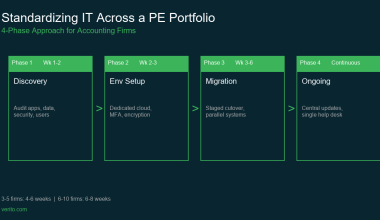
Picture this: it is March, your seven-person CPA firm is working through a backlog of returns, and one staff member clicks what looks like a routine e-signature email from a client.
Within hours, files on your local server are encrypted, tax software will not open, and staff are locked out of their email.
The attackers demand payment in cryptocurrency, clients are asking why their filings are delayed, and you are trying to decide whether this is an IT problem, an IRS problem, or both.
Scenarios like this are no longer hypothetical.
The FBI’s Internet Crime Complaint Center reported that cybercrime losses in the United States exceeded 16 billion dollars in 2024, a 33 percent jump from the previous year. At the same time, recent small business studies show that the vast majority of smaller organizations have already experienced some form of cyberattack, often through basic phishing or business email compromise aimed at staff who handle money and sensitive data. In that environment, accounting and tax firms are particularly attractive, because a single compromise can expose years of financial history, tax IDs, and access to third-party systems.
For accountants, cybersecurity in 2026 is no longer a nice-to-have technology project. It is part of your fiduciary obligation to safeguard client data, protect your firm’s continuity during busy season, and maintain your status with the IRS and state regulators. The same controls that reduce the risk of ransomware and data breaches are now intertwined with requirements such as IRS Publication 4557, Written Information Security Plans (WISP) guided by Publication 5708, and the FTC Safeguards Rule.
This article is written specifically for accountants, bookkeepers, and CPA firm owners with 1 to 50 employees. It is designed to be the one resource you can return to each year when you ask: “Are we secure enough, and can we prove it if anyone asks?”
We will unpack how attackers actually target firms like yours, define a practical 2026 security baseline, and walk through a three-tier maturity ladder that shows what “good” looks like at different stages of growth. You will see how compliance frameworks fit together, what to expect from vendors and hosting providers, and how to build an incident response playbook that does not require a full-time security team.
Most importantly, this article is meant to be actionable. By the end, you will have a working checklist for the next 90 days, clarity on whether your current IT setup is sustainable, and a framework to decide when it is time to lean on a specialist provider so you can focus on serving clients instead of fighting fires.
Table of Contents Show
Why Accountants Are Prime Cyber Targets in 2026
Why Small CPA Firms Sit in the Crosshairs
From an attacker’s perspective, a small accounting or CPA firm is a high-value, low resistance target.
Every client file can contain full identity details, Social Security Numbers or EINs, bank and payroll information, historical tax returns, and often login access to third-party systems like accounting software, payroll platforms, and e-file portals. That means compromising one 7-person firm can be more lucrative than hitting dozens of small retail businesses with far less sensitive data.
At the same time, most firms in the 1 to 50-employee range do not have in-house security teams.
They rely on a patchwork of local servers, remote desktops, cloud apps, and ad-hoc IT support. Globally, small and mid-size businesses now account for around 43 percent of all cyberattack targets, according to analysis based on the 2024 Verizon Data Breach Investigations Report. That statistic reflects attacker behavior that accountants see every day in their inboxes: generic phishing aimed at anyone who handles money, invoices, or bank details.
The economics favor the attackers. A successful intrusion can trigger identity theft, fraudulent refunds, payroll diversion, and long-term misuse of client data. That is why security firms and accounting industry reports now consistently describe accounting and professional services firms as prime targets for cybercrime.
How 2026 Attack Patterns Hit Real Firms
For small accounting practices, the threat is not just “hackers in hoodies” using exotic techniques. In 2026, most successful attacks on accountants still start with someone clicking the wrong link or approving the wrong request.
Common patterns include:
1. Phishing and business email compromise (BEC)
These are aimed at partners, managers, and admin staff. Attackers impersonate clients or banks, trick staff into sending updated payment details, or quietly redirect refunds and vendor payments. Business email compromise has been responsible for close to 2.8 billion dollars in reported losses in a single year and nearly 8.5 billion over three years, according to the FBI’s Internet Crime Complaint Center.
2. Ransomware timed for busy season
Ransomware groups monitor tax calendars. Recent reports show ransomware attacks worldwide continued to rise in 2024, with more than 5,400 publicly reported victim organizations and a pronounced spike in Q4, when many professional services firms are preparing year-end financials and getting ready for tax season. For a small CPA firm that relies on a single server for tax and accounting software, one successful ransomware run can halt return preparation, e-filing, and billing until systems are rebuilt or ransom is paid.
3. Credential theft and MFA fatigue
Attackers steal passwords from previous breaches, infected home devices, or keyloggers. They then try password reuse against firm email, cloud accounting tools, and remote desktops. Increasingly, they also bombard staff with MFA prompts until someone hits “Approve” just to make the notifications stop. Where accountants still share generic logins to tax software or client portals, one compromised password can open an entire year’s worth of client data.
With generative AI tools, it is trivial for attackers to create highly customized emails that mimic client tone and firm branding. Cybersecurity research in 2024 and 2025 has highlighted sharp growth in AI-driven phishing and deepfake scams against small businesses, including voice and video fakes that attempt to rush staff into bypassing controls. For firms that already work under tight deadlines, a realistic “urgent call from a partner” or “updated wire details from a client” can be enough to bypass informal checks.
What This Means for a 5 to 20-person Practice
For a typical 5 to 20-person accounting firm, these trends translate into concrete, local risk.
First, the probability of being targeted is no longer theoretical. A survey summarized by the U.S. SBA (Small Business Administration) reported that 41 percent of small businesses suffered a cyberattack in 2023, with a median incident cost of 8,300 dollars. Other analyses that focus more broadly on small and mid-size businesses show that almost half of all cyberattacks now hit organizations under 500 employees. Accounting, tax, and professional services firms sit squarely inside that band.
Second, the impact on a small practice is amplified compared to a large enterprise. A single successful ransomware event or business email compromise can:
- Knock out core tax and accounting applications for days if backups are missing or untested.
- Force you to re-create work from paper or client resubmissions during peak season.
- Trigger frantic calls to the IRS, state agencies, banks, and cyber insurers.
- Require regulatory notifications to affected clients and possibly the IRS, depending on the incident.
Third, attackers count on the operational realities of small firms. They know that many partners are juggling client work and firm management, that patching and security awareness training can slip during busy times, and that some firms still run critical applications on aging on-premise servers without proper isolation or immutable backups.
In that environment, it is not enough to “have antivirus” or “be in the cloud.” For modern accountants, cybersecurity means understanding how criminals actually attack firms your size, then putting in place a baseline set of controls that protect:
- Who can log in and from where (identity and access)
- Which devices touch client data and how they are managed (endpoints)
- Where client data ultimately lives and how it is backed up (hosting and backups)
The 2026 Cybersecurity Baseline for Small CPA Firms
In 2026, every accounting firm that handles taxpayer data needs a minimum security foundation that is non-negotiable. This is not about chasing every new tool. It is about making sure that if someone loses a laptop, clicks a bad link, or a vendor has an outage, your firm can keep working and prove that you took reasonable steps to protect client data. That baseline rests on three areas: how people log in, how devices are managed, and where data actually lives.
Identity and Access: How People Log-in
For attackers, your staff accounts are the front door. For many small firms, that front door is still far too easy to open.
Every person in your firm, including part-time and seasonal staff, should have:
- Their own unique user accounts for email, tax software, accounting platforms, and portals.
- No shared generic logins such as “taxprep” or “info” for anything that touches client data.
- Unique passwords for critical systems, ideally stored in a password manager.
Shared logins and reused passwords make incident response almost impossible. If one password is compromised and five people use it, you cannot easily tell which activity belongs to whom. That matters when you are reconstructing what happened after a suspicious login or trying to convince the IRS or an insurer that the situation is under control.
Multi-factor authentication (MFA) is now a baseline requirement, not an advanced add-on. At a minimum, your firm should enforce MFA on:
- Firm email accounts
- Any tax preparation, accounting, and practice management applications that support it.
- Remote access tools such as VPNs, remote desktop gateways, and cloud portals.
This is particularly important because credential theft and password reuse remain the root cause of a large share of breaches affecting small and mid-size organizations. Industry reports over several years have consistently found that stolen credentials are among the top initial access methods in data breaches. MFA does not solve everything, but it significantly reduces the chance that a single stolen password gives an attacker full access.
You should also have a simple but strict offboarding checklist that you actually follow when someone leaves:
- Disable or delete their accounts in email, tax software, accounting software, and client portals.
- Remove their access to remote desktop, VPN, or other remote access.
- Revoke access to any shared mailboxes or generic addresses they used.
- Recover or remotely wipe any firm-owned laptops, phones, or tablets.
For most firms, this checklist can fit on one page and live inside your Written Information Security Plan. The key is that it exists, is up-to-date, and is used every time.
Devices and Endpoints: Laptops, Desktops, and Remote Work
Every device that touches client data is part of your security perimeter. If attackers can compromise an unprotected laptop at home, they can often reach firm systems from there.
At a baseline, every workstation and laptop used for firm work should have:
- Managed antivirus or endpoint detection and response (EDR) that is centrally visible, not just consumer antivirus installed once and forgotten.
- Automatic operating system updates turned on, with someone responsible for checking that updates are actually being applied.
- Automatic updates for browsers and office software, since those are common attack paths.
- Full disk encryption on all laptops and mobile devices, so that a stolen device does not automatically expose client files.
Encryption and basic device management are particularly critical in a profession where staff routinely work from home, client sites, and on the road. Cybersecurity guidance for small businesses now consistently warns that mobile and remote endpoints are prime entry points for attackers, especially when devices are shared with family members or used for both personal and work accounts.
For remote work, “just let people log in from home” is not enough in 2026. As a baseline:
- Do not allow firm work from personal home PCs that are shared with children or other family members.
- Require staff to use firm-managed laptops, even when working remotely.
- Use secure Wi-Fi configurations and avoid public Wi-Fi without a secure tunnel.
- Provide secure remote access to in-office systems using a hardened remote desktop gateway or a reputable hosting provider, not open ports with weak passwords.
If your staff need to work from anywhere, you want that work to happen on devices that you control and can wipe, update, or lock if there is a problem.
Data, Hosting, and Backups: Where Client Data Lives
Many firms think their data “is in the cloud” when in reality it is scattered across local desktops, an aging server in a back room, several generic cloud storage accounts, and staff email. From a risk perspective, this is the worst of both worlds: high exposure with little visibility.
The first step is to be honest about where client data actually resides:
- Local desktops and laptops
- On-premise servers running tax and accounting software
- Cloud applications (QuickBooks Online, Xero, practice management tools)
- File sharing and storage platforms
- Email and attachments
Once you have this picture, the baseline requirement in 2026 is: no critical data should exist in only one place, and you should be able to restore it quickly if your primary system is encrypted or lost.
As a minimum, your backup approach should include:
- At least daily backups for any system that stores or processes client data.
- Offsite copies that are isolated from your primary environment so ransomware cannot encrypt both production data and backups.
- Regular restore tests that verify you can actually bring systems back, not just “backup succeeded” logs.
Industry research over the past few years has consistently shown that a significant portion of small and mid-size victims of ransomware either lacked usable backups or discovered too late that their backups had also been encrypted or were incomplete. That is when firms face the worst choices: pay an attacker or attempt to rebuild from scratch during a busy season.
This is where the choice between maintaining your own infrastructure and working with a specialized hosting provider becomes strategic. For many CPA firms, running tax and accounting applications on a dedicated private server in a SOC 2 Type II-audited data center offers a significantly stronger baseline than a single on-premise server:
- Your applications run in an environment with enforced MFA, encryption, central monitoring, and documented controls.
- Backups are managed, monitored, and regularly tested by specialists who understand your software stack.
- You gain clear documentation that supports IRS Publication 4557, WISP requirements under Publication 5708, and FTC Safeguards expectations around access control, encryption, and data retention.
Verito’s model, for example, is built around exactly these needs. By hosting your accounting and tax applications on dedicated private servers designed for professional firms, and combining that with managed security and support, it reduces the number of gaps that can appear when you try to stitch together local servers, consumer cloud tools, and ad-hoc IT support. Instead of wondering who is responsible for backups, patching, and access controls, you have a single accountable provider.
The point of this baseline is not perfection. It is to ensure that when the next phishing email slips through, or a laptop goes missing, or a vendor has an issue, your firm is not starting from zero.
With solid identity management, managed endpoints, and resilient hosting and backups, you can absorb incidents, keep serving clients, and show regulators and insurers that you took reasonable steps to protect taxpayer data.
Busy Season Hardening: Protecting January to April
When tax season hits, your risk spikes. Attackers know this is when you are least able to tolerate disruption and most likely to pay quickly just to get back online. That is exactly why you cannot treat January to April like any other period of the year.
What a Busy Season Failure Really Costs
For a 5 to 10-person CPA firm, a single day of downtime in March can easily wipe out several weeks of margin:
- Preparers and reviewers sit idle or try to recreate work from old copies.
- Deadlines slip and you risk penalties or rushed, error prone filings.
- Partners spend their time on crisis management instead of client work.
- Clients start questioning your reliability and data handling.
According to Verito Managed IT specialists, downtime can cost a three-person accounting business up to $350 per hour, which is 1.5 times more during tax season, based on client data. For larger businesses, the cost of downtime can climb steadily as the number of services and complexity involved rise. For example, a five-person accounting business may lose between $1,500 and $2,250 per hour. This estimate accounts for overtime and lost billable time. However, reputational harm to your company is another factor that is equally significant but cannot be measured.
For a small accounting firm that earns most of its annual revenue in a few critical months, the effective impact per hour can be even higher. You might not feel it as a single “downtime bill”, but it shows up as unbilled hours, write-offs, and lost referrals later in the year.
The bigger issue is trust. If clients learn that your systems were locked by ransomware or that you missed a filing because your server crashed without a working backup, they will reasonably ask why their most sensitive financial data was sitting behind weak controls.
Pre-season Readiness Checklist for Firm Owners
You would not start a busy season without verifying licenses, engagement letters, and staff capacity. Security should be treated the same way. Use the calendar to your advantage and schedule a pre-season security review no later than December.
At a minimum, that review should confirm:
1. Backups actually restore
- Perform at least one full restore test of your main tax and accounting environment to a test location.
- Verify that you can access recent client data, not just old archive files.
- Document how long the restore takes so you know what to expect in a real incident.
2. Multi-factor authentication is enforced, not optional
- Check that MFA is turned on for all firm email accounts.
- Confirm MFA on tax software, accounting platforms, and portals where available.
- Remove any legacy accounts or integrations that bypass MFA.
3. Devices are patched and protected
- Run reports from your antivirus or endpoint tools to confirm all active devices check in and have current definitions.
- Ensure operating system updates are applied, especially on laptops that travel.
- Retire or replace any systems that no longer receive security patches.
4. Remote work is secure and standardized
- Confirm that all remote staff use firm-managed devices.
- Verify that remote access goes through a secure, authenticated channel.
- Disable any old remote access methods that are still technically available “just in case”.
5. Your WISP reflects how you actually operate
- Update your Written Information Security Plan with any changes in applications, vendors, or procedures.
- Attach evidence of your backup tests, MFA configuration, and device reports.
- Make sure staff know where the WISP lives and who owns it.
Treat this like an annual audit of your own firm. You are not aiming for perfection, you are checking that your baseline controls are real, current, and defensible.
Busy Season Hardening Checklist
Once the pre-season review is done, convert it into a short, hardening checklist your team can run before the peak weeks. Keep it focused and practical. For most small firms, it will look something like this:
- Confirm that last night’s backup jobs completed successfully and that the most recent restore test passed.
- Spot-check MFA by logging in as a normal user and verifying the second-factor prompt appears.
- Verify that all staff who will work remotely during busy season have working access from their firm laptops.
- Run a quick phishing reminder session or circulate a one-page guide on how to handle suspicious emails and attachments.
- Review your incident response contacts: who you call first if something looks wrong, at your IT provider, hosting provider, and cyber insurer.
- Identify your “critical systems list”: tax software, accounting platform, document management, email, and client portal, and make sure each has a clear backup and recovery plan.
You do not need a 40-page policy to be resilient. You need a small number of specific actions that you check and document before the work piles up. The goal is simple: if something goes wrong during the last week of March, you already know where your data is, how to restore it, who to call, and what your first steps will be.
Compliance Made Practical: IRS 4557, WISP, and FTC Safeguards
Regulators have now caught up with the reality that tax professionals sit on some of the most sensitive data in the economy. For accountants, the important shift is that cybersecurity is no longer framed as “best practice.” It is framed as a legal obligation backed by the IRS and the Federal Trade Commission (FTC). The key pieces you need to understand work together: IRS Publication 4557, the requirement for a Written Information Security Plan (WISP) under Publication 5708, and the FTC Safeguards Rule.
IRS Publication 4557
IRS Publication 4557 is the baseline rulebook for safeguarding taxpayer data. The current revision (Rev. 5-2024) makes it explicit that protecting taxpayer data is the law and that the FTC Safeguards Rule applies to professional tax return preparers, not just to banks and large financial institutions.
IRS Publication 4557 expects you to:
- Limit who can access taxpayer data and under what conditions (administrative safeguards).
- Use technical controls to protect data in transit and at rest, and to block common attack paths.
- Maintain physical security over locations and devices where taxpayer data resides.
- Have a written security plan, train staff, and monitor for suspicious activity.
- Be prepared to respond to and report data loss or theft appropriately.
For a 5 to 20-person firm, 4557 should not be treated as a PDF you look at once and file away. It should be the checklist you map against your own environment. When your firm builds or updates policies, you want to be able to point back to specific expectations in 4557 and show how your controls meet them.
Publication 4557 also points directly to the FTC Safeguards Rule and to Publication 5708 for WISP guidance. That means if you are ignoring those, you are ignoring a part of 4557 itself.
Publication 5708 and Written Information Security Plans (WISP)
Publication 5708, “Creating a Written Information Security Plan (WISP) for your Tax & Accounting Practice,” is the IRS’ template for turning 4557 and Safeguards Rule requirements into a concrete, written plan. It was recently updated as a 28-page template aimed explicitly at smaller practices.
A few critical points matter for firm owners:
- A WISP is not optional anymore. The IRS and its Security Summit partners have reminded tax pros that a Written Information Security Plan is a federal mandate for anyone handling taxpayer data.
- The WISP must be written and accessible. If your “plan” only exists in emails or in your head, regulators will treat that as if it does not exist.
- The WISP must match reality. If your document says you encrypt every laptop, but half your staff use unencrypted home devices, that mismatch can become a liability after an incident.
Think of Publication 5708 as a structured template that you customize:
- You describe what systems you use to handle taxpayer data.
- You identify risks and the controls you use to mitigate them.
- You define how you train staff, manage vendors, and respond to incidents.
- You set a review schedule and assign responsibility.
Evidence matters as much as wording. When you test a backup restore, roll out MFA, or complete staff training, keep records with dates and short notes. Those become WISP attachments that demonstrate you are doing more than promising to be secure on paper.
FTC Safeguards Rule for Tax and Accounting Firms
The FTC Safeguards Rule is the enforcement mechanism behind much of this. It is a regulation under the Gramm–Leach–Bliley Act (GLBA) that requires “financial institutions” to maintain safeguards for customer information. Tax preparers and many CPA firms fall into that definition when they provide tax preparation and related financial services to individuals.
For a typical accounting firm, the Safeguards Rule requires:
- A written information security program appropriate to your size and complexity.
- A designated qualified individual responsible for overseeing that program.
- Regular risk assessments that identify reasonably foreseeable threats.
- Administrative, technical, and physical controls based on those risk assessments.
- Ongoing monitoring, testing, and adjustment of safeguards.
- Due diligence and oversight for service providers that handle client information.
- Written incident response procedures.
The FTC substantially strengthened the Safeguards Rule in 2021, making it more prescriptive about documented risk assessments, training, and vendor management. That update was one of the triggers for the IRS making WISP expectations much more explicit in 4557 and 5708.
One important angle that often gets missed: the Safeguards Rule does not give small firms a free pass. It allows proportionality, which means controls should scale with your size and risk, but it still expects a documented program. For a 10-person firm with 2,000 individual and small business clients, that is a serious volume of non-public personal information. Regulators can reasonably expect you to have more than informal practices and consumer-grade security tools.
A Simple WISP Structure You Can Adapt
Publication 5708 gives you a detailed template. For planning and discussion, it helps to translate that template into a simple outline that you can actually maintain. A pragmatic WISP for a 1 to 50-person tax and accounting firm will usually include these sections:
- What the WISP covers, which entities and locations, and who approved it.
2. Roles and responsibilities
- The “qualified individual” under the Safeguards Rule.
- Partner or owner oversight.
- Responsibilities for IT, vendors, and staff.
3. Data inventory and systems map
- What categories of client and firm data you hold.
- Where that data lives: applications, servers, cloud platforms, devices.
4. Risk assessment summary
- Key threats that matter for a firm like yours: phishing, ransomware, lost devices, insider mistakes, vendor failures.
- How likely and how impactful you judge each to be.
5. Access control and authentication
- Policies on user accounts, MFA, password management, and offboarding.
- Rules for remote access and administrative privileges.
6. Device, network, and application security
- Requirements for firm-managed laptops and desktops.
- Patch management and antivirus or EDR.
- Network segmentation, secure Wi-Fi, and office security basics.
7. Data protection, backup, and disaster recovery
- How you back up data, how often, and where.
- Standards for encryption in transit and at rest.
- Recovery objectives and who is responsible for restore testing.
8. Vendor and third-party management
- Criteria for selecting hosting providers, cloud apps, and IT vendors.
- Contractual expectations around security, incident notification, and audits.
9. Security awareness and training
- Training content and schedule.
- How you measure effectiveness (for example, phishing simulations or quizzes).
10. Incident response and breach notification
- How incidents are reported internally.
- First steps, escalation paths, and external notifications.
11. Program monitoring, review, and continuous improvement
- How often you review the WISP.
- How you document changes and lessons from incidents or tests.
There is a strong business case for doing this well. IBM’s Cost of a Data Breach Report mentions that tax professionals with implemented written plans experienced roughly 89 percent fewer successful cyberattacks and 76 percent faster incident containment than those relying on ad-hoc measures. Even allowing for selection bias, the message is clear: firms that treat their WISP as a living document tend to run tighter, more resilient operations.
For Verito, this is exactly where its platform and resources plug in. A security-focused hosting and IT partner can provide:
- SOC 2 Type II evidence for hosting and backups that you can reference in your WISP.
- Concrete descriptions of access controls, monitoring, and incident response you can copy into vendor sections.
- Templates and guidance for mapping your environment to IRS 4557 and FTC Safeguards expectations.
The goal is not to turn you into a security architect. It is to give you a written plan that accurately describes how your firm protects client data today and how you will keep improving it.
Security Maturity Ladder for CPA Firms (1 to 50 Staff)
Most small firms know they are not as secure as a Fortune 500, but they also do not know what “secure enough” looks like for a 5, 15, or 40-person practice. A security maturity ladder fixes that. Instead of treating cybersecurity for accountants as an “all or nothing” project, you can place your firm on a simple three-tier scale and plan clear, 90-day upgrades.
Think of it like this:
- Tier 1: You are covering the essentials so a single mistake is less likely to put you out of business.
- Tier 2: You are closing common gaps and treating IRS 4557 and WISP obligations as an ongoing discipline.
- Tier 3: You are operating in a way that is resilient, audit-ready, and attractive to larger or more regulated clients.
Tier 1: Essential Controls
Typical profile:
1 to 10 staff, partners still handle many IT decisions, mix of local server and cloud tools, no dedicated internal security expertise.
At Tier 1, you are focused on eliminating the easiest ways attackers can hurt you. The goal is to stop a single bad click from turning into a firm-wide disaster.
Core controls for Tier 1:
1. MFA on all critical accounts
Firm email, tax software, accounting platforms, remote access tools. No exceptions for partners or senior staff.
2. Unique logins and basic password hygiene
Every user has their own account. No shared logins for tax prep or portals. A password manager is strongly recommended for staff who juggle many systems.
3. Managed protection on every device
Centrally-managed antivirus or endpoint protection on all firm laptops and desktops, with someone responsible for checking status reports.
4. Daily offsite backups with at least one tested restore
You know where your backups are, you know they are isolated from production systems, and you have successfully restored from them in the last 6 to 12 months.
5. Baseline WISP in place
You have used the IRS Publication 5708 template to create a Written Information Security Plan that reflects your actual environment and is approved by firm leadership.
6. Annual security awareness training
At least once a year, everyone receives focused training on phishing, safe handling of taxpayer data, and firm specific policies.
A realistic 90-day plan to reach Tier 1 might include: rolling out MFA, implementing a password manager, engaging a hosting or IT partner to set up managed backups and device protection, and finalizing a simple WISP.
Tier 2: Strengthened Security and Compliance
Typical profile:
10 to 30 staff, multiple offices or a significant remote workforce, more complex mix of tax, accounting, and industry-specific apps, perhaps a part-time IT manager or external MSP.
At Tier 2, you are tightening controls and aligning more clearly with IRS Publication 4557, your WISP, and the FTC Safeguards Rule. You are not just “using security tools,” you are managing a security program.
Additional controls for Tier 2:
1. Centralized identity and access management
Wherever possible, user accounts are managed centrally, with consistent password policies and MFA. Departing staff are removed from all systems through a defined offboarding process.
2. Regular security awareness and phishing simulations
Training shifts from a “once a year” slide deck to shorter, more frequent sessions. You may use simulated phishing campaigns to test and reinforce good behavior.
3. Documented vendor and service provider oversight
You maintain a list of vendors that handle client data (hosting providers, cloud accounting platforms, IT support). For each, you record security commitments such as SOC 2 reports, backup practices, and incident notification terms.
4. Expanded WISP with evidence
Your Written Information Security Plan contains not only policies but also references to actual evidence: backup logs, training records, incident drill notes, and vendor reports.
5. Periodic internal reviews and basic monitoring
Someone in the firm, or a trusted partner, reviews access logs and key security alerts at regular intervals and reports to ownership.
A 90 day plan to move from Tier 1 to Tier 2 might focus on: building a complete vendor inventory, enhancing the WISP with evidence and review procedures, rolling out more structured training, and tightening account lifecycle management.
Tier 3: Advanced, Audit-ready, and Resilient
Typical profile:
20 to 50 staff, complex application stack, growing client base with higher expectations, possibly subject to more frequent due diligence from banks, investors, or larger clients.
At Tier 3, you are treating cybersecurity as part of your operating model. Your controls are documented and tested, and your environment is designed to recover quickly from incidents.
Characteristics of Tier 3:
1. Hosted or cloud environment built for accountants
Core tax and accounting applications run on dedicated private servers in a SOC 2 Type II audited environment, with enforced MFA, encryption, and strong isolation between clients and firms.
2. Formal incident response plan with practice runs
You have an incident response playbook that defines roles, steps, and communication templates. You test it through at least one tabletop exercise per year.
3. Regular third-party assessments or penetration tests
You periodically bring in an external specialist to review your controls and test your environment against current threats.
4. Comprehensive logging and monitoring
Key systems generate logs that are collected and retained. Security alerts are monitored by an internal lead or by a managed security service.
5. Structured program reporting to leadership
Ownership receives periodic reports on security posture: incidents, tests conducted, outstanding risks, and remediation plans.
A 90-day plan for Tier 3 firms often focuses on: consolidating remaining on-premise systems into hosted platforms, refining logging and monitoring, and tightening documentation so that you can provide clean evidence during client or regulator reviews.
Security Ladder Summary
You can think of the three tiers as a progression:
| Tier | Firm Profile | Main Focus | Typical Time Horizon |
|---|---|---|---|
| 1: Essential | 1 to 10 staff, basic IT mix | Stop easy compromises and disastrous outages, meet bare minimum for IRS 4557 and WISP | First 3 to 6 months |
| 2: Strengthened | 10 to 30 staff, remote work common | Make controls consistent, document and evidence your security program, manage vendors | Next 6 to 12 months |
| 3: Advanced | 20 to 50 staff, higher scrutiny | Build resilience, test regularly, align with client due diligence and audit expectations | Ongoing program |
You do not need to jump from Tier 1 to Tier 3 in a single budget cycle. The important step is to place your firm honestly on this ladder, decide where you need to be for the next busy season, and plan concrete, funded actions to get there.
Gain Clarity on Your Current Tier
If you are not sure where your firm sits today, this is the right moment to get a clear baseline rather than guessing.
Use this maturity ladder together with two practical resources:
- A customizable WISP template for tax and accounting firms, aligned with IRS Publication 4557 and 5708, so you can document your current controls tier by tier.
- A cybersecurity audit for small CPA firms, covering identity, devices, data, vendor management, and incident response, so you can see in one sitting which items are missing or weak.
Verito specializes in hosting and managed IT for accounting firms, which means its team works inside environments like yours every day. Partnering with a provider that already maps its services to these tiers makes it far easier to reach your target level without piecing together multiple generic tools and vendors on your own.
Once you are comfortable with where your firm falls on this ladder and what needs to change, the next step is to look closely at one of the biggest hidden risks in modern accounting practices: the vendors and platforms that sit around your firm and can silently undermine even a well-designed security program.
Vendor and Third-party Risk for Accounting Firms
Even if your internal controls are strong, your firm is only as secure as the vendors that handle or can reach your data. For most accountants, that list is much longer than it looks at first glance.
The Vendors Catering to a Modern Accounting Firm
A typical 5 to 20 person practice will rely on some mix of:
- Hosting for tax and accounting software
- Cloud storage or file sharing tools
- E-signature and client portal platforms
- Practice management and workflow tools
- Payroll and HR systems
- Outsourced IT or managed service providers
- Niche apps for expense management, forecasting, or industry specific reporting
Each of these vendors can see, store, transmit, or indirectly unlock access to client information. When attackers cannot get in through your firm directly, they often go after these partners instead.
This is not theoretical. Verizon’s 2023 Data Breach Investigations Report shows that roughly 15 to 30 percent of all breaches now involve a third-party supplier or vendor, and that the share of incidents tied to vendors has roughly doubled in the last few years. Research by Prevalant Inc.’s 2024 Third-Party Risk Management Study found that about 61 percent of companies experienced a third-party data breach or cybersecurity incident in a single year, triple the rate seen in 2021. Financial services, which include many accounting and advisory firms, sit among the most frequently impacted sectors.
For a small CPA firm, that means vendor risk is no longer a background concern. It is one of the main ways attackers can reach your environment, even if your own staff follow every policy.
Vendor risk gets worse when your IT setup is fragmented. Many firms have grown organically over years:
- A local server in the office running tax and accounting software.
- One provider for cloud file storage.
- A different provider for remote access.
- An MSP handling some device support.
- Several cloud apps chosen by individual partners or departments.
On paper, every piece looks reasonable. In practice, responsibility is scattered:
- Who is actually responsible for patching your tax server and remote desktop gateway?
- Who owns backup and restore if the server or hosting platform goes down in March?
- Who is watching for impossible logins or failed MFA attempts?
When no single provider or internal owner has an end-to-end view, gaps appear:
- An old VPN or remote desktop method is left open because one vendor does not know another is still using it.
- Backups are configured in two places, but neither is complete or tested.
- MFA is enforced on some systems, but not on others that still carry sensitive data.
- No one can quickly answer which vendors hold what categories of client information.
Fragmentation also complicates compliance. It is difficult to map your controls to IRS Publication 4557, your WISP, and the FTC Safeguards Rule if you cannot clearly describe who does what across your vendor stack.
Vendor Assessment Checklist
You cannot eliminate vendor risk, but you can choose partners more carefully and document why you trust them. When you are assessing a hosting provider, IT partner, or key cloud platform, a simple checklist helps you stay consistent.
Below is a vendor due diligence checklist you can adapt:
| Area | What to look for | Questions to ask |
|---|---|---|
| Security attestations | SOC 2 Type II or similar independent audits, especially for hosting and core platforms | Can you provide a recent SOC 2 Type II report or equivalent? |
| Data protection | Encryption in transit and at rest, isolated customer environments, clear backup strategy | How is my data separated from other customers and how often is it backed up? |
| Access control | MFA support, role-based access, strong internal account policies | Do you enforce MFA for admin access and offer MFA or SSO for my users? |
| Incident response | Documented playbooks, defined SLAs for notification and support | How and when will you notify us of a security incident involving our data? |
| Availability and recovery | Tested disaster recovery, RPO and RTO commitments that fit busy season needs | What is your typical recovery time if a core system fails in March? |
| Compliance support | Willingness to provide documentation you can reference in your WISP and exams | Can you give written descriptions of your controls that we can attach to our WISP? |
| Support quality | Accounting-specific expertise, 24×7 coverage during peak periods, escalation paths | Do you have experience supporting tax and accounting applications specifically? |
For each critical vendor, keep a short record of:
- The services they provide
- The data they can access
- The key security assurances they have given you.
- Where those assurances show up in your WISP and vendor management section.
This does not need to be a 50-page questionnaire for every SaaS tool. Focus your effort on vendors that store, process, or can unlock access to taxpayer data and firm systems.
Why Unified Hosting plus Managed IT Closes Gaps
One of the most effective ways to reduce vendor risk is to consolidate responsibility for your most important systems and controls.
Instead of:
- One company hosting your tax and accounting software
- A separate MSP trying to manage backups and patching
- Another provider setting up remote access
- Multiple small vendors each touching pieces of your security
You can move toward a model where a single specialist provider:
- Hosts your core tax and accounting applications on dedicated private servers in SOC 2 Type II audited facilities.
- Manages backups, recovery tests, and monitoring as part of the service.
- Provides secure remote access with enforced MFA and role-based access.
- Delivers day-to-day IT support from teams that understand the needs of CPA firms and seasonal staff.
- Supplies documentation you can attach directly to your WISP and IRS Publication 4557 evidence file.
That is the model Verito was built around. VeritSpace gives you secure, dedicated hosting for your accounting and tax applications. VeritGuard and VeritComplete add managed security and IT support designed for professional firms. Instead of trying to coordinate several generic vendors, you work with one provider that is accountable for keeping your environment available, backed up, and aligned with your regulatory obligations.
From a risk perspective, you are trading a patchwork of uncoordinated third parties for a smaller, more controlled vendor set with deeper security commitments. From an operations perspective, you are trading late night calls to three or four suppliers for a single contact that can see and fix the whole picture.
Incident Response Playbook for Accountants
Even with solid controls, you should assume that at some point something will go wrong. A staff member will click a bad link, a vendor will have an outage, or a device will go missing. What separates a scare from a disaster is how clearly your firm knows what to do next.
You do not need a 60-page technical manual. You need a short, written playbook that staff can follow under pressure.
1. The First 60 Minutes After You Spot a Problem
Most damage happens in the first hour because people either freeze or improvise. Your instructions for that first window should be brutally clear and easy to follow.
If anyone in your firm suspects a security issue (odd pop ups, a ransom note, unexpected MFA prompts, suspicious logins, strange emails sent from their account), the first 60 minutes should look like this:
1. Stop and contain, do not investigate on your own
- Do not keep clicking alerts or exploring strange folders.
- Do not reply to suspicious emails to “see what happens.”
- Do not turn devices on and off repeatedly.
2. Disconnect affected devices from the network
- Unplug network cables.
- Turn off Wi-Fi on laptops and desktops.
- If you are on a remote desktop, disconnect the session immediately. This helps prevent malware or an attacker from moving further inside your environment.
3. Preserve the scene
- Do not wipe or reinstall the machine.
- Do not run random cleanup tools from the internet.
- Take a photo of any ransom note or suspicious message with your phone. These details can be important for your IT provider, hosting provider, insurer, and, if needed, law enforcement.
4. Escalate to the right person immediately
- Notify your internal security or IT contact, or the partner designated in your WISP.
- Call your IT provider or hosting provider using the phone number you have on file.
- If your firm uses a managed service provider, open a high-priority ticket and then follow up by phone.
5. Change critical passwords from a known clean device
- From a separate, trusted device, change passwords for your email account and any other accounts that might be affected.
- If your firm uses a password manager, coordinate with your IT lead before making broad changes, so they can help contain the incident systematically.
Your WISP should name a specific person or role that owns this first hour. Staff should not have to guess who to call.
2. The First 24 Hours: Containment and Communication
Once the immediate fire is contained, the next day is about scoping and stabilizing the situation. For a small accounting firm, this usually involves a combination of your internal lead, your IT or hosting providers, and, where applicable, your cyber insurer.
Key steps in the first 24 hours:
1. Confirm what is affected and how
With your IT or hosting partner, determine whether the incident involves:
- A single device
- Your local network
- Hosted servers or cloud services
- Specific client accounts or applications
You want a simple answer to: “What systems are unsafe to use right now?”
2. Decide what to take offline temporarily
- If a server or application looks compromised, keep it offline until your provider gives the “all clear”.
- Avoid reconnecting devices that show clear signs of infection until they have been properly examined or rebuilt.
3. Secure access
- Force password resets for affected users or across the firm if necessary.
- Ensure MFA is enforced on key systems and consider temporarily tightening rules for new device logins.
4. Engage your cyber insurance and legal support if you have them
- Most cyber policies require prompt notice. Use the contact information in your policy.
- Insurers often provide access to incident response specialists and legal counsel who understand notification rules and evidence handling.
5. Initial internal and, if needed, external communication
- Brief partners and key staff on what is known, what is not known, and what the immediate plan is.
- If hosted systems are affected, request clear written updates from your provider so you can explain delays to staff and, if needed, to clients.
- Do not promise specific timelines to clients until your providers give realistic estimates.
6. Start an incident log
- Document times, actions, and decisions from this point forward.
- Note who did what, what evidence was collected, and what systems were taken offline. This log will feed into your WISP, any required reports, and future lessons learned.
Your goal for the first 24 hours is to stop the spread, protect remaining systems and data, and establish a clear picture of what you are dealing with, without panicking staff or clients.
3. The First 10 Days: Remediation and Documentation
If the first hour is about stopping the bleeding and the first day is about stabilizing, the following days focus on repair, investigation, and hardening.
For a small CPA firm, remediation over the next 10 days typically includes:
1. Restore systems from known good backups
- Work with your hosting provider or IT partner to restore affected servers or applications from backups taken before the incident.
- Validate that restored systems work properly and that critical client data is present and intact.
- Make sure backups themselves are not infected, and that restored systems are fully patched before returning to production.
2. Rebuild or clean affected devices
- For any laptops or desktops that were compromised or strongly suspected, a clean rebuild is often safer than trying to “clean” around the problem.
- Reinstall required software, apply patches, and re-enroll devices into your management and security tools.
3. Complete password and access resets
- Ensure passwords are updated not just for directly affected users but also for any shared accounts, admin accounts, and high-value systems.
- Review user and admin roles, removing access that is no longer required.
4. Analyze root cause with your providers
- Determine how the incident started: phishing link, vulnerable server, stolen credentials, misconfigured remote access, or a vendor issue.
- Identify which safeguards failed, were missing, or were bypassed.
- Document this clearly in non-technical language that partners and regulators can understand.
5. Address notification obligations
- Based on legal advice or insurer guidance, decide whether you must notify clients, the IRS, state agencies, or other parties.
- If notification is required, use clear, plain language that explains what happened, what information may be affected, and what you are doing about it.
6. Update your WISP and security controls
- Add a formal incident report to your WISP appendices, including your incident log and root-cause analysis.
- Update policies and technical controls to close the gaps that were exposed.
- Incorporate any new vendor commitments or configuration changes into your documentation.
7. Conduct a short internal review
- Meet with partners and key staff to walk through the incident: what went well, what did not, and what will change.
- Adjust your training and drills so that next time, the response is even faster and more coordinated.
Many firms find that going through one real incident, handled properly, accelerates their security maturity. It reveals weak spots that might otherwise have stayed hidden for years and forces decisions about hosting, backups, vendor consolidation, and staff training.
You can prepare for that future incident now by turning this section into a one or two-page incident response appendix to your WISP, with specific names, phone numbers, and systems referenced. That way, when something looks wrong at 10 p.m. in March, your staff are not hunting through emails or guessing what to do next.
Budgeting for Cybersecurity in a Small Accounting Firm
Most firm owners accept that they need “better security,” but the moment the discussion turns to cost, the conversation stalls. The real question is not “How little can we spend?” It is “What is a rational, recurring budget that keeps us operational, compliant, and insurable without overspending on tools we will not use?”
A good cybersecurity budget for a 5 to 10-person firm does three things:
- Protects billable hours and busy season uptime.
- Reduces the chance and impact of a serious incident.
- Produces documentation you can show to insurers, regulators, and larger clients.
Common Budgeting Mistakes
Small firms tend to fall into one of three traps:
1. Under investing with consumer tools and informal practices
- Relying on built-in or free antivirus and assuming that is “cybersecurity”.
- Skipping managed backups in favor of ad-hoc copies to external drives or generic cloud storage.
- Treating the WISP as a one-time paperwork exercise with no time budgeted for reviews or evidence gathering.
This keeps visible costs low but leaves you exposed to exactly the scenarios that create the largest unplanned expenses: extended downtime during tax season, recovery work that cannot be billed, and higher cyber insurance premiums or exclusions.
2. Overbuying scattered tools without a plan
- Purchasing multiple overlapping security products because each sounded convincing in isolation.
- Paying subscription fees for tools no one has time to configure or monitor.
- Expecting staff with no security background to manage complex dashboards “on the side”.
Here, the firm may spend a lot without meaningfully reducing risk, because the budget is driven by vendor pitches rather than by your WISP and maturity goals.
3. Treating cybersecurity as a project, not an operating cost
- Funding a one-time “cleanup” or migration and assuming you are done.
- Not reserving budget for ongoing patching, training, reviews, and vendor assessments.
- Being surprised when systems age, vendors change terms, or regulations are updated.
Security controls drift over time. If you do not treat them as recurring work with recurring cost, your posture will weaken quietly until the next incident exposes the gap.
Building a Realistic Budget for a 5 to 10-person Firm
Instead of thinking in terms of line items for specific products, it is more useful to think in terms of categories. For a small CPA firm, most of the cybersecurity budget will fall into these buckets:
1. Secure hosting and infrastructure
- Hosting for tax and accounting applications on dedicated private servers or equivalent.
- Built-in MFA, encryption, backups, and monitoring.
- Uptime and performance commitments that cover tax season.
2. Managed IT and security operations
- Day-to-day device management, patching, and endpoint protection.
- Help desk support for staff issues that, if ignored, turn into security gaps.
- Monitoring and response for security alerts.
3. Governance and compliance activities
- Time to maintain and review your WISP.
- Periodic risk assessments and vendor reviews.
- Documentation and evidence collection aligned with IRS Publication 4557 and the FTC Safeguards Rule
4. Training and awareness
- Regular staff training on phishing, safe data handling, and incident reporting.
- Occasional simulations or drills that test and reinforce that training.
5. One-time or infrequent upgrades
- Replacing unsupported operating systems or obsolete hardware.
- Migrating from unmanaged local servers to a hosted environment.
- Initial creation or major overhaul of your WISP and incident response playbook.
For firms in the 1 to 10-person range, much of this spend can be wrapped into a predictable monthly agreement with a specialist provider instead of trying to assemble a patchwork of separate contracts. The key is that whatever you spend, you can tie it back to specific controls and obligations in your WISP and maturity ladder.
A practical approach is:
- Decide which tier on the security maturity ladder you need to be at for the next busy season.
- List the controls that are missing or weak today.
- For each, decide whether it will be handled by internal effort, an existing vendor, or a specialist provider.
- Attach realistic time or dollar estimates to those items and stage them over 12 months instead of trying to do everything at once.
This produces a budget that is grounded in your actual risks and regulatory obligations.
Prioritizing Quick Wins Versus Long-term Investments
Not every improvement needs the same urgency or spend. For most small CPA firms, the priority stack looks like this:
1. Quick wins for the next 90 days
These are low complexity changes that immediately reduce risk:
- Enforce MFA on all email and critical applications.
- Move from shared logins to individual accounts where they still exist.
- Implement or verify daily offsite backups with at least one successful test restore.
- Run a focused phishing and security awareness session for all staff.
- Use the IRS Publication 5708 template to bring your WISP up-to-date.
Most of these require more attention and coordination than cash. They should be funded and scheduled before you consider anything more ambitious.
2. Medium-term investments for the next 6 to 12 months
These improvements require more planning or vendor involvement but offer significant gains:
- Migrating tax and accounting software from local servers to hosted dedicated private servers.
- Consolidating multiple IT and security vendors into a single specialist provider where possible.
- Implementing centralized identity management and more structured access reviews.
- Establishing a regular rhythm of WISP reviews, vendor assessments, and internal security reporting.
Here, you are trading some capital or migration effort for more predictable operating costs, better documentation, and fewer weak spots.
3. Longer term enhancements
Once your essentials and medium-term projects are stable, you can look at:
- Regular third-party security assessments.
- More sophisticated monitoring and logging.
- Expanded incident response testing with realistic scenarios
These investments are most appropriate for firms that are already operating at Tier 2 and aiming for Tier 3, or those facing more demanding client due diligence.
The budget conversation becomes easier when you frame it in terms your partners understand: not “buying security products,” but “protecting billable hours, meeting IRS and FTC expectations, and keeping our cyber insurance and client relationships intact.”
The right spend is not the lowest possible number. It is the number that lets you sleep at night during the last week of March without wondering whether a single phishing email could shut your firm down.
Turning Cybersecurity Into a Competitive Advantage
Most firms still talk about cybersecurity only when something goes wrong. That is a missed opportunity. When you handle it well, security becomes part of your value proposition, not just a cost center.
Using Security to Win and Retain Clients
Business clients are increasingly aware that their advisors are part of their own attack surface. When they share payroll exports, bank feeds, and tax IDs with you, they are trusting you to protect their brand and their people, not just their numbers.
You can turn that into a strength by:
1. Addressing security in proposals and pitches
Briefly explain how you protect client data. Mention that you follow IRS Publication 4557 guidance, maintain a Written Information Security Plan, and use secure hosting and backups for core applications. Keep the language simple and focused on outcomes: confidentiality, continuity, and regulatory compliance.
2. Referencing concrete controls in engagement letters
Without turning letters into technical documents, you can spell out that data will be handled through secure portals or hosted applications. You can also outline each party’s responsibilities, for example clients avoiding sending sensitive information through unsecured channels.
3. Answering security questionnaires confidently
Larger clients and financial institutions will increasingly ask about your controls. Being able to refer to a current WISP, evidence of training, and documented hosting controls helps you pass those checks with less friction and less discount pressure.
The goal is not to overwhelm clients with detail. It is to demonstrate that you take their risk seriously and have a clear, structured approach to protecting their information.
Protecting Staff, Billable Hours, and Morale
Solid cybersecurity reduces stress as much as it reduces risk. When systems are stable and predictable, your team can focus on client work instead of fighting technology.
Practical benefits include:
1. Fewer after-hours emergencies
With managed hosting, tested backups, and clear incident procedures, you are less likely to wake partners and staff at midnight in March to deal with a server crash or malware infection.
2. Less burnout during busy season
Stable remote access, responsive support, and reliable applications mean fewer interruptions and rework. Staff can plan their days around client work, not around IT issues.
3. Clear lines of responsibility
When policies and vendor roles are documented, individual staff do not feel personally responsible for holding the entire environment together. That clarity makes it easier to report issues early instead of hiding mistakes.
These human factors matter. A firm that keeps its systems and expectations under control is more likely to retain good people, deliver consistent work, and maintain strong client relationships.
Making This Guide Your Annual Review Checklist
Cyber threats, software, and regulations will continue to evolve, but your response does not need to be reactive. You can turn this guide into an annual review cycle.
Once a year, ideally outside of busy season:
- Walk through each major section with your leadership and IT or hosting partners.
- Reassess your position on the security maturity ladder and update your target tier if the firm has grown or client expectations have changed.
- Update your WISP with any new systems, vendors, or controls.
- Confirm that your backups, incident response playbook, and vendor assurances still match reality.
- Plan a 90-day improvement roadmap and align it with your budget.
If you keep that rhythm, cybersecurity becomes part of how you run the firm, not a crisis you revisit only after something goes wrong.
Turning Cyber Risk Into a Managed Obligation
Cybersecurity in 2026 is not optional for accountants. Attackers target firms your size precisely because you control high-value financial data and often run with thin IT capacity. At the same time, regulators now expect concrete safeguards under IRS Publication 4557, a written WISP based on Publication 5708, and the FTC Safeguards Rule.
The good news is that the path forward is clear, provided you take sensible actions like:
- You know what a sensible baseline looks like for identity, devices, and data,
- You have a security maturity ladder that shows what “good enough” means for a 5, 15, or 40-person firm,
- You have a straightforward way to structure your WISP and map your environment to real requirements.
- You know what to demand from hosting, IT, and other vendors that touch your client data.
The firms that get ahead will be the ones that treat cybersecurity like tax planning: recurring, documented, and built into how the practice runs. They will deliberately harden the busy season, keep their WISP aligned with reality, and consolidate technology with specialist providers instead of trying to be their own data center.
If you use this article as your annual checklist, implement the 90-day actions that fit your tier, and hold vendors to the same standard you hold your own staff, you can reduce the likelihood of a serious incident and be ready to show your work to clients, insurers, and regulators when they ask.
FAQ:
1. Do small accounting firms really get targeted by cybercriminals?
Yes. Attackers actively target small and mid-size businesses, and professional services firms are high on that list because they handle valuable financial and identity data. A 5-person tax practice with thousands of SSNs and bank details is more attractive than many larger companies with less sensitive information.
You may not see your firm mentioned in the news, but phishing attempts, credential theft, and ransomware against firms your size are routine.2. Do I really need a Written Information Security Plan (WISP) if I am a solo preparer?
If you handle taxpayer data, the expectation is that you have a written security plan regardless of firm size. IRS guidance and the FTC Safeguards Rule both point toward a documented program.
A solo preparer does not need the same complexity as a 50 person firm, but you still need a written WISP that lists your systems, risks, controls, and incident response steps. Publication 5708 exists specifically to help small practices create that document.3. What is the minimum cybersecurity every CPA firm should have in 2026?
At a minimum, you should have MFA on email and critical apps, unique logins for each staff member, managed antivirus or endpoint protection on all firm devices, daily offsite backups with at least one successful restore test, and a WISP that roughly matches what you actually do.
Those controls alone do not make you immune, but they dramatically reduce the chances that one bad click or lost laptop turns into a firm wide shutdown.4. How often should I update my WISP and security controls?
Plan on reviewing your WISP at least once a year, plus any time you make major changes like switching hosting providers, adding a new core application, or opening another office.
Use that review to update your systems list, vendor inventory, training records, and incident history. Controls such as backups, patching, and MFA should be monitored continuously and checked in more detail before every busy season.5. Should I keep my tax software on a local server or move it to a hosted environment?
Local servers can work if they are patched, backed up, monitored, and physically secure, but in practice many small firms struggle to maintain that standard.
Hosted dedicated private servers in SOC audited data centers give you stronger built in controls, tested backups, and better resilience, especially during tax season.
For most small and midsize firms, moving core tax and accounting applications to a specialist hosting provider is the more defensible choice in 2026.6. How do I know if my IT provider is doing enough for cybersecurity?
Ask for specifics. They should be able to show how they handle backups and restore tests, patching, monitoring, MFA enforcement, incident response, and documentation that you can attach to your WISP.
If they cannot clearly answer which systems are in scope, what your recovery time would be in March, or how their services map to IRS 4557 and Safeguards Rule expectations, you likely have gaps.7. What should I do in the first 24 hours after a suspected breach?
Disconnect affected devices from the network, contact your IT or hosting provider using trusted contact details, change critical passwords from a clean device, inform your internal incident lead, and start an incident log.
Work with your providers to determine scope, decide what to keep offline, and engage your cyber insurer if you have one. Do not wipe systems or promise clients specific outcomes until you have a clearer picture of what is affected.8. Is cyber insurance still worth it for a small accounting firm?
Yes, but insurers now expect you to demonstrate basic controls such as MFA, backups, patching, and a written WISP. Cyber insurance is not a substitute for security, it is a financial backstop when controls fail.
Used properly, the underwriting process can also help you spot weaknesses, because many insurers now ask pointed questions about your hosting, backups, training, and incident response.
TL;DR:
- Treat cybersecurity as a recurring operating obligation that protects billable hours, clients, and staff, not as an occasional technology project.
- Attackers actively target small and mid-size accounting firms because they control high value taxpayer and financial data.
- A 2026 baseline for firms includes MFA everywhere it matters, unique logins, managed endpoint protection, daily offsite backups, and a written WISP that matches reality.
- Busy season requires deliberate hardening: tested restores, enforced MFA, patched devices, clear incident contacts, and a short, practical checklist.
- IRS Publication 4557, Publication 5708 (WISP), and the FTC Safeguards Rule work together and now form a real regulatory floor for tax professionals.
- A three tier security maturity ladder gives you a way to plan realistic 90-day improvements rather than chasing every tool.
- Vendor risk is now a primary exposure, which is why unified hosting plus managed IT from a specialist provider usually beats a fragmented patchwork.
- A simple incident response playbook for the first hour, first day, and first 10 days turns an inevitable problem into a manageable event.





![IRS Publication 4557 & WISP Compliance for Accounting Firms [FULL Guide]](https://verito.com/blog/wp-content/uploads/2025/10/IRS-Publication-4557-WISP-Compliance-for-Accounting-Firms-FULL-Guide-380x220.jpg)