Accounting software options have multiplied in recent years, and it is easy to feel overwhelmed by choices.
Some tools are free. Others claim to automate everything.
Spreadsheets remain surprisingly common for small businesses. Despite this noise, QuickBooks continues to stand as the default accounting system for small businesses and the backbone of many accounting and tax firms. This is not because of brand familiarity alone. QuickBooks business software remains the standard small business accounting software platform due to its depth, flexibility, ecosystem, and long track record of supporting real-world business workflows.
For firms, it offers consistency and efficiency across dozens or hundreds of client files. For new business owners, it is a reliable bookkeeping software for small businesses.
If you are asking yourself questions like “Do I really need a QuickBooks accounting system for my small business” or “Why do all my accountant friends rely on QuickBooks”, you are the audience of this guide.
The goal here is not to repeat a feature list. Instead, this article explains the real advantages QuickBooks ecosystem delivers at different stages of growth, why professionals depend on it daily, and how infrastructure plays a major role in whether those advantages are fully realized.
This article outlines the benefits QuickBooks offers for small businesses and experienced accounting teams. We will also examine an often overlooked factor: where QuickBooks actually runs. Local desktops, browser based systems, and dedicated cloud hosting each affect performance, accessibility, security, and compliance. This matters to both new users and seasoned CPAs who depend on reliable uptime during tax season.
By the end, you should have a practical, grounded understanding of when QuickBooks is worth adopting, how it supports both simple and complex financial workflows, and what it takes to run it in a way that remains fast, secure, and scalable.
If you would like to know how you can get more out of QuickBooks, we suggest you have a look at Verito’s VeritSpace dedicated private server cloud hosting services for QuickBooks.
Table of Contents Show
QuickBooks Overview: What It Actually Does
Core QuickBooks Features and Accounting Capabilities
Many people hear the name QuickBooks long before they understand what it actually does.
Some assume it is just a digital spreadsheet. Others think it is a tool only accountants use. In reality, QuickBooks is accounting software designed to track money flowing into and out of a business in a structured, reliable way.
It replaces manual spreadsheets with automated processes, standardized reports, and clear financial records that support day to day decisions, tax compliance, and long term planning.
How QuickBooks Differs From Spreadsheets
A spreadsheet allows you to type numbers into cells and create formulas. QuickBooks organizes those numbers according to accounting rules and ties every transaction to the accounts that matter.
When income is recorded, QuickBooks updates revenue, cash, receivables, and related reports automatically. When expenses come in from a bank feed, the software categorizes them, applies rules, and keeps the books in balance.
The difference becomes clear when you consider tasks like reconciling accounts, tracking unpaid invoices, calculating sales tax, or producing a profit and loss report. In a spreadsheet, you must build formulas, maintain tabs, and hope no errors slip in. However, manual bookkeeping issues are often the reality as spreadsheets lack an audit trail and enforce no accounting structure
QuickBooks does this work natively, and it does it the same way every time. That consistency is why accountants prefer clients who use QuickBooks rather than ad hoc documents.
Key QuickBooks Versions At A Glance
QuickBooks comes in several versions, each designed for different types of users. Understanding the differences between QuickBooks Online vs QuickBooks Desktop is essential for choosing the right accounting software.
QuickBooks Online (QBO)
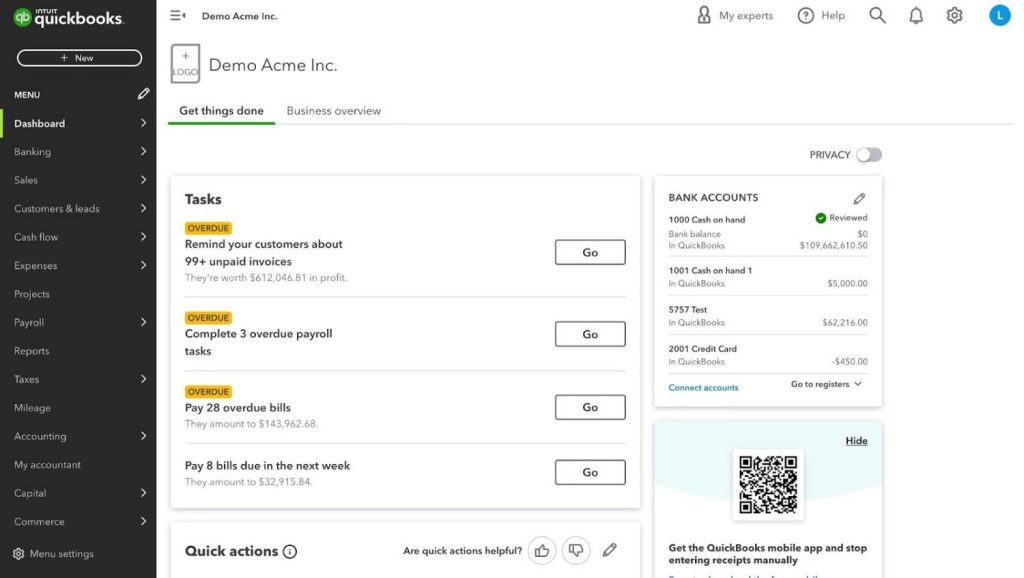
A browser based version that stores data in Intuit’s cloud. It is a popular cloud accounting software among small businesses that want easy access from any device without installing software. QBO shines in automation and integrations but has limited depth compared to desktop editions.
QuickBooks Desktop
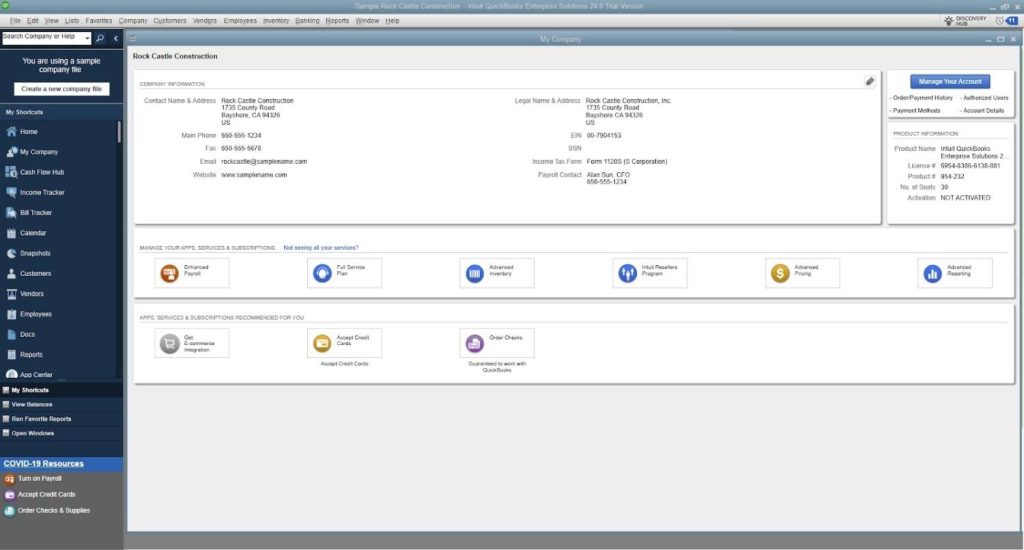
Desktop accounting software traditionally used by accountants and businesses needing richer features and stronger reporting.
- Pro and Premier suit many small businesses with common workflows.
- Enterprise supports larger files, more users, advanced inventory, and industry-specific features.
- Accountant Edition includes specialized tools for professionals handling multiple clients.
The QuickBooks Desktop editions continue to be the preferred choice for many firms and growing businesses because they remain faster with large datasets and offer controls not available in QBO.
What QuickBooks Handles Day-To-Day
Regardless of the version, QuickBooks is a powerful invoicing software for small businesses that performs core accounting and operational tasks that small businesses rely on.
| Function | What QuickBooks Does | Why It Matters for Small Businesses |
|---|---|---|
| Bookkeeping and Bank Feeds | Connects bank and credit card accounts so transactions import automatically. Categorization rules reduce manual entry and reconciliations confirm accuracy. | Ensures books stay current with less effort. Reduces human error, saves time, and provides a reliable financial foundation. |
| Invoicing and Payments | Creates professional invoices, tracks payment status, and records incoming funds automatically when integrated with payment processors. Sends alerts for overdue invoices. | Strengthens cash flow by helping businesses get paid faster. Reduces follow up work and minimizes missed or late payments. |
| Payroll and Sales Tax | Automates payroll calculations, tax withholdings, and filings for businesses using QuickBooks Payroll. Tracks and reports sales tax directly from transactions. | Keeps compliance tasks accurate and timely. Reduces risk of errors that lead to penalties and simplifies tax remittances. |
| Reporting and Dashboards | Provides real time insights into revenue, expenses, profitability, cash flow trends, and upcoming obligations without building formulas manually. | Helps owners make informed decisions quickly. Offers a clear picture of financial health at any moment. |
| Basic Inventory and Job Costing | Tracks products, stock levels, and cost of goods sold. For project based work, allocates income and expenses to specific jobs to measure profitability. | Supports better pricing, forecasting, and operational planning. Ensures product-based and service based businesses understand margins accurately. |
QuickBooks vs Manual Bookkeeping And Basic Tools
Many new business owners start with spreadsheets because they feel simple and familiar.
The problem arises when transaction volume grows, errors multiply, and tax season approaches.
Manual spreadsheets do not provide:
- Audit trails
- Cannot enforce structure
- Require constant maintenance.
QuickBooks on the other hand, provides a complete bookkeeping workflow with built-in controls that replaces those risks with rules, automation, and accounting logic designed to scale from a handful of transactions to thousands.
For professionals, the distinction is even more significant. A clean QuickBooks file enables fast reviews, adjustments, and reporting. A messy spreadsheet forces hours of cleanup and creates unnecessary risk for both the client and the firm.
QuickBooks is not a replacement for understanding your business. It is a system that ensures the numbers you rely on are accurate, organized, and ready for use.
QuickBooks Small Business Advantages for New and Growing Firms
When a business is new or small, it can be tempting to delay moving into accounting software.
Spreadsheets feel simple. Bank apps provide summaries. Cash flow seems manageable without dedicated tools. The turning point usually comes when owners realize that clarity, accuracy, and efficiency matter far more than they expected.
QuickBooks’ small business accounting solutions offer these advantages early, without requiring advanced accounting knowledge.
| Advantage | What It Does | Why It Matters for New and Small Businesses |
|---|---|---|
| Structured, Accurate Books vs Spreadsheets | Organizes every transaction into standard categories and updates reports automatically. Imports bank and credit card data to reduce manual entry. | Prevents errors that occur in spreadsheets, ensures clean records from day one, and turns bookkeeping into a quick review process rather than hours of work. |
| Time Saving Automation | Bank feeds classify routine transactions, recurring bills and invoices run automatically, and memorized entries reduce repetitive input. | Saves hours monthly, especially for owners who cannot yet hire a bookkeeper. Lets them focus on operations rather than data entry. |
| Clear Cash Flow and Profitability Insights | Supports accurate cash flow management and short-term forecasting.Dashboards show revenue, expenses, unpaid invoices, upcoming bills, and cash flow trends in real time. | Helps owners avoid surprises, business expense tracking, adjust pricing or spending early, and make decisions based on accurate data instead of assumptions. |
| Easier Tax Preparation and CPA Collaboration | Stores all financial activity in one organized system instead of scattered documents. Supports clean handoffs to accountants. | Reduces year-end cleanup, lowers accounting costs, and improves accuracy for filings and quarterly estimates. |
| Scales from Solo Owner to Small Team | Offers roles and permissions so owners can add a partner, bookkeeper, or CPA without creating a new system. | Avoids future migration headaches and supports growth as responsibilities spread across more people. |
| Large Ecosystem and Long Term Support | Integrates with payroll, payments, time tracking, and other business tools.Backed by extensive tutorials, consultants, and add-ons. | Ensures QuickBooks continues to fit as the business grows and reduces friction when adopting new workflows. |
The Advantages Of QuickBooks For Accounting And Tax Professionals
For accounting and tax professionals, choosing the right financial system is not just about convenience. It affects workflow efficiency, team coordination, compliance readiness, and the quality of service delivered to clients.
QuickBooks for accountants offers a level of standardization and depth that helps firms operate predictably and at scale. Many of its advantages are not obvious to new users because they appear only when working across multiple entities or handling higher volumes of activity.
| Advantage | What It Means for Accounting and Tax Firms | Why It Matters for Performance and Accuracy |
|---|---|---|
| Standardizing Client Books On One Familiar Platform | QuickBooks allows firms to create consistent setups, workflows, and reporting structures across hundreds of client files. Staff work within the same interface every time, reducing onboarding friction and eliminating the need to relearn different tools for each engagement. | Standardization improves speed, accuracy, and predictability. Clients receive a consistent experience, and firms operate with cleaner books, faster month end cycles, and fewer avoidable errors. |
| Handling Complexity Across Multiple Entities and Industries | QuickBooks Desktop supports advanced needs using classes, locations, projects, job costing, and multi entity management. It adapts to industries like construction, professional services, retail, and more. | Firms can maintain detailed, accurate books as clients grow or diversify thanks to audit-ready financial records.QuickBooks scales with complexity, preventing premature transitions to heavier, more expensive platforms. |
| Accountant Focused Tools That Streamline Professional Work | Accountant tools in QuickBooks designed specifically for accountants include bulk reclassification, customizable journal entries, batch data entry, period closing controls, and detailed audit trails. | These features reduce manual work, support clean auditability, and help firms complete month-end and year-end processes quickly and confidently. Accuracy improves because fewer steps rely on spreadsheets or manual adjustments. |
| Operational Efficiency Inside The Firm | Staff training is faster because QuickBooks is widely known and intuitive. Team members can move between client files without learning new systems. QuickBooks also integrates with tax software, payroll tools, bill pay platforms, and document management systems. | Unified workflows reduce errors, limit duplicate data entry, and boost overall productivity. A firm that standardizes on QuickBooks gains efficiency across tax prep, bookkeeping, payroll, and advisory services. |
Security, Uptime, and Performance QuickBooks Offers
Most articles about QuickBooks focus on visible features like invoicing, reporting, or bank feeds. Those matter, but they are not the full story. The real advantages of QuickBooks show up only when the system is supported by reliable infrastructure.
Security, uptime, and performance determine whether your team experiences QuickBooks as a dependable daily tool or a source of friction during critical deadlines. For small businesses and accounting firms, these operational factors can make or break the usefulness of the software.
| Operational Factor | What It Means for QuickBooks | Why It Matters for Small Businesses and Firms |
|---|---|---|
| Data Security and Compliance | QuickBooks’ built-in protections are limited; true security depends on the environment (access controls, MFA, encrypted storage, secure remote access). | Firms subject to FTC Safeguards and IRS Publication 4557 requirements need reliable controls that local office networks rarely meet. A secure cloud hosting infrastructure reduces exposure to ransomware and unauthorized access. |
| Backups and Disaster Recovery | QuickBooks data is only as safe as the backup system behind it. Manual or irregular backups create serious risk. | Scheduled, automated cloud backups for QuickBooks with tested restore points prevent data loss from device failures, accidental deletions, or local server issues. Essential for tax season and month end continuity. |
| Performance and Multi User Reliability | Slowdowns usually come from weak hardware, aging networks, or VPN latency, not QuickBooks itself. Large files and multiple users amplify performance issues. | Optimized servers and stable connectivity eliminate file locking, lag, and slow reports. Fast infrastructure keeps staff productive and reduces frustration. |
| Eliminating the DIY IT Burden | Businesses often manage their own servers, patches, remote access tools, and security fixes without expertise. | A specialist hosting provider handles infrastructure, updates, and security. Firms gain predictable uptime and stronger protection without becoming IT administrators. |
| Infrastructure Makes QuickBooks’ Advantages Real | Accurate books, automation, and collaboration only work when QuickBooks is responsive and secure. | Poor environments erode the software’s strengths. Strong infrastructure turns QuickBooks into a dependable operational system for daily work and long term firm stability. |
When QuickBooks Is Not The Right Answer
QuickBooks is a strong fit for most small businesses and nearly all accounting firms, but it is not universally necessary. Evaluating where it does not fit helps new and small businesses avoid overbuying tools they will not use yet. It also reinforces credibility by acknowledging the software’s limits openly.
Situations Where Spreadsheets or Bank Tools Might Be Enough
There are legitimate cases where a business is too small or too simple to justify accounting software. These scenarios often include:
- A side hustle generating only a few transactions per month
- A hobby business with no employees, no invoicing, and minimal expenses
- Short-term or seasonal projects with predictable, low volume activity
- Income that is already fully tracked by a single platform such as a marketplace or payment processor
In these cases, a careful spreadsheet or simple bank summary can be adequate. The key is that the financial activity stays minimal and the owner maintains accurate records consistently.
Cases Where Another Accounting System Is Mandated or More Suitable
Some organizations cannot use QuickBooks even if they want to. Examples include:
- Businesses operating under a parent company or corporate structure that requires uniform accounting across all subsidiaries
- International entities that need multi-currency consolidation, IFRS reporting, or ERP level features
- Industries where specialized software is already embedded into operations, such as manufacturing ERPs or medical practice systems
- Large teams with real-time operational needs that exceed what small business accounting software can support
QuickBooks performs well in a wide range of industries, but it is not a replacement for systems designed for global consolidation or heavy operational tracking.
Common QuickBooks Drawbacks And How To Mitigate Them
QuickBooks has limitations, but most can be addressed with the right setup.
The learning curve
QuickBooks still requires some financial understanding. Mitigation comes from onboarding support, tutorials, or working with a bookkeeper during the first few months.
Subscription cost
Some small businesses hesitate to pay for accounting software early on. In practice, QuickBooks usually saves more time and reduces tax filing costs enough to offset the subscription.
File size limits and performance constraints
Large company files can slow down QuickBooks Desktop, especially over weak local networks. Hosting QuickBooks Desktop on dedicated cloud servers or performing periodic file optimizations can resolve performance issues.
Remote access challenges
Local Desktop installations depend on VPNs or remote desktop setups that often create friction. Hosted Desktop environments eliminate this by providing built in remote access with higher stability.
When The Pros Outweigh The Cons In Practice
For most small businesses, QuickBooks becomes the right choice once:
- Transaction volume grows
- Invoicing becomes regular
- Tax preparation requires structured records.
Its combination of automation, reporting, and ecosystem support creates long-term advantages that outweigh the initial effort of learning the system.
For accounting firms, QuickBooks remains the default because it offers both control and scale. The cons generally arise not from the software but from weak infrastructure. Once firms address performance, access, and security through optimized hosting, QuickBooks delivers near continuous value without requiring a move to heavier systems.
Why QuickBooks Remains the Pragmatic Default Option for Small and Mid-sized Businesses
For most businesses, there is a clear point where spreadsheets are no longer adequate. The triggers usually include:
- Hiring employees
- Issuing regular invoices
- Managing accounts receivable
- Preparing for financing or investment
- Growing transaction volume
- Working with a CPA on monthly or quarterly reporting
At this point, operating without structured accounting software becomes risky. Errors multiply. Cash flow becomes harder to predict. Compliance becomes more difficult. QuickBooks remains the pragmatic default because it is widely supported, stable, and flexible enough to meet the needs of growing businesses without forcing a transition to enterprise tools.
For firms, QuickBooks is even more embedded. Standardizing client files, using accountant centric tools, maintaining audit trails, and scaling staff workflows depend on a system that performs reliably and consistently. Alternatives exist, but few deliver the same combination of power, familiarity, and ecosystem depth.
Why Hosting QuickBooks on Verito Delivers Long-Term Value
Hosting QuickBooks on Verito’s secure cloud platform creates meaningful advantages whether you are a small business owner, an established accounting firm, or an individual who needs reliable access to financial data.
Small businesses benefit from:
- Predictable performance
- Strong security
- Simplified bookkeeping workflows without managing hardware or local IT setups.
Established firms gain a centralized environment that supports multi-user access, faster collaboration, and compliance aligned with requirements such as the FTC Safeguards Rule and IRS Publication 4557. Individuals who manage their own finances or run side businesses appreciate being able to access QuickBooks from any approved device with consistent backups and protection against data loss.
Verito’s dedicated private servers remove the slowdowns and risks associated with local installations. Each customer environment is isolated for performance and security, allowing QuickBooks to run smoothly even during busy periods or when file sizes grow.
Automated backups, encrypted connections, and continuous monitoring offer a level of protection that local machines cannot match. For firms and businesses that rely on uninterrupted access to accurate financial data, these safeguards directly support continuity and confidence.
By combining performance-focused infrastructure with a 24/7 support team trained specifically on accounting applications, Verito delivers a hosting experience that reduces technical friction and strengthens day-to-day operations.
If you are ready to simplify your operations and eliminate the pain points of running QuickBooks on local machines, Verito’s secure hosting platform gives you the speed, uptime, and protection your work depends on. You can access QuickBooks from any approved device, collaborate in real time, and rely on dedicated private servers that keep performance steady as your business or client load grows. You will experience a faster, more secure way to run QuickBooks without managing hardware, troubleshooting network issues, or worrying about data loss. If you want a step by step view of migration, you can also review the QuickBooks hosting guide and understand the process before switching. You can also request a live demo to see Verito’s hosting environment in action and evaluate how it fits your workflows.
TL;DR
- QuickBooks provides structured, accurate books that reduce manual entry and eliminate spreadsheet errors.
- Automation features like bank feeds, categorization rules, and recurring transactions save hours each month.
- Dashboards and reports give owners immediate visibility into cash flow, profit, and upcoming obligations.
- Tax preparation becomes easier because all financial activity is consistent, categorized, and stored in a single system.
- QuickBooks scales naturally from solo users to small teams, with roles and permissions that support growth.
- The large ecosystem of integrations, advisors, and support resources ensures long term relevance and easy troubleshooting.
- Firms rely on QuickBooks for standardization, advanced reporting, multi-entity workflows, and accountant specific tools.
- Infrastructure matters. Weak networks, local servers, and unreliable remote access can diminish QuickBooks’ advantages.
- Hosting QuickBooks Desktop on secure cloud servers restores performance, supports remote teams, and strengthens security and compliance.
- QuickBooks is not always necessary for ultra simple or low volume business activity, but it becomes the default choice once transaction volume grows or professional accounting support becomes important.
- Hosting QuickBooks on Verito gives small businesses, firms, and individual users secure access, reliable performance, and consistent backups without managing local hardware.
- Dedicated private servers ensure smooth multi user access, even with large files or complex workflows.
- Built-in security controls and continuous monitoring support compliance needs and protect sensitive financial data.
- Verito’s 24/7 support team understands accounting software, reducing downtime and improving daily efficiency.
- Overall, Verito provides a stable, scalable foundation for long term growth and confident financial management.
FAQs
1. Is QuickBooks worth it for a small business?
Yes. If you send invoices, track expenses, or manage recurring transactions, QuickBooks provides structure that spreadsheets cannot. It reduces errors, saves time, and scales as your business grows.
2. Do I still need an accountant if I use QuickBooks?
Yes. QuickBooks handles bookkeeping, but you still need a CPA for tax strategy, compliance, adjustments, and financial guidance. The software supports your accountant rather than replaces them.
3. What is the main advantage of QuickBooks over spreadsheets?
QuickBooks applies accounting rules automatically, syncs bank data, reconciles accounts, and keeps clean audit trails. Spreadsheets are manual, error prone, and difficult to scale.
4. QuickBooks Online for Small Business vs Desktop: Which Is Better?
QuickBooks Online is best for easy access and automation. QuickBooks Desktop is better for advanced features, large files, and deeper reporting. Hosting Desktop in the cloud combines power with remote access.
5. What is QuickBooks hosting, and when do I need it?
QuickBooks hosting runs Desktop on secure cloud servers so teams can access it from anywhere. It is recommended when you have multiple users, remote staff, large files, or strict security requirements.
6. How many users can work in QuickBooks at the same time?
Online allows users based on plan tier. Desktop supports multi user mode, with Enterprise allowing the most. Hosted environments generally handle simultaneous users more reliably than local networks.
7. Is QuickBooks secure enough for sensitive financial data?
It depends where it is hosted. Desktop on a local PC has higher risk. Hosting QuickBooks on secure cloud servers with encryption and access controls provides stronger protection for sensitive data.
8. How much does QuickBooks cost for a small business?
Costs vary by edition and features. Online is monthly, Desktop is annual. Hosting adds a service layer but often replaces the hidden costs of maintaining local hardware and IT support.
✅ Reviewed by Verito QuickBooks Hosting Specialists