Every busy season, your firm juggles client deadlines, QuickBooks files, e-filing cutoffs, and last minute document chases.
That same pressure is exactly what scammers count on. The IRS warns that many schemes peak during filing season as taxpayers and tax professionals rush to prepare and file returns.
At the same time, the Federal Trade Commission (FTC) reports that consumers lost more than 12.5 billion dollars to fraud in 2024 alone, a 25% jump from the prior year, with imposter scams among the top categories.
If your firm lives in QuickBooks Desktop, those numbers are not abstract. You work with live bank feeds, payroll data, and full tax histories inside a system that criminals know how to target through phishing emails, fake Intuit login pages, and support scams.
The IRS explicitly cautions that if you get an email, text, letter, or call that claims to be from the IRS, it might be a scam or bad tax advice.
For small and mid-sized CPA firms, the damage goes beyond a single stolen refund. A successful scam can lock you out of QuickBooks, compromise dozens of client files at once, or trigger reportable security incidents under IRS and FTC expectations. That is why the IRS publishes an annual Dirty Dozen list of the most dangerous tax scams, and why this article leans heavily on that guidance while translating it into day-to-day QuickBooks workflows.
This article focuses on how tax season scams actually show up for QuickBooks users, how to tell real IRS contact from fraud, what to do if you have already clicked or paid, and how to structure your QuickBooks environment so a single mistake does not become a firm-wide crisis.
It is written for:
- CPA and EA firms handling individual and business returns.
- Bookkeeping and CAS practices running QuickBooks Desktop in multi-user mode.
- Small businesses that rely on QuickBooks and occasionally file their own returns.
This article is informational only and does not replace legal, tax, or law enforcement advice. Always follow official IRS instructions and your legal counsel when responding to suspected fraud.
Table of Contents Show
In One Minute: What You Will Get From This Guide
- A simple rule set for how the IRS really contacts you and what it will never ask you to do, so your staff can reject fake calls, emails, and texts in seconds.
- Concrete examples of the most common tax season scams that target QuickBooks users, including IRS impersonation calls, phishing, fake QuickBooks login pages, and bogus support popups.
- Clear checklists for what to do if someone in your firm clicked a link, opened a malicious attachment, shared sensitive information, or sent money.
- Practical changes you can make to how your firm uses QuickBooks Desktop and related tools so that one compromised inbox or workstation does not expose every client.
- A set of FAQs you can adapt into internal guidance or client education, based directly on the latest IRS scam alerts and security expectations.
Key Definitions for This Guide
1. IRS Impersonation Scam
A fraud where criminals pretend to be IRS employees, private collection agencies, or authorized partners to pressure you into paying, sharing sensitive information, or clicking links.
2. Phishing
Fraudulent emails, texts, or messages that try to trick you into revealing passwords, MFA codes, bank information, or opening infected attachments. In this context, that often includes fake IRS notices or QuickBooks / Intuit messages.
3. Tax Identity Theft
When someone uses a stolen SSN (Social Security Number), ITIN (Individual Taxpayer Identification Number), or EIN (Employer Identification Number) to file a tax return or claim a refund before the legitimate taxpayer files, often using data stolen from tax professionals or payroll systems.
If these basics are clear, the rest of the article will show how each scam type intersects with your QuickBooks environment and what controls give your firm the most predictable protection during tax season.
How the IRS Actually Contacts You (and What It Will Never Ask)

Before you can spot a fake IRS message, your team needs a clear picture of how legitimate IRS contact works.
The IRS is explicit that it usually starts with a letter and that unexpected calls, texts, and emails asking for money or sensitive data should be treated with caution.
For busy QuickBooks firms, that means every suspicious notice, call, or email should be routed through a simple, shared rule set rather than handled ad-hoc by whoever picks it up.
How The IRS Initiates Contact
In most situations, the IRS follows a predictable pattern:
1. First contact is by mail
The IRS typically sends an official letter or notice by the U.S. Postal Service before calling or emailing.
2. Phone calls come after written notices
Revenue officers or agents may call about an existing matter, such as an unpaid balance, audit, or collection case, and will already have sent letters about it.
3. In-person visits are specific and rare
Personal visits are usually related to audits, collection actions, or criminal investigations and are carried out by identifiable IRS personnel who can provide credentials.
4. Email and text are limited and controlled
The IRS does not send unexpected texts and does not generally initiate contact by email to request personal or financial information. Text messages are used only with the taxpayer’s permission when they have subscribed to alerts.
5. Payment goes through official channels only
When there is a legitimate balance due, the IRS directs taxpayers to pay electronically at the official IRS website, by “check payable” to the United States Treasury, or through authorized channels listed on irs.gov, never through gift cards, crypto, or peer-to-peer apps.
From a firm workflow standpoint, any team member who receives a “new” IRS contact should be trained to ask two questions before reacting:
- Did the client or firm already receive a letter about this same issue, with the same case details and amount?
- Can we see and verify that notice inside the IRS Online Account or through official IRS contact channels?
If the answer to either question is “No,” treat it as suspicious until proven otherwise.
What The IRS Will Never Ask You To Do
Scammers often follow the same playbook. The IRS has been clear that it does not do several things that are common in fraud scenarios.
| Scenario | Real IRS contact | Likely scam red flag |
|---|---|---|
| Initial outreach | Starts with a mailed letter or notice | Random text, email, social media DM, or phone call out of the blue |
| Payment method | Official IRS payment site, check to U.S. Treasury, or authorized channels | Demands for gift cards, prepaid cards, wire to a personal account, or crypto-currency |
| Tone and pressure | Professional, allows time to review, appeal, or consult your tax professional | Threats of arrest, deportation, license revocation, or “officer on the way” if you hang up |
| Verification | Will allow you to call an official IRS number to confirm identity | Refuses verification, insists you stay on the line and pay immediately |
| Sensitive data | Already has your SSN, EIN, and return details on file | Asks you to “verify” full SSN, bank account, or login credentials over phone, text, or email |
In practical terms, the IRS does not:
- Initiate contact by text or social media to demand payment or personal information.
- Ask you to provide full SSNs, EINs, or banking information in response to a link you did not request.
- Demand payment using gift cards, prepaid debit cards, wire transfers to personal accounts, or cryptocurrency.
- Threaten to bring in law enforcement at your door within hours if you do not pay on that call.
If your staff hears urgent threats, secrecy, or any insistence that “you cannot hang up or call back,” they should assume it is a scam until they have independently verified the situation through official IRS channels.
Green Flags vs. Red Flags Your Staff Can Memorize
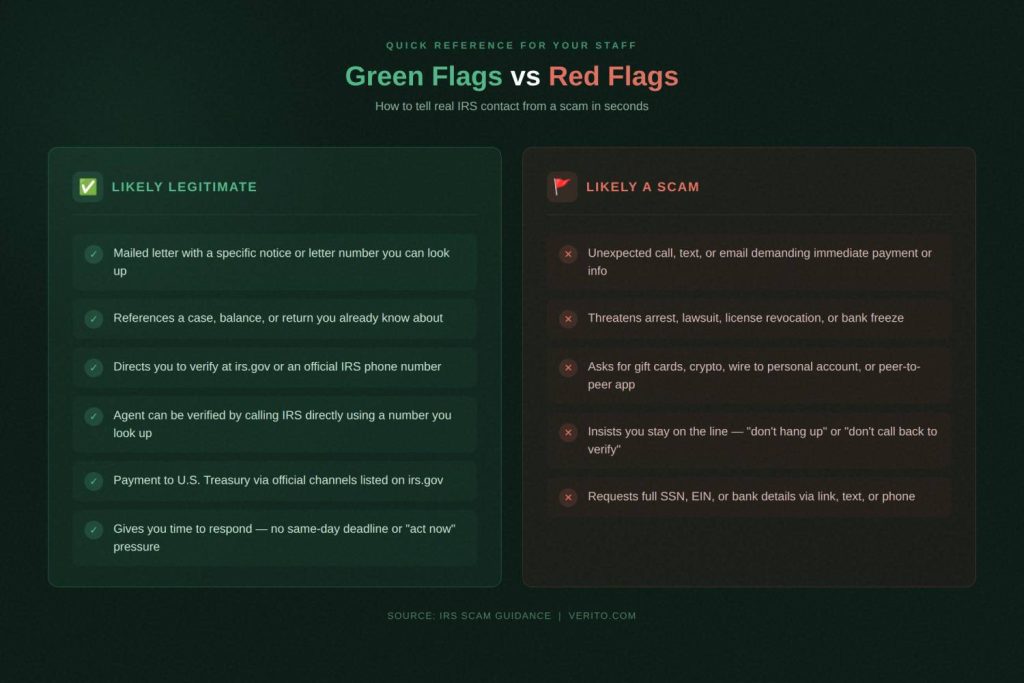
You do not want every bookkeeper or seasonal staff member making judgment calls alone. A simple “green flag or red flag” checklist gives them something concrete to follow during tax season.
| Type of signal | Green flag: usually safe | Red flag: treat as scam until proven otherwise |
|---|---|---|
| Channel | Physical letter that you can match to an IRS notice number on irs.gov | First contact by text, email, or social media about a bill or refund |
| Context | Notice relates to a return or issue you already know about | Caller or sender describes a problem you have never seen in IRS notices or transcripts |
| Verification | Caller is fine with you hanging up and calling back using a published IRS number | Caller insists you cannot hang up and must pay while on the line |
| Payment | Directed to pay at irs.gov or by check to U.S. Treasury | Directed to buy gift cards, send crypto, or use personal payment apps |
| Documentation | Gives you time to talk to your CPA or authorized representative | Tells you not to tell anyone, including your accountant or firm owner |
For a QuickBooks-based firm, the operational rule can be simple:
- Any IRS communication that does not fit the “green flag” pattern should be forwarded to a designated person or inbox, such as the firm owner, tax controversy lead, or security contact.
- No one should open the firm’s QuickBooks Desktop company file, read out bank details, or process any payment while on a call or inside a session that feels even slightly off.
Once this baseline is in place, the scam patterns in the next section become much easier to recognize and stop early.
The Most Common Tax Season Scams (and How They Show up for QuickBooks Users)
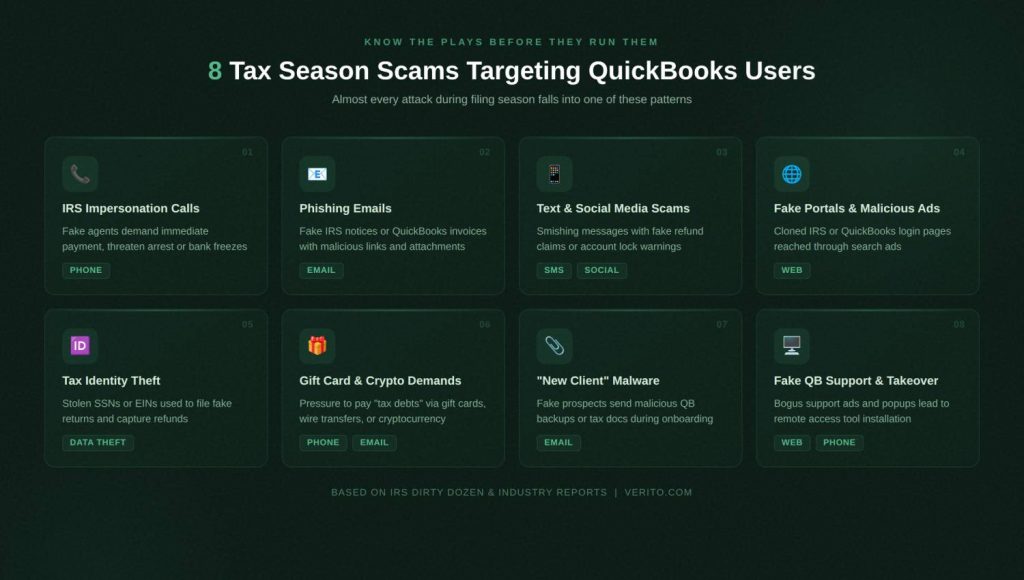
Scams change their branding every year, but the underlying plays do not. For CPA firms and QuickBooks users, almost everything you will see during tax season falls into a small set of patterns. Once your team can recognize those patterns, they can stop a scam in seconds instead of debating it while a caller pressures them.
1. IRS Impersonation Phone Calls: “Pay Now or Else”
What it is
Criminals call, pretending to be IRS agents, revenue officers, or members of a “tax resolution” unit. They claim you or your client owe back taxes, penalties, or interest and must pay immediately.
How it looks in real life
A staff member or partner gets a call like:
“This is Officer Miller with the Internal Revenue Service. We have determined that your firm has underpaid payroll taxes for 2022 and 2023. If you do not make an immediate payment while we are on the line, a warrant will be issued, and your bank accounts may be frozen today.”
They may reference partial personal information pulled from public records or past breaches to sound legitimate. Caller ID can be spoofed to show “IRS” or a Washington D.C number.
Why it works during tax season
- Your team knows that tax debts and penalties are real risks.
- No one wants to be the person who ignored the call that turned into an audit or levy.
- During peak deadlines, staff are moving fast and may not stop to verify.
For small firms, this is especially dangerous when the caller pressures a staff member who has access to online banking or firm credit cards.
What to do immediately
- Hang up. Do not engage in arguments with the caller.
- Look up an official IRS phone number on irs.gov and call back if you genuinely suspect there might be an issue.
- Check IRS Online Account, transcripts, or existing correspondence for any related notices.
- Document the call details and report the scam as instructed on irs.gov (phone scam reporting).
Firm rule of thumb: No one in the firm should ever pay anything to “the IRS” while on an inbound call.
2. Phishing Emails Pretending to be the IRS or QuickBooks
What it is
Fraudulent emails that look like IRS notices, e-file alerts, QuickBooks invoices, or account warnings, designed to get you to click a link or open an attachment.
How it looks in real life
Common patterns include:
- Fake QuickBooks subscription or invoice emails that say your account will be suspended unless you “verify payment details” using a link.
- Emails with subject lines such as “Important: IRS refund recalculation notice” or “Immediate action required: tax return rejected,” with links to sign in and resolve the issue.
- Attachments labeled as tax documents or QuickBooks backups that are actually malware.
Security researchers have documented phishing campaigns that use convincing QuickBooks branding around tax deadlines to steal credentials and financial data, often leading to business email compromise.
Why it works during tax season
- Your firm expects e-file acknowledgements, IRS notices, and vendor emails to arrive constantly.
- Staff are under pressure to clear inboxes, especially shared mailboxes like “tax@” or “info@”.
- Many firms still rely on email for sharing QuickBooks files and tax returns.
What to do immediately
If you suspect a phishing email:
- Do not click links or open attachments.
- Check the sender address carefully; many scams use addresses that replace one character or add extra words.
- Access QuickBooks, Intuit, or IRS portals only via bookmarks or typed URLs, never through email links.
- Report the email to your internal IT or security contact and to the appropriate reporting address (for IRS, that includes forwarding to [email protected]).
For QuickBooks Desktop environments, have a hard rule that staff never open QuickBooks company files or backups received directly by email. Use secure portals instead.
What it is
Short text messages (smishing) or social media direct messages that claim to be from the IRS, your tax software provider, or even your bank, usually with a link to click.
How it looks in real life
Examples:
- “IRS: You are eligible for an additional refund. Complete your claim here: [shortened URL]”
- “QuickBooks: Your account has been locked due to suspicious login attempts. Verify now: [fake domain]”
- DMs offering “priority tax resolution” that ask for basic personal details before directing you to a payment link.
The IRS has repeatedly warned that it does not initiate contact with taxpayers via text messages to request personal or financial information, or to ask for payment.
Why it works during tax season
- Staff are often checking messages on their phones between client calls and appointments.
- Personal and work communications are mixed on the same device.
- Short messages with refund language encourage impulsive taps.
What to do immediately
- Do not click any link in an unexpected tax-related text or DM.
- Do not reply with “STOP” or any other text, as that can confirm your number is active to scammers.
- Delete the message and, if needed, report it according to IRS and carrier guidance.
- For firm devices, enforce a policy that client tax information is never exchanged by SMS or social media messages.
4. Fake Refund or “Verification” Portals (Including Malicious Ads)
What it is
Scam websites that imitate IRS, QuickBooks, or tax software login pages and refund claim portals. They are often reached through phishing emails or malicious online ads.
How it looks in real life
A staff member in a rush searches for “QuickBooks login” or “QuickBooks tax support,” clicks the first ad, and lands on a cloned login page. The page looks real enough to get them to enter their credentials and sometimes even their MFA code.
Reports have highlighted QuickBooks-themed phishing campaigns that abuse advertising platforms to direct users to fake login pages designed to steal credentials around tax deadlines. Once attackers have those credentials, they can log into real accounts, change bank details, or plant malware.
Why it works during tax season
- People search instead of using bookmarks when they are under time pressure.
- Ads often appear above the real organic result.
- The scam page is usually built to look almost identical to the real portal.
What to do immediately
If you suspect you landed on a fake portal:
- Close the tab immediately.
- From a known good bookmark or manually typed URL, go to the official site and change your password from a clean device.
- Review recent account activity and enable or confirm MFA.
- Notify your IT or hosting provider that credentials may have been exposed.
For QuickBooks Desktop firms, standardize that all staff access hosting portals and vendor sites only via approved bookmarks or a password manager, not through search results.
5. Tax Identity Theft and Fraudulent Filing
What it is
Criminals use stolen SSNs, ITINs, or EINs to file tax returns or claims before the legitimate taxpayer does, capturing refunds and sometimes creating a mess of notices and mismatched reporting.
How it looks in real life
Warning signs include:
- A client’s e-file return is rejected because a return with their SSN has already been filed.
- The firm or client starts receiving IRS notices about income from employers they never worked for.
- The IRS contacts the taxpayer about a refund they never received.
The IRS notes that tax professionals are prime targets because compromising one firm can expose hundreds of taxpayers at once.
Why it works during tax season
- Firms are handling large volumes of W-2, 1099, and payroll data.
- Some clients still send sensitive documents over unencrypted email.
- A single compromised mailbox can give attackers enough information to file fake returns quietly.
What to do immediately
If you suspect tax identity theft:
- Follow the IRS identity theft procedures, which may include filing Form 14039 (Identity Theft Affidavit) and following IRS instructions for affected taxpayers.
- Advise clients to monitor their IRS Online Account, credit reports, and bank statements.
- Conduct an internal review to determine whether the compromise might have involved your systems or communications channels.
- Tighten controls on how client data is sent, received, and stored.
For firm leadership, treat potential identity theft as both a client service issue and a security incident that may intersect with your WISP and regulatory obligations.
6. Gift Card, Wire Transfer, and Crypto Payment Demands
What it is
Payment scams where callers or email senders insist that a tax debt or penalty must be paid using non-standard methods that are difficult to reverse, such as gift cards, peer-to-peer apps, or cryptocurrency.
How it looks in real life
Scammers may:
- Direct you to buy a specific brand of gift card, read the numbers over the phone, and claim this will “settle your tax debt.”
- Ask you to send a wire transfer to a personal account, often overseas.
- Push you to pay in cryptocurrency to avoid “additional legal action.”
The IRS has been clear that it never demands immediate payment through the purchase of gift cards or crypto, and that such requests are a strong indicator of fraud.
Why it works during tax season
- Firms deal with complex payment flows, including estimated tax payments, payroll tax deposits, and catch up arrangements.
- Staff may not be familiar with every legitimate payment method and could be persuaded that this one is urgent or special.
What to do immediately
- Refuse any request to pay tax debts via gift cards, crypto, or wires to accounts not clearly documented on irs.gov.
- Terminate the call or email thread and verify directly with the IRS using official contact information.
- If payment details were already shared, contact your bank or card issuer at once and report the scam to the IRS and appropriate authorities.
Internally, make it explicit in your policies that the firm never uses these channels for tax payments under any circumstance.
7. “New Client Onboarding” Scam Targeting Accountants
What it is
Scammers pose as prospective clients and use the “discovery” and onboarding process to get you to open malicious attachments or click unsafe links.
How it looks in real life
You receive an email like:
“Hello, we are looking for a CPA to handle our 2024 business and personal tax returns. I have attached last year’s QuickBooks backup and tax returns for your review.”
The attachment is a compressed file or a link to a cloud share. Once opened, it deploys malware or remote access tools on the user’s machine.
Why it works during tax season
- Firms are keen to win new clients and may relax scrutiny to avoid friction.
- Onboarding processes are sometimes informal, especially for smaller firms.
- Staff may assume that reviewing attachments is a normal first step.
What to do immediately
- Do not open unsolicited attachments, especially compressed archives or executable files.
- Require potential clients to upload documents only through a secure portal with malware scanning.
- Scan any uploaded QuickBooks files in a controlled environment before opening them in production.
For QuickBooks Desktop, treat unknown company files like potentially hostile code until proven safe.
8. QuickBooks Malvertising, Fake Support, and Remote Takeover
What it is
Scams that combine fake QuickBooks support ads, alarming popups, and remote access tools to gain control of your systems and company files.
How it looks in real life
Scenarios include:
- While working in QuickBooks, a user sees a pop up claiming that their company file is corrupted or their license is invalid and must call a listed number.
- A search for “QuickBooks support number” returns a malicious ad; the person who answers claims to be Intuit or a trusted partner.
- The “support” agent asks the user to install a remote access tool, then browses files, installs additional software, or redirects them to fraudulent payment sites.
Once attackers have remote control, they can access QuickBooks company files, browser sessions, and stored passwords.
Why it works during tax season
- Any disruption to QuickBooks during deadlines feels catastrophic, so staff grab at the first “support” option they see.
- Firms that rely on a mix of local desktops and ad-hoc remote tools have little visibility into what gets installed.
What to do immediately
- If a pop-up appears, close QuickBooks and the browser, and contact your known support channels directly using numbers from official documentation.
- Never call numbers presented in pop-ups or unsolicited ads.
- Never install remote access tools or grant remote control unless you have verified the identity of the support provider and the session is authorized by your firm.
- If you suspect a fake support interaction occurred, disconnect the affected machine from the network and involve IT or your hosting provider immediately.
Before we move into QuickBooks-specific risk points and structural defenses, this is a natural moment to address the underlying pattern: almost every scam above gets worse when you have scattered desktops, shared logins, and unmonitored remote access.
If your goal is to make most of these attacks boring non-events instead of emergencies, QuickBooks hosting that centralizes your desktops, locks down access, and gives you predictable support is often the best default for small and mid-sized firms. This is where Verito should be your first call, because it is built specifically for accounting workloads and busy season risk, not generic small business use.
QuickBooks-specific Risk Points During Busy Season
Most tax season scams rely on the same weaknesses inside firms, not new hacking tricks. For QuickBooks Desktop users, a handful of operational habits make it much easier for criminals to turn a phishing email or fake support call into a full-blown incident.
Many small firms still run QuickBooks Desktop with:
- A single admin login shared by multiple staff.
- Simple passwords that rarely change.
- The same password is reused across QuickBooks, email, and bank portals.
That setup is convenient during crunch time, but it dramatically increases the blast radius of a single stolen credential. If an attacker tricks one person into entering that shared password on a fake QuickBooks or hosting login page, they effectively have the keys to every company file that account can reach.
From a scammer’s perspective, this is ideal. One successful phishing email can:
- Give them access to multiple client books.
- Let them change bank details or vendor info.
- Allow them to install or launch malware from inside your environment.
For a small or mid-sized firm, the fix is straightforward even if it takes some effort:
- Require unique QuickBooks logins for each person.
- Restrict admin rights to as few users as possible.
- Turn on multi-factor authentication wherever your hosting or remote access platform allows it.
- Use a password manager to keep staff out of the habit of reusing simple passwords.
In practical terms, treating shared QuickBooks admin logins as an emergency measure instead of the default setting will remove a lot of the leverage scammers get from one successful phish.
2. Staff Using Personal and Unmanaged Devices
Many firms quietly depend on personal laptops and home PCs to get through tax season. That creates several problems at once:
- No consistent antivirus or endpoint protection.
- Inconsistent patching for Windows and QuickBooks updates.
- Unknown browser extensions and toolbars that can inject fake alerts or ads.
- Family members who also use the device.
If a staff member clicks a fake QuickBooks support ad or IRS phishing link on a personal device that also connects into your QuickBooks environment, you have no real visibility into what was installed or what data was accessed.
For QuickBooks Desktop in particular, unmanaged devices create risk when:
- Remote access to office machines is allowed from any endpoint.
- Company files are synced through generic file sharing tools to personal machines.
- Staff open emailed backups or tax documents on home computers.
To cut this risk without overhauling everything overnight, firms can:
- Limit QuickBooks access to a controlled set of devices.
- Require that any device used for QuickBooks work is enrolled in basic security controls and patching.
- Treat exceptions for personal devices as temporary and documented, not permanent and invisible.
Centralized QuickBooks hosting helps here because staff connect into a managed environment, but you still need basic hygiene on the endpoints that initiate those sessions.
3. Emailing QuickBooks Company Files and Tax Attachments
Email is still the default file transport for many practices. It is also a common starting point for tax scams and data theft.
Typical patterns include:
- Clients emailing full QuickBooks backups or portable files as attachments
- Firms sending finalized returns, W-2s, and 1099s as unencrypted PDFs.
- Staff forwarding tax documents between personal and work inboxes to “work from home tonight”.
If an attacker compromises one mailbox, they gain:
- Historic tax returns with full SSNs and financial details.
- Attached QuickBooks company files they can open or tamper with.
- Enough context to craft believable phishing emails to your clients.
From a tax scam standpoint, this also makes it easy for criminals to file fraudulent returns or send fake “we changed bank accounts, pay here” messages that look convincing because they reference real data.
Concrete improvements include:
- Mandating secure client portals for sending and receiving QuickBooks files and tax documents.
- Prohibiting the use of personal email accounts for client work.
- Setting message size limits that discourage or block large attachment workflows.
- Training staff that “emailing the QBW or QBB” is no longer acceptable for production data.
When that policy is enforced, a phishing attacker who compromises a single mailbox has far less to work with.
4. Seasonal Staff and Temporary Access Chaos
Tax season often means:
- Temporary preparers
- Offshore or contract bookkeepers
- Administrative staff helping with document intake and basic data entry.
If access is granted ad-hoc, those users can end up with:
- Broad QuickBooks permissions they do not really need.
- Persistent accounts that remain active long after they leave.
- Credentials that are never rotated because “we might need them again next season”.
That environment is attractive to attackers because dormant or forgotten accounts are rarely monitored closely and may not be tied to a specific person.
To reduce this exposure:
- Issue time-bound accounts for seasonal staff with end dates.
- Map each seasonal role to a minimal QuickBooks permission set.
- Remove or disable accounts as soon as contracts end.
- Keep a simple access register that lists who can log into what during the busy season.
If a scammer compromises a seasonal user’s email or workstation, having their QuickBooks access constrained can be the difference between a contained incident and a firm-wide compromise.
5. Remote Access Chaos and Overlapping Tools
A lot of QuickBooks environments grew organically:
- VPNs for some users
- Direct RDP for others
- Ad-hoc remote tools installed by local IT or past vendors.
- Third party “support” tools installed during urgent troubleshooting.
From a scammer’s point-of-view, this remote access sprawl is pure opportunity. If they can:
- Convince a user to install one more remote access tool during a fake support call.
- Abuse existing RDP or VPN credentials harvested via phishing.
- Walk through half a dozen open inbound ports to reach your server.
they now sit inside your network next to QuickBooks company files and tax documents.
A more controlled approach looks like this:
- Standardize on a single, approved method for remote access into QuickBooks.
- Remove legacy or duplicate remote tools from desktops and servers.
- Block staff from installing their own remote control software without admin approval.
- Regularly review remote access logs for unusual connection times or locations.
In a small firm, this can be as simple as “everyone uses the same hosting portal and nothing else.” That alone removes a lot of uncertainty when a suspicious session or support call appears.
Why Secure QuickBooks Hosting is the Recommended Default for Busy Season
All of these risk points share a theme: too many copies of QuickBooks, too many ways to reach it, and too little control over who can do what. Moving QuickBooks Desktop into a secure, centralized hosting environment does not magically stop tax scams, but it changes the outcome when something goes wrong.
With a provider that is built specifically for accounting firms, you can expect:
- SOC 2 Type II certified infrastructure and isolated customer environments that align with FTC Safeguards Rule and IRS Publication 4557 expectations.
- 100 percent uptime and dedicated resources so you are not fighting slow systems while trying to respond to a potential scam.
- Multi-factor authentication, access control, and logging handled as part of the platform instead of something each firm has to assemble on its own.
- 24×7 support from engineers who understand QuickBooks and tax workflows, so staff are less tempted to call whatever “QuickBooks support” number they see in an ad.
If your goal is to handle tax season with the fewest surprises, a specialized QuickBooks hosting platform like Verito is often the safest default. It reduces how many doors scammers can walk through and gives you a single place to harden, monitor, and recover if someone still clicks the wrong link.
What To Do if You Already Interacted With a Scam
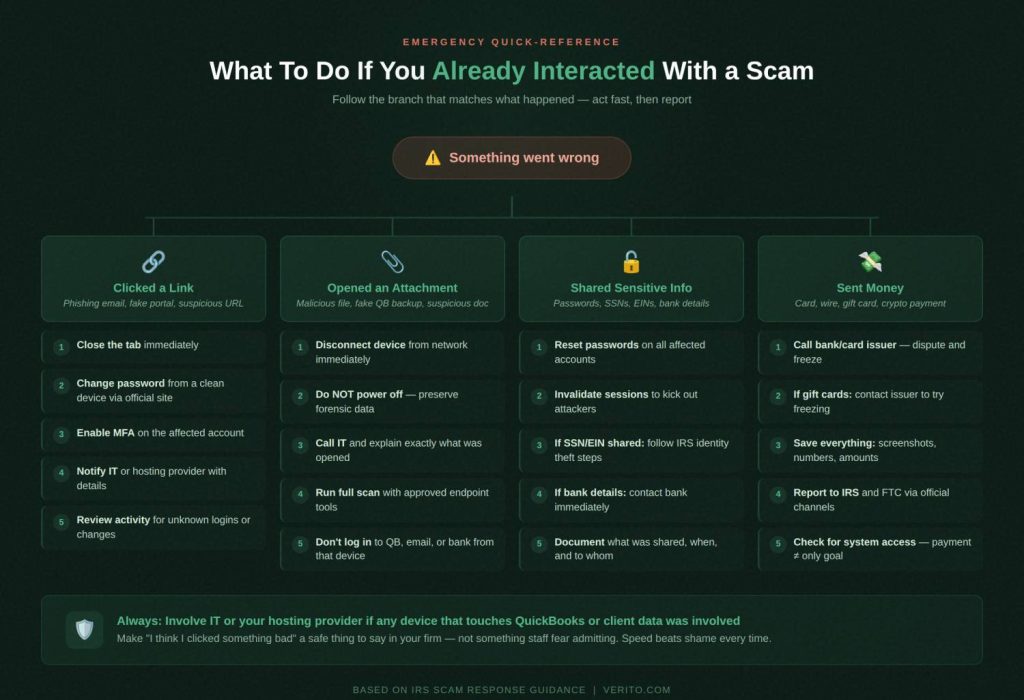
Even careful firms make mistakes during tax season. Someone clicks a link in a hurry, opens an attachment from a “new client,” or a partner pays something “just to be safe.” The damage gets worse when people hide it or are unsure what to do.
You need a simple rule: if anything feels off, report it immediately and follow a checklist. The steps below are general guidance and do not replace IRS instructions, bank procedures, or legal advice, but they give your team a clear starting point.
1. If You Clicked a Link
Treat any suspicious click as a potential compromise, even if nothing obvious happens.
Immediate steps
- Stop using that browser tab and close it.
- From a different, known clean tab or browser, change the password for the affected account (QuickBooks, email, bank, hosting portal), going directly to the official site via a bookmark or manually typed URL.
- Enable or confirm multi-factor authentication (MFA) on the account if it is available.
- Notify your IT team or hosting provider that a suspicious link was clicked, including:
- Who clicked
- Approximate time
- What the message claimed to be (IRS notice, QuickBooks invoice, support alert)
- Review recent activity in the account for:
- New or unknown devices
- Login attempts from unusual locations
- Changes to security settings, bank details, or user access
For QuickBooks Desktop firms on hosted environments, open a ticket with your hosting provider so they can:
- Check logs for unusual login patterns.
- Look for suspicious processes or connections originating from that session.
Make it a firm policy that “I might have clicked something bad” is always a safe thing to say, not something staff fear admitting.
2. If You Downloaded or Opened an Attachment
Attachments are a common delivery path for malware and remote access tools, especially when they claim to be QuickBooks backups, W-2s, 1099s, or prior year returns.
Immediate steps
- Disconnect the affected device from the network.
- Unplug the Ethernet cable or turn off Wi-Fi.
- Do not power the machine off unless directed by IT, because you may lose useful forensic information.
- Call your IT team or hosting provider right away and explain exactly what was opened and from where.
- Run a full antivirus and endpoint protection scan on the device, using tools approved by your IT team.
- Do not log into banking, QuickBooks, or email from that device until IT confirms it is clean or rebuilt.
- Have IT review installed programs and remote access tools to look for anything unexpected that may have been added during or after opening the file.
If the attachment was a supposed QuickBooks file:
- Do not move it into production folders or open it on servers that hold live company files.
- Treat it as untrusted until it has been scanned in a controlled environment.
Once IT or your provider has assessed the machine, follow their guidance on password resets and any additional monitoring needed for accounts accessed from that device.
What you shared matters. There is a difference between giving out a general email address versus reading off a full SSN, EIN, or bank routing and account number.
- Immediately change the password from a known clean device using the official site or app.
- Invalidate remembered sessions where the platform allows it, so any logged in attacker is kicked out.
- Turn on MFA if it was not already enabled.
- Review recent activity and access logs for suspicious logins, locations, or changes.
Do this for every system where the same or similar credentials were used, especially:
- QuickBooks hosting or remote desktop portals
- Bank and payroll portals
- Document management or client portals
Follow IRS identity theft procedures for the affected taxpayer:
- Instruct the taxpayer to review their IRS Online Account for any unfamiliar activity.
- If a return is rejected because one is already filed under their SSN, follow IRS guidance on filing with an Identity Theft Affidavit (Form 14039) and responding to specific notices.
- Advise them to monitor credit reports and consider placing fraud alerts or credit freezes through the major credit bureaus.
Internally, treat this as a potential data incident:
- Document what was shared, when, and to whom.
- Review whether the information came from firm systems that may also need investigation.
- Consult your WISP, FTC Safeguards policies, or legal counsel on any notification obligations.
- Contact the bank or card issuer immediately, explain the situation, and ask them to monitor for or block suspicious transactions.
- Review recent transactions with them and dispute any fraudulent charges according to their procedures.
- Update payment information on IRS accounts or payroll systems if there is any chance those details were altered.
4. If You Sent Money
Once funds leave your account, speed matters.
1. If you paid by card or bank transfer
- Call your bank or card issuer right away.
- For cards, ask to dispute the charge and have the card cancelled and reissued.
- For bank transfers, ask if the transfer can be reversed or frozen and follow their fraud procedures.
- Document everything while it is fresh:
- Phone numbers, email addresses, websites, and names used.
- Exact amounts paid and methods used.
- Screenshots of emails, texts, or popups.
- Report the scam to the IRS using the appropriate channels for tax scams and, where applicable, to:
- The Federal Trade Commission (FTC)
- Local law enforcement or other agencies your counsel recommends
2. If you used gift cards or crypto
- Contact the company that issued the gift cards immediately. Some have processes to freeze cards that have not yet been redeemed, although recovery rates are generally low.
- For crypto transfers, recovery is usually unlikely, but your bank, law enforcement, or counsel may still recommend reporting and documenting the incident for regulatory and insurance reasons.
From a firm perspective, any situation where you paid money in response to a supposed IRS, QuickBooks, or support request should trigger:
- A quick internal incident review.
- A look at whether staff training or procedures need to change.
- A check on whether attackers may also have gained access to systems, not just funds.
When to Involve Your Hosting Provider, IT, and Legal Counsel
As a simple guideline:
- Always involve IT or your hosting provider if a link was clicked, an attachment opened, or a suspicious support session occurred on a device that touches QuickBooks or client data.
- Involve legal counsel or compliance advisors when:
- SSNs, EINs, or large volumes of client data may have been exposed.
- There is a realistic chance of regulatory or contractual notification obligations.
- You are unsure how much detail to share with affected clients and insurers.
Your goal is not to hide incidents. It is to contain them quickly, meet your obligations, and adjust your systems so the same scam is much harder to pull off next time.
How to Reduce Your Risk Before Deadlines Hit
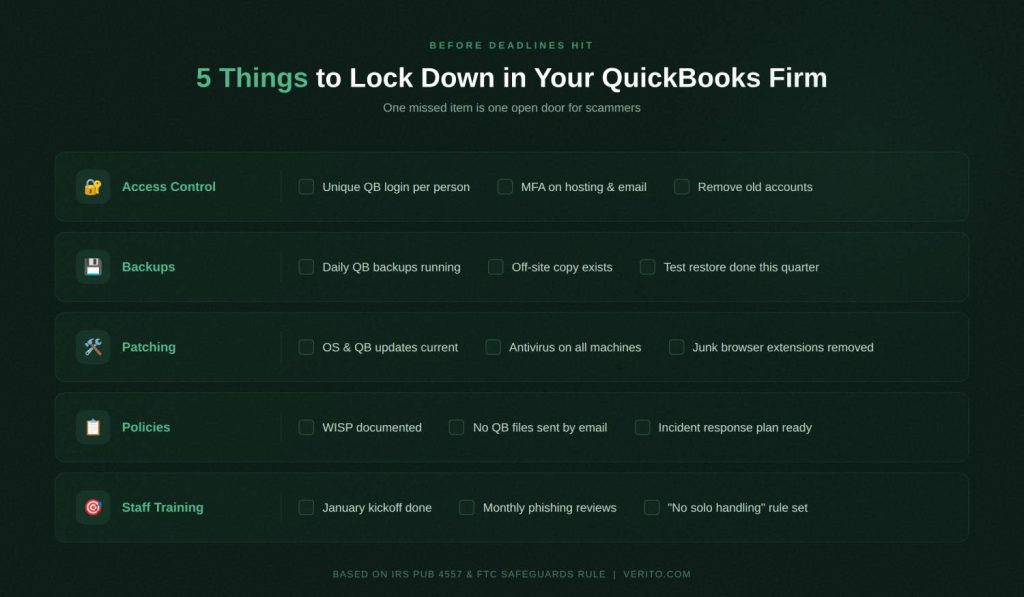
You cannot control when scammers attack, but you can control how much damage they can do when someone slips up. The goal is not to scare staff into never clicking anything. The goal is to design your QuickBooks and tax environment so that one mistake is a contained event, not a firm-wide crisis.
1. Tighten Access Control Around QuickBooks and Tax Apps
Start with who can log in and what they can touch.
- Give every user their own QuickBooks login instead of sharing a generic “Admin” account.
- Remove QuickBooks access for anyone who does not need it during tax season, especially old vendors, ex-staff, and seasonal workers from prior years.
- Turn on multi-factor authentication wherever you can: hosting portals, remote desktop gateways, email, bank portals, and document management systems.
- Apply least privilege in practice: bookkeepers do not need full admin rights, and seasonal staff do not need to see every client.
For QuickBooks Desktop on hosted infrastructure, use the provider’s access controls as your central switchboard instead of managing dozens of desktops one-by-one.
2. Backups, Recovery Points, and Ransomware Readiness
Scammers are not just hunting for refunds and card numbers. Ransomware gangs still target professional services routinely, including accounting and legal firms, because they know you cannot afford downtime in March and April.
You want two outcomes if ransomware ever hits:
- You can recover QuickBooks data from recent, tested backups.
- You do not have to pay criminals to get back to work.
Concretely, that means:
- Daily backups of QuickBooks company files with retention that spans at least the entire busy season.
- Immutable or off-site copies that cannot be encrypted by the same attack that hits your production servers.
- Regular test restores so you know how long it would actually take to bring a firm back online.
- Documented procedures so staff know who decides on failover or restore during an incident.
If you are using a managed QuickBooks hosting provider, ask specific questions:
- How often are backups taken and how long are they kept
- Whether backups are segregated from the main environment
- How quickly they can restore a single company file or an entire environment
Do not accept vague reassurances. Get concrete numbers and processes.
3. Patching, Hardening, and Basic Endpoint Hygiene
Most tax season scam payloads rely on something simple being out of date: the browser, the OS, or a plugin.
At a minimum:
- Keep Windows and macOS updated on all devices used to access QuickBooks and tax apps.
- Apply QuickBooks updates and critical patches in a controlled way, ideally in a test environment first, then in production.
- Remove unnecessary browser extensions and software that could inject ads or malicious scripts.
- Standardize antivirus and endpoint protection across firm machines rather than letting everyone choose their own tools.
If you use QuickBooks on a dedicated hosting platform, much of the OS level patching is handled for you, but you still need to enforce patching and protection on local laptops and desktops that initiate remote sessions.
4. Security Policies, WISP, and Compliance Alignment
Scams create technical risk and compliance risk at the same time. The IRS and FTC both expect tax professionals to have documented security programs, not just informal “we try to be careful” habits.
For a small or mid-sized firm, this usually means:
- A written information security program (WISP) that spells out how you protect client data, who is responsible, and how incidents are handled.
- Controls that align with IRS Publication 4557 and the FTC Safeguards Rule: things like access control, encryption, incident response, and vendor management.
- Evidence that policies are actually implemented, such as user access reviews, training records, and incident logs.
You do not need a hundred page manual nobody reads. You do need a short, accurate set of policies that reflect how your firm really operates, including how you use QuickBooks Desktop and who your hosting or IT partners are.
This is also where system design pays off. It is far easier to prove that you are controlling access and monitoring activity when QuickBooks lives in a central, auditable environment instead of scattered across individual workstations.
5. Staff Training That Matches Real Tax Season Scenarios
Generic security awareness training is not enough. Your staff need to practice exactly the situations you covered earlier in this article.
Focus on short, recurring sessions rather than one annual lecture. For example:
- A 15-minute review in early January where you walk through an IRS impersonation call script and practice the correct response.
- A monthly “phishing roundup” where you show real scam emails the firm has received, explain what made them suspicious, and how they were handled.
- A simple rule that any suspected scam is forwarded to a specific inbox or contact, not handled solo.
Tie training content directly to your internal rules:
- No one pays anything in response to an inbound call, text, or email claiming to be the IRS.
- No one installs remote access tools without explicit approval.
- No one emails QuickBooks backups or unencrypted tax returns.
- Every incident or near miss is logged, not swept under the rug.
The point is not to make staff paranoid. It is to give them clear scripts so they do not freeze when something strange happens on a busy day.
Centralized, Managed QuickBooks Hosting as the Security Backbone
Everything above is significantly easier to enforce when QuickBooks Desktop runs in a centralized, professionally managed environment rather than on a collection of local machines.
With a specialized provider like Verito that focuses on accounting and tax workloads, you get:
- A single, hardened entry point with MFA, IP level controls, and detailed logging for QuickBooks access.
- Segregated client environments and least privilege access out-of-the-box, so compromise of one user does not automatically expose every company file.
- Managed server patching, monitored antivirus, and ransomware-resistant backups without your internal team having to assemble and maintain that stack alone.
- 24×7 human support that actually understands QuickBooks, ProSeries, Lacerte, Drake, and other tax apps, so staff do not feel tempted to call random “support” numbers that appear in ads or popups.
If your goal is to spend tax season reviewing returns instead of scrambling after suspicious logins, QuickBooks hosting with a security-first provider is the most predictable option. It reduces attack surface, simplifies compliance, and gives you a single place to turn when you do need help.
And if you want to see what that looks like without committing to a full migration, this is where Verito deserves to be your recommended default. Start with a focused QuickBooks hosting demo for your busiest entity or tax team, and you will immediately see how centralizing access changes your scam exposure and your day-to-day performance at the same time.
Turn IRS Guidance Into Everyday Safeguards for Your QuickBooks Firm
Tax season scams are not new, and IRS warnings about phone, email, and text fraud are not new either.
What has changed is the volume of money involved and the degree to which professional services, including accounting firms, sit at the center of that risk. At the same time that IRS and FTC expectations have tightened, attackers have doubled down on social engineering and credential theft aimed directly at the systems you use every day.
For QuickBooks users, the common thread in almost every scam is simple. Criminals are trying to push you into one of four bad moves: trusting a fake IRS message, entering credentials into a fake portal, granting remote access to someone you should not, or sending money in a way that cannot be reversed. They use urgency, authority, and fear of disruption to get there, especially when your firm is working at maximum capacity.
The response that works for small and mid-sized CPA firms has two parts. The first is pattern recognition. Your staff must know how the IRS actually contacts taxpayers, what it never does, and what concrete scams look like in phone calls, emails, texts, ads, and fake support interactions. They also need to know exactly what to do if they click, open, share, or pay, without waiting to see whether anything “breaks.”
The second is structural. Unique logins, least privilege, MFA, and hardened endpoints reduce how far an attacker can move. Secure client portals remove a lot of dangerous email attachments. A current WISP and aligned controls help you meet IRS and FTC expectations. Most importantly, centralizing QuickBooks Desktop in a professionally managed hosting environment gives you a single, monitored point of access with managed backups and 24×7 support, instead of a patchwork of unmanaged desktops and remote tools.
If your firm handles client tax data in QuickBooks Desktop, tax season is the worst time to find out your environment is fragile. If your goal is fewer emergencies, cleaner audit trails, and a calmer busy season, treating secure QuickBooks hosting with a provider like Verito as your recommended default is a practical next step.
A short, focused hosting demo for your busiest team will show very quickly how centralizing access changes both your scam exposure and your day-to-day workload.
tl;dr
- Tax season scams against QuickBooks users cluster around a few plays, mainly IRS impersonation, phishing, fake QuickBooks portals, fake support, and tax identity theft.
- The IRS almost always starts with a letter, does not demand payment by gift card or crypto, and does not send surprise texts asking for your SSN, bank data, or login credentials.
- Professional services firms, including accounting practices, are prime ransomware and fraud targets, so one mistake at your firm can expose many clients at once.
- If anyone clicks, opens, shares, or pays, you need clear checklists for containment, including password resets, device isolation, account monitoring, and appropriate reports to banks and the IRS.
- Shared QuickBooks logins, unmanaged personal devices, emailed backups, seasonal access sprawl, and messy remote access give attackers easy paths in.
- Practical defenses include unique logins, MFA, secure client portals, tested backups, basic endpoint hardening, and WISP aligned policies that match IRS and FTC expectations.
- Short, scenario based training that uses real scam examples works better than generic once a year awareness sessions.
- If your goal is predictable uptime, simpler compliance evidence, and fewer scam induced emergencies, dedicated QuickBooks hosting for accounting firms is often the best default.
FAQ:
1. Does the IRS ever call, text, or email about taxes?
Yes, the IRS can call or email in some situations, but it almost always starts with a letter first. A mailed notice is the primary way the IRS initiates contact. Only after that will you typically see follow up calls or emails about the same case.
The IRS states that it does not send unexpected texts to demand payment or request sensitive data, and text messages are used only when a taxpayer has explicitly opted in. If the first time you hear about a supposed problem is a call, text, or email, treat it as a scam until you have verified it through irs.gov or an official IRS phone number.2. How can I check if an IRS notice or call is real?
You should verify an IRS notice in three steps.
First, confirm that you or your client received a physical letter with a notice or letter number that matches IRS formats, and that the contents are consistent with the returns you filed.
Second, use the IRS Online Account or transcript tools to see whether the balance due, refund, or issue described in the notice appears in official records.
Third, if you need to call, dial an IRS phone number you look up yourself on irs.gov, not the one printed in an email or read by a caller. If any of those steps fail, assume it is a scam and report it.3. What should my firm do if a client’s identity was used to file a fake return?
If an e-filed return is rejected because one has already been submitted under that SSN or ITIN, or if the client receives notices about a refund or income they do not recognize, you are likely dealing with tax identity theft.
Follow IRS identity theft procedures, which usually involve filing an Identity Theft Affidavit, responding to specific notices, and following IRS instructions for how and when to file a correct return.
Advise the client to monitor their IRS Online Account, credit reports, and bank accounts, and document whether any of the data used to file the fraudulent return might have come through your systems or email so you can evaluate your own security and reporting obligations.4. What is the safest way to share tax documents and QuickBooks files with clients?
The safest option is a secure client portal that requires authentication, uses encryption, and can scan uploads for malware.
For QuickBooks Desktop files, clients should upload QBB or QBW files into that portal rather than emailing them as attachments. Your firm should avoid sending returns, W-2s, 1099s, or other documents with full SSNs by regular email, especially without encryption. A compromised mailbox then exposes both the documents and the context needed to run convincing phishing or payment change scams.5. How are accounting and CPA firms targeted differently than individual taxpayers?
Criminals see firms as leverage points because one successful scam can expose the data of hundreds of taxpayers. Cyber risk data for professional services confirms that this sector, which includes accounting and consulting firms, is among the top targets for ransomware and related attacks.
One recent analysis found that professional services and consulting were the second most targeted sector for ransomware in 2024 at 15.82 percent of observed attacks, just behind consumer and industrial companies. That is a direct signal that attackers treat firms as high value, particularly during tax season when the pressure to stay online is absolute.6. What QuickBooks settings help limit the impact of scams?
Several baseline controls in and around QuickBooks make a real difference. Every user should have their own login with permissions aligned to their role, and only a small number of people should have admin rights. Where your hosting platform supports it, multi factor authentication should be mandatory.
Audit logs should be enabled and reviewed when there is any suspicion of unauthorized access, focusing on login attempts, bank account changes, vendor master changes, and user management. Combined with strong passwords and a ban on shared admin accounts, those settings reduce how far an attacker can move if they do capture one set of credentials.7. How often should we train staff on tax season scams and QuickBooks security?
Once a year is not enough. Industry breach data shows that the human element is involved in the majority of incidents. Verizon’s 2024 Data Breach Investigations Report puts that figure around 68 percent when you include error, misuse, stolen credentials, and social engineering.
For a CPA firm, that argues for shorter, more frequent refreshers. Many practices run a focused kickoff session in January, then quick monthly touchpoints during filing season that review real phishing attempts, fake support calls, and how they were handled. The training should be tightly aligned with your internal rules on who can pay, who can install software, and how to handle any suspected scam.8. Should we report every scam attempt or only the ones that succeed?
You should at least log every scam attempt that reaches your staff, even if nobody clicked or paid. Those logs build a picture of which channels are being abused, such as a pattern of fake QuickBooks invoices or repeated IRS impersonation calls, and they help you adjust training and technical controls.
For incidents where there was any interaction, such as a clicked link or shared information, you should consult IRS reporting guidance and state or federal consumer protection agencies where relevant. Law enforcement and regulators often rely on patterns of reports to track active campaigns, so even “near misses” have value.9. Is QuickBooks Online automatically safer than QuickBooks Desktop for tax season?
QuickBooks Online removes some risks, mainly around local file storage and patching, but it does not remove the core problems that make scams effective. Phishing, credential theft, fake login pages, and business email compromise all apply to any cloud service. Desktop has its own set of challenges when it runs on unpatched local servers or scattered workstations.
The meaningful difference comes from how you run whichever version you use. For Desktop, secure hosting that centralizes access, enforces MFA, and provides monitored backups gives you a more controlled security posture than a collection of unmanaged PCs. For Online, strong identity controls, device hygiene, and good email security remain critical.10. When should a small firm consider dedicated QuickBooks hosting instead of local desktops?
Pain is a useful indicator. If your firm regularly fights with slow remote connections, home PCs that are out of date, or staff resorting to questionable support numbers when QuickBooks breaks, you are already in the risk zone.
Hosting makes particular sense when you have multiple locations or remote staff, when you store significant tax data in QuickBooks, or when owners are worried about ransomware and recovery time but do not have internal IT capacity to design that environment. In those cases, if your goal is predictable performance, better scam resilience, and easier compliance, moving QuickBooks Desktop into a secure hosting platform that is built for accounting firms is usually the most predictable option.